

 Haris Khan
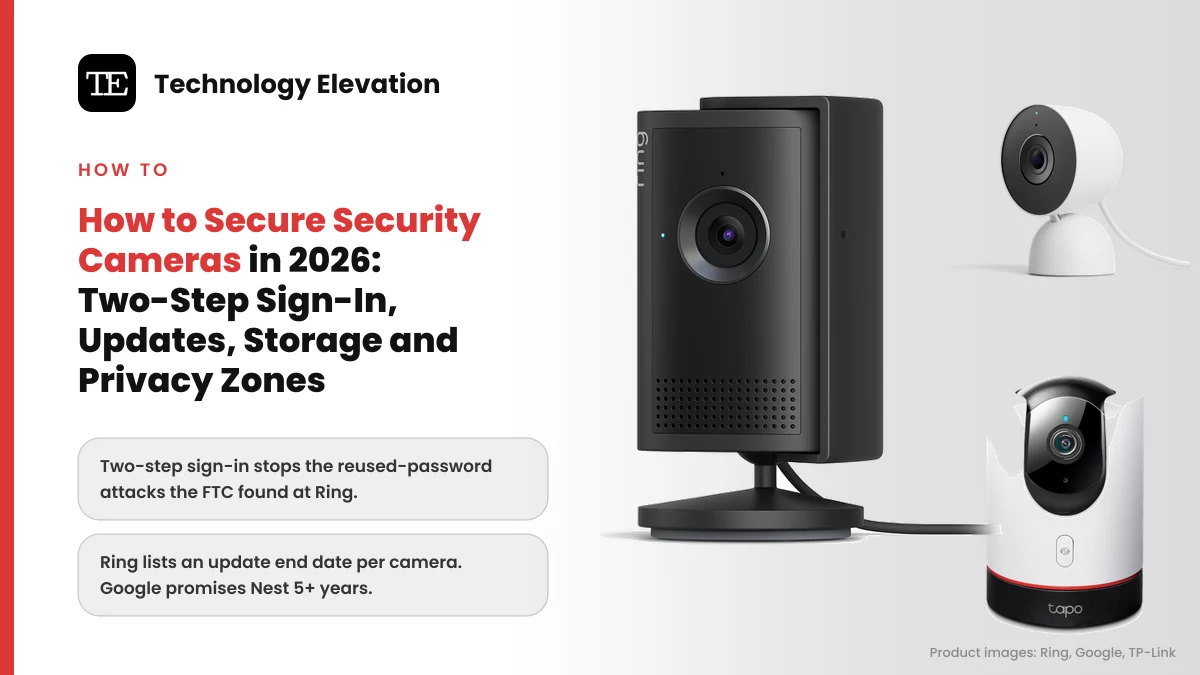
A camera in the hallway is supposed to make you feel safer. Then you read about strangers talking to children through a bedroom camera, and the little lens on the shelf starts to feel like a window that anyone could open. Most of those stories share one boring cause: an account that was easy to get into.
Learning how to secure security cameras is mostly about closing that gap. The camera itself is rarely “hacked” in the movie sense. Attackers log in with a password stolen from some other site, or they reach a camera that never got an update. The Federal Trade Commission found that hackers got into the stored videos, live streams and account profiles of about 55,000 US Ring customers this way.
So the fixes are free and quick: two-step sign-in, automatic updates, a locked-down Wi-Fi router, careful storage choices and privacy zones. CISA, the US cybersecurity agency, tells people to turn on MFA for every account or app that offers it, and your camera app is near the top of that list.
Below are the steps in order of impact, the exact menus for Ring and Google Nest, what the FTC and CISA advise, and the lessons from two camera cases the FTC brought itself.
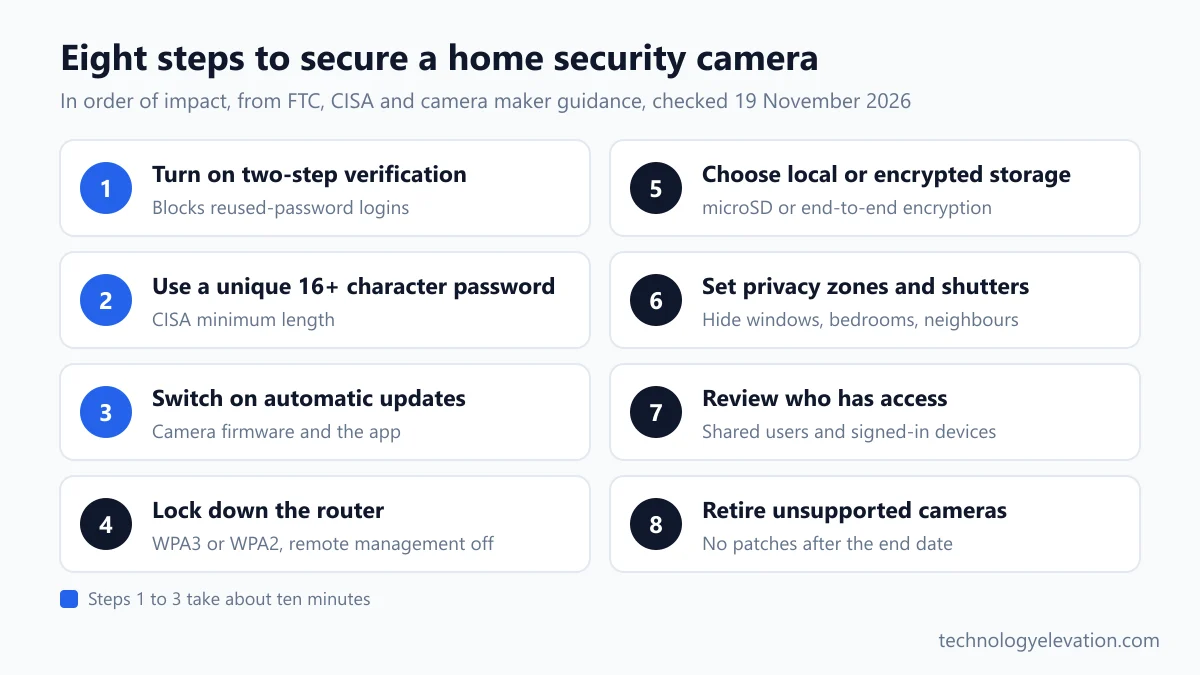
How to secure security cameras: the eight steps that matter most
To secure your security cameras, turn on two-step verification, use a unique long password, switch on automatic firmware updates, lock down your Wi-Fi router, choose local or encrypted storage, set privacy zones, and review who can see your cameras. Retire cameras that no longer get updates.
- Turn on two-step verification (also called two-factor authentication or MFA) in the camera app.
- Give the camera account a password of at least 16 characters that you use nowhere else.
- Turn on automatic updates for the camera firmware and keep the app up to date.
- Secure the router: WPA3 or WPA2 encryption, a new admin password, remote management off.
- Pick where footage lives: a microSD card, an end-to-end encrypted cloud, or both.
- Add privacy zones, and use a shutter or privacy mode on indoor cameras.
- Check shared users and signed-in phones and computers every few months.
- Replace any camera whose maker has stopped sending security updates.
Steps 1 to 3 take about ten minutes and block the password attacks the FTC described in its Ring case. Steps 4 to 8 are worth an evening, ideally the same evening you set up a new camera.
Two-step verification blocks the most common camera break-in
Two-step verification stops the most common camera break-in, called credential stuffing, where attackers try email and password pairs leaked from other websites. With it on, a stolen password is not enough: the attacker also needs a one-time code from your phone or an authenticator app.
Credential stuffing is exactly what the FTC described in its May 2023 complaint against Ring. Hackers used it in 2017 and 2018, and some of them used two-way audio to harass people, including children and teens. Ring did not add multifactor authentication until 2019. The FTC order that followed required multifactor authentication for both employee and customer accounts, and Ring paid $5.8 million. In April 2024, the FTC sent more than $5.6 million of that to customers in 117,044 PayPal payments.
On Ring, the setting lives in Control Center. Ring’s two-step verification help page gives these steps for choosing how codes arrive:
- In the Ring app, tap the menu (☰), then Control Center.
- Tap Account Verification.
- Select Text Message or Authenticator App and tap Continue.
- Re-enter your password and tap Continue.
- For an authenticator app, tap Copy Key to copy the Setup Key, or scan the QR code from another device, then follow the prompts.
Ring also offers WhatsApp codes and push approval on a phone that is already signed in. If you pick an authenticator app, Ring warns that the authenticator only works on the enrolled device, so delete it from the old phone before you set it up on a new one.
Google Nest cameras sign in through your Google Account. On a computer, open myaccount.google.com, select Security & sign-in, and under How you sign in to Google choose Turn on 2-Step Verification. The same Google Account usually unlocks your email too, so this one switch protects two things at once.
Pair two-step sign-in with a strong password. CISA recommends at least 16 characters, either a random mix of letters, numbers and symbols or a passphrase of unrelated words, kept in a password manager rather than on a sticky note by the router.
Firmware updates close security holes, and every camera has an end date
Firmware updates close the security holes attackers look for, so set every camera and its app to update automatically. Then check how long your camera will get updates at all. Once a maker stops sending security patches, a camera’s weaknesses stay open for good.
CISA’s advice is blunt: turn on automatic updates and do not click “Remind me later”. Its archived guide on the Internet of Things adds the reason: default passwords are easily found online, and patches should be applied as soon as possible.
The end date is the part most people miss. Ring publishes a software security update table for every model. Ring supports a device for at least four years after you bought it new from Ring or from Amazon as the seller, or until a listed date if that is later. The table shows the original Video Doorbell (1st Generation) supported until 31 December 2024 and the Video Doorbell 2 until 31 December 2025. The Indoor Cam 2K and Pan-Tilt Indoor Cam are listed until at least 31 December 2030.
Google promises critical security updates for Google Nest devices for at least 5 years from the date it starts selling each one. In the UK, the law now forces the issue: since 29 April 2024, makers of connected products sold there must publish a minimum security update period with an end date, and passwords must be unique per product or set by the user.
A secondhand camera from a yard sale can look perfect and be years past its last patch. Check the model against the maker’s support list before you plug it in.
Your Wi-Fi router is the front door for every camera
Your Wi-Fi router is the front door for every camera, so secure it first. Use WPA3 Personal or WPA2 Personal encryption, replace the default admin password and network name, update its firmware, turn off remote management, and put guests on a separate network.
Those are the FTC’s own steps for home Wi-Fi, from its consumer advice on securing a home network. The FTC also says to avoid the older WPA and WEP options. CISA’s archived home network guidance adds two more: turn off WPS, the push-button pairing feature that is vulnerable to PIN guessing, and switch off any router services you do not use.
- Encryption: WPA3 Personal if every device supports it, otherwise WPA2 Personal.
- Admin login: a new, unique password, not the one printed on the sticker.
- Remote management: off, so nobody can change router settings over the internet.
- WPS: off.
- Guest network: on, with its own password, for visitors.
- Firmware: current, from the router maker’s own site or app.
A router that still gets updates matters as much as a camera that does. If yours is old enough that the maker has stopped patching it, a modern model from the best Wi-Fi 7 routers or a mesh Wi-Fi system also fixes the weak signal that makes outdoor cameras drop offline. Whether you need the newest standard is a separate question, and Wi-Fi 7 explained covers it.
Many home routers also show a list of connected devices. The FTC suggests checking it to take stock of everything on your network, and a camera you forgot about is still a camera online.
Local storage keeps footage off someone else’s server
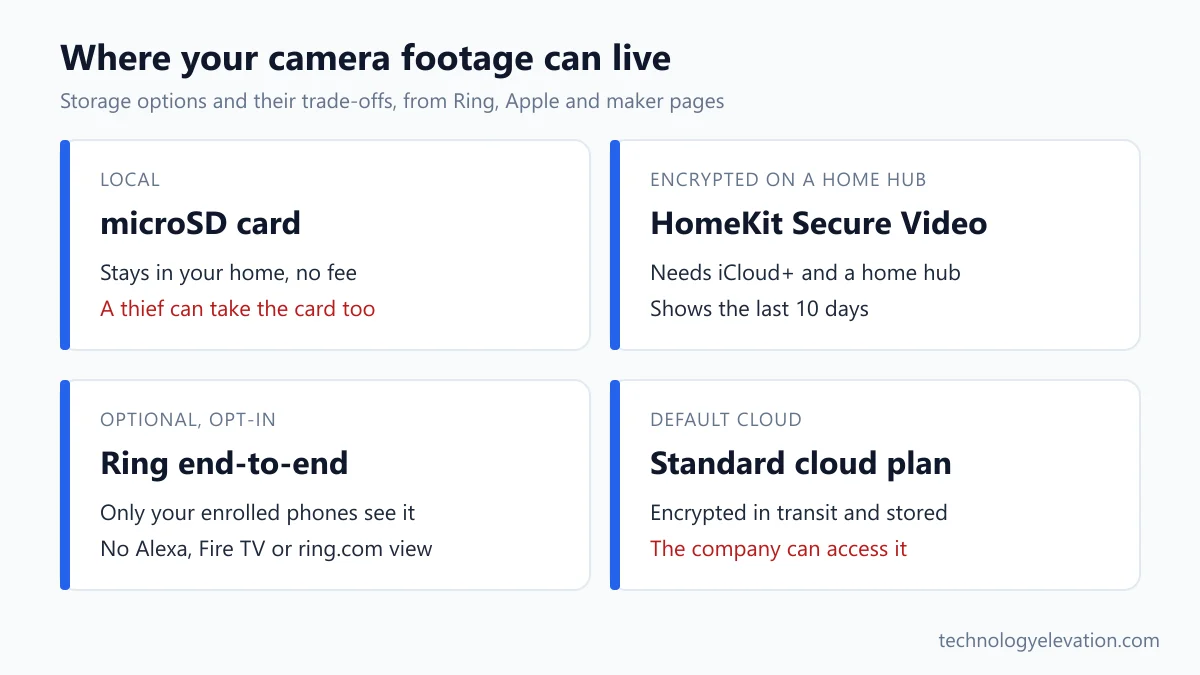
Local storage keeps your footage on a microSD card or hub in your own home instead of a company’s cloud, which removes one place it can leak from. If you prefer the cloud, choose end-to-end encryption, so even the camera company cannot open your videos.
Many cameras from Tapo, Wyze, eufy and Aqara record straight to a microSD card with no monthly fee. The trade-off is physical: if someone steals the camera, the card goes with it. A sensible mix is local recording indoors and cloud backup on the one camera that watches the front door.
Apple’s HomeKit Secure Video is the middle path. Video is analysed and encrypted on your home hub (an Apple TV 4K or HomePod) before it goes to iCloud, and only you and the people you share with can view it. Recording needs an iCloud+ plan: the 50 GB plan covers one camera, the 200 GB plan up to five, and the 2 TB plan and above unlimited cameras. You can view the last 10 days of activity, and the video does not count against your iCloud storage.
Ring offers optional video end-to-end encryption. When it is on, only your enrolled phones and tablets can view the videos, and Ring says no one else, including Ring, can access them. Turn it on in the Ring app under the menu (☰), Control Center, Video Encryption. Save the 12-word passphrase it creates somewhere safe, because Ring cannot recover encrypted videos for you.
End-to-end encryption has a cost in convenience. Encrypted Ring videos cannot be watched through Alexa, Fire TV or ring.com, and older models such as the Video Doorbell (2nd Gen) and Stick Up Cam (2nd Gen) do not support it. If those features matter more to you than total privacy, standard encryption still protects video in transit and in Ring’s cloud.
Privacy zones and shutters control what a camera can see
Privacy zones black out parts of the picture, such as a neighbour’s window or a bedroom doorway, so the camera never shows or records them. Indoors, a physical shutter or a lens that turns away is stronger still, because nothing can be recorded at all.
Ring’s help pages tell owners to use the privacy tools to follow privacy laws and be respectful of people nearby. You can make up to two Privacy Zones per Ring device:
- Open the Ring app to the main dashboard and tap the menu (☰).
- Tap Devices, then the camera you want to adjust.
- Tap Device Settings, then Privacy Settings.
- Tap Add Privacy Zones, then plus (+) to create a zone.
- Drag the box over the area to hide and tap Done.
Three catches come straight from Ring. Privacy zones do not exist on the Pan-Tilt Indoor Cam. If the camera gets bumped, the zone moves with it and may stop covering the area. And blocked areas are burned into the recording, so you cannot unhide them later.
Sound is the other privacy leak. In the same Privacy Settings menu, the Audio Streaming and Recording toggle stops a Ring camera recording sound, which matters in places where recording conversations is restricted. Ring notes that the toggle needs a compatible Ring subscription.
For indoor cameras, a physical shutter beats any setting. The FTC’s Ring complaint showed why: one employee viewed thousands of recordings from female customers’ cameras, including cameras in bathrooms and bedrooms. Cameras that close or turn their lens are compared in the best indoor security camera picks, and the simplest rule is to keep cameras out of bathrooms entirely.
Google says its Nest cameras show a clear visual indicator, such as a green light, when they are sending footage. Learn what your camera’s light means, so a glance tells you whether it is live.
Check who can see your cameras every few months
Every few months, open your camera app and review three lists: shared users, signed-in phones and computers, and linked apps or speakers. Remove anything you do not recognise, change your password, and the stranger loses access straight away.
In Ring’s Control Center, Authorized Client Devices lists every phone, tablet and computer that has signed in to your account. Shared Users shows who can review, save and share your videos. Linked Accounts and the Alexa device list show which apps and speakers can reach your cameras. Ring advises changing your password immediately if you see changes you did not make.
The FTC gives similar advice for IP cameras (cameras that stream over the internet): check the access logs for unfamiliar IP addresses or odd access times. An ex-partner, a former roommate or a babysitter from two years ago can still be on the list long after they left.
Scam emails are the other way in. Ring says no Ring employee will ever ask for your password, and real Ring emails come from a ring.com address. Treat any “your account will be deleted” message as a scam and sign in through the app instead.
Two FTC cases show what goes wrong with home cameras
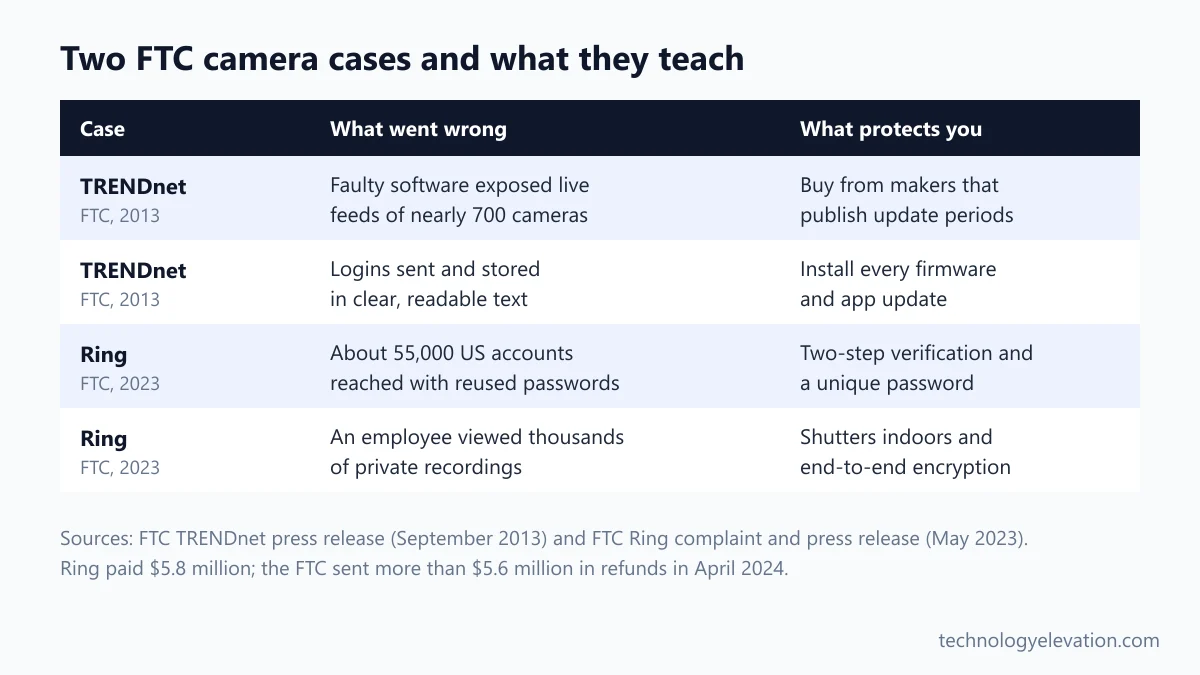
The FTC’s TRENDnet case in 2013 and Ring case in 2023 show the two ways home cameras fail: weak security built in by the maker, and accounts left open to stolen passwords. Owners can fix the second; only buying carefully avoids the first.
| Case | What happened | What protects you now |
|---|---|---|
| TRENDnet (FTC, September 2013) | Faulty software let anyone with a camera’s internet address watch it. Hackers posted links to the live feeds of nearly 700 cameras, showing babies asleep in cribs and children playing. | Buy from makers that publish security update periods, and install updates. |
| Ring (FTC, May 2023) | Hackers reached the videos and live streams of about 55,000 US customers with reused passwords in 2017 and 2018. An employee viewed thousands of private recordings. | Two-step verification, a unique password, end-to-end encryption and shutters indoors. |
TRENDnet also sent login details in clear, readable text over the internet and stored them in plain text in its mobile apps, according to the FTC. The order required a security program with outside audits every two years for 20 years. No owner setting could have fixed that, which is why the maker’s track record belongs on your shopping list.
For doorbells, the same thinking applies. A camera that faces the street is the one most likely to catch neighbours and passers-by, so privacy zones matter most there. Models that suit cold or sunny porches are in the best video doorbell and solar doorbell camera lists.
Replace a camera once its security updates stop
Replace a security camera once its maker stops sending security updates, or if it cannot do two-step verification. No setting fixes a hole the maker will never patch, and a cheap modern camera with a shutter and local storage is safer.
Start with the maker’s update list. If your model’s end date has passed, or the maker publishes no date at all, treat that camera as a weak point. The same goes for baby monitors with Wi-Fi: a nursery camera deserves the same checks, and the best baby monitor picks include models that never touch the internet.
When you shop, look for four things: two-step sign-in, a published security update period, local or end-to-end encrypted storage, and a physical shutter or privacy mode for indoor use. Those four points decide the ranking of the 2026 indoor security camera picks.
The FTC also tells people to disconnect old devices they no longer need. Before you retire a camera, remove it from your account in the camera app, so it stops showing up as a way into your home.
Frequently asked questions about securing security cameras
Can home security cameras be hacked?
Yes, and the usual route is the account, not the camera. The FTC found that hackers reached about 55,000 Ring customers’ accounts in 2017 and 2018 using passwords leaked from other sites. Two-step verification and a unique password block that attack.
How do I know if my security camera has been hacked?
Look for devices, shared users or sign-ins you do not recognise in the camera app, settings that changed on their own, or the camera’s light coming on when nobody is watching. If you see any of these, change your password, remove unknown devices and turn on two-step verification.
Is local storage safer than cloud storage for security cameras?
Local storage on a microSD card keeps footage off company servers, which removes one place it can leak. The catch is that a thief can take the card with the camera. End-to-end encrypted cloud storage, such as HomeKit Secure Video or Ring’s optional encryption, is a strong alternative.
Should security cameras be on a separate Wi-Fi network?
A separate network helps, because it keeps cameras apart from your laptops and phones. The FTC lists a guest network among its router steps, so visitors never need your main password. Strong router encryption, a new admin password and updates matter even more.
Do security cameras need firmware updates?
Yes. Updates fix security holes, and CISA advises turning on automatic updates for all devices. Check how long your model will get updates: Ring publishes an end date for every device, and Google promises at least 5 years for Nest devices.
What are privacy zones on a security camera?
Privacy zones are areas of the picture that the camera blacks out in live and recorded video, such as a neighbour’s window. Ring allows up to two per device. Motion behind a zone can still trigger a recording, so adjust motion zones as well.
Is it legal to record audio on a home security camera?
Rules on recording conversations vary by state and country, so check your local law before you leave audio on. Most camera apps let you turn audio recording off; on Ring it is the Audio Streaming and Recording toggle in Privacy Settings.
Last checked and sources
Last checked on 19 November 2026 by Haris Khan. We checked every step against the makers’ current help pages and the FTC, CISA and UK government pages listed below, and kept only what they state.
- Federal Trade Commission: Ring LLC complaint and press release (May 2023), Ring refunds press release (April 2024), consumer alert on Ring’s privacy failures, TRENDnet press release (September 2013), Securing Your Internet-Connected Devices at Home, How To Secure Your Home Wi-Fi Network
- CISA: Turn On MFA, Use Strong Passwords, Update Software, Securing the Internet of Things, Home Network Security
- Ring Help: two-step verification, Control Center, privacy features, video end-to-end encryption, account and privacy settings, software security updates
- Google: Nest safety and privacy commitments, Google Account 2-Step Verification help
- Apple Support: Set up security cameras in Home (HomeKit Secure Video)
- UK Government: Product Security and Telecommunications Infrastructure (PSTI) product security regime
We update this guide when camera makers change their security settings, update policies or encryption options.

GIPHY App Key not set. Please check settings