

 Haris Khan
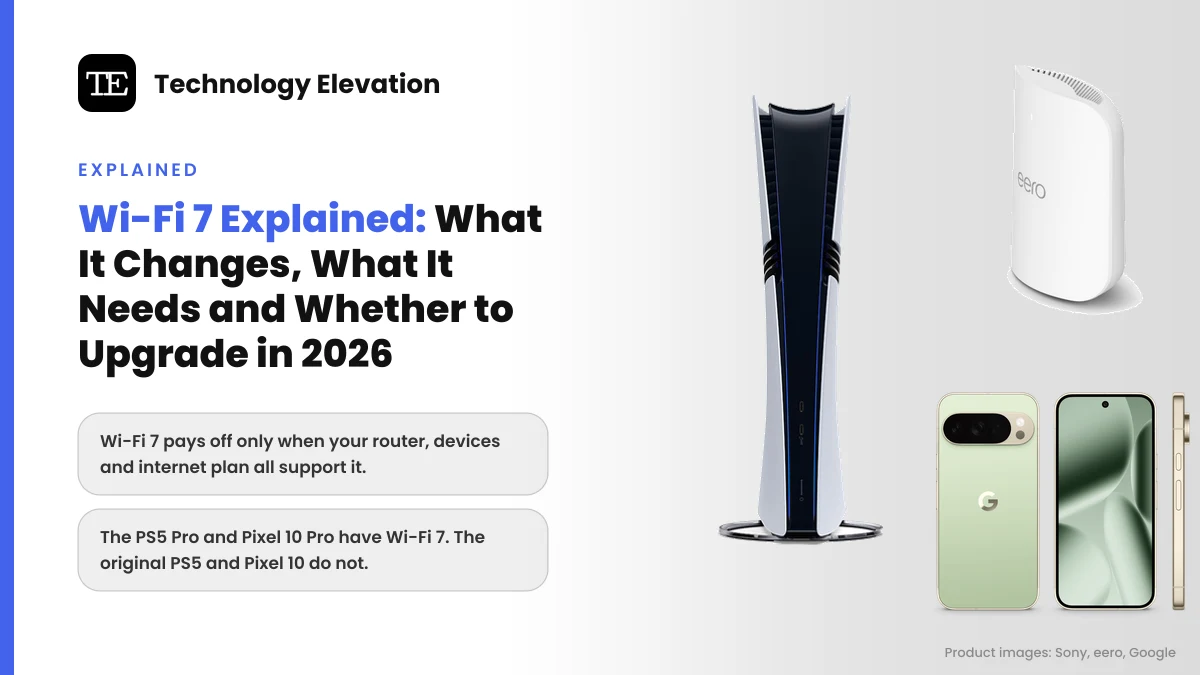
Walk into any electronics store this month and nearly every new router box has a big “7” on it. The phone in your pocket may already support the same standard, and so might a new console. Wi-Fi 7 explained in one line: it is a real upgrade, but only when your router, your devices and your internet plan are all ready for it.
Wi-Fi 7 is the friendly name for the IEEE 802.11be standard. The Wi-Fi Alliance, the industry group that tests and certifies Wi-Fi gear, launched its Wi-Fi CERTIFIED 7 program on 8 January 2024. Nearly three years later, the hardware has caught up with the hype, at least at the top end.
Most homes still do fine on Wi-Fi 6. So the useful question is whether Wi-Fi 7 fixes a problem you actually have. Slow speeds on a 300 Mbps plan? Probably not. A dead zone upstairs, a busy household or a new Wi-Fi 7 phone and console? Then it might.
We checked every claim below against the Wi-Fi Alliance and the makers’ own pages (Microsoft, Apple, Google, Samsung, Sony, Nintendo and eero) as of November 2026.
Wi-Fi 7 is worth it when your devices, router and internet plan all support it
Wi-Fi 7 pays off when three things line up: a Wi-Fi 7 router, Wi-Fi 7 devices and an internet plan fast enough to use the extra headroom. Miss one of the three and you mostly get Wi-Fi 6 performance at a Wi-Fi 7 price.
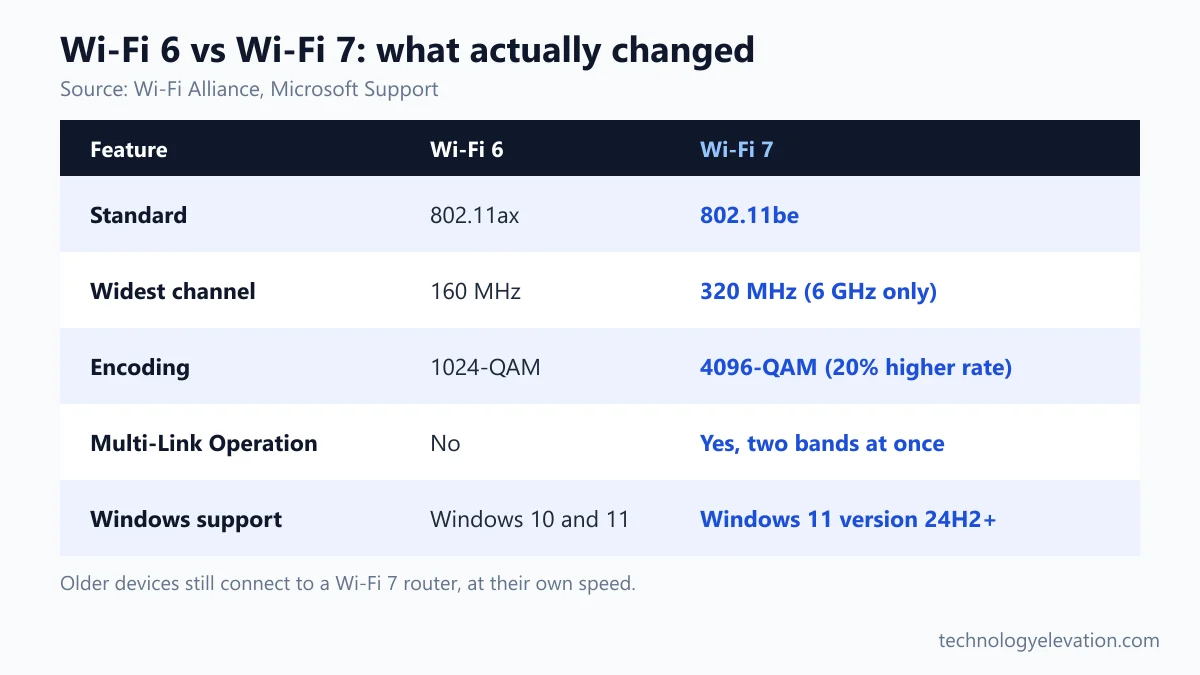
The big gains come from three features. Wider 320 MHz channels on the 6 GHz band raise peak speed. Multi-Link Operation lets one device use two bands at once. And denser 4K QAM encoding squeezes about 20% more data into each transmission.
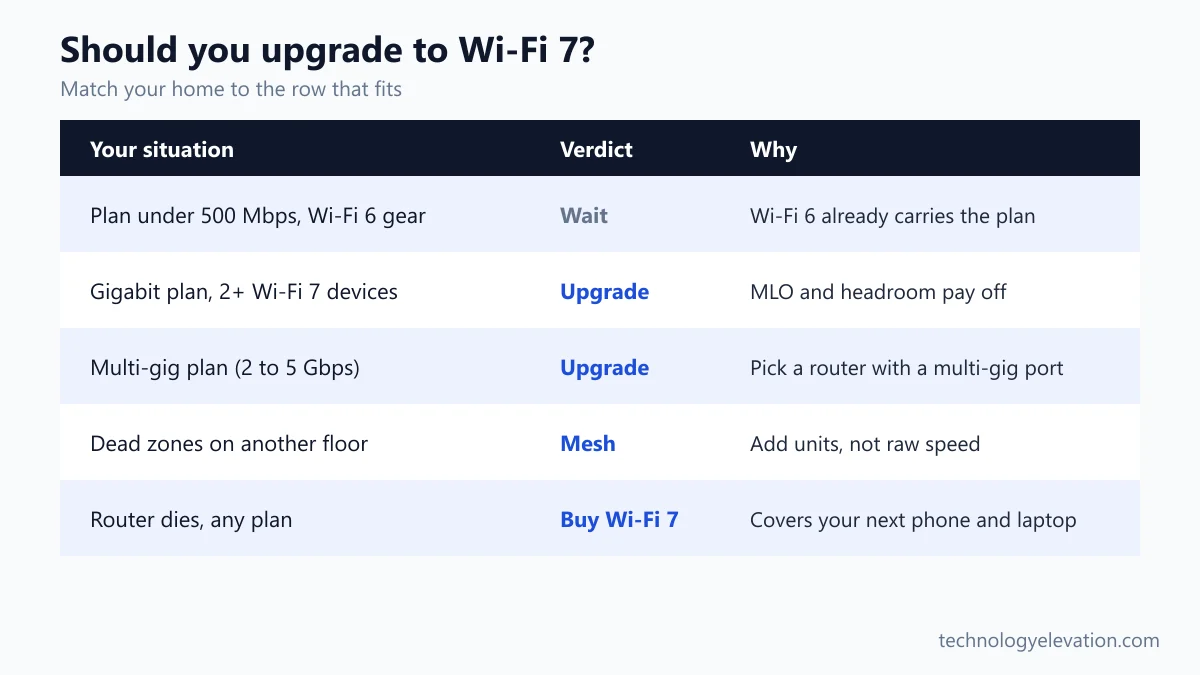
- Upgrade now if you have a gigabit or faster plan, two or more Wi-Fi 7 devices, and a router that is four or more years old.
- Upgrade when your router dies if most of your gadgets are Wi-Fi 6 or older. Buying Wi-Fi 7 then covers your next phone and laptop too.
- Skip it for now if your plan is under 500 Mbps and your current Wi-Fi reaches every room.
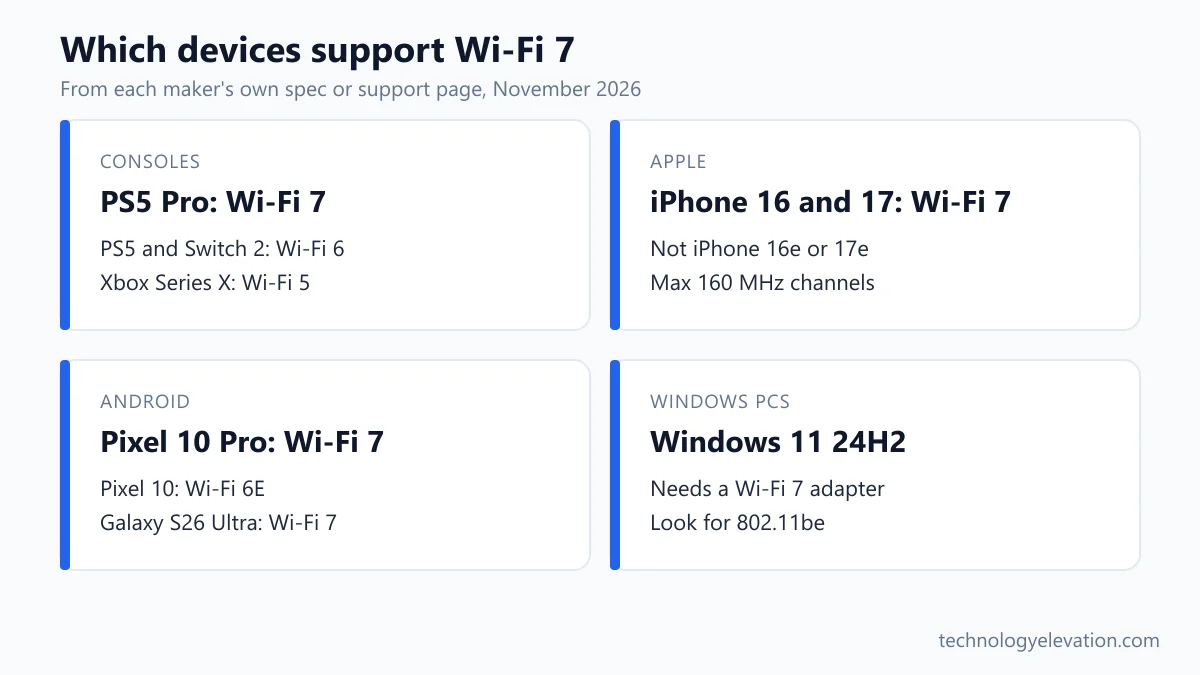
Gamers are a special case. The PS5 Pro supports Wi-Fi 7, the original PS5 and Nintendo Switch 2 stop at Wi-Fi 6, and the Xbox Series X uses Wi-Fi 5. The router you pick matters more for a console than the label on it, which is why the best routers for PS5 list weighs ports and placement alongside the Wi-Fi standard.
Wi-Fi 7 changes how wide, how many and how dense the radio links are
Wi-Fi 7 changes three things about the radio link. Channels can be twice as wide, a device can hold several links to the router at once, and each transmission carries more bits. Smaller fixes cut overhead and waste less spectrum when neighbours crowd the airwaves.
The Wi-Fi Alliance launch announcement lists the headline features. Here they are in plain words.
320 MHz channels: a wider road on the 6 GHz band
Think of a channel as a road. Wi-Fi 6 tops out at 160 MHz lanes. Wi-Fi 7 doubles that to 320 MHz, but only on the 6 GHz band and only in countries that open 6 GHz to Wi-Fi. A wider road moves more traffic, which is where the multi-gigabit speed figures come from.
The catch is support. Your router and your device both need 320 MHz, and many phones skip it entirely, as the phone section below shows. Apple also notes that 6 GHz Wi-Fi works only in regions that permit it, and devices fall back to 2.4 GHz and 5 GHz elsewhere.
Multi-Link Operation: two bands at the same time
Multi-Link Operation, or MLO, lets a device send and receive over more than one band at once, for example 5 GHz and 6 GHz together. The Wi-Fi Alliance says it adds throughput, cuts latency and improves reliability.
For most people, MLO is the feature that matters. If the microwave interferes with 2.4 GHz or a neighbour crowds your 5 GHz channel, traffic keeps flowing on the other link. Video calls stutter less, and game lag spikes get rarer.
4K QAM: more data in every burst
QAM is the way Wi-Fi packs bits into a radio wave. Wi-Fi 6 uses 1024-QAM. Wi-Fi 7 moves to 4096-QAM, which the Wi-Fi Alliance rates at 20% higher transmission rates. You only get that boost with a strong, clean signal, usually within a room or two of the router.
Wi-Fi 7 works with your old devices, but only new devices get the gains
Wi-Fi 7 routers still connect Wi-Fi 6, Wi-Fi 5 and older devices, so nothing in your home stops working. Those older devices keep their old speeds, though. Only a Wi-Fi 7 phone, laptop or console can use MLO, 320 MHz channels and 4K QAM.
Sony puts it plainly on the PS5 Pro page: the console supports Wi-Fi 7 but also works with Wi-Fi 6 and Wi-Fi 5 routers, and the enhanced wireless needs a compatible router. Samsung’s Galaxy S26 Ultra page says the same in a footnote: Wi-Fi 7 “will require a Wi-Fi 7 router.”
Apple adds a useful detail. Its Wi-Fi 7 support page says Apple devices with Wi-Fi 6E or Wi-Fi 7 can join Wi-Fi 7 networks, but only the newest models get every Wi-Fi 7 feature. In practice, a new router still helps older gear indirectly: fewer devices fighting over the same band means less waiting for everyone.
Your oldest smart plug will not care. Wi-Fi 7 still runs on the 2.4 GHz and 5 GHz bands as well as 6 GHz, so older gadgets have a band to join.
Phones, laptops and consoles with Wi-Fi 7 support in November 2026
Wi-Fi 7 support is now standard on flagship phones and the newest laptops, but it is not universal. The base Pixel 10 and Apple’s budget iPhones stay on Wi-Fi 6E, and among consoles only the PS5 Pro has Wi-Fi 7. Check the exact model, not the brand.
| Device | Wi-Fi standard | Maker’s note |
|---|---|---|
| iPhone 16, 16 Plus, 16 Pro, 16 Pro Max | Wi-Fi 7 | Up to 160 MHz channels, 2,400 Mbps link rate, MLO |
| iPhone 17, 17 Pro, 17 Pro Max, iPhone Air | Wi-Fi 7 | Apple N1 chip, up to 160 MHz, MLO |
| iPhone 16e and iPhone 17e | Not full Wi-Fi 7 | Excluded from Apple’s Wi-Fi 7 list |
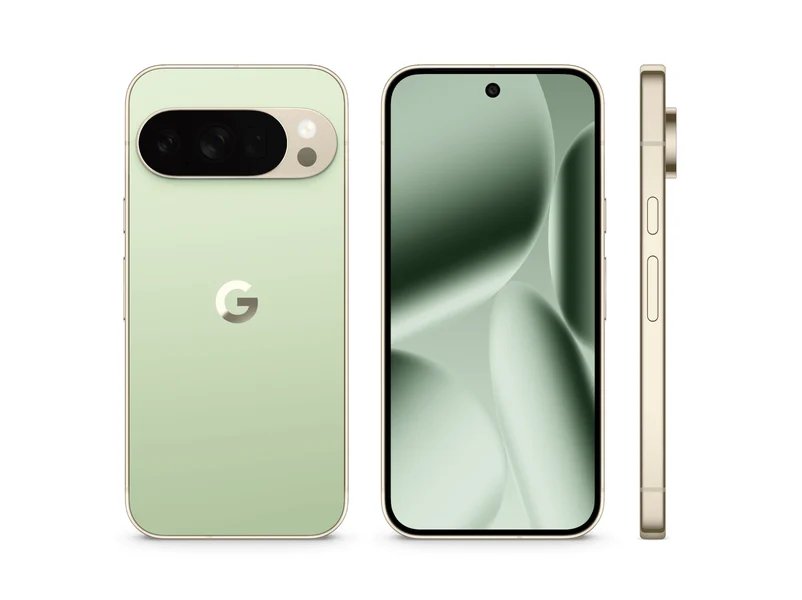
| Google Pixel 10 Pro and Pixel 10 Pro XL | Wi-Fi 7 | 2.4, 5 and 6 GHz, 2×2 MIMO |
| Google Pixel 10 | Wi-Fi 6E | 2.4, 5 and 6 GHz, 2×2 MIMO |
| Samsung Galaxy S26 Ultra | Wi-Fi 7 | Requires a Wi-Fi 7 router |
| MacBook Air (M5), MacBook Pro (M5 Pro, M5 Max) | Wi-Fi 7 | Full Wi-Fi 7 feature set |
| iPad Pro (M5), iPad Air (M4) | Wi-Fi 7 | Full Wi-Fi 7 feature set |
| Windows 11 laptops | Depends on the adapter | Needs Windows 11 version 24H2 and a Wi-Fi 7 card |
| PlayStation 5 Pro | Wi-Fi 7 | Also works with Wi-Fi 6 and Wi-Fi 5 routers |
| PlayStation 5 (original) | Wi-Fi 6 | 802.11ax, plus gigabit Ethernet |
| Nintendo Switch 2 | Wi-Fi 6 | Wired LAN port on the dock in TV mode |
| Xbox Series X | Wi-Fi 5 | 802.11ac dual band |
| Apple TV 4K (4th generation) | Wi-Fi 7 | Full Wi-Fi 7 feature set |
One finding surprised us. Apple’s deployment guide lists the same 2,400 Mbps maximum link rate and 160 MHz channel width for the Wi-Fi 6E iPhone 15 Pro and the Wi-Fi 7 iPhone 17 Pro. On an iPhone, Wi-Fi 7 does not raise peak speed at all. What you gain is MLO, the steadier two-band connection.
Google’s lineup shows why model names matter. The Pixel 10 Pro lists Wi-Fi 7, while the cheaper Pixel 10 lists Wi-Fi 6E with the same 2×2 antennas and bands.
Your Windows PC can show its Wi-Fi 7 support in under a minute
Windows 11 shows Wi-Fi 7 support in one command. Wi-Fi 7 needs Windows 11 version 24H2 or later plus a Wi-Fi 7 adapter. Run “netsh wlan show drivers” and look for 802.11be next to Radio types supported. Then confirm MLO in your network’s properties.
These steps follow Microsoft’s Wi-Fi support page for Windows:
- Select the Start button, then select Settings > Windows Update > Check for updates. Install updates until you are on Windows 11, version 24H2 or later.
- Open Command Prompt or Terminal.
- Type netsh wlan show drivers and press Enter.
- Look next to Radio types supported. If you see 802.11be, the adapter supports Wi-Fi 7. If you only see 802.11ax, it tops out at Wi-Fi 6 or 6E.
- While you are there, check Authentication and cipher supported in infrastructure mode for WPA3 Personal.
- Connect to your Wi-Fi 7 network, then open Settings > Network & internet > Wi-Fi > (your network) properties.
- Check the value next to Network band (channel). If it shows two bands, such as 5 GHz and 6 GHz, MLO is working.
No 802.11be on a desktop PC? A plug-in card is the usual fix. The best Wi-Fi adapter for gaming list covers that route, though Ethernet still beats any adapter for a desk that never moves.
Your internet plan sets the speed limit, not your router
A router cannot make your internet plan faster. On a 300 Mbps plan, a Wi-Fi 6 phone near the router already gets the full 300 Mbps, so Wi-Fi 7 changes nothing for downloads. Wi-Fi 7 helps with multi-gigabit plans, local file transfers and crowded networks.
Look at your bill before you look at routers. Every device on your network shares the plan speed. If four people stream and one person downloads a game, a faster router spreads that bandwidth more smoothly, but the total never goes above the plan.
The wired side matters too. The original PS5 has a gigabit Ethernet port, and a gigabit port maxes out at 1,000 Mbps. If your provider sells 2 Gbps or 5 Gbps service, you need a router with a multi-gig WAN port to use it. The eero Pro 7, for example, has two 5 GbE ports and eero rates it for plans up to 5 Gbps.
So where does Wi-Fi 7 earn its keep on a normal plan? Inside the house. Backing up a phone to a NAS, casting from a laptop or moving game files between PCs all run at Wi-Fi speed, not internet speed. And a busy home with 40 connected gadgets benefits from MLO even on a 500 Mbps plan.
For a console, the plan matters less than steady latency. Sony’s own guidance for PlayStation Portal streaming asks for just 5 Mbps, with 15 Mbps recommended. A stable link beats a fast one, which is why the router for your PS5 should sit close to the console or connect to it by cable.
Wi-Fi 7 mesh fixes dead zones better than a faster single router
None of Wi-Fi 7’s headline features adds range. If your problem is a weak signal two floors away, a Wi-Fi 7 mesh system with a unit in each zone solves it. A single faster router in the basement will not.

Mesh systems place two or three units around the home and link them together. Wi-Fi 7 helps here because the units talk to each other over Wi-Fi as well as to your devices, so faster, steadier links between units lift every room. An Ethernet cable between units is faster still.
The numbers on the box tell you how many units you need. eero rates each eero Pro 7 unit at 2,000 sq. ft. of coverage and more than 200 devices, with wireless speeds up to 3.9 Gbps. A 3,000 sq. ft. two-storey house would want two units, ideally joined by an Ethernet cable.
Budget matters too. Our best mesh Wi-Fi systems picks include cheaper dual-band Wi-Fi 7 kits for smaller homes that do not need a tri-band set. For one stubborn bedroom in a small flat, a Wi-Fi extender is a cheaper fix than replacing the whole network.
Upgrade to Wi-Fi 7 in five checks, in this order
Decide on Wi-Fi 7 by checking five things in order: your plan speed, your devices, your router’s age, your home’s layout and your budget. If the first two answers are “under gigabit” and “mostly Wi-Fi 6”, waiting costs you nothing today.
- Check your plan. Under 500 Mbps, Wi-Fi 6 already carries the full speed to nearby devices. At 1 Gbps or more, Wi-Fi 7 starts to matter.
- Count your Wi-Fi 7 devices. Use the table above. Two or more devices you use daily, such as a phone and a laptop, make the upgrade worthwhile.
- Check your router’s standard. A Wi-Fi 5 router is two generations behind and likely due for replacement anyway. Buy Wi-Fi 7 when you replace it.
- Map your dead zones. If whole rooms drop out, plan for mesh rather than a single router.
- Match the ports. Plans above 1 Gbps need a router with a 2.5 GbE or faster WAN port, and gaming PCs or consoles near the router should still use a cable.
Gamers on an older PS4 or a Switch 2 still benefit from a steady, low-lag router, even though neither console speaks Wi-Fi 7. The best router for gaming PS4 list covers that angle, and the same QoS and placement rules apply to newer consoles.
Wi-Fi 7 adoption is moving fast, so a new router will not age badly
The Wi-Fi Alliance expected more than 233 million Wi-Fi 7 devices to ship in 2024, growing to 2.1 billion by 2028. Phones, PCs and tablets were expected to adopt it first. Buying Wi-Fi 7 now means your next three or four gadgets will speak the same language.
That forecast is already visible in shops. Apple, Google and Samsung all put Wi-Fi 7 in their current flagship phones, and Apple’s M5 MacBooks carry it too. Budget models lag behind, just as they did with the Wi-Fi 6 generation: the Pixel 10 and iPhone 17e both miss out this year.
Security improved along the way. Microsoft lists WPA3, the current Wi-Fi security standard, alongside Wi-Fi 7 in its router and adapter requirements for Windows 11. If an old device refuses to connect to a new network, check whether it supports WPA3 before blaming the router.
Frequently asked questions about Wi-Fi 7
Is Wi-Fi 7 faster than Wi-Fi 6?
Yes, Wi-Fi 7 has a higher peak speed, mainly through 320 MHz channels and 4K QAM, which the Wi-Fi Alliance rates at 20% higher transmission rates than Wi-Fi 6’s 1024 QAM. Real gains depend on your device, because many phones top out at 160 MHz channels.
Do I need Wi-Fi 7 if my internet is only 300 Mbps?
No, a 300 Mbps plan does not need Wi-Fi 7 for downloads, because a good Wi-Fi 6 router already delivers the full plan speed nearby. Wi-Fi 7 still helps with in-home transfers and crowded networks.
Will my old devices work with a Wi-Fi 7 router?
Yes, Wi-Fi 7 routers connect Wi-Fi 6, Wi-Fi 5 and older devices. Those devices keep their old speeds, and only Wi-Fi 7 devices get features like Multi-Link Operation.
Does the PS5 support Wi-Fi 7?
Only the PS5 Pro supports Wi-Fi 7, according to Sony. The original PS5 uses Wi-Fi 6 (802.11ax), so it connects to a Wi-Fi 7 router at Wi-Fi 6 speeds.
Which iPhones support Wi-Fi 7?
Apple lists Wi-Fi 7 for the iPhone 16 and iPhone 17 families, the iPhone Air and newer Pro models, but not the iPhone 16e or iPhone 17e. Apple’s iPhones use channels up to 160 MHz, not the full 320 MHz.
How do I check if my laptop has Wi-Fi 7?
On Windows 11, open Command Prompt, type netsh wlan show drivers and look for 802.11be next to Radio types supported. You also need Windows 11 version 24H2 or later.
What is Multi-Link Operation in Wi-Fi 7?
Multi-Link Operation lets a device send and receive data over two or more bands at the same time, such as 5 GHz and 6 GHz. The Wi-Fi Alliance says it increases throughput, reduces latency and improves reliability.
Does Wi-Fi 7 improve range?
No, the Wi-Fi 7 feature list focuses on speed, latency and reliability, not range. For larger homes, a mesh system with two or more units fixes coverage far better than a single faster router.
Last checked and sources
Last checked on 15 November 2026 by Haris Khan.
We compared the leading Wi-Fi 7 explainers, then confirmed every feature, device and menu step against the standards body’s and makers’ own pages.
- Wi-Fi Alliance: Wi-Fi CERTIFIED 7 launch announcement (8 January 2024) and Wi-Fi CERTIFIED 7 program page
- Microsoft Support: Faster and more secure Wi-Fi in Windows
- Apple Support: Wi-Fi 7 availability on Apple devices, and the Apple Platform Deployment Wi-Fi specifications for iPhone, iPad and Mac
- Google Store: Pixel 10 Pro and Pixel 10 tech specs
- Samsung: Galaxy S26 Ultra product page
- Sony Interactive Entertainment: PS5 Pro product page, PlayStation Blog PS5 FAQ and PS5 Pro announcement
- Nintendo: Nintendo Switch 2 tech specs
- Microsoft Xbox: Xbox Series X specifications
- eero: eero Pro 7 product page
We update this guide when new Wi-Fi 7 devices launch or when makers change their specifications.

GIPHY App Key not set. Please check settings