

 Haris Khan
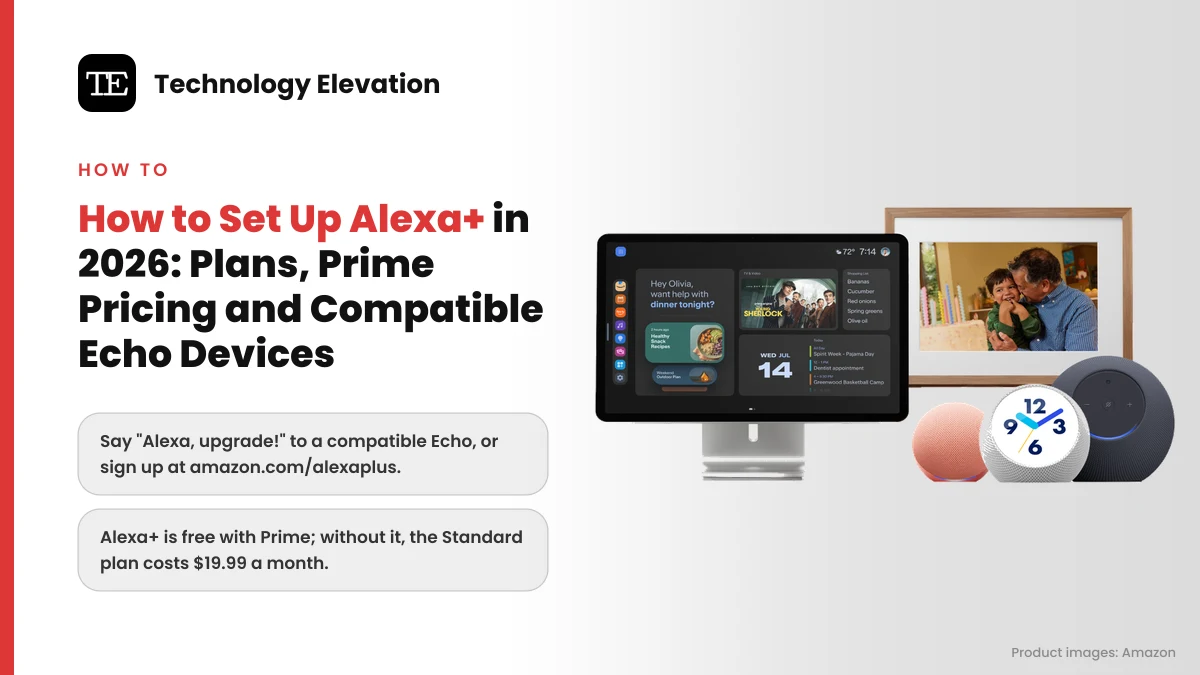
Ask an older Echo for help planning dinner and you get a recipe skill. Ask the same speaker after the upgrade and it can talk through the week’s meals, add the shopping list and set a reminder in one go. That jump is Alexa+, Amazon’s generative AI assistant, and most people already own a speaker that can run it.
Learning how to set up Alexa+ (Alexa Plus) takes about five minutes on a compatible Echo. Amazon’s own help page says you can sign up online or simply say “Alexa, upgrade!” to an Echo device. The catch is in the details: the right plan, the right device language and a personal Amazon account.
Prime members get Alexa+ free. Everyone else pays $19.99 a month for the Standard plan, or uses a limited free version in the browser and the Alexa app. Nine older Amazon devices will never get it at all.
Below are the setup steps, checked against Amazon’s help pages on 19 November 2026, plus the plan prices, the device list and the fixes for when Alexa+ does not appear.
How to set up Alexa+ on an Echo in seven steps
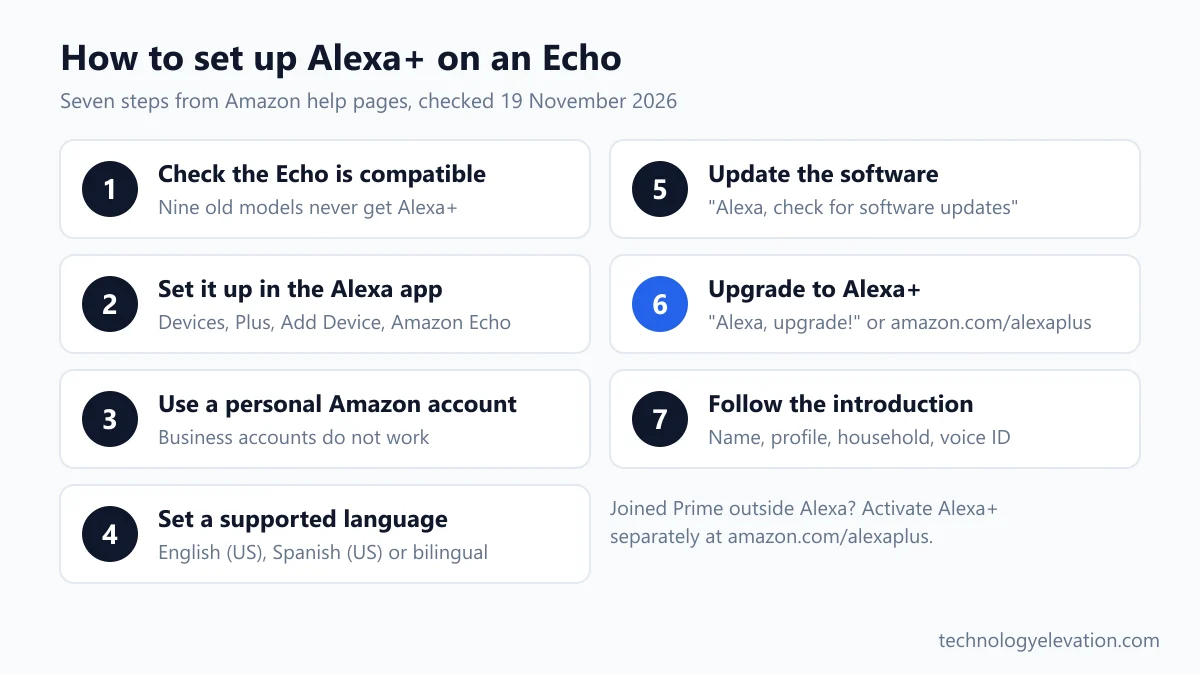
To set up Alexa+, check that your Echo is compatible, register it to a personal Amazon account in the Alexa app, set its language to US English or Spanish, update its software, then say “Alexa, upgrade!” Alexa+ then introduces itself, learns your name and builds your profile.
- Check that your Echo supports Alexa+ (the older models that never will are listed further down).
- If the Echo is new, plug it in, open the Alexa app and select Devices, then Plus, then Add Device, then Amazon Echo, and follow the instructions.
- Make sure the device is registered to a personal Amazon account, not a business account.
- Set the device language to English (United States), Spanish (United States) or a bilingual English and Spanish option.
- Say “Alexa, check for software updates” to install the latest software.
- Say “Alexa, upgrade!” or sign up at amazon.com/alexaplus while signed in.
- Follow the introduction: Alexa+ learns your name, creates your profile, offers to invite your household and offers to recognize your voice.
Once you sign up, Amazon sends a notification to your phone and a welcome email with getting-started details. Keep the phone nearby during step 7, since the invitations for other household members go out from there.
Step 6 has one trap. If you joined Prime through another Amazon service (for example, at checkout), Alexa+ does not switch on by itself. Amazon says you need to activate it separately from its Alexa+ sign-up page. If you join Prime through Alexa, or buy the Standard plan, Alexa+ arrives automatically.
Alexa+ is free with Prime and $19.99 a month without it
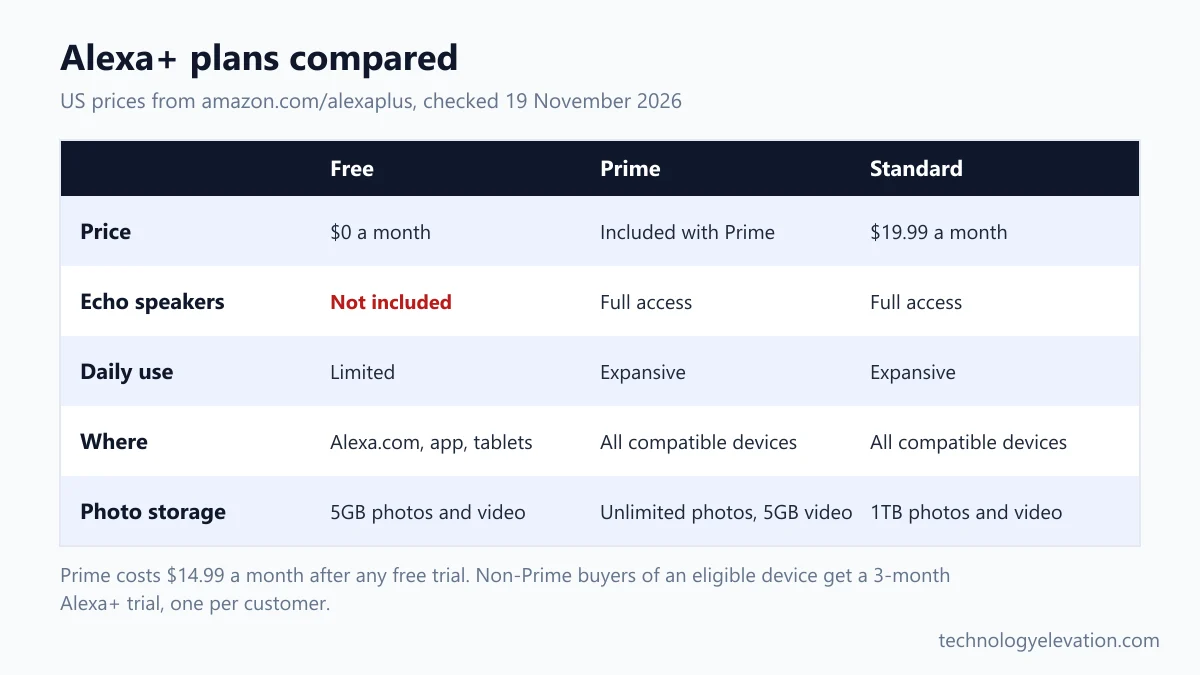
Alexa+ costs nothing extra for Amazon Prime members, who get full access on compatible Echo devices, Fire TV, tablets, Alexa.com and the Alexa app. Without Prime, the Standard plan costs $19.99 a month. A free plan gives limited daily use, but not on Echo speakers.
| Plan | Price | Works on Echo devices? | What you get |
|---|---|---|---|
| Free | $0 a month | No | Limited daily use on Alexa.com, the Alexa app and Alexa Tablets; 5GB photo and video storage |
| Prime | Included with Prime ($14.99 a month after any free trial) | Yes | Expansive daily use, personalized voice recognition, advanced smart home control, plus all Prime benefits |
| Standard | $19.99 a month | Yes | Same Alexa+ features as Prime, no Prime benefits, 1TB photo and video storage |
The maths is blunt. Standard costs $5 a month more than Prime itself, and Prime adds free delivery, Prime Video and Amazon Music. Unless you have a firm reason to avoid Prime, the Standard plan rarely makes sense.
Buying a new Echo without Prime gets you a trial. Amazon says non-Prime customers can try Alexa+ free for 3 months with an eligible device purchase, and only one trial runs per customer, so a second speaker will not restart it.
The free plan’s limits move around. Amazon says usage limits refresh regularly and can differ day to day based on your activity and overall demand.
Alexa+ is live in the US and Canada, with early access in eight more countries
Alexa+ is available to all customers in the US and Canada. Amazon offers early access in Brazil, the UK, Mexico, Italy, Spain, Germany, Austria and France, with more countries planned. In the US, Alexa+ speaks English and Spanish, and features vary by region.
Amazon’s Alexa+ announcement was updated on 21 July 2026 to confirm the US and Canada rollout and list the early access countries. Prices on this page are Amazon’s US prices.
Location matters for setup. Alexa+ works only on personal Amazon accounts set to a supported country. If you moved from another country and never changed your account, update it in Manage Your Content and Devices: open the Preferences tab, select Country/Region Settings, select Change, pick your current country and select Update.
Plan for a slow day if you do this. Amazon says country changes take up to 24 hours, and smart home devices, skills, routines, lists and alarms may need setting up again. Linked third-party accounts get signed out too.
Most Echo devices work with Alexa+, but nine older models never will
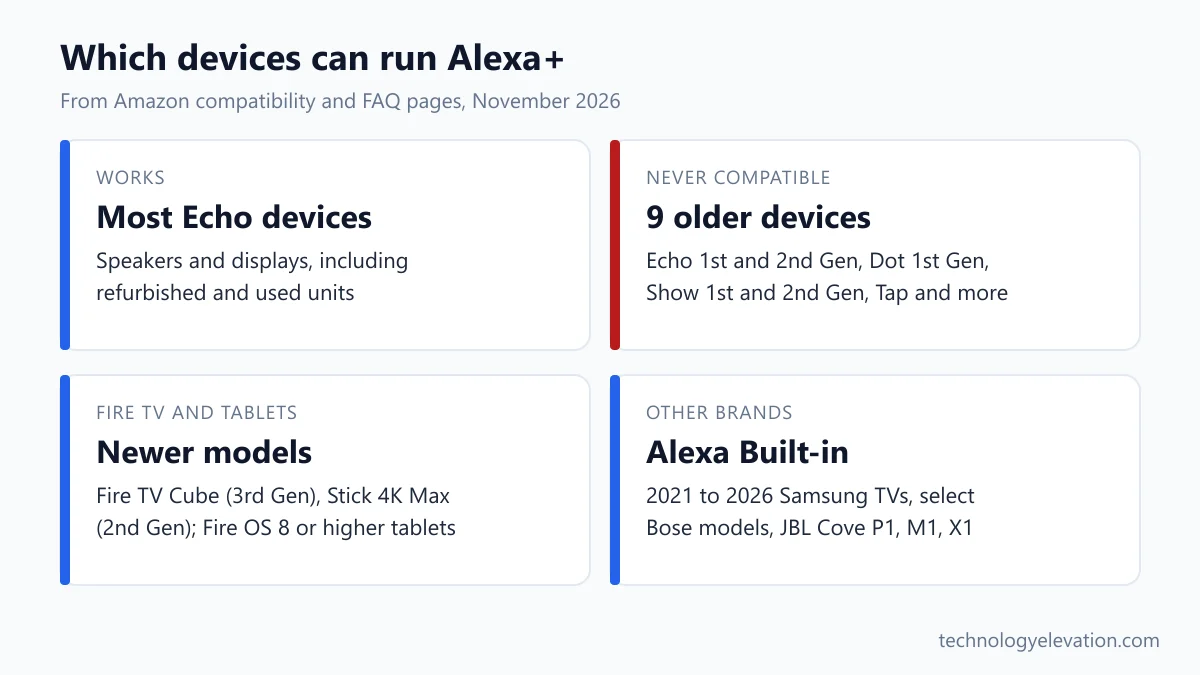
Alexa+ runs on most Echo speakers and displays, Fire TV devices, Alexa Tablets and newer Fire tablets. Amazon says nine older devices will never get it: the first two Echo speakers, the first Echo Dot, Echo Plus, Echo Buds, Echo Spot and the first two Echo Shows, plus Amazon Tap.
Amazon’s compatibility page lists the devices that stay on the original Alexa for good:
- Echo (1st Generation) and Echo (2nd Generation)
- Echo Dot (1st Generation)
- Echo Plus (1st Generation)
- Echo Buds (1st Generation)
- Echo Show (1st Generation) and Echo Show (2nd Generation)
- Echo Spot (1st Generation)
- Amazon Tap
- Fire TV devices on Fire OS 5, and Fire tablets on Fire OS 7 or earlier
If one of these sits on an account that has Alexa+, it simply keeps working with the original Alexa. Not sure which generation you own? Amazon’s “Which Echo Device Do I Have?” help page shows each model side by side.
Beyond Echo, Amazon names these as compatible:
- Fire TV: Fire TV Cube (3rd Gen), Fire TV Stick 4K Max (2nd Gen), Fire TV Stick 4K Plus, Fire TV Stick 4K (2nd Gen), and Fire TV Omni Mini-LED, Omni QLED, 4-Series and 2-Series TVs.
- Tablets: Amazon Alexa Tablet 12 Pro, Alexa Tablet 11 and Alexa Tablet 8, plus Fire tablets on Fire OS 8 or higher, such as the Fire HD 10 (13th Gen) and Fire Max 11 (13th Gen).
- Other brands: 2021 to 2026 Samsung TVs with Alexa Built-in, select Bose smart speakers and soundbars, and the JBL Cove P1, M1 and X1 speakers.
For Samsung TVs, Amazon says to sign in to the Alexa app on the TV and run the latest Alexa TV app. JBL Cove owners need Alexa chosen as the assistant in the JBL One app and the latest firmware.
Shopping for a screen first? Every Echo Show after the 2nd Generation runs Alexa+, and the choice between Apple HomeView, Echo Show and Nest Hub mostly comes down to which phones your household uses.
Check the language and account type before you upgrade
Alexa+ needs three things on the account side: a supported device language, a personal Amazon account and a supported country. A device set to UK English, or registered to an Amazon Business account, will not get Alexa+ until you change it.
To change the language on an Echo, Amazon’s steps are:
- Open the Alexa app.
- Open More and select Settings.
- Select Device Settings.
- Select your device.
- Select the gear icon at the top right of the screen.
- Under General, select Language.
- Choose English (United States), Spanish (United States) or a bilingual English and Spanish option.
On an Echo with a screen, you can also go to Settings, then Device Options, then Device Language.
Business accounts are a harder fix. Amazon says Alexa+ is not compatible with Amazon Enterprise or Business accounts, so you need to factory reset the device and set it up again on your personal account. Anyone who bought an office Echo on a work login will hit this.
Bought a device that came with Alexa+? Amazon ties that access to the account used to register the device, so register it to the account you actually want to use.
Setting up Alexa+ for a whole household takes one extra step
Alexa+ does not support account switching. For a family, Amazon recommends that every adult accepts the upgrade on their own Amazon account inside an Amazon Family, or that you move all shared Echo devices onto one primary account and create a profile for each person.
The Amazon Family route needs wallet sharing turned on, since that is what activates Prime benefit sharing, including Alexa+. Each adult then accepts the upgrade invitation from their own account.
The single-account route takes more work but leaves less to go wrong:
- Pick the account with the most devices, routines and smart home setups as the primary account.
- Upgrade that account to Alexa+.
- Factory reset each shared Echo.
- Set each one up again and register it to the primary account.
- Create a profile for each household member by saying “Create a profile” or using the Alexa app.
Kids get their own version. Parents can turn on Alexa+ Kids on Kids Edition Echo devices, or create a child profile with Verifiable Parental Consent. On a shared speaker, a child’s voice ID can switch the device into Alexa+ Kids when it recognizes them.
Alexa+ changes how you talk to your Echo from day one
After setup, Alexa+ keeps listening for a follow-up for about 8 seconds after it answers, so you do not repeat the wake word. Screens get a new interface with a Menu icon and Settings, and you can control smart home devices and build routines by voice.
Amazon calls the follow-up feature Follow Up Mode. You will see a visual indicator when Alexa is still listening. On compatible Echo Show models, you can interrupt Alexa without the wake word while facing the screen. It does not kick in after a button press, during skills or smart home commands, or while the Echo is paired with a Bluetooth device.
On an Echo Show, select the Menu icon and then Settings to find the new sections: Alexa, Display & Appearance, Accounts & Profiles, Device Options, Notifications & Sounds, Accessibility, Privacy & Permission and Help. Amazon notes that the Echo Hub and every Echo Show 5 may show different menu items until a later update.
Smart home control is where Alexa+ earns its keep. You can ask it to create a routine in plain words, such as turning off the lights and the heater at 11 pm, instead of building it tap by tap. Cheap plugs make that useful fast, and the best smart plug picks cover indoor, outdoor and energy monitoring models. Many plug boxes now carry the logo of Matter, the shared smart home standard, so learn what it means before you buy.
Thermostats get the same voice control. If yours is old, the best smart thermostat picks compare models by wiring and smart home platform.
You can use Alexa+ without an Echo on the web, in the app and on tablets
Every customer can use a free, limited Alexa+ on Alexa.com and in the Alexa app for iPhone and Android, and Amazon’s plan page adds Alexa Tablets to that free plan. Full use on Echo speakers and Fire TV needs Prime or the Standard plan.
Alexa.com works in a normal web browser with your Amazon account. Amazon says Alexa+ remembers context across devices, so a chat started in the browser can continue on your Echo.
The Alexa app is free on the Apple App Store and Google Play. Amazon says you can talk to it, type or show it what you need.
Prime members get the full version on all of these. Amazon also extends the free plan to app-supported devices such as Echo Buds, Echo Frames and Echo Auto, which run through the Alexa app on your phone.
When Alexa+ does not show up, check these five things
If Alexa+ does not appear after you upgrade, update the Echo’s software, confirm the device is on the compatible list, check the language and country settings, and make sure the account is personal. Amazon says that once those are fixed, Alexa+ should arrive soon.
- Say “Alexa, check for software updates.” Amazon’s own tip for missing Alexa+ is an outdated device.
- Confirm the model is not one of the nine that will never be compatible.
- Check the device language is English (United States), Spanish (United States) or bilingual.
- Check the account is a personal one set to a supported country.
- If you joined Prime outside Alexa, activate Alexa+ from amazon.com/alexaplus.
Setup itself can fail before Alexa+ even enters the picture. Amazon’s fixes for a stuck Echo setup: check for a strong internet connection, update the Alexa app, and restart the Echo by unplugging it, waiting 30 seconds and plugging it back in. If that fails, reset the Echo.
Weak Wi-Fi is the usual culprit in far bedrooms and garages. Alexa+ answers come from Amazon’s cloud, so a slow connection makes every request lag, and a mesh Wi-Fi system fixes that better than moving the speaker.
How to turn off Alexa+ and go back to the original Alexa
To turn off Alexa+, say “Alexa, end Alexa+” or deactivate it at amazon.com/alexaplus. Standard plan subscribers cancel in Your Memberships & Subscriptions. Your Echo then returns to the original Alexa with Follow Up Mode on, which you can switch off by voice.
Standard subscribers follow three steps from Amazon’s help page:
- Go to Your Memberships & Subscriptions on Amazon.
- Find your Alexa+ Standard subscription.
- Select Cancel My Subscription and follow the on-screen steps.
You keep Standard benefits until the end of the billing cycle. Prime members who deactivate lose Alexa+ straight away. Household members can switch it off for themselves without affecting the main account holder’s plan.
One thing you cannot turn off is the free Alexa+ on Alexa.com and in the Alexa app. Amazon says that limited version cannot be deactivated. To stop the follow-up listening on your Echo afterwards, say “Alexa, turn off Follow-Up Mode.”
Which Echo to use for Alexa+
Any compatible Echo you already own runs Alexa+, so start there. Buy a new one only if your speaker is on the never-compatible list, or if you want a screen for photos, cameras and calendars. Amazon’s 2026 models get the newest Alexa+ updates first.
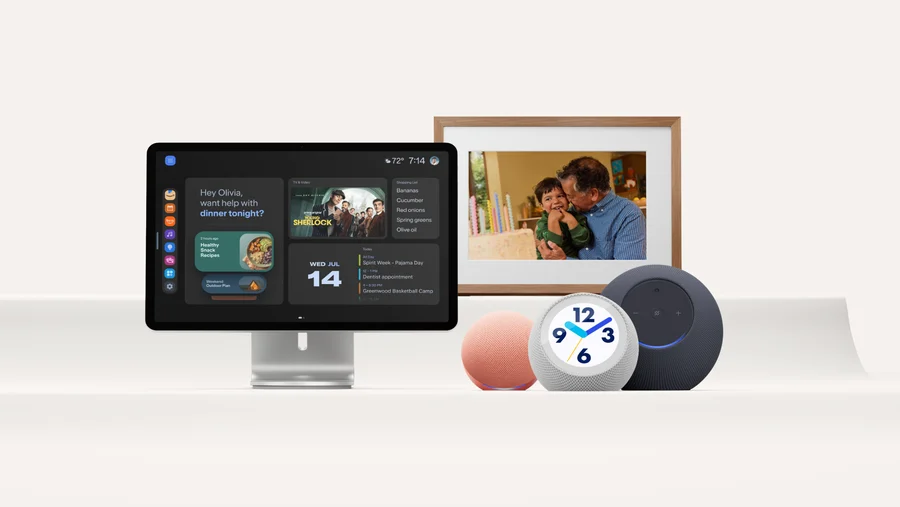
Amazon says Alexa+ Update 12, its latest release, reaches the new 2026 devices first: the Echo Dot, Echo Time, Echo Show 16, Echo Studio with Home Camera and the Alexa Photo Frame. Existing Alexa+ devices get it after, in English first for US accounts.
For a kitchen or bedroom screen, Echo Show models run from a 5.5-inch bedside screen to a 21-inch wall display. A screen also suits Alexa+ camera event summaries, which pair well with an indoor security camera.
To start small, a smart plug and a lamp show off Alexa+ routines for very little money. The smart plug picks start with simple indoor models.
Frequently asked questions about Alexa+ setup
Is Alexa+ free with Prime?
Yes, Alexa+ is included with an Amazon Prime membership at no extra cost. Prime members get full access on compatible Echo devices, Fire TV, tablets, Alexa.com and the Alexa app. Without Prime, the Standard plan costs $19.99 a month.
How do I get Alexa+ on my Echo?
Say “Alexa, upgrade!” to a compatible Echo, or sign up at amazon.com/alexaplus. You need Prime or the Standard plan, because the free Alexa+ plan does not work on Echo speakers. Alexa+ then introduces itself and sets up your profile.
Why don’t I have Alexa+ even though I have Prime?
The most common reasons are an outdated device, an unsupported device language, a business account or an unsupported country setting. If you joined Prime outside Alexa, you also need to activate Alexa+ separately at amazon.com/alexaplus.
Which Echo devices don’t work with Alexa+?
Amazon says nine devices will never get Alexa+: Echo (1st and 2nd Generation), Echo Dot (1st Generation), Echo Plus (1st Generation), Echo Buds (1st Generation), Echo Show (1st and 2nd Generation), Echo Spot (1st Generation) and Amazon Tap. They keep the original Alexa.
Can I go back to the original Alexa?
Yes, say “Alexa, end Alexa+” or deactivate it at amazon.com/alexaplus. Your Echo returns to the original Alexa with Follow Up Mode on. The free Alexa+ on Alexa.com and in the Alexa app cannot be deactivated.
Can I try Alexa+ without Prime?
Yes, anyone can use a free, limited Alexa+ on Alexa.com and in the Alexa app. Non-Prime customers who buy an eligible device also get a 3-month free trial on that device, limited to one trial per customer.
Does Alexa+ work outside the US?
Alexa+ is available to all customers in the US and Canada. Amazon offers early access in Brazil, the UK, Mexico, Italy, Spain, Germany, Austria and France, and says more countries are coming, with features varying by region.
Last checked and sources
Last checked on 19 November 2026 by Haris Khan. We followed each step against Amazon’s current Alexa+ help pages and plan page and kept only what Amazon states.
- Amazon: Alexa+ plans and FAQ page (amazon.com/alexaplus)
- Amazon Help: Activate and Set Up Alexa+, Alexa+ Requirements, About Alexa+, Compatibility of Alexa+ with Alexa Built-in Devices, Using Alexa+ with Amazon Family, How Follow Up Mode Works on Alexa+, Cancel Your Alexa+ Subscription
- Amazon Help: Change the Language on Your Echo Device, Update Country Settings, Update the Software on Your Echo Device, Set Up Doesn’t Work on Your Echo Device, How to Set Up Your Echo Dot Max, Alexa and Alexa+ Settings on Your Echo Devices with a Screen, Which Echo Device Do I Have?
- About Amazon: Alexa+ announcement, updated 21 July 2026
- US Consumer Product Safety Commission recall database (no Echo device recalls listed)
We update this guide when Amazon changes Alexa+ plans, prices, countries or compatible devices.
Technology Elevation is reader-supported. As an Amazon Associate, we earn from qualifying purchases. When you buy through links on this page, we may earn a small commission at no extra cost to you.

GIPHY App Key not set. Please check settings