

 Abdullah Kabeer
Technology Elevation is reader-supported. When you buy through the Amazon links on this page, we may earn a small commission at no extra cost to you.
At 3 a.m., a phone app that is still loading feels like an hour. A plain parent screen on the nightstand shows the crib the second you tap it. That gap between a Wi-Fi app and a direct radio link is the first thing to settle when you choose the best baby monitor, long before you compare cameras or sleep charts.
The second thing is cost after the box. Several popular smart monitors now lock their best features behind a monthly plan, and one of them will not work at all without one. Others charge nothing, ever. Over two years, the difference can be more than the price of the camera.
Then there is safety, which no monitor can buy you. In September 2025 the FDA warned parents that it is not aware of any clinical or scientific evidence that currently available baby products prevent SIDS. A monitor helps you see and hear your baby. Safe sleep habits are what protect them.
We compared every major video baby monitor on sale in the US in November 2026, using manufacturer spec sheets, official subscription pricing pages and FDA records.
The best baby monitor for most families is the eufy Baby Monitor E21
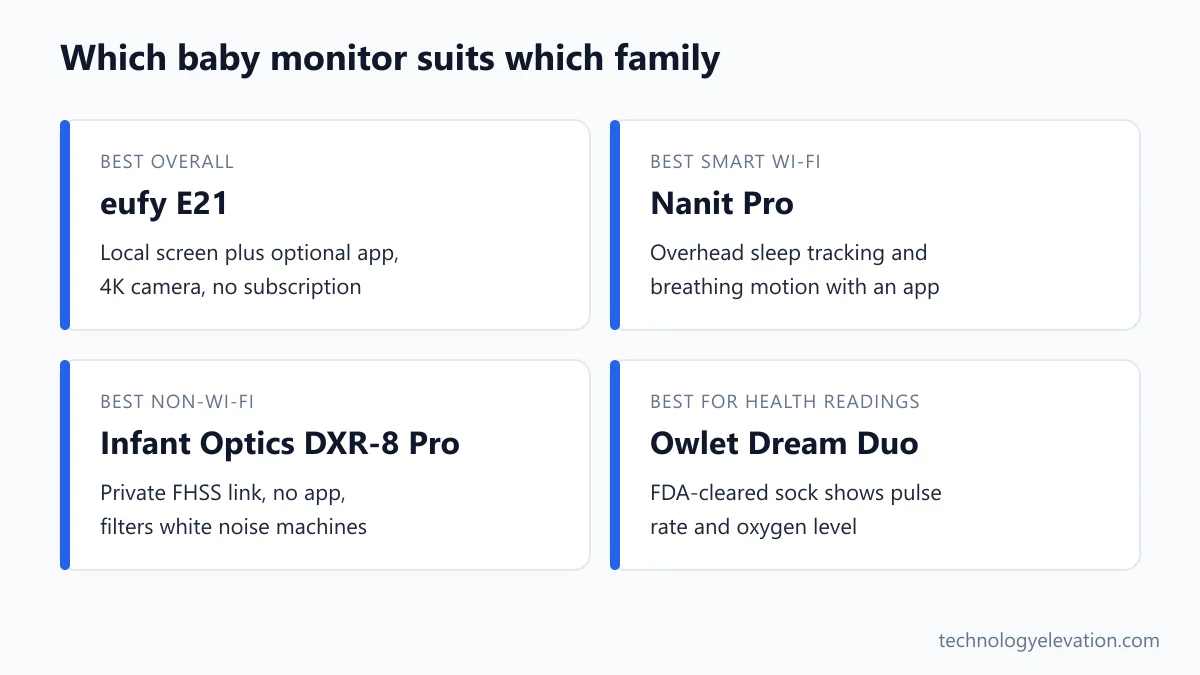
The eufy Baby Monitor E21 is the best baby monitor for most families. Its 4K pan-and-tilt camera talks straight to a 5-inch parent screen without Wi-Fi, adds an optional app with a physical Wi-Fi switch, and charges no subscription. Its list price is $259.99.
Every pick, by the job it does best:
- Best overall: eufy Baby Monitor E21
- Best smart Wi-Fi monitor: Nanit Pro (Smart Baby Monitor System)
- Best non-Wi-Fi monitor: Infant Optics DXR-8 Pro
- Best on a budget: eufy Baby Monitor C10
- Best for health readings: Owlet Dream Duo (Gen 3)
| Model | Camera | Parent screen | Connection | Subscription | List price |
|---|---|---|---|---|---|
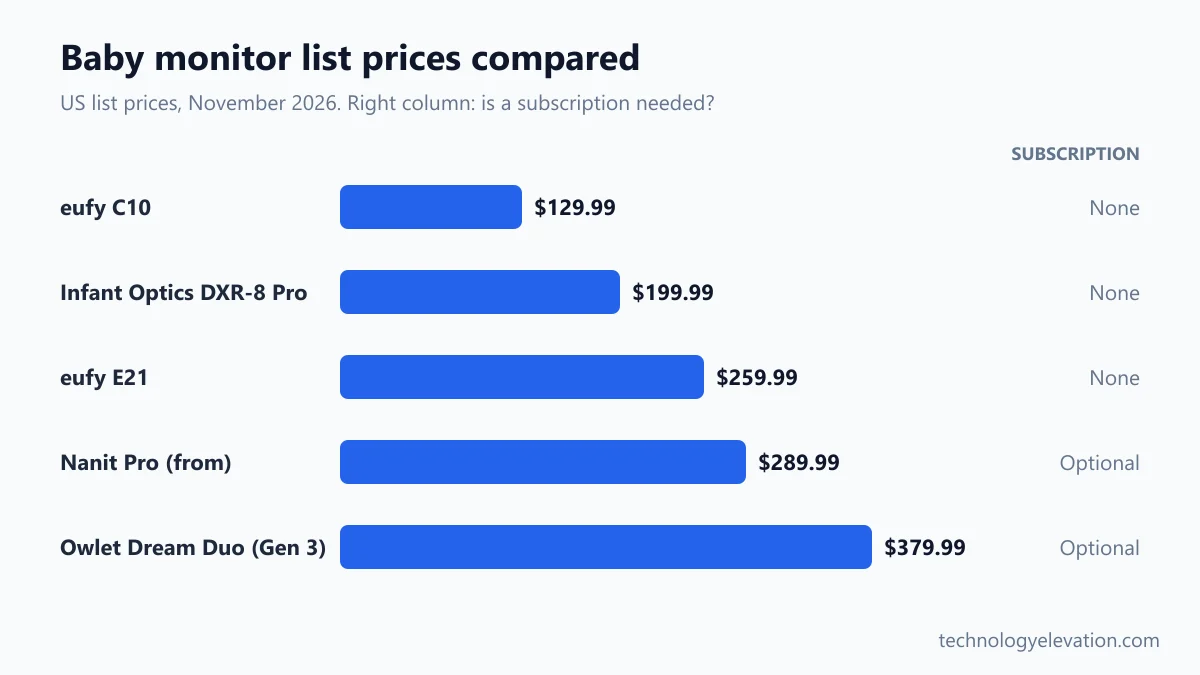
| eufy Baby Monitor E21 | 4K, pan, tilt, 8x zoom | 5 in, 720p | Direct link plus optional Wi-Fi | None | $259.99 |
| Nanit Pro | 1080p, overhead view | Phone app (8 in Home display optional) | Wi-Fi only | Optional, $120 or $300 a year | From $289.99 |
| Infant Optics DXR-8 Pro | Pan, tilt, interchangeable lenses | 5 in, 720p | FHSS, no Wi-Fi | None | $199.99 |
| eufy Baby Monitor C10 | 2K, pan, tilt, 4x zoom | Included parent unit | Direct link plus optional Wi-Fi | None | $129.99 |
| Owlet Dream Duo (Gen 3) | Dream Sight HD camera plus Dream Sock | Phone app | Wi-Fi | Optional, $9.99 a month | $379.99 |
Baby gear goes on sale constantly, and Black Friday is close. Treat the list prices above as a ceiling.
eufy Baby Monitor E21: the best baby monitor overall
The eufy E21 wins because it refuses to make you choose. The camera and parent screen link directly, so the picture keeps working when your router does not, and the app is there when you want it. Nothing on it needs a monthly fee.
Key specs: 4K camera with 330-degree pan, 60-degree tilt and 8x zoom, infrared night vision, 5-inch 720p parent screen, direct range up to 1,000 feet in open space, built-in 5,000 mAh camera battery (about 9 hours, or 5.5 hours with night vision), microSD recording up to 128 GB, cry, sound, motion and room temperature alerts. List price: $259.99.
The hybrid setup is the clever part. A switch on the camera decides whether it joins your home network at all. Leave it off and you have a closed, local monitor. Flip it on and grandparents can check in from the app, with up to 5 family members sharing access.
The battery in the camera matters more than it sounds. You can move it to a travel cot or a grandparent’s spare room for a nap without hunting for an outlet, and it keeps running through a power cut. Eufy says the parent screen still connects during an outage, though app viewing stops if your internet goes down.
Recordings stay local on a microSD card you buy yourself. Eufy only stores short notification thumbnails in the cloud, and says it encrypts video with a unique key for each recording.
The catch: the 4K figure describes the camera, not the screen. The parent unit shows 720p, so you only see the full detail when you zoom or open the app. The app also needs a 2.4 GHz Wi-Fi network, which older dual-band routers handle fine but some mesh setups hide by default.
Check the eufy Baby Monitor E21 price on Amazon
Nanit Pro: the best smart Wi-Fi baby monitor
The Nanit Pro is the best smart Wi-Fi baby monitor for parents who want sleep data, not just a picture. Its overhead 1080p camera tracks sleep, sends sound and motion alerts, and watches breathing motion through patterned Breathing Wear. Nanit’s system starts at $289.99.
Key specs: 1080p HD overhead camera, wall mount or floor stand, two-way audio, temperature and humidity tracking, white noise and nightlight, breathing motion monitoring with Nanit Breathing Wear (sleeping bags from $34.99). Optional 8-inch Home display ($179). Starts at $289.99.
Nanit’s whole idea is the bird’s-eye view. Mounted above the crib, the camera sees the entire mattress, which makes its sleep tracking far more useful than a camera peering through the slats from the side. Each morning the app tells you how long the baby slept, how often they woke and when you went in.
Good news on cost: Nanit’s FAQ says the monitor works without a plan. Live video from anywhere, sound and motion alerts, two-way audio, room readings and breathing motion monitoring are all included. You pay for history and analysis.
The Memories plan costs $120 a year and adds 2 days of continuous video history and up to 10 caregivers. Milestones costs $300 a year, keeps 7 days of video and adds development tracking such as rolling over. A cheaper Sleep plan comes free for the first 3 months. Most of the sleep analysis also needs the wall mount or floor stand, not the flexible travel stand.
The honest catch is that Nanit is Wi-Fi only. No internet, no picture. If your nursery sits at the far end of the house, check your signal there before you buy. A weak spot is often fixed with a mesh Wi-Fi system.
Check the Nanit Pro price on Amazon
Infant Optics DXR-8 Pro: the best non-Wi-Fi baby monitor
The Infant Optics DXR-8 Pro is the best non-Wi-Fi baby monitor. It uses a private FHSS radio link instead of the internet, so there is no app, no cloud and no account to hack. Active noise reduction filters out white noise machines. Its list price is $199.99.
Key specs: 5-inch 720p parent screen, pan and tilt camera, interchangeable lenses (an optical zoom lens comes in the box), second-generation FHSS link with range up to 1,000 feet line of sight, Active Noise Reduction, two-way talk, user-replaceable battery, up to 4 cameras on one screen. List price: $199.99.
FHSS stands for frequency-hopping spread spectrum. In plain words, the signal jumps between radio channels many times a second, and only the paired screen follows the pattern. Nothing touches your router, so nothing reaches the internet.
Active Noise Reduction is the feature parents notice first. Most nurseries run a white noise machine all night, and on a normal monitor that hiss comes through the parent speaker too. The DXR-8 Pro filters steady background noise, so a whimper stands out.
The replaceable battery is a quiet win. Monitor batteries usually fade after a year or two of nightly use. Here you swap the cell instead of the whole parent unit.
The catch is the flip side of its privacy. You cannot check in from work or a date night, and the 720p picture looks soft next to a 4K or 2K camera. Infant Optics also now sells the DXR-8 PRO SS, which adds split-screen viewing with live audio from two rooms at once, for families with two kids in separate rooms.
Check the Infant Optics DXR-8 Pro price on Amazon
eufy Baby Monitor C10: the best baby monitor on a budget
The eufy Baby Monitor C10 is the best budget baby monitor. For $129.99 it pairs a 2K pan-and-tilt camera with a parent unit that works without Wi-Fi, plus optional app access, and like the E21 it needs no subscription to unlock its features.
Key specs: 2K camera with 351-degree pan, 60-degree tilt and 4x zoom, split-screen view for two cameras, hybrid local or Wi-Fi connection with a one-tap Wi-Fi off switch, 5,000 mAh parent unit battery rated for up to 12 hours of screen time, microSD slot. List price: $129.99.
Think of the C10 as the E21’s sensible younger sibling. You still get the direct link to the parent screen and the choice of app or no app. You lose the 4K sensor and, more importantly, the battery in the camera.
The camera has to stay plugged in by USB-C. That is fine for a crib that never moves, but it means planning a safe cord route from day one.
For a second room or a toddler bed, the split-screen view means you can add a second camera later without buying another parent unit. That stretches the budget further than a cheaper monitor you would replace in a year.
Want to go cheaper still? VTech’s VM819 has a 2.8-inch screen, a no-Wi-Fi link and a range of up to 1,000 feet. The picture is small and basic, but for a parent who only needs to hear and glimpse the baby, it does the job.
Check the eufy Baby Monitor C10 price on Amazon
Owlet Dream Duo (Gen 3): the best monitor for health readings
The Owlet Dream Duo (Gen 3) is the best choice if you want health readings alongside video. Its Dream Sock is FDA-cleared to show pulse rate and oxygen level for babies 1 to 18 months, and it pairs with the Dream Sight camera. The bundle lists at $379.99.
Key specs: Dream Sock with live pulse rate and oxygen saturation readings and alerts, for babies 1 to 18 months and 6 to 30 lb; Dream Sight HD camera with night vision, two-way talk and cry, sound and motion alerts; free Owlet Dream app; optional Owlet360 at $9.99 a month. Bundle list price $379.99 (Dream Sock alone $299.99, Dream Sight alone $99.99).
The sock’s FDA status is real and specific. Owlet received De Novo clearance in November 2023 (FDA record DEN220091), which created the product code QYU for over-the-counter infant pulse rate and oxygen monitors. When the FDA tells parents to look for code QYU, this is the kind of device it means.
Live readings and alerts are free in the Owlet app. Owlet360, the paid add-on, layers on daily summaries, weekly trends and comparisons with babies the same age.
Now the honest part. FDA clearance means the readings are accurate enough for home use. It does not mean the sock prevents SIDS, and the FDA classification for these devices lists over-reliance and false alarms among the risks. For most healthy babies, the readings add data and, for some parents, extra worry. Talk to your pediatrician if your baby has a medical reason to be monitored.
Owlet owners need to know about the company’s camera safety update of November 13, 2026. Owlet is sending a free replacement cable guard for every Owlet camera (Cam 1, Cam 2 and Dream Sight) bought before that date, after a toddler died entangled in an exposed camera cable. Request it in the Dream app or through Owlet’s Help Center chat, and run the in-app safety check.
Until the new guard arrives, Owlet’s instruction is clear. Do not reattach a loose guard, because the adhesive may be compromised. Move the camera and any exposed cable so that no part of the cable is within 3 feet of the child’s sleep area. Throw the old guards away once the new ones are fitted, and never sell or give them away.
Owlet also paused shipments of Dream Sight and the Dream Duo bundle while it switches to the new guard. Units bought from owletcare.com on or after November 13, 2026 include it. If you buy a Dream Duo elsewhere, including from older retail stock, request the replacement guard before you set the camera up.
Wi-Fi and FHSS baby monitors trade convenience for privacy
A Wi-Fi baby monitor lets you watch from anywhere, but it depends on your router, your internet and the maker’s cloud servers. A non-Wi-Fi FHSS monitor only works inside your home, and cannot be reached from the internet at all. Hybrid monitors like the eufy E21 let you pick.
For a lot of families the right answer is boring. One parent at home, one nursery, no need to check in from the office: a local monitor does everything, and you never have to think about passwords.
Wi-Fi monitors earn their place when people check in from elsewhere. A parent on a night shift, a nanny during the day, grandparents across the country. The app also works on any phone, so nobody fights over a single parent unit.
If you go Wi-Fi, a few habits keep the camera yours:
- Use a long, unique password for the monitor account and turn on two-step verification.
- Install firmware and app updates as soon as they arrive.
- Share access through the app’s caregiver invites, never by sharing your own login.
- Remove old caregivers when the babysitter or night nurse moves on.
- Keep the monitor on your main network with a strong router password, ideally on a newer router with Wi-Fi 6 support.
Signal strength is the other half of a good Wi-Fi monitor. A nursery at the end of a hallway can drop the feed at exactly the wrong moment. A Wi-Fi extender is the cheap fix, and a mesh system is the better one.
What about a smart display or a regular home camera? A smart display can show a camera feed, and some Google Home compatible security cameras work as a basic nursery camera. Neither offers cry detection tuned for babies, a dedicated parent screen or a white noise filter, so a real baby monitor is still the better tool for night after night.
Subscription costs can double what a baby monitor costs
Subscription costs vary from nothing to $300 a year. The eufy E21, eufy C10 and Infant Optics DXR-8 Pro charge nothing. Nanit and Owlet work without a plan but charge for history and trends. Miku Pro requires a $9.99 monthly membership to work as intended.
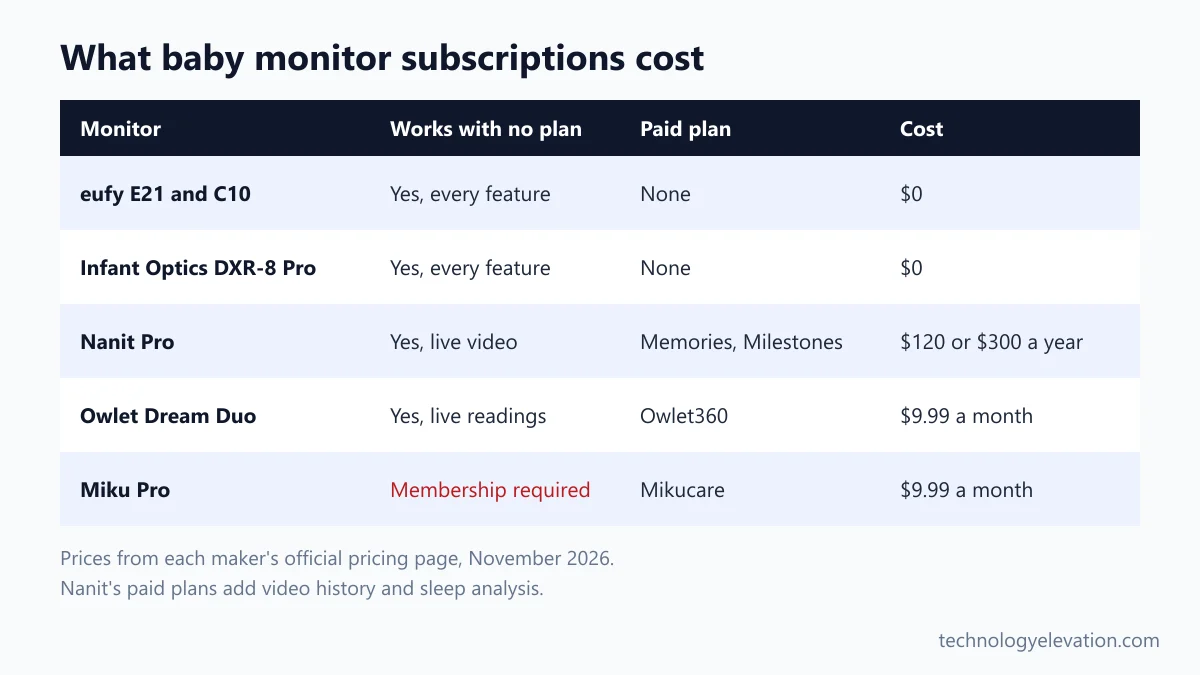
Run the numbers over two years, roughly how long most families use a crib monitor. Nanit’s Memories plan adds $240 and Milestones adds $600. Owlet360 at $9.99 a month adds about $240. A Mikucare membership adds the same, on top of the camera.
Miku deserves a note of its own. The Miku Pro is a capable camera, with 1080p video, a 140-degree field of view and radar for contact-free breathing motion tracking. But Miku’s own site says it requires the $9.99 monthly Mikucare membership. If you would rather not commit to a fee for the life of the monitor, that rules it out.
CuboAi, best known for alerts when something may be covering a baby’s face, includes one year of its Premium plan with each camera and then charges to renew. Read the renewal terms before you rely on any feature that sits behind a paywall.
Paying is not a bad deal if you will use the data. Plenty of parents swear by Nanit’s sleep reports when they are trying to drop a night feed. Just decide before you buy, not after the free trial ends.
Connection, screen and running costs decide the right baby monitor
Choose a baby monitor by connection first, then screen, then running costs. Decide whether you need to check in from outside the house, pick a parent screen or app you will actually use at night, and add up any subscription before comparing launch and list prices.
- Decide on Wi-Fi. Only at home? A local FHSS monitor is simpler and private. Need remote access? Pick Wi-Fi or a hybrid.
- Pick a parent screen or an app. A dedicated 5-inch screen is easier at 3 a.m. than unlocking a phone. Apps win if two or more people watch.
- Check night vision and audio. You will use the monitor in the dark far more than in daylight. A white noise filter like Active Noise Reduction helps a lot.
- Count the rooms. Planning on a second child or a separate playroom? Check how many cameras one parent unit supports.
- Look at battery life. A parent unit should last a full night unplugged. A battery in the camera, like the E21’s, makes naps away from home easy.
- Add up subscriptions. Multiply the monthly fee by 24 and add it to the list price.
- Plan the cord route. Before you buy, find a mounting spot at least 3 feet from the crib with a safe path to an outlet.
Mounting position changes everything. A camera high on the wall or above the crib sees the whole mattress. One on a dresser sees the side rail and a lot of ceiling. A soft night lamp on the far side of the room also helps for those 2 a.m. feeds, so you are not relying on the monitor’s infrared picture alone.
Baby monitors do not prevent SIDS, and cords need 3 feet of space
No baby monitor prevents SIDS. The FDA and the American Academy of Pediatrics both say there is no evidence that consumer products reduce the risk. Monitor cords are a real strangulation hazard, and the CPSC says corded cameras should never sit within three feet of a crib.
The American Academy of Pediatrics is blunt about this in its safe sleep advice: do not use home cardiorespiratory monitors as a strategy to reduce the risk of SIDS, and avoid commercial devices that claim to. The AAP’s own advice is a firm, flat sleep surface, baby on their back, no soft bedding, and room-sharing without bed-sharing, preferably for at least the first 6 months.
The FDA’s September 16, 2025 safety communication goes further. It warns against infant monitors that claim to measure heart rate, oxygen, breathing rate or temperature without FDA authorization, citing missed changes, false alarms and skin burns or rashes. Authorized devices carry product code QYU in the FDA’s 510(k) and De Novo databases, and you can search those by device name.
Cords are the hazard parents underestimate. In 2011 the CPSC announced a recall of about 1.7 million Summer Infant video monitors after two infants were strangled by camera cords, and said parents should never place corded cameras within three feet of a crib. Owlet’s November 2026 cable guard program shows the risk has not gone away.
Safe placement habits:
- Mount the camera on the wall or a floor stand at least 3 feet from any part of the crib, bassinet or play yard.
- Run every cable through the supplied cable guard, and check that the guard is still firmly attached each time you change the sheets.
- Never rest a camera or parent unit on the crib rail or inside the crib.
- Move the setup again when your baby starts pulling up to stand, because their reach grows fast.
- Remember the other cords in the room: lamps, sound machines and smart lights follow the same 3-foot rule.
Older monitors to skip or replace in 2026
Skip discontinued baby monitors, even at clearance prices. Older Wi-Fi models stop getting security updates, and older cameras may ship with outdated cable guards. Eufy’s own store now leads with the E21, E20 and C10, and Owlet’s current Dream Duo pairs the sock with Dream Sight rather than Cam 2.
Older non-Wi-Fi monitors are a different story. A secondhand Infant Optics or VTech unit with a healthy battery still works as well as the day it was made, because nothing about it depends on an app or a server.
Buying used? Check that the camera’s cords are intact, that it comes with its wall mount and cable guards, and that a Wi-Fi model has been removed from the previous owner’s account. Search cpsc.gov for the model name too, in case it has been recalled.
Frequently asked questions about baby monitors
What is the best baby monitor right now?
The eufy Baby Monitor E21 is the best baby monitor for most families. It has a 4K pan-and-tilt camera, a 5-inch parent screen that works without Wi-Fi, an optional app and no subscription, at a list price of $259.99.
Do baby monitors prevent SIDS?
No. The FDA says it is not aware of any evidence that currently available baby products prevent SIDS, and the American Academy of Pediatrics advises against using home monitors as a SIDS prevention strategy. Safe sleep practices are what lower the risk.
Is a non-Wi-Fi baby monitor safer?
A non-Wi-Fi baby monitor is more private, because it uses a direct FHSS radio link that cannot be reached from the internet. The trade-off is that you cannot watch from outside your home. Wi-Fi monitors are safe enough with a strong password, two-step verification and regular updates.
Which baby monitors work without a subscription?
The eufy Baby Monitor E21, eufy Baby Monitor C10 and Infant Optics DXR-8 Pro need no subscription at all. Nanit and Owlet work without a plan but charge for video history and trends. Miku Pro requires a $9.99 monthly membership.
How far should a baby monitor be from the crib?
Keep the monitor and its cord at least 3 feet from the crib. The CPSC warns that corded cameras should never be within three feet of a crib because of the strangulation risk. Use the supplied cable guards and mount the camera on a wall or stand.
Is the Owlet Dream Sock FDA-cleared?
Yes. The Owlet Dream Sock received FDA De Novo clearance in November 2023 to show pulse rate and oxygen level for babies 1 to 18 months and 6 to 30 lb. Clearance covers the readings, not SIDS prevention.
How much does a Nanit subscription cost?
Nanit’s Memories plan costs $120 a year and its Milestones plan costs $300 a year. The camera works without a plan, including live video, sound and motion alerts and breathing motion monitoring with Breathing Wear.
Last checked and sources
Last checked on 15 November 2026 by Abdullah Kabeer. We compared every major video baby monitor on sale in the US using manufacturer spec sheets and official subscription pricing pages, then checked every safety claim against FDA, AAP and CPSC publications. Discontinued models were left out.
- eufy, Baby Monitor E21 and Baby Monitor C10 product pages (eufy.com)
- Nanit, Smart Baby Monitor System and Insights plan pricing (nanit.com)
- Infant Optics, DXR-8 PRO and DXR-8 PRO SS product pages (infantoptics.com)
- Owlet, Dream Duo, Dream Sock and Owlet360 pages, and the Important Camera Safety Update of November 13, 2026 (owletcare.com)
- Miku, Miku Pro specs and Mikucare membership pages (mikucare.com)
- CuboAi, CuboAi Care plan page (getcubo.com)
- US Food and Drug Administration, safety communication on unauthorized infant vital sign monitors, September 16, 2025, and De Novo record DEN220091
- American Academy of Pediatrics, 2022 safe sleep recommendations (healthychildren.org)
- US Consumer Product Safety Commission, Summer Infant video monitor recall, February 11, 2011
We update this buying guide when baby monitors launch, are discontinued or change their subscription pricing.

GIPHY App Key not set. Please check settings
One Comment