

 Abdullah Kabeer
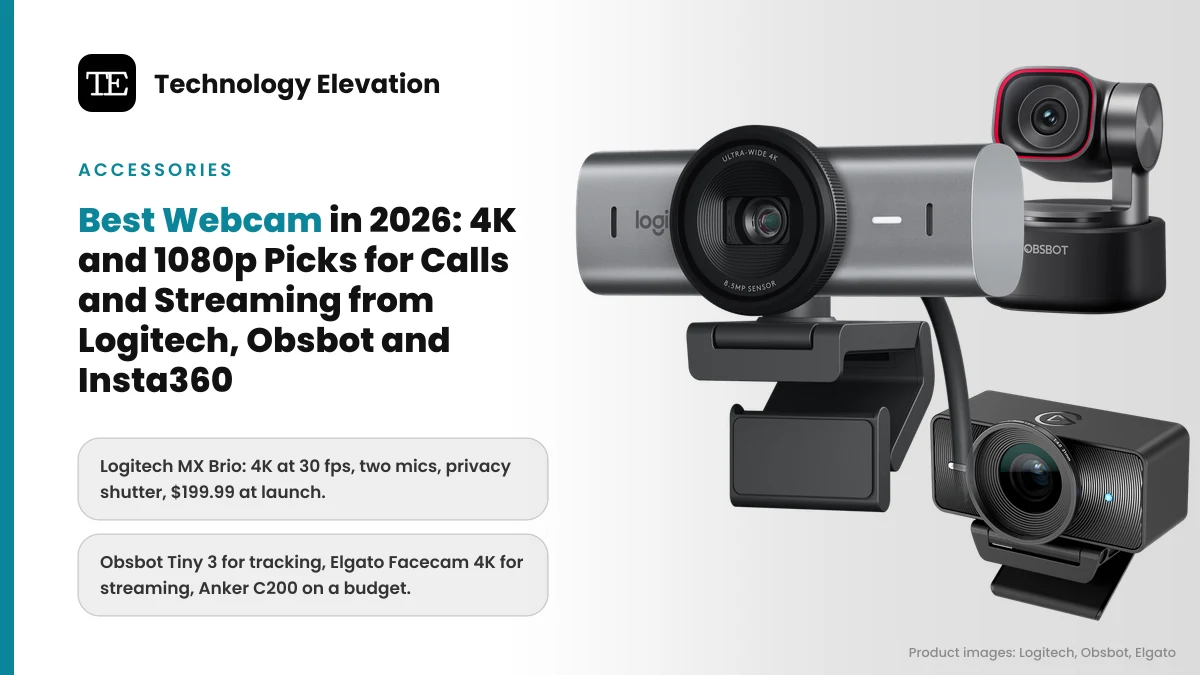
Join any video call this week and you can spot the built-in laptop cameras straight away. Faces look soft and a little orange, the window behind someone blows out to white, and half the people seem to be looking up from the bottom of a well. A good webcam fixes all three, and the best webcam for most people now costs less than a decent office chair.
The market moved quickly this year. Insta360 and Obsbot both launched new tracking webcams in January, with sensors far bigger than the tiny chips inside a typical laptop lid. Obsbot says the Tiny 3 weighs just 63 g yet carries a 1/1.28-inch sensor, which is closer to a phone’s main camera than to a classic webcam.
Mac owners have a free option too. Your iPhone can act as a wireless webcam through Continuity Camera, and it beats most cheap USB cameras.
We compared the official specs and launch prices of the webcams on sale in the US in November 2026, from Logitech, Insta360, Obsbot, Elgato and Anker, and sorted them by the job they do best.
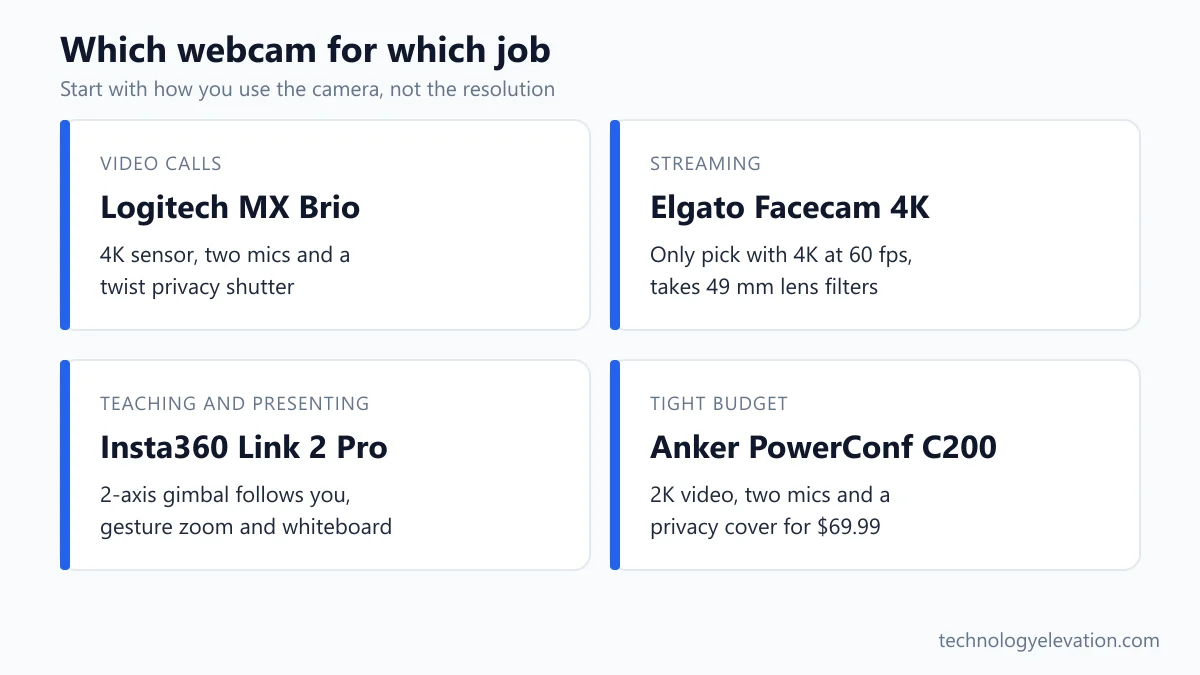
The best webcam for most people is the Logitech MX Brio
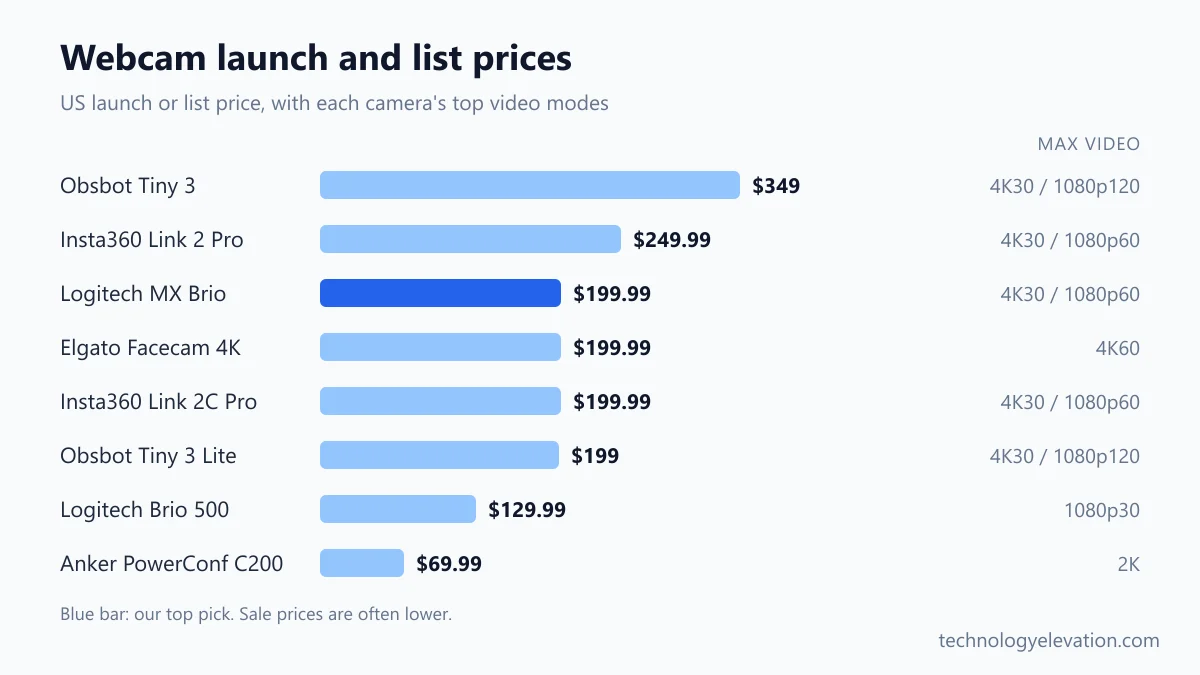
The Logitech MX Brio is the best webcam for most people. It records 4K at 30 fps or 1080p at 60 fps, has two beamforming mics, a built-in privacy shutter and simple Logitech software on Windows and Mac. It launched at $199.99.
Every pick, by the job it does best:
- Best overall: Logitech MX Brio
- Best AI tracking webcam: Obsbot Tiny 3
- Best for streaming: Elgato Facecam 4K
- Best for teachers and presenters: Insta360 Link 2 Pro
- Best compact 4K webcam for calls: Insta360 Link 2C Pro
- Best tracking webcam under $200: Obsbot Tiny 3 Lite
- Best 1080p webcam for a home office: Logitech Brio 500
- Best cheap webcam: Anker PowerConf C200
- Best free option for Mac owners: your iPhone, with Continuity Camera
| Model | Max video | Sensor | Built-in mics | Tracking | Launch or list price |
|---|---|---|---|---|---|
| Logitech MX Brio | 4K30, 1080p60 | 1/2.8 in Sony Starvis | 2 | Auto-framing (software) | $199.99 |
| Obsbot Tiny 3 | 4K30, 1080p120 | 1/1.28 in, 50 MP | 3 | Gimbal, AI Tracking 2.0 | $349 |
| Elgato Facecam 4K | 4K60 | Sony Starvis | None | Software, needs NVIDIA RTX | $199.99 |
| Insta360 Link 2 Pro | 4K30, 1080p60 | 1/1.3 in | 2 | 2-axis gimbal | $249.99 |
| Insta360 Link 2C Pro | 4K30, 1080p60 | 1/1.3 in | 2 | Digital auto framing | $199.99 |
| Obsbot Tiny 3 Lite | 4K30, 1080p120 | 1/2 in, 48 MP | 3 | Gimbal, AI Tracking 2.0 | $199 |
| Logitech Brio 500 | 1080p30 | 4 MP | Stereo | RightSight auto-framing | $129.99 |
| Anker PowerConf C200 | 2K | 2K sensor | 2 | None | $69.99 |
Webcam prices drop hard around Black Friday, and most of these models are already discounted on their makers’ own stores. Treat the prices above as a ceiling, not what you will actually pay.
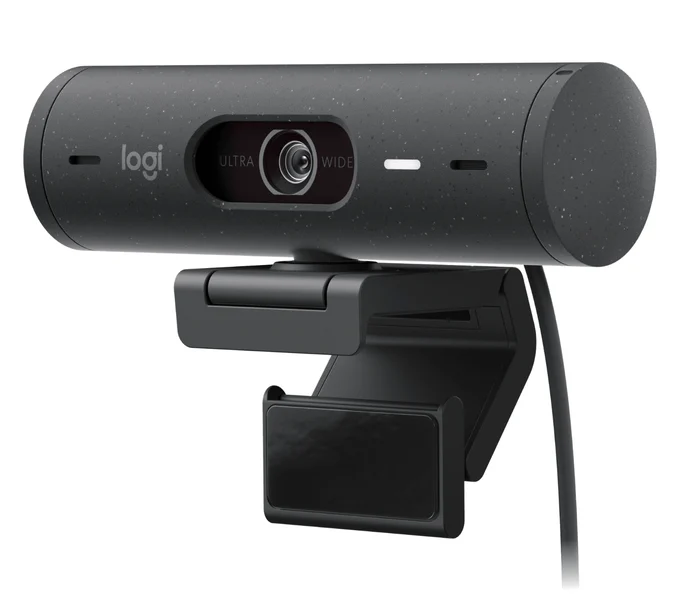
Logitech MX Brio: the best webcam for most people
The Logitech MX Brio is the safest all-round buy. Its 4K sensor has much larger pixels than the old Brio 4K, the two mics handle a normal home office well, and the twist shutter physically blocks the lens. Setup takes about a minute on Windows or Mac.
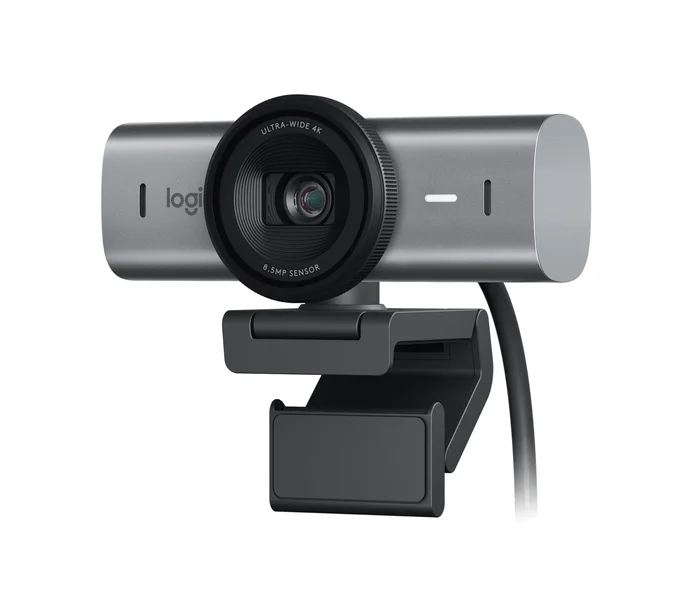
Key specs: 4K at 30 fps or 1080p at 60 fps, Sony Starvis IMX415 sensor (1/2.8 inch), field of view up to 90 degrees, two beamforming mics with AI noise reduction, rotating privacy shutter, USB-C (needs a USB 3.0 port), 5 ft cable, works with Windows 10 or later and macOS 10.15 or later. Launch price: $199.99.
Logitech says the sensor’s pixels are 70% larger than those in the Brio 4K, and that shows up where it matters: a dim room in winter, late in the afternoon. You get a cleaner, less grainy picture without buying a light.
The software is the quiet strength. Logi Options+ and G Hub let you set exposure, white balance and ISO by hand, or leave everything on auto. Most people will never open the settings, and that is fine.
The honest catch is the price for what is still a fixed camera. Nothing follows you around the room, and the auto-framing is a digital crop. If you pace while you present, look at the Obsbot or Insta360 gimbal models instead.
Offices that manage dozens of cameras can buy the MX Brio 705 for Business at the same $199.99 list price. It adds Logitech Sync for remote IT management and is certified for Microsoft Teams, Zoom and Google Meet.
Buy the Logitech MX Brio now on Amazon
Obsbot Tiny 3: the best AI tracking webcam
The Obsbot Tiny 3 is the best webcam if you move around on camera. A tiny gimbal physically turns to follow you, its 1/1.28-inch sensor is the largest in this guide, and three built-in mics make it the strongest all-in-one audio choice. It launched at $349.
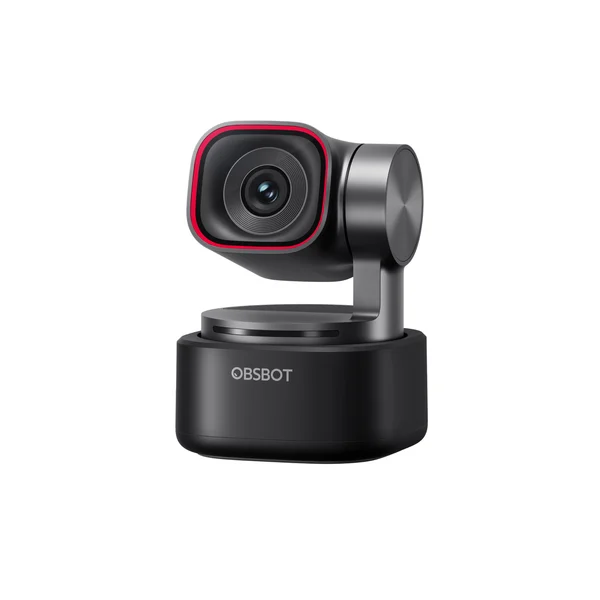
Key specs: 1/1.28-inch 50 MP sensor, 4K at 30 fps and 1080p at 120 fps, ISO 100 to 12800, Dual All-Pixel PDAF autofocus, DCG HDR, three MEMS mics (one omnidirectional, two directional) with five audio modes, AI Tracking 2.0 with Voice Tracking, gesture and voice control, 63 g, 37 x 37 x 49 mm. Launched January 28, 2026, at $349.
Tracking is the headline. AI Tracking 2.0 can follow a person, a group, a hand or even an object, and Zone Tracking lets you draw the area the camera is allowed to follow. That stops it swinging off to frame the cat.
Voice Tracking is the clever new trick. The mic array works out where speech is coming from, rotates the gimbal toward it and locks on, so a two-person podcast at one desk gets framed without anyone touching the camera.
Desk Mode and Whiteboard Mode are exclusive to the Tiny 3, not the Lite. Teachers and anyone who sketches on paper during calls will want them. For privacy, you tilt the lens down to face the base, which works as a physical cover.
The catch is cost and complexity. At $349 it is the most expensive pick here, and you need OBSBOT Center (Windows 10 or macOS 11 or later) to get the most from it. A 10th Gen Intel Core i5 or Apple M1 with 8 GB of RAM is recommended for 4K and 120 fps.
Buy the Obsbot Tiny 3 now on Amazon
Elgato Facecam 4K: the best webcam for streaming
The Elgato Facecam 4K is the best webcam for streamers. It is the only pick here that records 4K at 60 fps, it sends uncompressed video for low lag, and it even takes 49 mm lens filters. There is no microphone, by design. Launch price: $199.99.
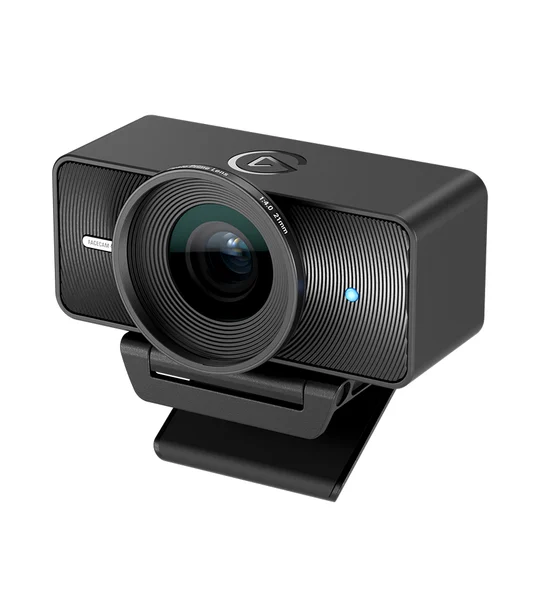
Key specs: 4K at 60 fps, HDR up to 4K30, Sony Starvis CMOS sensor, Elgato Prime lens at f/4.0, fixed focus from 30 to 120 cm (11.8 to 47.2 in), field of view up to 90 degrees, 49 mm filter thread, on-device settings memory, USB-C (USB 3.0 or later recommended), no built-in mic. List price: $199.99.
Streamers usually already own a proper microphone, and Elgato leans into that. Every part inside goes toward the picture, and the Elgato Studio app gives you DSLR-style control over shutter speed, ISO and color, plus cinematic LUTs.
The filter thread is a genuine first for webcams. Screw on a polarizer to kill glare from glasses, or a black mist filter for softer skin tones, and your stream looks more like a camera feed than a webcam.
Two catches. The focus is fixed, so the picture is sharp from roughly an arm’s length to about four feet away, but not for close-up product shots. And face tracking and background effects need an NVIDIA RTX graphics card.
The privacy cover is a separate cap accessory rather than a built-in shutter. Pair it with a laptop for live streaming that has a fast USB-C port, or a desktop with a spare USB 3.0 socket.
Buy the Elgato Facecam 4K now on Amazon
Insta360 Link 2 Pro: the best webcam for teachers and presenters
The Insta360 Link 2 Pro is the best webcam for teachers, coaches and presenters. A 2-axis gimbal follows you across the room, gesture controls let you zoom without touching anything, and its 1/1.3-inch sensor handles dim rooms well. It launched at $249.99.
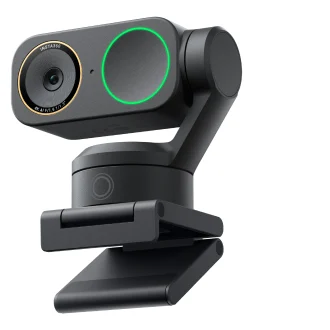
Key specs: 1/1.3-inch sensor with dual native ISO (100 to 3200), 4K at 30 fps and 1080p at 60 fps, f/1.9 aperture, 24 mm equivalent lens, 83.9-degree field of view, PDAF autofocus from 12 cm, up to 4x digital zoom, two mics (one omnidirectional, one directional) with four audio modes, 2-axis gimbal, USB-C (USB 2.0), magnetic mount. Launched January 13, 2026, at $249.99.
The gimbal tracking offers head, half-body and full-body framing, and you can set a Tracking Area and Pause Track privacy zones. In plain terms, the camera follows you to the whiteboard and stops following when you walk to the door.
Insta360 also added Elgato Stream Deck integration, so one tap can change exposure, switch presets or trigger a mode. Smart Whiteboard, DeskView, green screen keying and uncropped 4K vertical video round out a very full feature list.
The catch is the software. The Link Controller app does not support ARM-based Windows laptops, and background blur on Windows works best on NVIDIA graphics. Check your laptop before you buy, especially if it runs on a Snapdragon chip.
Buy the Insta360 Link 2 Pro now on Amazon
Insta360 Link 2C Pro: the best compact 4K webcam for calls
The Insta360 Link 2C Pro is the best compact 4K webcam for people who sit still on calls. It has the same 1/1.3-inch sensor, lens and mics as the Link 2 Pro, but swaps the gimbal for digital auto framing and a slimmer body. Launch price: $199.99.
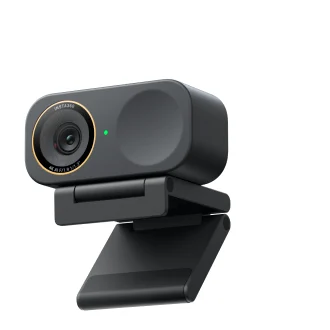
Key specs: 1/1.3-inch sensor, 4K at 30 fps and 1080p at 60 fps, f/1.9 aperture, 83.9-degree field of view, PDAF autofocus, HDR, two mics with AI noise canceling, Auto Framing for one person or a small group, 48.5 g without the magnetic mount, USB-C. Launched January 13, 2026, at $199.99.
For a typical desk job, a gimbal is overkill. You sit in one spot, and you mostly want to look sharp and sound clear. The 2C Pro does both and weighs less than half as much as the gimbal model, so it sits more securely on a thin laptop lid.
Sensor size is where it beats the Logitech MX Brio on paper. A 1/1.3-inch chip collects far more light than a 1/2.8-inch one, which helps on dark winter mornings without a lamp.
The catch is the same software limit as the Link 2 Pro: the Link Controller app does not run on ARM-based Windows laptops. Most of the AI features live in that app, so Snapdragon laptop owners lose the main reason to pay $199.99.
Buy the Insta360 Link 2C Pro now on Amazon
Obsbot Tiny 3 Lite: the best tracking webcam under $200
The Obsbot Tiny 3 Lite is the cheapest way to get a gimbal that follows you. It keeps the Tiny 3’s three-mic system, AI Tracking 2.0, Voice Tracking and 1080p at 120 fps, but uses a smaller 1/2-inch sensor. It launched at $199.
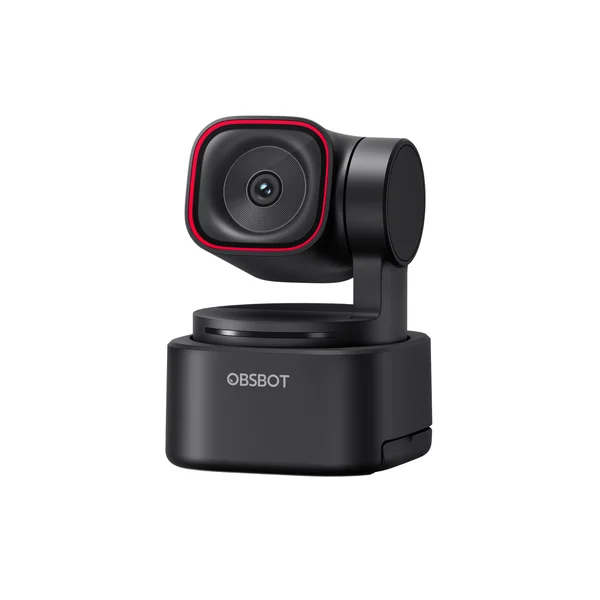
Key specs: 1/2-inch 48 MP stacked sensor, 4K at 30 fps and 1080p at 120 fps, ISO 100 to 6400, PDAF autofocus, HDR, three mics with the same five audio modes, AI Tracking 2.0 and Voice Tracking, 73 g, 41 x 41 x 58 mm with an integrated stand. Launched January 28, 2026, at $199.
For streamers on a budget, the 120 fps mode is the surprise. Smooth slow motion from a $199 webcam is unusual, and it suits gaming reaction cams and quick product clips.
You give up two things against the full Tiny 3. Low-light quality drops with the smaller sensor, and Desk Mode and Whiteboard Mode are missing. Hand Tracking, gesture control and voice commands such as “Hi, Tiny” all remain.
Buy it if you want a camera that turns to follow you and you work in a reasonably bright room. If you present in the evening with one desk lamp, the extra money for the Tiny 3 buys real image quality.
Buy the Obsbot Tiny 3 Lite now on Amazon
Logitech Brio 500: the best 1080p webcam for a home office
The Logitech Brio 500 is the best 1080p webcam for a home office. It adds HDR light correction, a choice of three fields of view, auto-framing, a built-in shutter and Show Mode for desk demos. Logitech lists it at $129.99, often discounted.
Key specs: 1080p at 30 fps or 720p at 60 fps, 4 MP sensor, autofocus with a glass lens, RightLight 4 with HDR, 90, 78 or 65-degree diagonal field of view, stereo mics with a 4 ft pickup range, integrated privacy shutter, USB-C with an attached 5 ft cable, certified for Microsoft Teams, Zoom and Google Meet. List price: $129.99.
Show Mode is the feature people end up using. Tilt the camera down and it flips the image to show what is on your desk, which is handy for sketches, a signed form or a gadget you are trying to explain.
RightSight auto-framing keeps you centered and needs the free Logi Tune app, which is not available on ChromeOS. The camera itself still works as a plain plug-in webcam on Chromebooks.
The catch is the spec sheet. At 1080p and 30 fps, the Brio 500 looks basic beside the 4K models above. For pure video calls on Zoom or Teams, which rarely send more than 1080p anyway, that matters less than you would think.
Buy the Logitech Brio 500 now on Amazon
Anker PowerConf C200: the best cheap webcam
The Anker PowerConf C200 is the best cheap webcam. For a $69.99 list price you get 2K video, two noise-canceling mics, a sliding privacy cover and three field-of-view settings. Nothing tracks or follows you, but the picture is a clear step up from most laptop cameras.
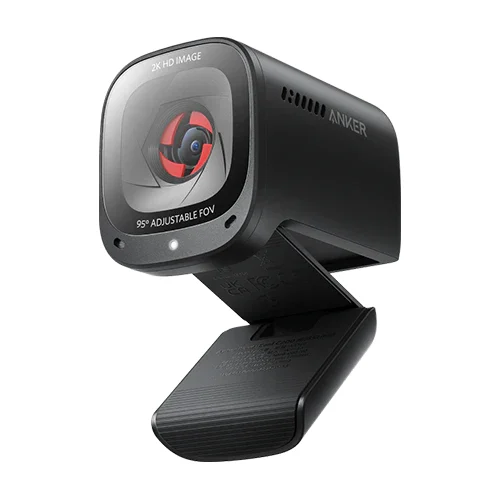
Key specs: 2K resolution, 65, 78 or 95-degree field of view set in software, dual stereo mics with AI noise cancellation, built-in sliding privacy cover, works with Windows 7 or later and macOS 10.11 or later. List price: $69.99.
The 95-degree wide setting is wider than any other pick here. Use it when two people share a desk for a call, then switch back to 65 degrees when you are alone and want the messy shelves out of the frame.
Keep your expectations sensible. No 4K, no HDR claims and no gimbal. For a student’s laptop, a second home office or a parent who just wants to see the grandchildren clearly, none of that matters.
Pair it with decent light and it punches above its price. A cheap monitor light bar or a desk lamp aimed at a wall behind the screen does more for image quality than an extra $100 of webcam.
Buy the Anker PowerConf C200 now on Amazon
Your iPhone is already a very good Mac webcam with Continuity Camera
Mac owners may not need a webcam at all. Continuity Camera turns an iPhone XR or later on iOS 16 or later into a wireless webcam and mic for any Mac on macOS Ventura or later, using the phone’s much better rear cameras.
Apple’s Continuity Camera support page lists the setup, and it takes about a minute:
- Sign in to the same Apple Account on the iPhone and the Mac, with two-factor authentication turned on.
- Turn on Bluetooth and Wi-Fi on both devices, and keep them close together.
- On the iPhone, check that Continuity Camera is on in Settings > General > AirPlay & Continuity (it is on by default).
- Mount the iPhone near the Mac, locked, stable and in landscape, with the rear cameras facing you. Plug it in to keep it charged.
- Open FaceTime or another video app and choose the iPhone from its camera or video menu.
A few rules trip people up. The iPhone cannot be sharing its cellular connection, the Mac cannot be sharing its internet connection, and a wireless link will not work while the Mac uses AirPlay or Sidecar.
Once connected, macOS adds video effects such as Center Stage, Portrait mode, Studio Light and Desk View, which shows the top of your desk from the same phone. You do need a mount that clips the phone to the top of the screen, and the phone is tied up for the whole call.
The limit is obvious: Continuity Camera only works with a Mac. Windows PC owners, and anyone who needs their phone during meetings, should buy a USB webcam. If you are about to upgrade your laptop anyway, the built-in camera is one more thing to weigh when deciding which MacBook to buy.
Pick a webcam by how you work, then by resolution
Choose a webcam by how you use it first. Sit-still callers need good light handling and decent mics, streamers need frame rate and manual control, and presenters need tracking. Resolution matters less than people expect, because most call apps cap video well below 4K.
- Decide if you move. If you stay in your chair, a fixed webcam like the MX Brio, Link 2C Pro or Brio 500 is simpler. If you walk to a whiteboard or demo products, get a gimbal model like the Tiny 3 or Link 2 Pro.
- Check the sensor size. Bigger sensors handle dim rooms better. Here, 1/1.28 inch (Tiny 3) and 1/1.3 inch (both Insta360 models) are the largest, and 1/2.8 inch (MX Brio) is typical for a premium fixed webcam.
- Match the frame rate to the job. 30 fps is fine for calls. Streamers and gamers notice 60 fps, and only the Facecam 4K does 60 fps at 4K.
- Decide on audio. If you already own a microphone or headset, the Facecam 4K’s missing mic is no loss. If you do not, pick a model with two or three mics.
- Check your computer. 4K models want a USB 3.0 port, Insta360 software skips ARM Windows, and AI effects on several models need an NVIDIA RTX card.
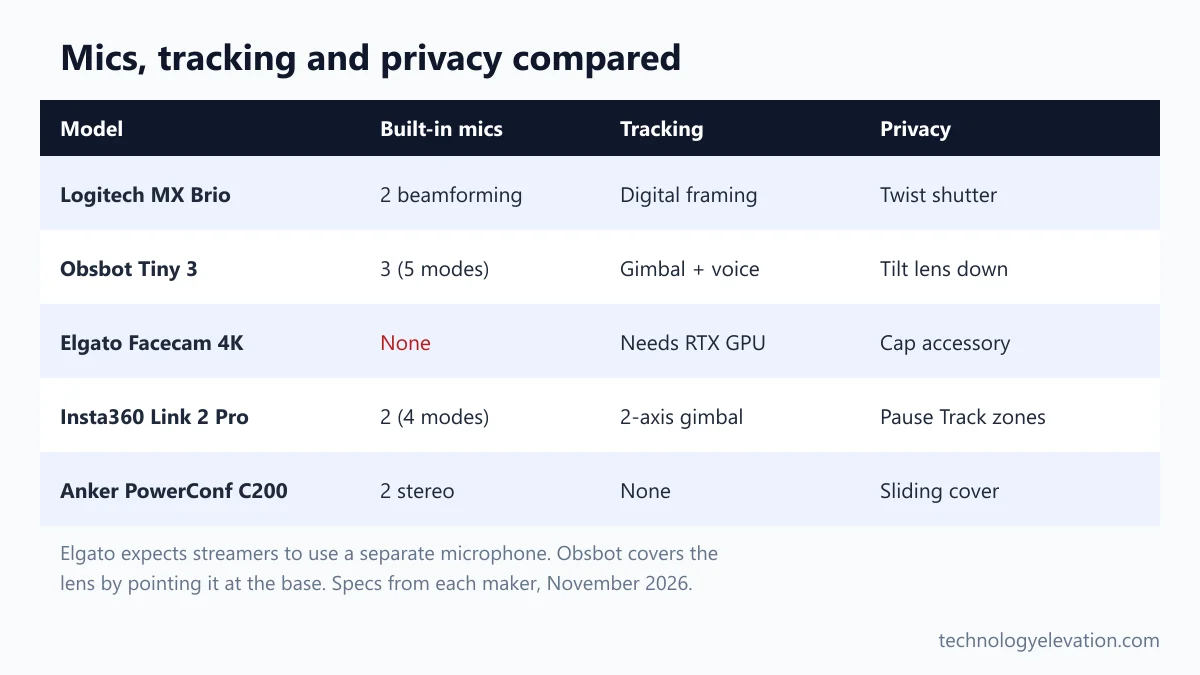
- Think about privacy. Logitech and Anker have built-in shutters, Obsbot tilts the lens down, and Elgato sells a cap.
A note on 4K. Zoom, Teams and Google Meet compress video heavily, so a 4K webcam mostly shows its value through a cleaner sensor and better light handling, not raw pixels. Recording YouTube videos or streaming through OBS is where 4K really pays off, and a dedicated YouTube camera is still worth a look if video is your job.
Light and sound matter more than the webcam you buy
Good light improves a webcam more than any upgrade. A soft lamp in front of you, and no bright window behind you, makes a $70 webcam look better than a $350 one in a dark room. For sound, a headset or USB mic still beats every built-in webcam mic.
Webcam mics have improved a lot this year. The Obsbot Tiny 3 Series uses a three-mic array with five modes, and Insta360 pairs one directional and one omnidirectional mic. Both are fine for meetings. But a webcam sits a couple of feet from your mouth, and distance is the enemy of clear audio.
Mac users who record podcasts or voiceovers should look at USB mics for Mac before paying extra for webcam audio. Everyone else can start with the earbuds they already own.
Mounting is the last detail. Every pick here clips onto a monitor, and the Elgato and Insta360 models add a 1/4-inch thread for a small tripod. Put the camera at eye level, slightly above the screen, and you will stop looking up everyone’s nose. If your laptop has run out of ports, a USB-C hub with a USB 3.0 or faster port keeps a 4K webcam running properly.
Frequently asked questions about webcams
What is the best webcam right now?
The Logitech MX Brio is the best webcam for most people. It records 4K at 30 fps or 1080p at 60 fps, has two beamforming mics and a built-in privacy shutter, and launched at $199.99.
Is a 4K webcam worth it for Zoom calls?
A 4K webcam is worth it mainly for its better sensor, not the extra pixels. Zoom and Teams compress video heavily, so the gain shows up as cleaner light handling. 4K really pays off for recording and streaming.
Can I use my iPhone as a webcam?
Yes, on a Mac. Continuity Camera works with an iPhone XR or later on iOS 16 or later and a Mac on macOS Ventura or later. Both must use the same Apple Account with two-factor authentication.
Which webcam follows you around the room?
The Obsbot Tiny 3, Obsbot Tiny 3 Lite and Insta360 Link 2 Pro follow you with a motorized gimbal. The Insta360 Link 2C Pro and Logitech MX Brio only reframe digitally, which works for small movements in your chair.
Does the Elgato Facecam 4K have a microphone?
No. The Elgato Facecam 4K has no built-in microphone, by design. Elgato expects streamers to use a separate mic, so plan to buy one if you do not already own a headset or USB microphone.
What is the best cheap webcam?
The Anker PowerConf C200 is the best cheap webcam. It records 2K video, has two noise-canceling mics, a sliding privacy cover and three field-of-view settings, at a list price of $69.99.
Do webcams work with Chromebooks?
Most do as plain plug-in cameras. The Logitech Brio 500 is certified Works With Chromebook, and the MX Brio offers basic webcam support on ChromeOS. Logitech’s extra software features are not available there.
Last checked and sources
Last checked on 19 November 2026 by Abdullah Kabeer. We compared every webcam in this guide using the manufacturers’ published specs, launch announcements and support pages, cross-checked launch prices against independent reviews, and searched recall databases for every pick. No recalls or safety notices were found.
- Logitech, MX Brio, MX Brio 705 for Business and Brio 500 product and specification pages (logitech.com, support.logi.com)
- Obsbot, Tiny 3 Series launch announcement, January 28, 2026, and Tiny 3 Series product page (obsbot.com)
- Insta360, Link 2 Pro and Link 2C Pro launch announcement and spec sheet, January 13, 2026 (insta360.com)
- Elgato, Facecam 4K and Facecam product pages and comparison tables (elgato.com)
- Anker, PowerConf C200 product page (soundcore.com)
- Apple, Use iPhone as a webcam for Mac support article (support.apple.com)
- Independent reviews by Engadget, Windows Central, Tom’s Guide, PC Gamer and TweakTown, for launch prices and reviewer notes
- US Consumer Product Safety Commission recall database (cpsc.gov)
We update this buying guide when Logitech, Obsbot, Insta360, Elgato or Anker launch, discontinue or significantly change a model.
Technology Elevation is reader-supported. As an Amazon Associate, we earn from qualifying purchases. When you buy through links on this page, we may earn a small commission at no extra cost to you.


GIPHY App Key not set. Please check settings