

 Abdullah Kabeer
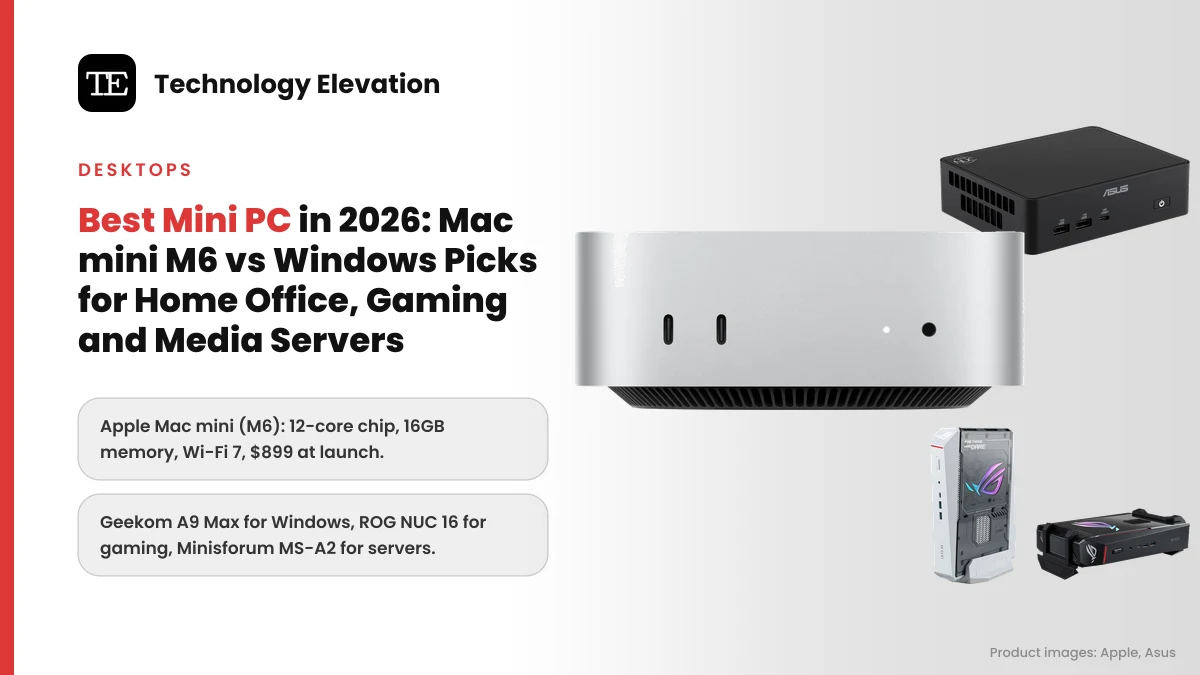
Pull a desk away from the wall in most home offices and you find the same thing: a tower PC the size of a carry-on bag, humming away to run email, spreadsheets and a browser. A box that fits in one hand now does that job, and plenty more. Picking the best mini PC in 2026 comes down to what you want it to do once the email is done: edit photos, play games or quietly serve movies to every TV in the house.
Apple set the tone this year. The new Mac mini still measures 5 inches square and 2 inches tall, and Apple says the M6 model has 40 percent faster CPU performance than the M4 version it replaced. It also costs more, starting at $899 instead of $599.
The Windows side moved just as fast. Asus now builds the NUC line it took over from Intel in 2023, and Geekom, Beelink and Minisforum ship AMD Ryzen chips with more ports than most laptops.
We compared the official specs of the mini PCs on sale in the US in November 2026 and sorted them by the job they do best.
The best mini PC for most people is the Apple Mac mini (M6)
The Apple Mac mini (M6) is the best mini PC for most people. Its 12-core M6 chip, 16GB of memory, three Thunderbolt 4 ports, Wi-Fi 7 and quiet everyday running make it the easiest small desktop to live with. It launched at $899.
Every pick, by the job it does best:
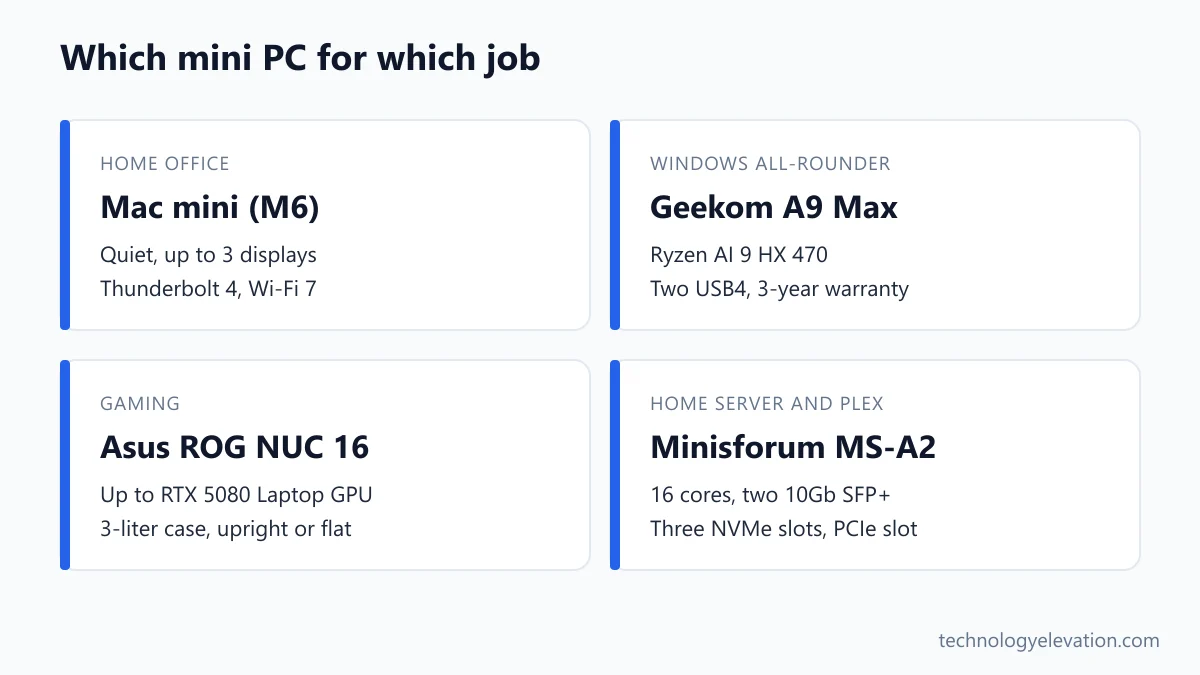
- Best overall and best for a home office: Apple Mac mini (M6)
- Best Windows mini PC: Geekom A9 Max (2026 Edition)
- Best for business and multiple monitors: Asus NUC 16 Pro
- Best for gaming: Asus ROG NUC 16
- Best for fast home networks: Beelink SER10 Max
- Best for a home server: Minisforum MS-A2
- Best on a budget and for simple media streaming: Beelink EQ14
| Model | Chip | Graphics | Fastest Ethernet | Best for |
|---|---|---|---|---|
| Apple Mac mini (M6) | Apple M6, 12-core CPU | 12-core Apple GPU | 2.5Gb (10Gb option) | Home office, Mac users |
| Geekom A9 Max (2026 Edition) | AMD Ryzen AI 9 HX 470 | Radeon 890M | 2 x 2.5Gb | Windows all-rounder |
| Asus NUC 16 Pro | Intel Core Ultra Series 3 | Intel Arc (integrated) | 2 x 2.5Gb | Business, four displays |
| Asus ROG NUC 16 | Up to Intel Core Ultra 9 290HX Plus | Up to RTX 5080 Laptop GPU | 2.5Gb | Gaming |
| Beelink SER10 Max | AMD Ryzen AI 9 HX 470 | Radeon 890M | 10Gb | Fast networks, NAS editing |
| Minisforum MS-A2 | AMD Ryzen 9 9955HX, 16 cores | Radeon 610M | 2 x 10Gb SFP+ | Home server, home lab |
| Beelink EQ14 | Intel N150, 4 cores | Intel UHD | 2 x 1Gb (2.5Gb version sold) | Budget, media streaming |
Mini PC prices from the smaller brands swing by hundreds of dollars from week to week, and memory costs pushed many of them up during 2026. We give launch prices only where the maker or two reviews agree on them.
Apple Mac mini (M6): the best mini PC overall
The Mac mini (M6) is the best mini PC overall because it pairs desktop-class speed with a tiny, quiet body and a full set of ports. Front USB-C ports and a headphone jack save reaching round the back. The 256GB base SSD is its weak spot.
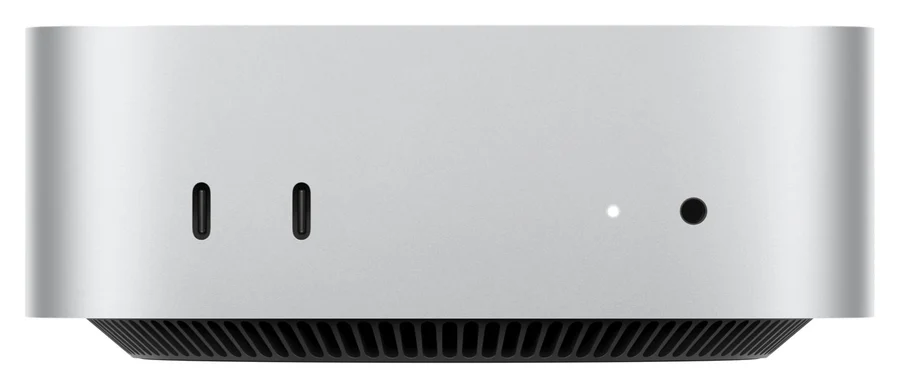
Key specs: Apple M6 with a 12-core CPU and 12-core GPU, 16GB unified memory (up to 32GB), 256GB SSD (up to 2TB), three Thunderbolt 4 ports, HDMI, 2.5Gb Ethernet (10Gb option), two front USB-C ports and a headphone jack, Wi-Fi 7 and Bluetooth 6, support for up to three external displays. 5.0 x 5.0 x 2.0 inches, 1.5 lb. Launched September 22, 2026, at $899.
For a home office, nothing here is simpler. Plug in a monitor, keyboard and mouse, and you have a desktop that reviewers describe as cool and quiet through spreadsheets and video calls.
Apple also claims up to 2x faster graphics than the M4 model, and up to 2x faster gaming with ray tracing in Cyberpunk 2077. The Mac still has fewer games than Windows, though, so treat that as a bonus rather than a reason to buy.
The catch is storage. Reviewers flagged that the 256GB base drive fills quickly and, in at least one review, runs slower than the larger options. Paying for 512GB at checkout is the smart move, because Apple offers no storage upgrade after purchase. A fast portable SSD is the cheaper fix for photo and video libraries.
Creators who outgrow the M6 have a step up. The Mac mini with M5 Pro starts at $1,699 with a 15-core CPU, 16-core GPU, 24GB of memory, 512GB of storage and faster Thunderbolt 5 ports. If you are torn between this and a laptop, the trade-offs are laid out in which MacBook to buy in 2026.
Buy the Apple Mac mini (M6) now on Amazon
Geekom A9 Max (2026 Edition): the best Windows mini PC
The Geekom A9 Max (2026 Edition) is the best Windows mini PC for most homes. Its Ryzen AI 9 HX 470 chip is fast, its Radeon 890M graphics handle light gaming, and you get two USB4 ports, Wi-Fi 7, upgradeable memory and a 3-year warranty.
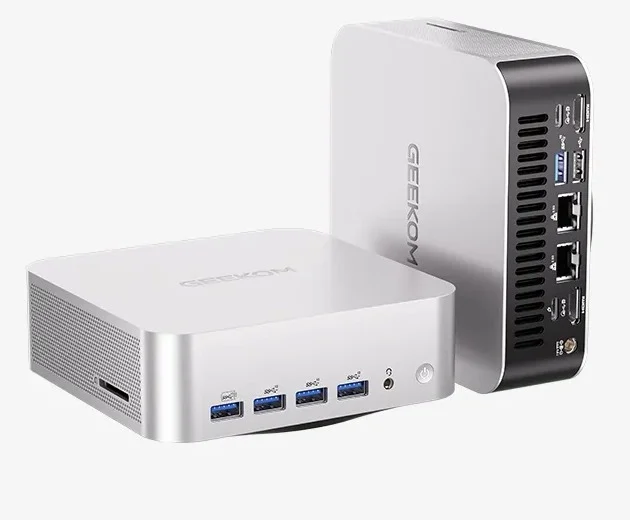
Key specs: AMD Ryzen AI 9 HX 470 (12 cores, 24 threads, up to 5.2 GHz), Radeon 890M graphics, NPU rated at 55 TOPS, 32GB DDR5 in two SO-DIMM slots (up to 128GB), two M.2 PCIe 4.0 slots, two USB4 ports, two HDMI 2.1 ports, two 2.5Gb Ethernet ports, SD card reader, Wi-Fi 7 and Bluetooth 5.4. 135 x 132 x 46.9 mm.
Think of it as the Windows answer to the Mac mini. The aluminium box is only a touch larger, and the front panel has USB-A ports and a headphone jack, so a webcam or headset plugs straight in.
The 55 TOPS NPU (the chip’s dedicated AI engine) clears the 40 TOPS bar Microsoft sets for Copilot+ PC features, such as live captions that translate speech into English.
Upgrades are the quiet win. Unlike the Mac mini, you can add memory and a second SSD yourself years from now. Reviewers did note that the fans get loud under heavy loads, and that the 2026 model is a modest step up from the 2025 version with the HX 370 chip. A discounted 2025 unit is a sensible buy.
Buy the Geekom A9 Max (2026 Edition) now on Amazon
Asus NUC 16 Pro: the best mini PC for business and multiple monitors
The Asus NUC 16 Pro is the best mini PC for business desks and multi-monitor setups. It drives up to four displays, has two Thunderbolt 4 ports and dual 2.5Gb Ethernet, and opens without tools. Intel’s Core Ultra Series 3 chips give it strong AI performance.
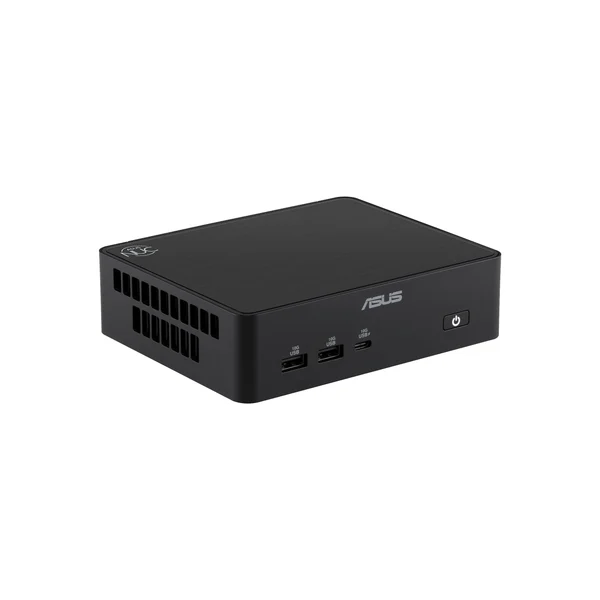
Key specs: Intel Core Ultra Series 3 (Panther Lake) processors, including the 16-core Core Ultra 7 356H and Core Ultra X7 358H, up to 180 platform TOPS of AI performance, two Thunderbolt 4 ports, two HDMI 2.1 or two DisplayPort 2.1 outputs depending on version, two 2.5Gb Ethernet ports, Wi-Fi 7 and Bluetooth 6.0, two M.2 slots (one PCIe 5.0). 144 x 117 x 42 mm.
The NUC name has history. Intel made these boxes for about a decade before Asus took over the line in 2023, and the NUC 16 Pro debuted at CES 2026 as its flagship business model. Asus says it was tested against heat, cold, humidity, drops and vibration.
Four screens is the headline for anyone who trades, codes or runs a front desk. Pair it with a USB-C hub or docking station and one Thunderbolt cable can feed a whole desk.
Buy carefully, though. Asus sells it as a barebone kit with no memory, storage or Windows, and as a ready-to-use system. Memory varies too: some versions take standard SO-DIMM sticks, while others have faster LPDDR5X soldered to the board. Check the exact model number before you order.
Buy the Asus NUC 16 Pro now on Amazon
Asus ROG NUC 16: the best mini PC for gaming
The Asus ROG NUC 16 is the best mini PC for gaming because it fits a real Nvidia GeForce graphics chip, up to an RTX 5080 Laptop GPU, into a 3-liter case. It runs current games at high settings and stands upright or flat. You pay heavily for that size.
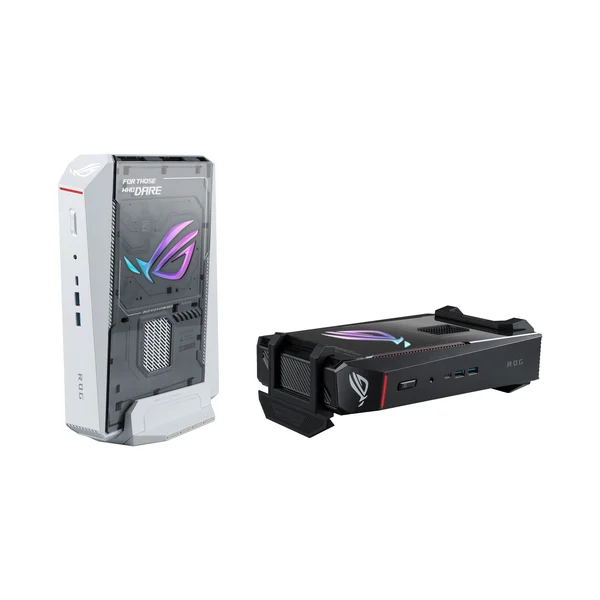
Key specs: Up to an Intel Core Ultra 9 290HX Plus, up to an Nvidia GeForce RTX 5080 Laptop GPU with 16GB GDDR7, up to 128GB DDR5-6400, one Thunderbolt 4 port, two HDMI 2.1 and two DisplayPort 2.1 outputs, 2.5Gb Ethernet, Wi-Fi 7, support for up to five 4K displays, three-fan QuietFlow cooling, removable stand. Announced May 15, 2026, in black and a Moonlight White Edition.
Asus says the cooling keeps noise below 38 dBA under full load, which is quieter than most gaming laptops. The removable stand lets it sit upright beside a TV or flat under a monitor.
Cheaper versions arrived over the summer, starting with a Core Ultra 7 and an RTX 5060 Laptop GPU. Reviewers point out that a full-size tower with similar parts still costs less and upgrades further, and Asus’s own benchmarks showed only small gains over the 2025 ROG NUC.
So size is what you are buying. If the PC can live under a desk, a gaming PC under $1,500 gives you more frames per dollar and room to upgrade. If you want to play away from the desk, a handheld gaming PC is the other option.
Buy the Asus ROG NUC 16 now on Amazon
Beelink SER10 Max: the best mini PC for fast home networks
The Beelink SER10 Max is the best mini PC for fast home networks. It has the same Ryzen AI 9 HX 470 chip as the Geekom, plus a 10Gb Ethernet port and USB4, so editing files straight off a network drive feels local. It launched from $1,259.
Key specs: AMD Ryzen AI 9 HX 470 (12 cores, 24 threads), Radeon 890M graphics, DDR5-5600 in two SO-DIMM slots (32GB or 64GB configurations), two M.2 PCIe 4.0 slots, one 10Gb Ethernet port, one USB4 port, HDMI and DisplayPort, Wi-Fi 6 and Bluetooth 5.2, 3-year warranty. Launched in February 2026 from $1,259 with 32GB and 1TB.
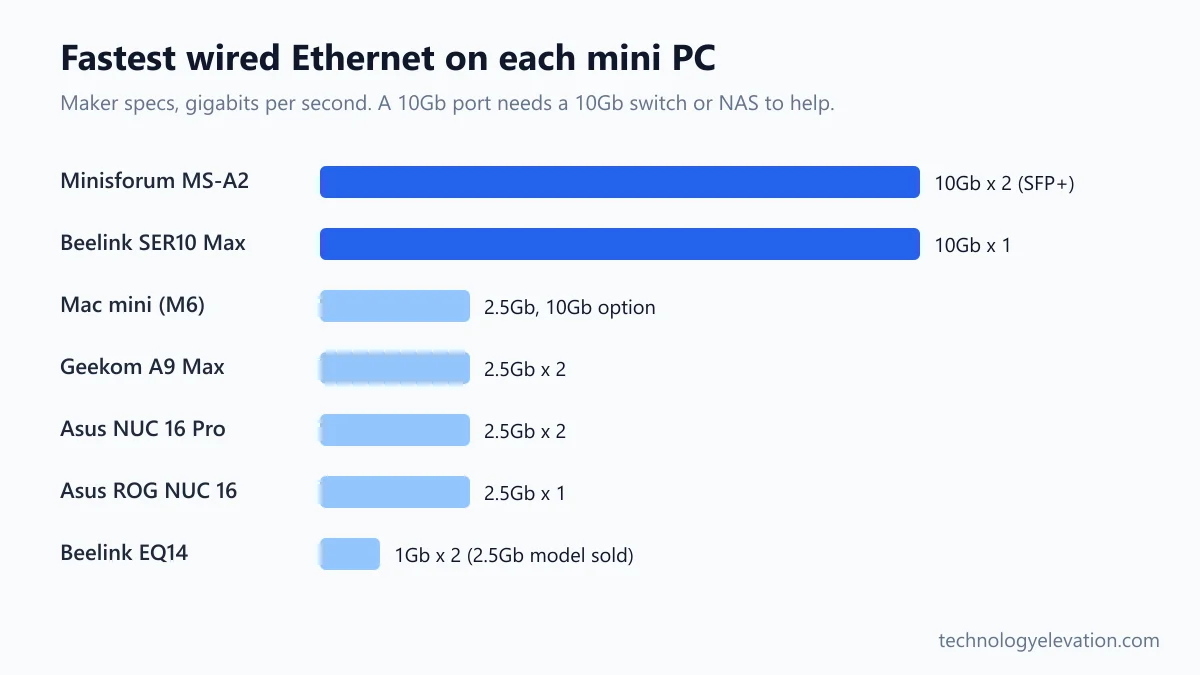
A 10Gb port matters if you keep photos or video on a NAS (a network storage box) with its own 10Gb connection. A normal 1Gb link tops out around 110 MB per second, which feels slow when you scrub through 4K footage.
Reviewers found its vapor chamber cooler stays fairly quiet under load. Beelink also sells Ubuntu versions for a little less than the Windows ones.
The trade-offs are small but real. Wi-Fi is the older Wi-Fi 6 standard, there is only one USB4 port, and the power brick is external. If you live on Wi-Fi rather than cables, the Geekom is the better buy.
Buy the Beelink SER10 Max now on Amazon
Minisforum MS-A2: the best mini PC for a home server
The Minisforum MS-A2 is the best mini PC for a home server or home lab. A 16-core Ryzen 9 9955HX, two 10Gb SFP+ ports, two 2.5Gb ports, three NVMe slots and a PCIe slot give it workstation muscle in a box smaller than a hardback book.
Key specs: AMD Ryzen 9 9955HX (16 cores, 32 threads, up to 5.4 GHz), Radeon 610M graphics, two DDR5 SO-DIMM slots (up to 96GB), three M.2 PCIe 4.0 slots (one accepts U.2 enterprise drives), two 10Gb SFP+ ports, two 2.5Gb Ethernet ports, one PCIe 4.0 x8 slot for half-height cards up to 75W, HDMI, Wi-Fi 6E. Sold as a barebone kit or with memory and storage.
The MS-A2 is built for people who run Proxmox, Unraid or TrueNAS and want several virtual machines, a Plex or Jellyfin server and a backup target on one box. Sixteen cores and 96GB of memory leave plenty of headroom.
The PCIe slot is the clever part. Drop in a low-profile graphics card for video transcoding, or a network card for more ports, and the box grows with you.
Watch the trade-offs. Reviewers measured idle power of 25 to 30 watts, noticeable fan noise under load and a large 240W power brick. The integrated graphics are weak, and there is no USB4 or Thunderbolt, so it is a poor everyday desktop.
Buy the Minisforum MS-A2 now on Amazon
Beelink EQ14: the best cheap mini PC and media box
The Beelink EQ14 is the best cheap mini PC for basic office work and a simple media server. Its 4-core Intel N150 sips power, its power supply is built in, and it has two Ethernet ports and two M.2 slots. Heavy 4K transcoding is beyond it.
Key specs: Intel N150 (4 cores, up to 3.6 GHz), Intel UHD graphics, 16GB DDR4-3200 in one slot, two M.2 PCIe 3.0 slots, two HDMI ports, one 10Gbps USB-C port, three USB 3 ports, two Ethernet ports (1Gb, or 2.5Gb on the dual 2.5G version), Wi-Fi 6 and Bluetooth 5.2, internal power supply.
For a kitchen computer, a kid’s homework PC or a parent who only needs email and video calls, the EQ14 does the job. The built-in power supply means no brick on the floor, which matters behind a TV.
As a media server, it suits Plex or Jellyfin when your TVs play files directly. Reviewers rate it fine for direct play and light transcoding, but HDR tone mapping and more than two or three 4K transcodes at once push it too hard.
Know its limits before you buy. Memory is single-channel DDR4, the bundled SSD is the slower SATA type and the second M.2 slot runs at reduced speed. Games are out of the question.
Buy the Beelink EQ14 now on Amazon
Use, ports and upgrades decide the right mini PC
Choose a mini PC by the job first, then the ports, then upgrades. Match the chip and graphics to your heaviest task, count the screens and drives you will plug in, and decide whether you want to add memory and storage later. Price comes last, because it moves weekly.
- Pick the operating system. If your phone and laptop are Apple, the Mac mini fits in with AirDrop, iMessage and Handoff. If you rely on Windows-only software or PC games, skip the Mac.
- Match the chip to the heaviest job. Office work runs fine on an Intel N150. Photo editing and light games want a Ryzen AI 9 or Apple M6. Modern games need a dedicated GPU like the one in the ROG NUC 16.
- Buy enough memory on day one. 16GB is the floor in 2026, and 32GB suits editing and local AI. The rules for how much RAM you need are the same for mini PCs as laptops.
- Count your screens. The Mac mini (M6) handles three external displays and the NUC 16 Pro handles four. Check the port types match your monitors.
- Check the network ports. Most homes only need 2.5Gb Ethernet or Wi-Fi 7. A 10Gb port only pays off with a 10Gb NAS or switch.
- Decide on upgrades. Windows mini PCs usually take SO-DIMM memory and extra SSDs. The Mac mini and some soldered-memory models cannot be upgraded, so buy the size you need.
- Look at the power brick. The Mac mini and Beelink EQ14 have internal power supplies. Most fast Windows boxes ship with a laptop-style brick that needs space under the desk.
Wireless matters more than it used to. Wi-Fi 7 on the Mac mini, Geekom and NUC 16 Pro gives faster, steadier links to a new router, and Wi-Fi 7 only helps if your router supports it too. A wired connection still beats any wireless standard for a home server.
Mini PCs make good media servers if you plan for transcoding
A mini PC makes a good Plex or Jellyfin media server if you match it to how your TVs play files. Direct play, where the TV handles the file itself, needs very little power. Transcoding, where the server converts video on the fly, needs a strong media engine.
Most modern TVs and streaming sticks can direct play common formats. In that case even the Beelink EQ14 is plenty, and its low idle power keeps the electricity bill small for a box that runs all day.
Transcoding kicks in when a phone on mobile data, an old TV or a remote family member needs a smaller or different file. Intel chips use Quick Sync, a built-in video engine that Plex and Jellyfin support well. For several 4K HDR streams at once, step up to a stronger box like the Minisforum MS-A2 with a graphics card in its PCIe slot.
Storage is the other half. Mini PCs hold two or three M.2 drives at most, so many people pair one with a NAS or an external drive enclosure for the movie library and keep the operating system on the internal SSD.
Ports matter more than benchmark scores on a mini PC
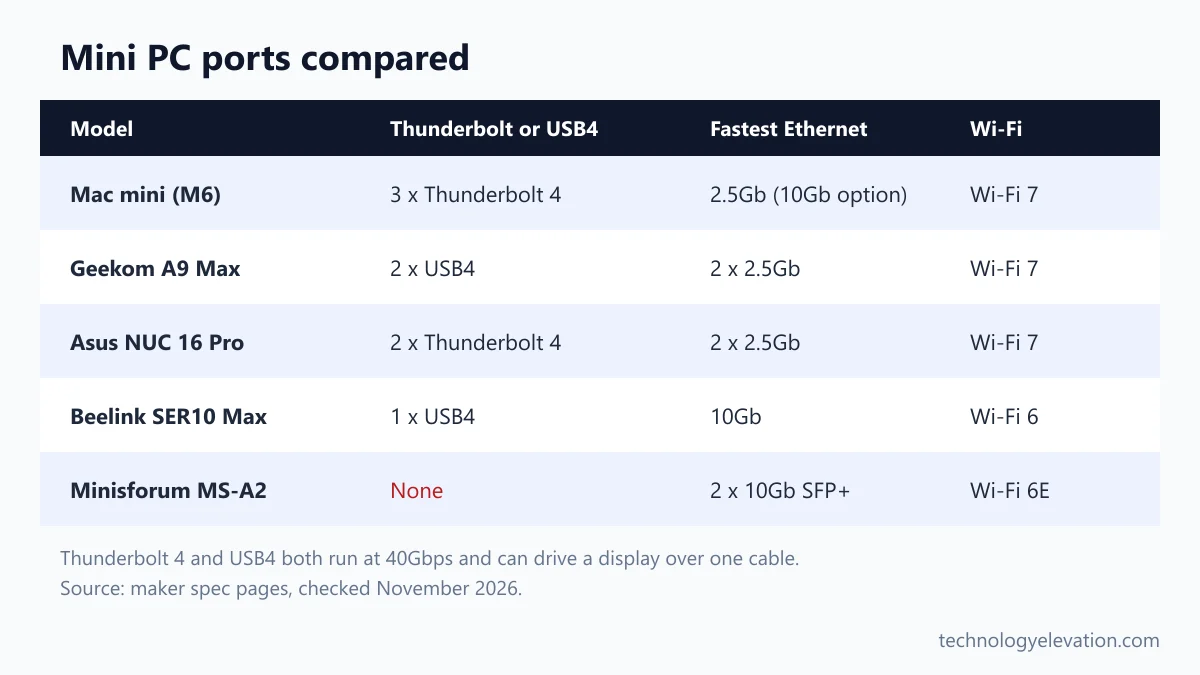
On a mini PC, ports decide how useful the box is far more than benchmark scores. Fast USB-C ports run displays, docks and drives, Ethernet speed matters for servers, and Wi-Fi 7 helps without cables. Thunderbolt and USB4 are the two ports worth checking first.
Thunderbolt 4 and USB4 both run at 40Gbps and can carry a display signal, data and power over one cable. The Mac mini (M6) has three Thunderbolt 4 ports, the NUC 16 Pro has two, the Geekom A9 Max has two USB4 ports, and the SER10 Max has one. The MS-A2 and EQ14 have none.
Front ports sound minor until you plug in a USB stick every day. The Mac mini, Geekom A9 Max and Beelink EQ14 all put USB ports and a headphone jack on the front.
A mini PC with fewer ports is not a dead end. One good dock adds card readers, Ethernet and extra USB-A ports, and a monitor stand with a shelf can hide the whole setup under the screen.
Frequently asked questions about mini PCs
What is the best mini PC right now?
The Apple Mac mini (M6) is the best mini PC for most people. It has a 12-core M6 chip, 16GB of memory, three Thunderbolt 4 ports and Wi-Fi 7, launched at $899. Windows users should pick the Geekom A9 Max (2026 Edition).
Is a mini PC as good as a desktop?
For office work, browsing, photo editing and streaming, yes. A mini PC with a Ryzen AI 9 or Apple M6 chip matches many full-size desktops. Towers still win for high-end gaming and upgrades, because they fit full-size graphics cards.
Can a mini PC play games?
Yes, within limits. Chips with Radeon 890M graphics, like the Geekom A9 Max, run lighter and older games at modest settings. For new AAA games at high settings, you need a mini PC with a dedicated GPU such as the Asus ROG NUC 16.
How much RAM does a mini PC need?
16GB is the minimum for a mini PC in 2026, and 32GB is better for photo editing, video work and local AI tools. Windows mini PCs with SO-DIMM slots can be upgraded later, while the Mac mini cannot.
Is a mini PC good for Plex or Jellyfin?
Yes. A low-power mini PC like the Beelink EQ14 handles direct play and light transcoding while using little electricity. For several 4K HDR transcodes at once, choose a stronger machine like the Minisforum MS-A2 with a graphics card.
Do mini PCs come with Windows?
Most ready-to-use mini PCs ship with Windows 11 installed. Barebone kits, like some Asus NUC 16 Pro and Minisforum MS-A2 versions, come without memory, storage or an operating system, so you add your own.
Can you upgrade a Mac mini later?
No. Apple does not offer memory or storage upgrades for the Mac mini after purchase, so you choose both when you buy. Pick at least 512GB of storage if you keep photos or video on the computer.
Last checked and sources
Last checked on 19 November 2026 by Abdullah Kabeer. We compared every mini PC here using the makers’ own spec pages and announcements, then checked prices, noise and real-world limits against independent reviews. Facts that sources disagreed on were left out.
- Apple Newsroom, Mac mini with M6 and M5 Pro announcement (August 25, 2026) and availability (September 22, 2026), plus the Mac mini technical specifications page
- Asus press releases for the NUC 16 Pro (CES 2026) and ROG NUC 16 (May 15, 2026), and the NUC 16 Pro datasheet
- Geekom A9 Max product page
- Independent reviews and launch coverage from TechRadar, Tom’s Hardware, Notebookcheck, Liliputing, StorageReview, NAS Compares, 9to5Mac and BGR
- CPSC recall database, checked for every pick (no recalls or safety notices)
We update this buying guide when makers launch, discontinue or significantly change a model.
Technology Elevation is reader-supported. As an Amazon Associate, we earn from qualifying purchases. When you buy through links on this page, we may earn a small commission at no extra cost to you.

GIPHY App Key not set. Please check settings