

 Haris Khan
Turn on a new TV that supports both big formats, open Netflix, and a small badge in the corner says Dolby Vision. Switch to Prime Video on the same screen and it says HDR10+, or nothing at all. Same TV, same evening, two different HDR formats, and most people have no idea which one they are watching or whether it matters.
The Dolby Vision vs HDR10 question is really about one thing: whether the TV gets instructions for each scene or one set of instructions for the whole film. HDR10 is the free base format every HDR TV reads. Dolby Vision and HDR10+ add scene-by-scene data on top, and HLG is the broadcast format that skips the data altogether.
The format your TV supports is a brand decision, not a quality tier. Samsung still skips Dolby Vision, LG skips HDR10+, and the HDR10+ group itself says HDR10 applies a single tone mapping curve to the entire video program. Below are the four formats in plain words, plus which TVs, streaming devices, consoles and services support each one, checked against the makers’ own pages.
Dolby Vision vs HDR10: Dolby Vision adapts scene by scene, HDR10 does not
Dolby Vision beats HDR10 on a TV that supports it. It sends brightness and color data for every scene, so the TV adjusts as a film moves from a dark cave to a bright beach. HDR10 sends one fixed set for the whole film.
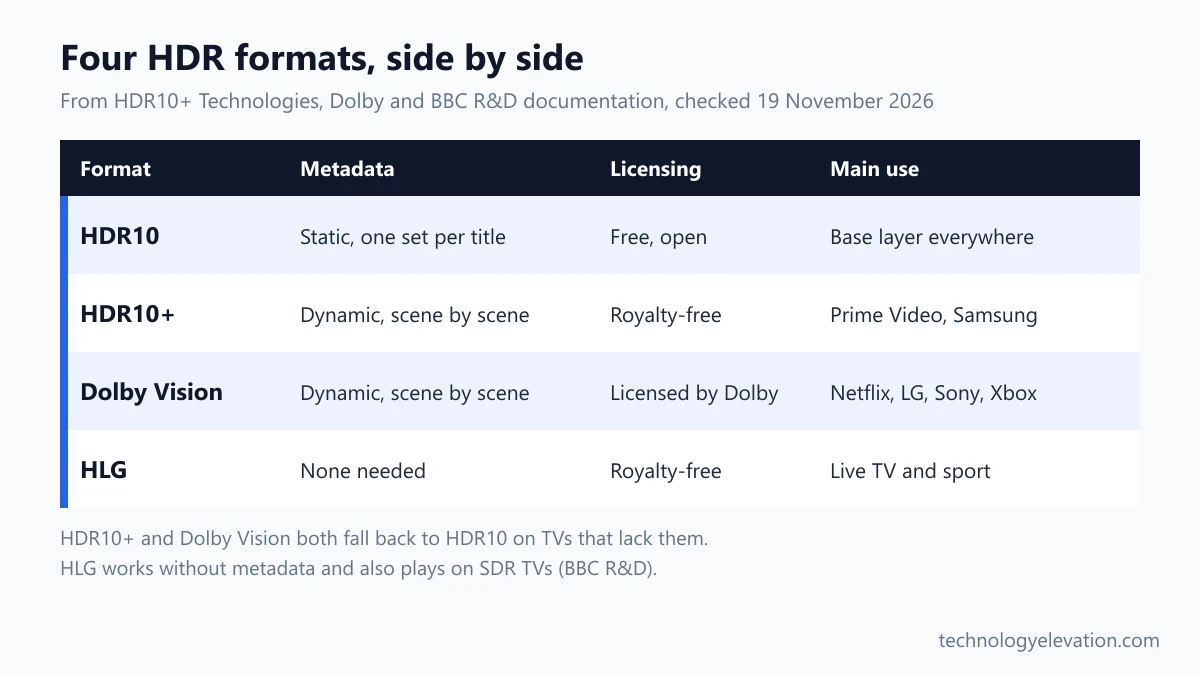
Every HDR format on sale today falls into one of these four:
- HDR10: the free base format, with static metadata. Every HDR TV supports it.
- HDR10+: a royalty-free format with dynamic metadata, backed by Samsung and used by Prime Video.
- Dolby Vision: Dolby’s licensed format with dynamic metadata, used by Netflix, Disney+ and most Hollywood studios.
- HLG (Hybrid Log-Gamma): a broadcast format from the BBC and NHK that needs no metadata and also works on SDR TVs.
| Format | Metadata | Licensing | Where you meet it |
|---|---|---|---|
| HDR10 | Static (one set per title) | Free | Everywhere: streaming, discs, consoles |
| HDR10+ | Dynamic (scene by scene) | Royalty-free | Prime Video, Samsung TVs, UHD Blu-ray |
| Dolby Vision | Dynamic (scene by scene) | Licensed from Dolby | Netflix, Apple TV 4K, LG and Sony TVs, Xbox |
| HLG | None | Royalty-free | Live TV and broadcast sports |
Metadata is the key word in that table. It is a small stream of instructions that tells the TV how bright the brightest parts of a scene are, so the TV can squeeze that picture into what its own panel can actually show.
HDR10 is the base layer every HDR TV understands
HDR10 is the open, free HDR format that every HDR TV, streaming device and console supports. It uses the PQ brightness curve (standardized as SMPTE ST 2084) with static metadata, so the TV gets a single set of brightness numbers for the whole movie or episode.
Static metadata is fine when the TV is bright enough to show the film as it was graded. Trouble starts on dimmer sets. A TV that cannot reach the film’s peak brightness has to compress the whole picture by the same amount, scene after scene.
HDR10+ Technologies, the group that runs the HDR10+ program, puts the weakness bluntly: one curve for the whole program cannot adapt to a dark night scene followed by a bright explosion, which leads to crushed shadows or blown-out highlights on many displays.
The good news is that HDR10 is the safety net. HDR10+ is built on top of it, and a TV without Dolby Vision plays Dolby Vision titles from the big services in HDR10, so you still get real HDR, just without the scene-by-scene tuning.
If you are shopping for a set, HDR10 is never the deciding format among the best 4K TVs, since every HDR set reads it.
HDR10+ is the royalty-free rival to Dolby Vision
HDR10+ adds dynamic metadata to HDR10, giving the TV scene-by-scene or frame-by-frame instructions for brightness, contrast and color. Unlike Dolby Vision, it is royalty-free: makers pay no per-device fee to HDR10+ Technologies, and every Samsung TV supports it.
Amazon Prime Video was the first streaming service to deliver HDR10+, in December 2017. Prime Video’s vice president of technology has said that all of its HDR content carries HDR10+ metadata, which makes it the biggest single library for the format.
Netflix also streams HDR10+, but only on AV1-encoded titles, according to HDR10+ Technologies. A TV or streamer without an AV1 decoder plays the same Netflix title in plain HDR10, which is one reason two TVs can show different badges for the same show.
HDR10+ is fully backward compatible. Play an HDR10+ film on a TV that only knows HDR10, and you simply get HDR10. Nothing breaks and nothing needs changing.
The format also reaches broadcast. HDR10+ is approved for ATSC 3.0, the NextGen TV standard in the US, and HDR10+ Technologies says active HDR10+ broadcasts already run in at least 40 US markets.
Dolby Vision is a licensed format with its own picture engine
Dolby Vision is Dolby’s own HDR system, introduced in January 2014. Like HDR10+, it sends dynamic metadata. The difference is that Dolby licenses it and supplies the display management software inside the TV, which maps each scene to that TV’s exact brightness and color limits.
Dolby’s own introduction to the format explains the idea. Every TV has a different peak brightness and color range, so Dolby Vision takes the full, uncompromised signal and maps it to each display through what Dolby calls display management. Colorists can also add manual “trims” during grading to fine-tune how that mapping looks.
Dolby Vision’s dynamic metadata is standardized as SMPTE ST 2094-10, while HDR10+ uses SMPTE ST 2094-40. In everyday terms, both do the same job with different rulebooks, and a TV needs to support the specific one a stream is using.
The Ultra HD Blu-ray standard includes Dolby Vision as an optional extra, so you will find it on many 4K discs as well as on streaming services.
On the streaming side, Apple’s support page lists Dolby Vision Profile 8.1 and Profile 5 on the new Apple TV 4K. You never need to know the profile number. The box picks it automatically when your TV reports Dolby Vision support.
HLG is the broadcast format that needs no metadata
HLG (Hybrid Log-Gamma) is the HDR format built for live TV. The BBC and Japan’s NHK developed it because metadata often gets lost or out of sync as a live signal passes through a broadcast chain, so HLG works without any metadata at all.
The clever part is compatibility. According to BBC Research and Development, HLG has native compatibility with SDR television, so one signal can feed both HDR and older SDR screens. Broadcasters can reuse much of their existing equipment instead of running two separate feeds.
HLG is part of ITU-R BT.2100, the international standard for HDR programme production and exchange, and the BBC says it is royalty-free.
You will rarely choose HLG on purpose. It shows up when you watch live sports or broadcast channels in HDR, and every streaming device in the table further down supports it quietly in the background.
Dolby Vision 2 and HDR10+ Advanced are the 2026 upgrades
Both camps now have a second-generation format. Dolby Vision 2 reached its first TVs, select 2026 Hisense models, on 6 August 2026. HDR10+ Advanced adds brightness and motion data, and Prime Video became the first service to stream it, on supported Samsung TVs.
Dolby says Dolby Vision 2 combines Content Intelligence, which recognizes the type of content and the room’s viewing conditions, with a new image engine. The standard tier adds an intensity slider. The premium tier, Dolby Vision 2 Max, adds Authentic Motion to reduce judder, Light Sense 2 for room lighting and Pro settings.
Dolby says the first TVs to get Dolby Vision 2 are the Hisense UX, UR9, UR8 and U7, with more models getting firmware updates. Existing Dolby Vision films benefit too, because the new image engine works on “both new and available Dolby Vision titles”. Authentic Motion only applies to newly authored titles.
HDR10+ Advanced is the HDR10+ answer. HDR10+ Technologies says it extends the metadata with scene-level motion and brightness signals, adding HDR10+ Bright for higher overall brightness and Intelligent Motion Smoothing.
Neither upgrade should drive a purchase yet. The content is thin, and the original Dolby Vision and HDR10+ formats will keep working on every TV that has them.
TV brands split on Dolby Vision and HDR10+
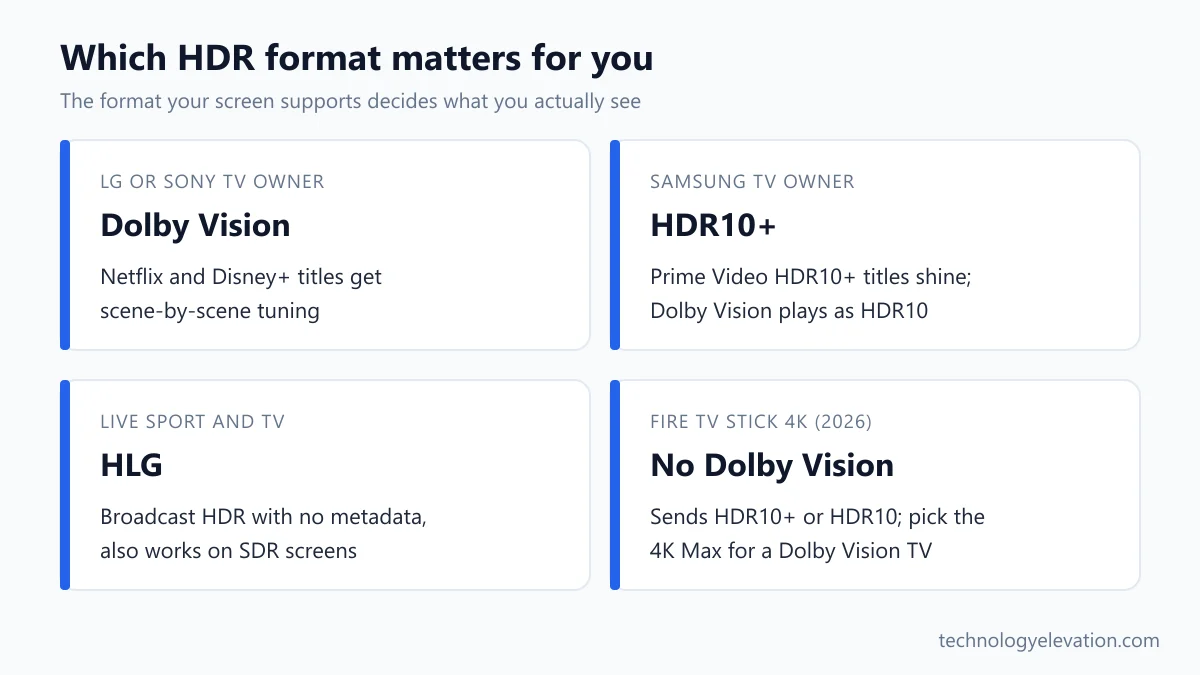
The format your TV supports depends mostly on its brand. LG’s C6 and B6 OLEDs support Dolby Vision, HDR10 and HLG but not HDR10+. Samsung TVs use HDR10+ and skip Dolby Vision entirely. Hisense now leads on Dolby Vision 2, and Sony and Panasonic both support Dolby Vision.
| TV brand (models checked) | Dynamic HDR | Missing |
|---|---|---|
| LG (C6 and B6 OLED) | Dolby Vision, plus HDR10 and HLG | HDR10+ |
| Samsung (S95H OLED) | HDR10+, plus HDR10 and HLG | Dolby Vision |
| Hisense (UX, UR9, UR8, U7) | Dolby Vision and Dolby Vision 2 Max | None listed by Dolby |
| Sony (Bravia 8 II OLED) | Dolby Vision | None listed |
| Panasonic (Z95B OLED) | Dolby Vision | None listed |
Samsung’s newest OLEDs also carry HDR10+ Gaming, the HDR10+ version for games. Samsung is the brand that catches people out most. Its TVs still play Dolby Vision titles from Netflix or Disney+, but the picture falls back to standard HDR10. On a bright, high-end Samsung panel that fallback is hard to spot. On a cheaper, dimmer set, the missing scene-by-scene tuning shows more.
LG has the mirror problem with Prime Video. A Prime Video HDR10+ title plays on an LG OLED in HDR10. Since OLED panels handle dark scenes so well, most viewers will not notice.
If you are choosing a new OLED right now, the best OLED TV picks for 2026 mark which models have Dolby Vision. Room light matters as much as format, which is why picks differ for dark rooms and bright rooms.
Most 4K streaming devices support all four formats
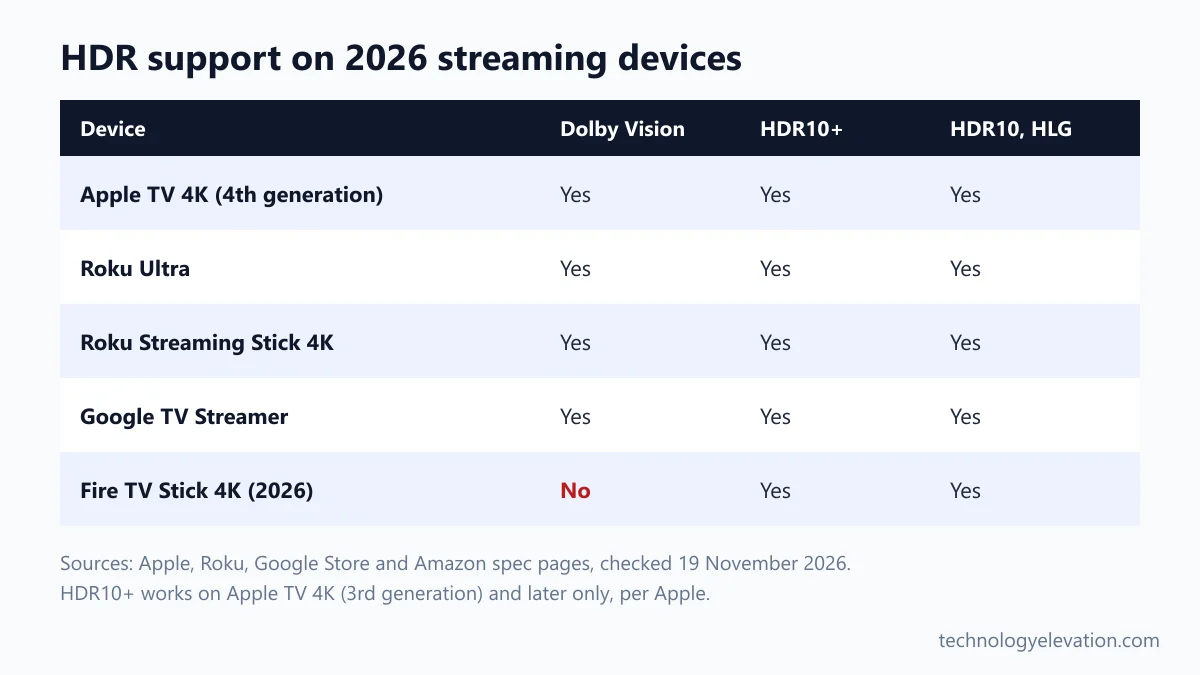
The Apple TV 4K, Roku Ultra, Roku Streaming Stick 4K and Google TV Streamer all support Dolby Vision, HDR10+, HDR10 and HLG. The 2026 Fire TV Stick 4K is the odd one out: Amazon lists HDR10, HDR10+ and HLG, but no Dolby Vision.
| Streaming device | Dolby Vision | HDR10+ | HDR10 and HLG |
|---|---|---|---|
| Apple TV 4K (4th generation) | Yes (Profile 8.1 and 5) | Yes | Yes |
| Roku Ultra | Yes, at 60fps | Yes | Yes |
| Roku Streaming Stick 4K | Yes, up to 60fps | Yes | Yes |
| Google TV Streamer | Yes | Yes | Yes |
| Fire TV Stick 4K (2026) | No | Yes | Yes |
The Fire TV Stick 4K Max keeps Dolby Vision, which Amazon lists as one of its premium features, along with HDR10+. So if you own a Dolby Vision TV and like Fire TV, the Max is the stick to get.
Older Apple boxes are worth a quick check. Apple says HDR10+ works only on the Apple TV 4K (3rd generation) and later, so the first and second generation models play HDR10+ titles in HDR10.
Picking a box for a particular TV comes down to ecosystem first and HDR second, and the best streaming device for 2026 comparison lays out the remotes, Wi-Fi and prices side by side. To mirror a phone instead, the steps differ again, as covered in how to connect your phone to a TV.
Streaming services and consoles pick their own formats
Netflix streams HDR only on its Premium plan. Prime Video carries HDR10+ on all its HDR titles. On consoles, Microsoft says the Xbox Series X|S are the first consoles to support gaming in Dolby Vision, while older Xbox One models stream Dolby Vision video.
Netflix’s plan page lists “Watch in 4K (Ultra HD) + HDR” only under Premium. On a Standard plan, a Dolby Vision TV shows Netflix in HD and SDR, which explains why some Dolby Vision TV owners never see the badge on Netflix.
Live sport is moving to dynamic HDR too. Dolby announced in June 2026 that Telemundo’s FIFA World Cup 2026 coverage on Peacock would stream in Dolby Vision and Dolby Atmos, which Dolby called a streaming first.
Gaming is where the formats split again. Xbox Series X|S consoles support Dolby Vision for games, and Samsung TVs certified for HDR10+ Gaming use the rival standard.
Xbox players who want Dolby Vision gaming need a TV or monitor that supports it, which narrows the field among monitors for Xbox Series X. Families still choosing a system can compare the best gaming console for casual gamers.
How to make sure you are actually getting HDR
To get HDR, line up four things: an HDR title, a plan that includes HDR, a source device set to the right format, and a TV input that accepts HDR. Apple’s Apple TV 4K support page walks through each check, and the logic applies to any box.
- Check the plan. On Netflix, HDR needs the Premium plan.
- Plug the streamer into an HDMI input that supports 4K HDR. Apple notes that some TVs only support HDR on HDMI input 2 or 3.
- Turn on the enhanced HDMI setting on the TV. Apple says it may be called Ultra, Deep or Enhanced video or color.
- On an Apple TV 4K, open Settings, select Video and Audio, then select Match Content, so the box switches to each title’s own format.
- Run Settings > Video and Audio > Check HDMI Connection, a 2 minute cable test on Apple TV 4K.
- Use an HDMI 2.1 cable. Apple recommends cables marked “Compatible Dolby Vision”.
- If a soundbar or receiver sits in the chain, connect the streamer straight to the TV to test, then update the receiver’s firmware.
Step 3 is the easy one to miss. Apple notes you may need to switch it on yourself, and when it is off the streamer can see no HDR support and quietly send SDR.
Apple’s full checklist is on its support page, About 4K, HDR, HDR10+, and Dolby Vision on your Apple TV 4K. A soundbar in the middle needs HDMI passthrough for HDR as well, so check that before you buy one of the best Dolby Atmos soundbars.
Which HDR format should decide what you buy
For most people, the TV’s brightness and contrast matter far more than its HDR badge. Choose the TV first, then make sure your streaming device supports every format that TV can show. Dolby Vision matters most if you watch a lot of Netflix or Disney+.
Prime Video fans get more from HDR10+, which points to Samsung, or to a brand that supports both formats. Live sport fans need HLG, which LG, Samsung and every streamer in the table above support.
The streaming device is the easy part. Pick one that covers both Dolby Vision and HDR10+, and you never have to think about it again. The best streaming devices of 2026 mostly do, at prices from a cheap stick to a premium box.
Buying the TV itself is the bigger call. A great OLED showing HDR10 usually beats a dim LCD showing Dolby Vision, and the best OLED TVs of 2026 are a good place to start comparing panels.
Frequently asked questions about HDR formats
Is Dolby Vision better than HDR10?
Yes, on a TV that supports both, because Dolby Vision sends scene-by-scene metadata while HDR10 sends one set for the whole title. The gap is biggest on dimmer TVs. On a very bright high-end TV, the difference is often small.
Is HDR10+ the same as Dolby Vision?
No, but they do the same job. Both add dynamic, scene-by-scene metadata on top of HDR10. Dolby Vision is licensed from Dolby, while HDR10+ is royalty-free and backed by Samsung, and a TV needs the specific format a stream uses.
Can a Samsung TV play Dolby Vision?
Samsung TVs do not support Dolby Vision. They still play Dolby Vision titles from Netflix or Disney+, but the picture falls back to standard HDR10. Samsung uses HDR10+ for dynamic HDR instead.
What is HLG used for?
HLG is used for live TV and broadcast sports. The BBC and NHK designed it to work without metadata, so it survives live broadcast chains, and the same signal also plays on SDR TVs.
Do I need the Netflix Premium plan for HDR?
Yes. Netflix lists 4K and HDR only on its Premium plan. On other plans, a Dolby Vision or HDR10 TV shows Netflix without HDR.
Does my streaming device need to support Dolby Vision?
Only if your TV supports Dolby Vision. A device without it, such as the 2026 Fire TV Stick 4K, sends HDR10 instead. If your TV has Dolby Vision, pick a device that supports it, such as an Apple TV 4K, Roku Streaming Stick 4K or Google TV Streamer.
What is Dolby Vision 2?
Dolby Vision 2 is Dolby’s 2026 upgrade, with a new image engine and Content Intelligence that adapts to the content and the room. The first TVs to get it were select 2026 Hisense models in August 2026, and older Dolby Vision titles also benefit.
Last checked and sources
Last checked on 19 November 2026 by Haris Khan. We checked each format against its owner’s or standards body’s documentation, and each device’s support list against the maker’s own spec or support page, keeping only what they state or two independent reviews agree on.
- HDR10+ Technologies: HDR10+ official site and FAQ (static vs dynamic metadata, royalty-free licensing, Prime Video, Netflix AV1, ATSC 3.0, HDR10+ Advanced, SMPTE ST 2094-40 and ST 2094-10)
- Dolby: An Introduction to Dolby Vision white paper, Dolby Vision 2 page, Dolby Vision 2 Hisense launch release (6 August 2026), Peacock FIFA World Cup release (5 June 2026)
- BBC Research and Development: High Dynamic Range and HLG project page
- ITU: Recommendation ITU-R BT.2100
- Apple: Apple TV 4K technical specifications and Apple TV 4K HDR support article
- Roku: Roku Ultra, Roku Streaming Stick 4K and player comparison pages
- Google Store: Google TV Streamer specifications; Amazon: Fire TV Stick 4K (2026) announcement
- Xbox: Xbox Series X and Series S product pages; Netflix Help Center plans page
- LG: OLED evo C6 product page; Panasonic: Z95B product page
- Independent reviews: Tom’s Guide (LG C6 vs Samsung S95H), TechRadar (LG B6 and Samsung S95H reviews), What Hi-Fi (Sony 2026 TV lineup)
We update this guide when TV makers, streaming services or Dolby and HDR10+ Technologies change which formats they support.


GIPHY App Key not set. Please check settings