

 Abdullah Kabeer
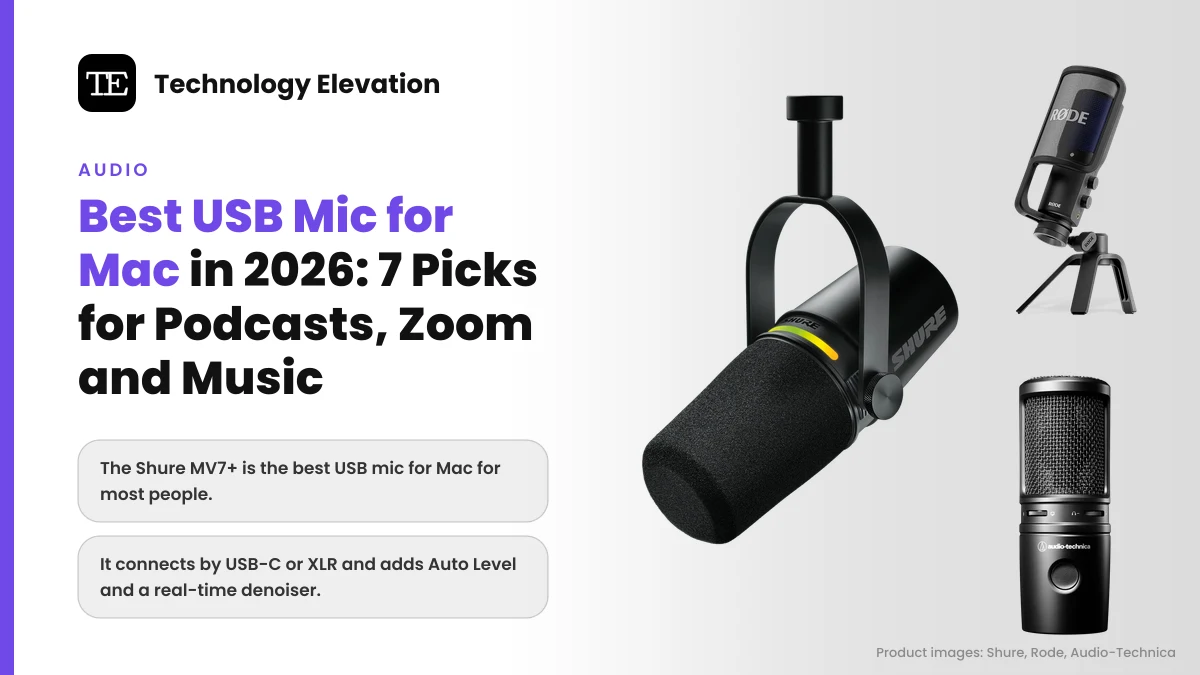
Join a Zoom call from a MacBook and the first thing people hear is your room: the echo off a bare wall, the fan in the corner, the keyboard you forgot you were typing on. The best USB mic for Mac fixes most of that with one cable, no audio interface and no driver to install.
Macs make the setup part easy. Apple’s guide to the sound input settings on Mac says every sound input device available to your Mac appears in one list under System Settings > Sound > Input. Plug in a USB-C microphone for MacBook use, pick it from that list, and you are recording.
We compared seven current models from Shure, Rode, Logitech, Audio-Technica and Elgato on the specs their makers publish, plus launch announcements and independent reviews. Every pick is on sale in the US in November 2026.
Two of them launched this fall. Shure’s MV6 Gen 2 and Logitech’s Yeti 2, the first real sequel to the Blue Yeti, both arrived in late September.
The best USB mic for Mac for most people is the Shure MV7+
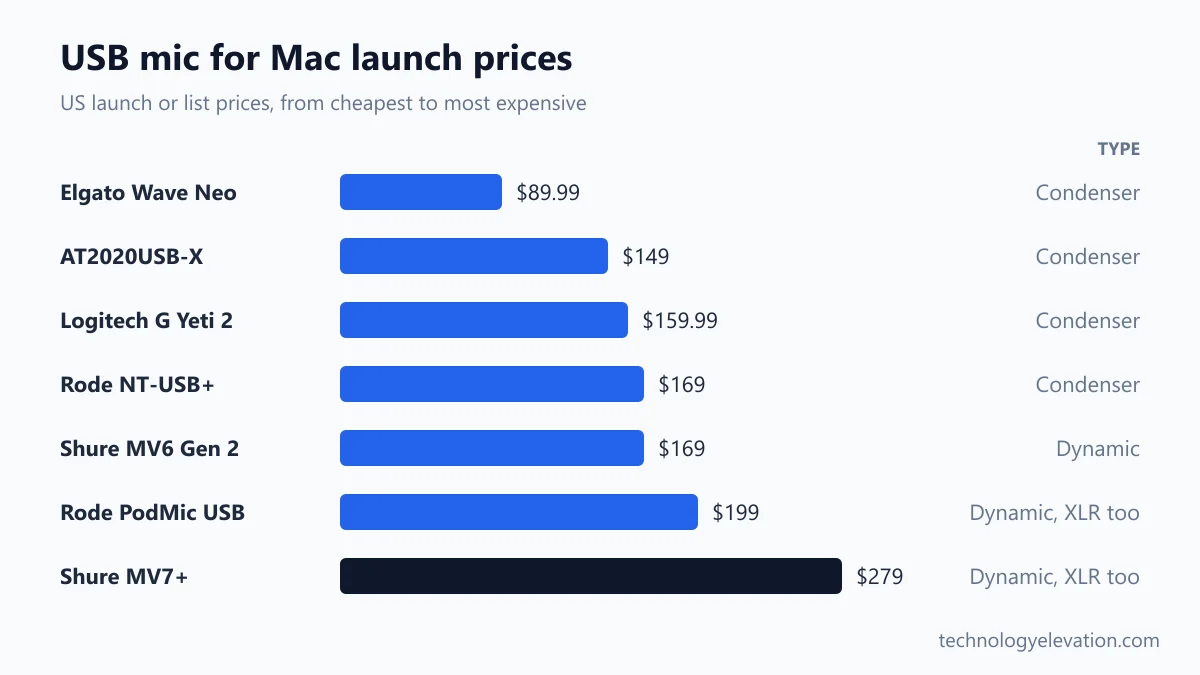
The Shure MV7+ is the best USB mic for Mac for most people. It is a dynamic mic that ignores much of your room, connects by USB-C or XLR, and adds Auto Level, a real-time denoiser and tap-to-mute, all for a $279 launch price.
Every pick, by the job it does best:
- Best overall: Shure MV7+
- Best condenser for voiceover: Rode NT-USB+
- Best multi-pattern mic: Logitech G Yeti 2
- Best for Zoom and calls: Shure MV6 Gen 2
- Best for podcasting with room to grow: Rode PodMic USB
- Best for music and instruments: Audio-Technica AT2020USB-X
- Best budget pick: Elgato Wave Neo
| Model | Type | Pickup pattern | Connections | Launch price |
|---|---|---|---|---|
| Shure MV7+ | Dynamic | Cardioid | USB-C, XLR | $279 |
| Rode NT-USB+ | Condenser | Cardioid | USB-C | $169 |
| Logitech G Yeti 2 | Condenser, 3 capsules | Cardioid, omni, figure-8, stereo | USB-C | $159.99 |
| Shure MV6 Gen 2 | Dynamic | Cardioid | USB-C | $169 |
| Rode PodMic USB | Dynamic | Cardioid | USB-C, XLR | $199 |
| Audio-Technica AT2020USB-X | Condenser | Cardioid | USB-C | $149 |
| Elgato Wave Neo | Condenser | Cardioid | USB-C | $89.99 |
Mics go on sale constantly, especially around Black Friday. Read the launch prices as a ceiling.
Shure MV7+: the best USB mic for Mac overall
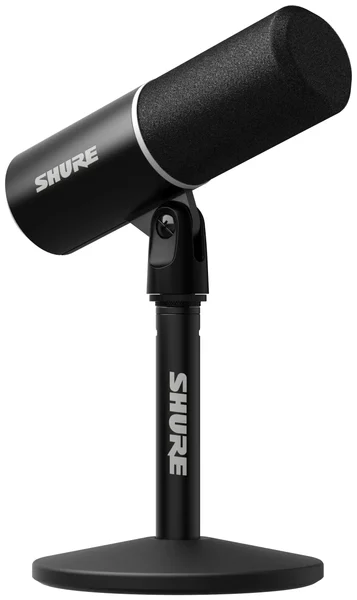
The Shure MV7+ wins because it sounds good in the rooms people actually record in. Its dynamic capsule hears your voice and little else, its software tidies up levels for you, and an XLR port means it can move to a pro setup later.
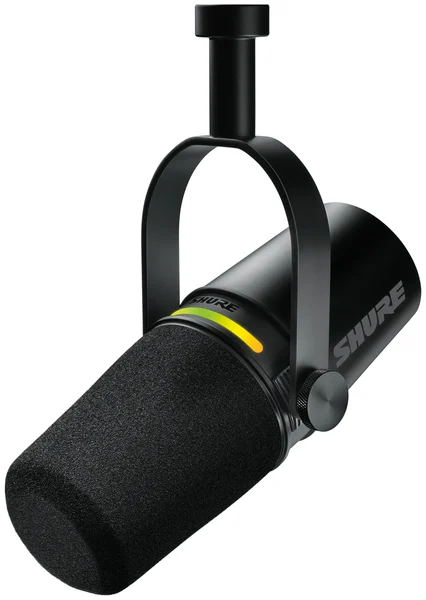
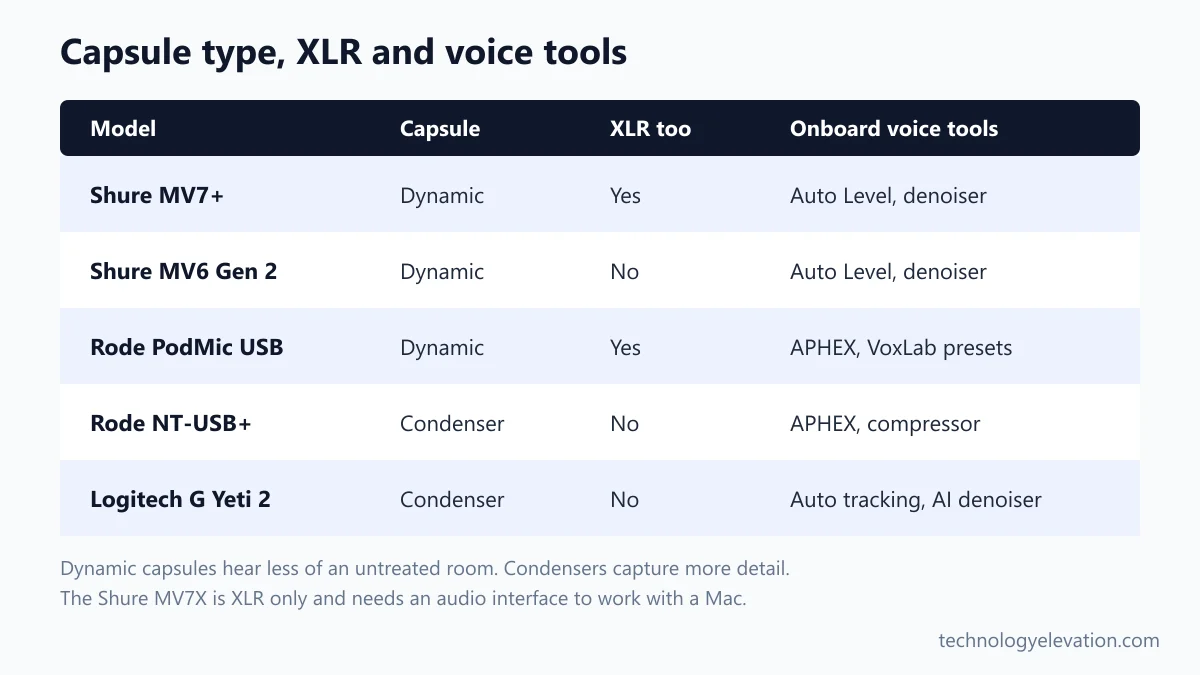
Key specs: dynamic cardioid capsule, USB-C and XLR outputs, 3.5 mm headphone jack, up to 24-bit/48 kHz over USB, 50 Hz to 16 kHz frequency response, Auto Level Mode, Real-time Denoiser, Digital Popper Stopper, LED touch panel with tap-to-mute. Launched April 9, 2024, at $279.
Most people buying a mic for podcasting on Mac record in a spare bedroom or a home office. Bare walls bounce sound around. A dynamic mic like the MV7+ picks up what is close to it, so the echo and the dishwasher two rooms away fade into the background.
Shure’s free MOTIV Mix app runs on macOS, and Auto Level Mode adjusts gain as you lean in or sit back.
The catch is placement and price. Dynamic mics want your mouth a few inches away, so plan on a boom arm. The base mic ships without a stand, and Shure’s Podcast Kit with a Gator stand launched at $299.
Shure also sells the MV7X for $179. It looks similar, but it is XLR only, with no USB port, so it needs an audio interface before a Mac can hear it.
Check the Shure MV7+ price on Amazon
Rode NT-USB+: the best condenser mic for voiceover
The Rode NT-USB+ is the best condenser USB mic for voiceover and narration. It captures more detail than a dynamic mic, records at 24-bit/48 kHz, and runs Rode’s APHEX processing right on the mic, for a $169 launch price.
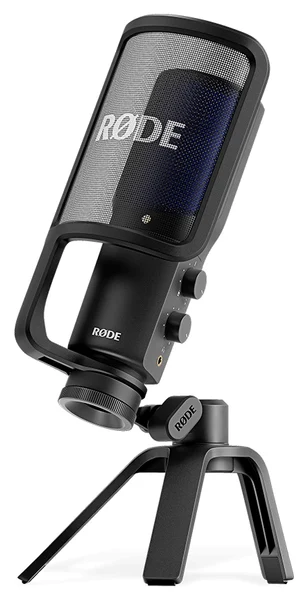
Key specs: studio condenser capsule, tight cardioid pattern, USB-C, 24-bit/48 kHz conversion, Revolution Preamp, onboard APHEX Aural Exciter and Big Bottom, compressor, noise gate and high-pass filter, headphone output with level and mix controls. Launched November 16, 2022, at $169.
Condenser mics hear the airy top end of a voice that dynamic mics soften. For audiobooks and explainer videos, that detail shows.
The processing runs inside the mic, so your Mac does no extra work. You switch it on through Rode Central or Rode Connect, then record in anything from GarageBand to a browser call.
The honest catch is the room. A condenser also hears the echo, the fridge and the neighbor’s leaf blower. Put it in a quiet room with a rug and some soft furniture, or pick a dynamic mic instead.
Check the Rode NT-USB+ price on Amazon
Logitech G Yeti 2: the best multi-pattern USB mic
The Logitech G Yeti 2 is the best multi-pattern USB mic. Its three capsules switch between cardioid, omni, figure-8 and stereo modes, and a proximity sensor adjusts gain, EQ and pattern as you move. Logitech’s own store lists it at $159.99.
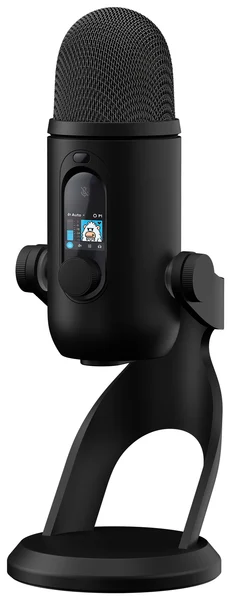
Key specs: three-capsule condenser array, cardioid, omnidirectional, figure-8 and stereo patterns, USB-C, 24-bit/48 kHz, 3D voice proximity sensor, AI denoiser, 1.3-inch front display, control dial, headphone output, Blue VO!CE processing. Announced September 23, 2026, at $159.99.
The Blue brand is gone. Logitech has sold Yeti mics under its Logitech G name since 2023, and the Yeti 2 succeeds the original 2009 Yeti.
Pattern switching is the reason to buy one. Omni mode picks up a whole table, so two people can share one mic for an interview. Figure-8 suits two people sitting face to face.
The catch is the same as every condenser: it hears your room. The AI denoiser helps with keyboard clicks and computer fans, but it cannot fix a hollow, echoing space. Shops still sell the original Yeti, which uses an old mini-USB port, so check the name on the box.
Check the Logitech G Yeti 2 price on Amazon
Shure MV6 Gen 2: the best mic for Zoom on Mac
The Shure MV6 Gen 2 is the best mic for Zoom on Mac and everyday calls. It is a compact dynamic mic with Shure’s Voice Isolation Technology, an adjustable denoiser and tap-to-mute, and it launched on September 30, 2026, at $169.
Key specs: dynamic cardioid capsule, USB-C with a 2 m cable, 3.5 mm headphone jack, 24-bit/48 kHz, adjustable Auto Level Mode, Real-time Denoiser slider, 5-band EQ, digital pop filtering, Speech, Singing and Instrument presets, tap-to-mute with a color LED, desktop stand with an isolation base. Launched at $169.
Shure pitches the MV6 at gamers, but the features fit remote work perfectly. A small dynamic mic on a desk stand, close to your mouth, pushes a laptop fan and a mechanical keyboard into the background.
Settings live in the MOTIV Mix app, which needs macOS 14 or later, and save to the mic itself.
The catch is the ceiling. The MV6 Gen 2 is USB only, so there is no XLR route to an audio interface later. For a show you plan to grow, the MV7+ is the safer buy.
Check the Shure MV6 Gen 2 price on Amazon
Rode PodMic USB: the best mic for podcasting with room to grow
The Rode PodMic USB is the best mic for podcasting on Mac if you want classic broadcast sound now and an XLR upgrade later. It is a heavy dynamic mic with USB-C, XLR and onboard APHEX processing, for a $199 launch price.
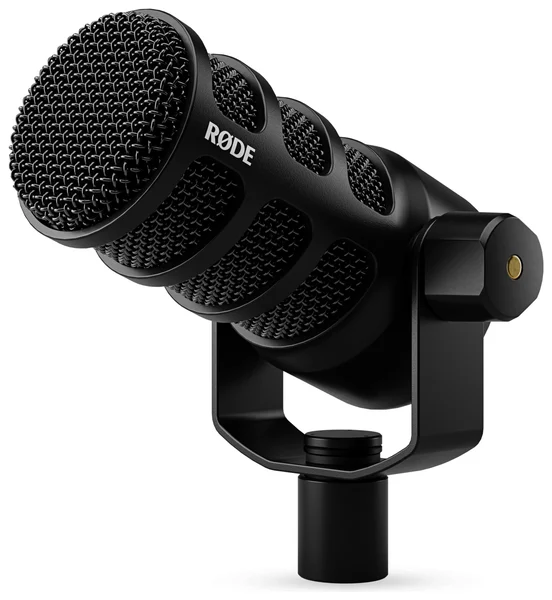
Key specs: dynamic capsule, cardioid pattern, USB-C and XLR outputs, Revolution Preamp, onboard APHEX processing with VoxLab presets, high-pass filter, noise gate and compressor, headphone output with level control and zero-latency monitoring. Launched in 2023 at $199.
The sound is warm, radio-style broadcast tone. Rode’s VoxLab presets in Rode Central apply compression and EQ inside the mic, before the sound reaches your recording app.
The catch is practical. It comes without a stand and is built for a boom arm, it lacks the touch controls of the MV7+, and reviewers found you cannot record over USB and XLR at the same time. At $199 it also costs twice the XLR-only PodMic.
Check the Rode PodMic USB price on Amazon
Audio-Technica AT2020USB-X: the best USB mic for music
The Audio-Technica AT2020USB-X is the best USB mic for singing and acoustic instruments. It updates a classic condenser with USB-C, 24-bit/96 kHz recording, a headphone mix control and a touch mute button, for a $149 launch price.
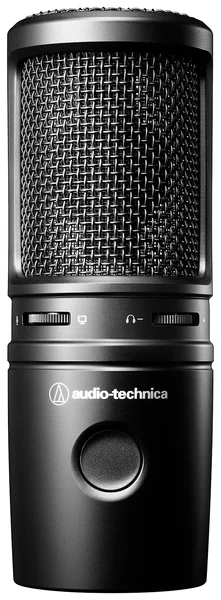
Key specs: cardioid condenser, USB-C, 24-bit/96 kHz conversion, headphone jack with a mix control for blending the mic and computer audio, capacitive mute button with a red LED, desk stand and thread adapter included. Launched August 2022 at $149.
Musicians get two useful things here. The 96 kHz option gives editing headroom in Logic Pro, and the mix knob lets you hear the backing track and your own voice with no delay.
The catch is the room again. As a condenser, it hears everything, and it has none of the voice-tracking tricks of the Yeti 2.
Check the Audio-Technica AT2020USB-X price on Amazon
Elgato Wave Neo: the best budget USB mic for Mac
The Elgato Wave Neo is the best budget USB mic for Mac. At $89.99 it brings a cardioid condenser capsule, USB-C, 24-bit/96 kHz recording, a headphone jack and a front mute button, which is a big step up from a laptop’s built-in mics.
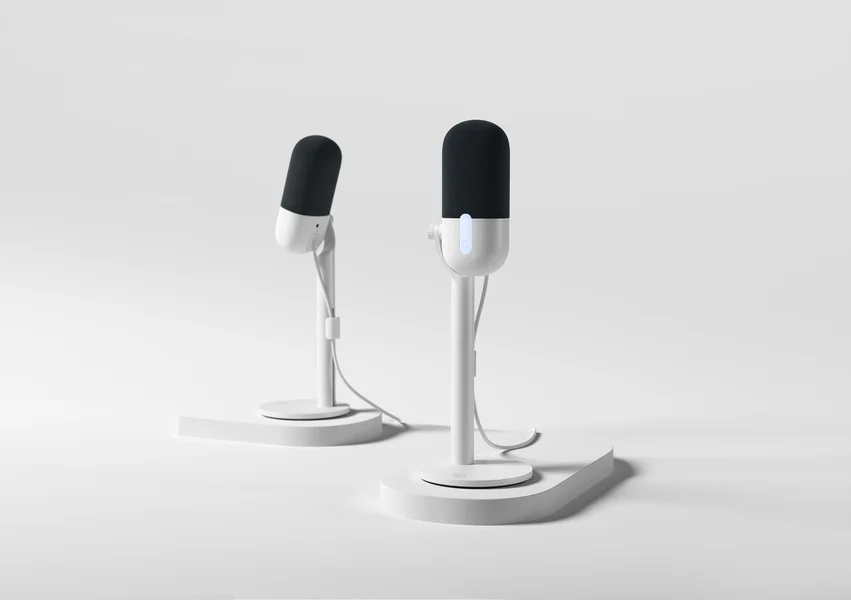
Key specs: cardioid condenser, USB-C, 24-bit up to 96 kHz, 120 dB maximum SPL, 3.5 mm headphone output, front mute button, foam windscreen, adjustable riser. List price $89.99, first sold in April 2024.
Streamers who want more can step up to Elgato’s Wave:3 MK.2, launched in March 2026 at $169.99. It adds Clipguard 2.0, which stops sudden shouts from distorting, and Elgato lists macOS 14.2 or newer.
The catch is extras. You get a mute button and a headphone jack and little else, so a noisy room will show.
Check the Elgato Wave Neo price on Amazon
How to choose a USB mic for Mac in five steps
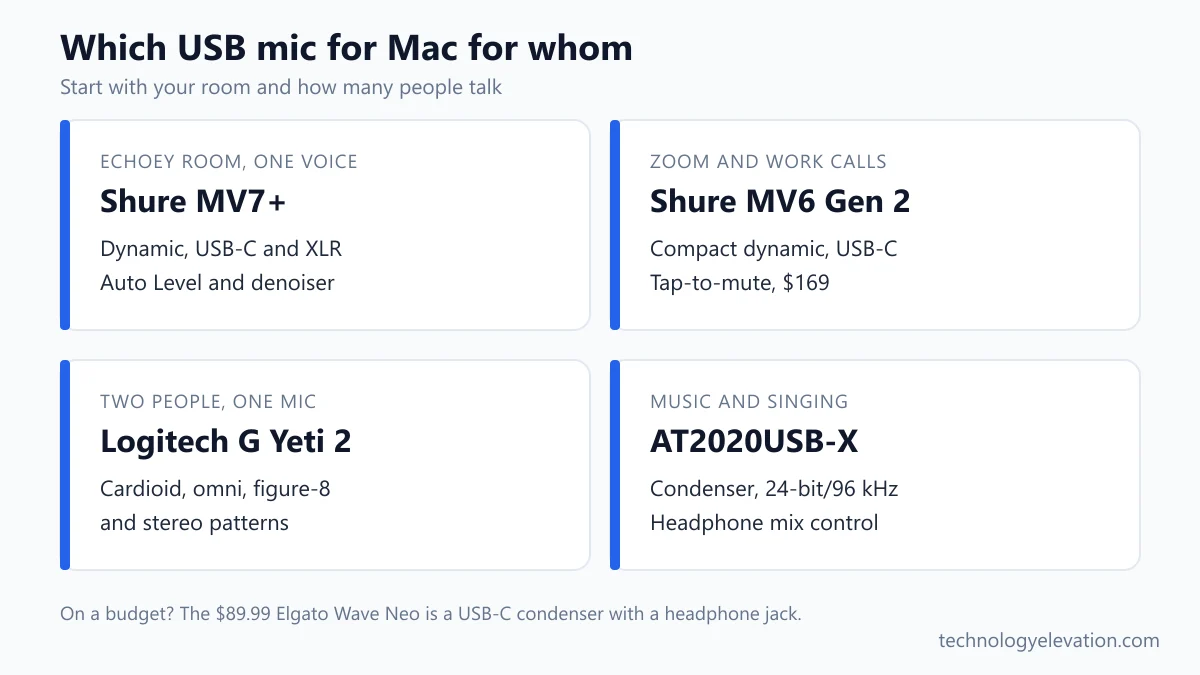
Choose a USB mic for Mac by starting with your room and your voice, not the spec sheet. Every pick here is plug-and-play on macOS, so the real decisions are capsule type, pickup pattern and whether you might want XLR later.
- Listen to your room. Clap once. If you hear an echo, buy a dynamic mic such as the MV7+, MV6 Gen 2 or PodMic USB.
- Count the voices. One person needs cardioid. Two people sharing one mic need omni or figure-8, which points to the Yeti 2.
- Check the port. Every current MacBook uses USB-C, and all seven picks connect by USB-C. A USB-C hub or docking station frees a port if your laptop runs short.
- Plan the next step. If a show might grow into a two-mic studio, buy a USB and XLR hybrid now.
- Use the headphone jack. Every pick has one. Plug headphones for a MacBook Air into the mic and you hear yourself with no delay.
Lighting matters for video calls too. A monitor light bar pairs well with a mic on a boom arm, since neither takes desk space.
Dynamic vs condenser mics and polar patterns in plain words
A dynamic mic uses a sturdy coil and magnet and needs your voice close to it. A condenser mic uses a thin, sensitive plate and hears more detail from farther away. In an untreated room, dynamic usually wins because it hears less of the room.
Think of a dynamic mic as a flashlight and a condenser as a room light. An untreated room, one without foam panels, heavy curtains or a big rug, bounces your voice back, and a condenser records those reflections as a hollow, boxy sound.
Polar patterns describe where a mic listens. Cardioid hears the front and ignores the back, which suits one person. Omni hears all around, which suits a round-table chat. Figure-8 hears front and back, for two people facing each other. Stereo records left and right separately, for music or ambience.
Gamers care about this too. A cardioid dynamic mic keeps the clack of a gaming keyboard out of your voice chat far better than a condenser.
Setting up a USB mic on a Mac takes one menu
Setting up a USB mic on a Mac means plugging it in and choosing it in System Settings > Sound > Input. USB mics that follow the standard USB audio class work with the driver built into macOS, so nothing needs installing first.
That driver-free behavior is called class compliance. Maker apps such as MOTIV Mix, Rode Central, Logitech G HUB and Elgato Wave Link add extra settings on top, but the mic records without them.
Apple’s Audio MIDI Setup app goes deeper. Its guide to setting up audio devices shows how to pick the sample rate and bit depth for each microphone in Window > Show Audio Devices. Use 48 kHz for video and calls.
macOS also has its own noise filter. Apple’s page on video effects and mic modes explains that Voice Isolation gives priority to your voice and minimizes traffic, barking dogs and other background noise. On macOS Sonoma and later, choose it from the Video or Audio menu in the menu bar during a call.
Wide Spectrum does the opposite and keeps the sound around you, which suits a music lesson. Mic Mode is a video-call feature, so Logic Pro recordings are not affected.
Blue Yeti vs Shure MV7 comes down to your room
The Blue Yeti vs Shure MV7 question now means the Logitech G Yeti 2 vs the Shure MV7+. Pick the Yeti 2 for several voices or a quiet room, and the MV7+ for one voice in an ordinary, echoey room.
The Yeti 2 costs $159.99 and offers four patterns plus automatic tracking. The MV7+ costs $279, has one pattern and adds XLR.
Old stock confuses this comparison. The original MV7 used micro-USB, and the original Yeti uses mini-USB.
Wireless clip mics, XLR-only models and other things to skip
Skip XLR-only mics unless you already own an audio interface, skip old mini-USB and micro-USB stock, and treat wireless clip mics as a separate tool for video. A desk USB mic is still the simplest, best-sounding choice for a Mac.
Wireless clip-on systems like the DJI Mic 3 and Rode Wireless GO (Gen 3) can connect their receivers to a computer by USB-C. Rode’s guide says to plug the receiver into the computer and choose it as the input device in your audio settings. They suit walking tutorials and interviews, not a fixed desk setup.
Be wary of very cheap RGB mics sold mainly on their lights. For streaming, a good mic and a capable laptop for live streaming matter far more than color effects.
Frequently asked questions about USB mics for Mac
What is the best USB mic for Mac?
The Shure MV7+ is the best USB mic for Mac for most people. It is a dynamic mic with USB-C and XLR, Auto Level and a real-time denoiser, and it launched at $279. On a budget, the $89.99 Elgato Wave Neo is the pick.
Do USB microphones need drivers on a Mac?
No. USB mics that follow the standard USB audio class use the driver built into macOS. You plug the mic in and choose it as the input in Sound settings. Maker apps only add extra settings.
Is a dynamic or condenser mic better for a home office?
A dynamic mic is usually better for a home office. It hears what is close and ignores more of the echo and noise in an untreated room. A condenser captures more detail but needs a quiet, soft-furnished space.
What does Voice Isolation do on a Mac?
Voice Isolation gives priority to your voice and minimizes background noise, such as traffic or a barking dog, during video calls. Apple offers it in FaceTime and other video apps. On macOS Sonoma and later, pick it from the Video or Audio menu in the menu bar.
Is the Blue Yeti still sold?
Yes, but under the Logitech G name now. Shops still sell the original Yeti with its mini-USB port, and Logitech launched the Yeti 2 with USB-C and a proximity sensor in September 2026 at $159.99.
Can I use the Shure MV7X with a MacBook?
Only with an audio interface. The MV7X is XLR only and has no USB port. For a direct USB-C connection, buy the MV7+ or the MV6 Gen 2 instead.
What sample rate should I record at on a Mac?
Record at 48 kHz for podcasts, video and calls. Every pick here supports it, and you can set it in Audio MIDI Setup. The AT2020USB-X and Wave Neo go up to 96 kHz for music work.
Last checked and sources
Last checked on 15 November 2026 by Abdullah Kabeer. We compared every pick on its maker’s published specifications and launch announcements, and cross-checked launch prices against independent reviews where makers did not list one.
- Shure, MV7+ launch announcement (April 2024), MV7+ and MV6 product pages, MV6 Gen 2 announcement (September 2026), MV7X product page
- Rode, NT-USB+ and PodMic USB product pages, NT-USB+ launch announcement, Wireless GO (Gen 3) user guide
- Logitech G, Yeti 2 store page, and TechRadar and ChannelNews coverage of the Yeti 2 launch
- Audio-Technica, AT2020USB-X launch coverage by Sound On Sound and Radio World
- Elgato, Wave:3 MK.2 product page and Wave Next announcement, Wave Neo listing and reviews
- Apple, Change the sound input settings on Mac, Use video effects and mic modes during video calls on Mac, and Audio MIDI Setup User Guide (support.apple.com)
- Tom’s Hardware, TechRadar and GamesRadar reviews of the PodMic USB
We update this buying guide when Shure, Rode, Logitech, Audio-Technica or Elgato launch, discontinue or significantly change a model.
Technology Elevation is reader-supported. As an Amazon Associate, we earn from qualifying purchases. When you buy through links on this page, we may earn a small commission at no extra cost to you.


GIPHY App Key not set. Please check settings
One Comment