

 Haris Khan
A 65-inch TV looks modest in a warehouse store with a 30-foot ceiling. Then it arrives, you pull it out of the box, and it suddenly feels like a garage door leaning against your sofa. A week later, most people stop noticing the size at all and start wondering whether they should have gone bigger.
So what size TV should I get? The honest answer is a number you can work out with a tape measure in two minutes: the distance from your eyes to the screen, divided by 1.6. That one rule covers most living rooms, and two more numbers fine-tune it for movie fans and for small rooms.
The science behind it is older than flat screens. The International Telecommunication Union, the UN agency that writes broadcast standards, puts the best viewing distance for HD at about three times the screen height, and for 4K at half that. In plain terms, 4K lets you sit twice as close, or buy a much bigger screen for the same seat.
Below are the viewing distance rules (the 30-degree SMPTE figure and THX’s 40-degree figure), a size chart for every common screen from 43 to 98 inches, how to check your wall, and how much 4K resolution really changes the answer. We checked every number against the standards documents and the geometry on 19 November 2026.
What size TV should you get: divide your viewing distance by 1.6
Measure from your eyes to where the screen will sit, in inches, and divide by 1.6. The result is the smallest screen size that fills a comfortable 30 degrees of your view. Divide by 1.2 instead for a cinema-style 40 degrees. Most 4K buyers land between the two.
- Sit in your usual seat and measure from your eyes to the wall or stand where the TV will go.
- Convert the distance to inches (feet x 12).
- Divide by 1.6 for the mixed-use minimum (sport, news, streaming, everyday gaming).
- Divide by 1.2 for the movie-night ideal that THX recommends.
- Measure the width of the wall or stand, and check the TV’s full width on the maker’s spec sheet.
- Pick the biggest standard size between your two numbers that fits the wall and the budget.
Say your sofa sits 9 feet from the wall. That is 108 inches. Divide by 1.6 and you get about 66 inches, so a 65-inch TV is the minimum. Divide by 1.2 and you get 90 inches, so a 77, 83 or 85-inch screen would give you the cinema feel.
| Seat to screen | Minimum size (30 degrees) | Cinema size (40 degrees) |
|---|---|---|
| 6 feet | 43 inches | 55 to 60 inches |
| 7 feet | 50 to 55 inches | 65 to 70 inches |
| 8 feet | 55 to 60 inches | 75 to 80 inches |
| 9 feet | 65 inches | 85 to 90 inches |
| 10 feet | 75 inches | 98 to 100 inches |
| 12 feet | 85 inches | Projector territory |
The exact maths at 30 degrees gives 44, 52, 59, 66, 74 and 89 inches for those six distances. At 40 degrees, it gives 60, 70, 80, 90, 100 and 120 inches. We rounded to sizes you can actually buy.
The SMPTE 30-degree rule sets the smallest TV that feels right
The 30-degree rule says the screen should fill at least 30 degrees of your horizontal field of view. On a 16:9 TV, that works out to a viewing distance of about 1.6 times the screen diagonal. Any smaller and the picture starts to feel like a window across the room.
The figure is usually credited to SMPTE, the Society of Motion Picture and Television Engineers, and it shows up in home theater design books and TV makers’ size guides. SMPTE does not publish a simple chart for living rooms, so treat it as the industry’s working baseline rather than a law.
Why 30 degrees? At that angle, text, faces and game menus are easy to read without moving your eyes much. At 20 degrees, which is what a 50-inch TV gives you from about 10 feet away, fine detail shrinks and subtitles get squinty.
Your field of view is the part of the scene in front of you that your eyes take in without turning your head. A screen at 30 degrees sits comfortably in the middle of that view, with room to spare around it.
The THX 40-degree rule is for movie nights and story games
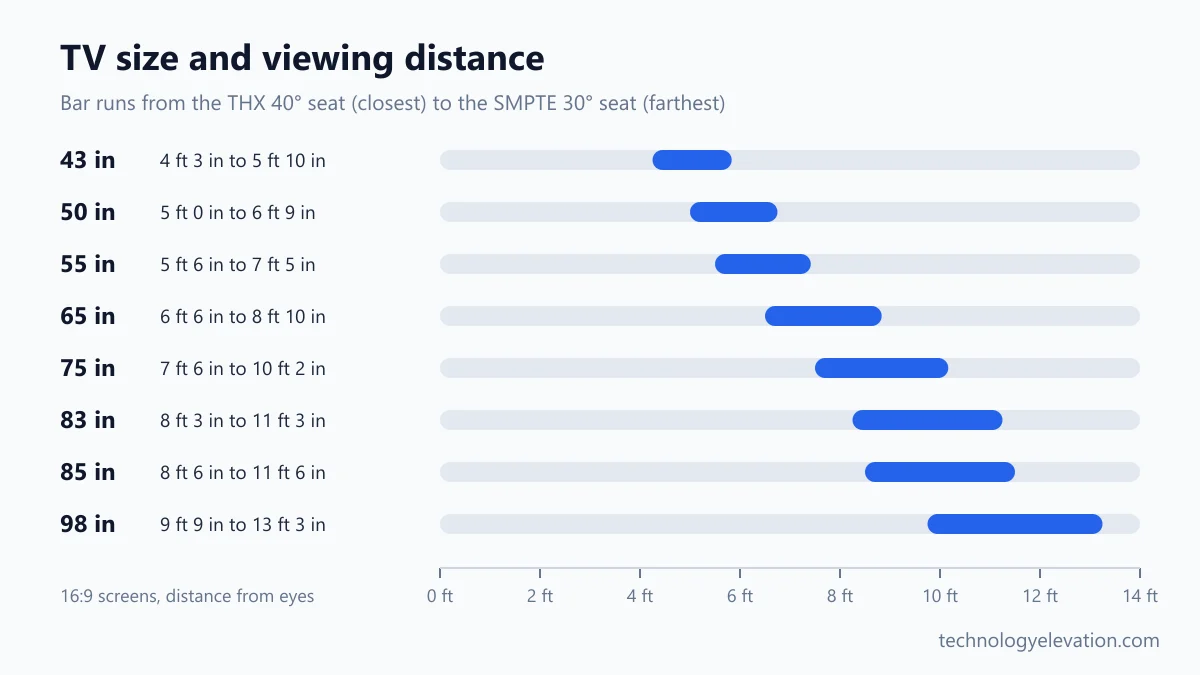
THX recommends a seat where the screen fills about 40 degrees of your view, which means sitting at roughly 1.2 times the diagonal. A 65-inch TV hits that at about 6 feet 6 inches, and the picture feels close to a good cinema seat.
THX, the certification company George Lucas founded, built its home theater advice around matching the view from a good cinema seat. At 40 degrees, a wide shot of a landscape fills most of what you can see, and you start to look around the frame rather than at it.
The catch is comfort. Fast sport and busy game interfaces can feel like too much at 40 degrees, because scores and maps sit at the edges of the screen. Plenty of people settle between 30 and 40 degrees for that reason.
Comfort has an upper limit too. Go much wider than 40 degrees and you have to turn your head to follow the action, which is fine in IMAX and tiring on a Tuesday night. Very few living rooms get anywhere near that with a TV.
| Screen size | Screen width | 30 degrees (SMPTE) | 40 degrees (THX) |
|---|---|---|---|
| 43 inches | 37.5 in | 5 ft 10 in | 4 ft 3 in |
| 50 inches | 43.6 in | 6 ft 9 in | 5 ft 0 in |
| 55 inches | 47.9 in | 7 ft 5 in | 5 ft 6 in |
| 65 inches | 56.7 in | 8 ft 10 in | 6 ft 6 in |
| 75 inches | 65.4 in | 10 ft 2 in | 7 ft 6 in |
| 77 inches | 67.1 in | 10 ft 5 in | 7 ft 8 in |
| 83 inches | 72.3 in | 11 ft 3 in | 8 ft 3 in |
| 85 inches | 74.1 in | 11 ft 6 in | 8 ft 6 in |
| 98 inches | 85.4 in | 13 ft 3 in | 9 ft 9 in |
Screen width here is the picture only, worked out from the 16:9 shape. The TV itself is a little wider once you add the frame.
4K resolution is the reason you can sit closer than you used to
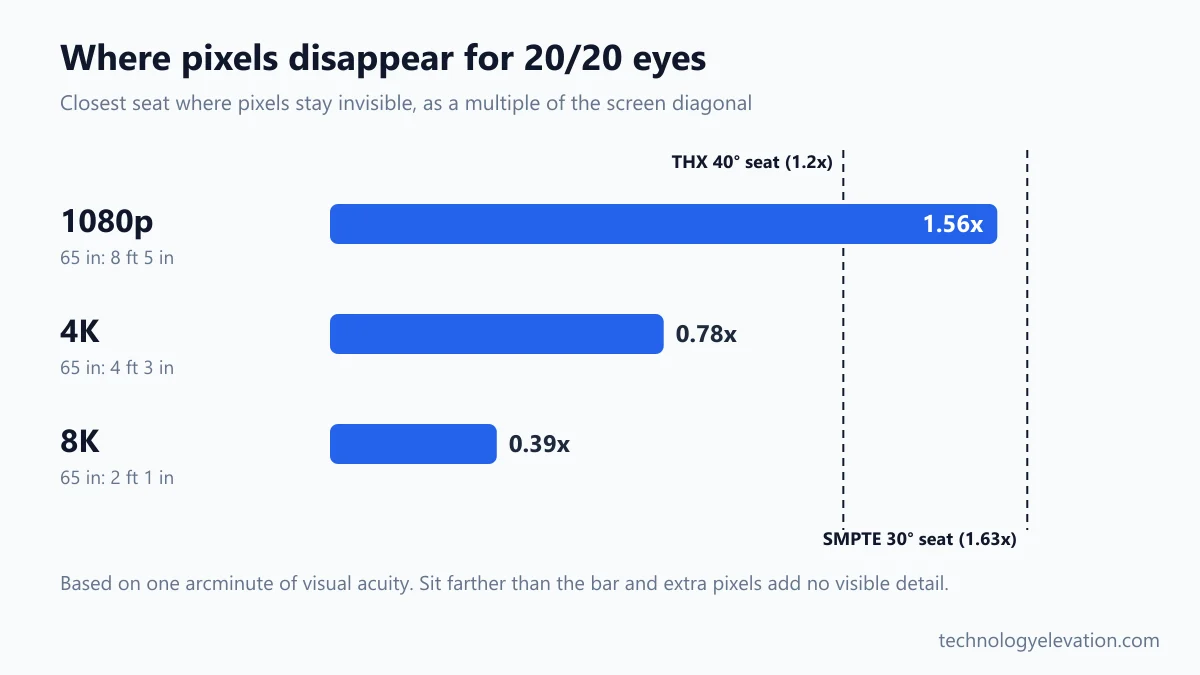
4K lets you sit about twice as close as 1080p before you can see individual pixels. With 20/20 vision, 1080p pixels blend together at about 1.56 times the diagonal, while 4K pixels blend at about 0.78 times. The cinema-style 40-degree seat only looks sharp on 4K.
The maths comes from how sharp human eyes are. Someone with 20/20 vision can separate details about one arcminute apart, which is one sixtieth of a degree. Once each pixel is smaller than that from your seat, the screen looks smooth.
ITU’s own tables follow the same logic. They list an optimal viewing distance of 3.1 picture heights for a 1920 x 1080 picture and 1.5 picture heights for 3840 x 2160, the UHDTV format defined in ITU-R BT.2020 and sold as 4K. Picture height is simply the height of the screen, so a 65-inch TV is about 32 inches tall.
The difference is visible in testing. In a viewing study summarised in that ITU report, the operator Orange showed viewers a 55-inch 4K panel at 1.5 picture heights, and 4K scored half a grade higher than 1080p on a five-point quality scale.
Here is the twist most size guides skip. At the 30-degree distance, 1.6 times the diagonal, you sit right at the point where 1080p pixels start to disappear. So 4K’s extra detail is hard to see from the minimum distance, and clearly visible from the 40-degree seat. If you are paying for 4K, the bigger end of your range is where you get your money’s worth.
Nearly every TV sold at 50 inches and up is 4K now, so you are not choosing between resolutions. You are choosing how much of that detail you sit close enough to see. HDR, the wider brightness and colour range that comes with 4K sources, looks good from any seat.
8K only pays off if you sit closer than most rooms allow
8K needs a very close seat to show any extra detail. ITU puts the optimal distance for 7680 x 4320 at 0.75 picture heights, about 2 feet from a 65-inch screen. From a sofa, 8K and 4K TVs of the same size look equally sharp.
Japan’s NHK designed 8K, which it calls Super Hi-Vision, for exactly that kind of close, wraparound viewing. The ITU report describes a horizontal field of view of 100 degrees, which is far wider than any of the comfort rules above.
On a TV in a living room, that means the 8K sticker adds cost, not visible detail. Spend the same money on a bigger 4K screen, or on a better panel at the size you already wanted.
Your wall decides the biggest TV, so measure it first
Before you fall for a size, measure the wall or stand. A 16:9 screen is about 0.87 times its diagonal wide and 0.49 times its diagonal tall, so a 75-inch picture is about 65 inches wide and 37 inches tall before you add the frame.
- Width: leave space for speakers, a door frame or a window. A TV that touches the wall corners always looks crammed.
- Height: keep the middle of the screen close to your eye level when seated. Measure that height from your usual seat, then compare it with the TV’s height.
- Stand feet: many TVs put their feet near the outer edges. Check the foot spacing on the spec sheet against the width of your cabinet.
- Mounting: check the TV’s VESA pattern (the hole spacing on the back) and weight against the mount, and find the studs before you buy.
- Doors and stairs: big boxes are wider than the TV. Measure the tightest turn on the way in.
The cheapest test is cardboard. Cut a rectangle to the screen size you are thinking about, or mark it on the wall with painter’s tape, and watch something from your sofa for an evening. You will know within ten minutes if it is too small.
Height catches out a lot of buyers. A TV above a fireplace forces you to look up, which hurts after a two-hour film, so lean towards a stand or a lower mount if the room allows it.
Desks, bedrooms and gaming rooms need different sizes
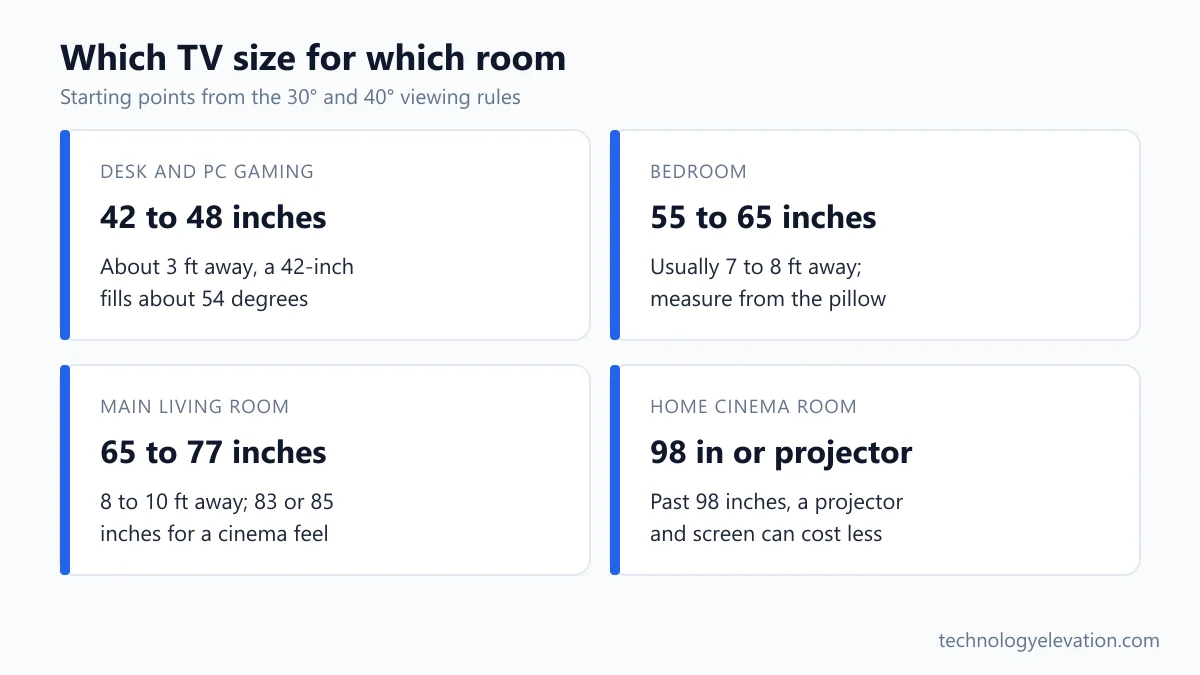
The same rules work for every room, but the distances change a lot. On a desk 3 feet from your eyes, a 42-inch screen already fills about 54 degrees, more than a 65-inch TV across a 9-foot room. Bedrooms and kitchens usually need smaller screens than people expect.
- Desk gaming and PC use: 42 to 48 inches is the useful range. A 42-inch OLED TV makes a superb monitor if you sit about an arm’s length back.
- Bedroom: measure from the pillow, not the end of the bed. At 7 to 8 feet, a 55 or 65-inch TV is usually right.
- Kitchen or second room: 43 to 50 inches is enough, since you watch while doing something else and rarely look closely.
- Main living room: most 8 to 10-foot rooms suit 65 to 77 inches, and 83 or 85 inches if you want the 40-degree feel.
- Dedicated cinema room: above 98 inches, a projector and screen can cost less than a TV of the same size.
Projectors deserve a look once you pass 100 inches. A model like those in our list of the best projectors under $1,000 can throw a bigger picture than any TV in a dark room, although it struggles in daylight.
Gamers should also check the ports. A big TV used with a console or PC needs HDMI 2.1 for 4K at 120Hz, and a cable rated for it, so compare HDMI cables for gaming before you blame the screen for a blank picture.
Bigger sizes can get a better panel, not just a bigger picture
Within one TV range, the size you choose can change the hardware inside it. In 2026, LG gives only the 77 and 83-inch C6 its brighter tandem panel, while the 97-inch G6 drops to 120Hz. Check the size-by-size footnotes before you settle on a number.
That makes the size choice part of the model choice. In the best OLED TV picks, for example, the jump from 65 to 77 inches on the LG C6 buys a slightly better TV as well as a bigger one.
Room light matters too. A large screen in a sunny room shows more reflections, so the TVs for bright rooms are worth comparing if your sofa faces a window. In a basement, the TV for dark rooms can be a size bigger, since you sit in the dark and nothing washes it out.
For a full spread of sizes and brands beyond OLED, the best 4K TVs cover cheaper LED models too.
The size mistakes that cause the most regret
The biggest regret is buying too small. A screen that meets the 30-degree minimum feels big for a week and normal after that, so if you are torn between two sizes and both fit the wall, the larger one is usually the right call.
The other mistakes are easy to avoid with the tape measure:
- Measuring from the back of the sofa instead of from your eyes, which adds about a foot.
- Forgetting that the TV is wider than its screen, and that the stand feet set the cabinet width.
- Paying for 8K at a normal distance, where it looks the same as 4K.
- Mounting the TV so high that the middle of the screen is well above eye level.
- Ignoring sound. TVs get thinner as they get bigger, and slim speakers struggle to fill a large room, so a Dolby Atmos soundbar is worth budgeting for.
Once the size is settled, the shortlist gets short. If you want the best picture at 55 inches and up, start with the best OLED TVs of 2026, which list every size each model comes in.
Frequently asked questions about TV size
How far should I sit from a 65-inch TV?
Sit between about 6 feet 6 inches and 8 feet 10 inches from a 65-inch TV. The closer end matches THX’s 40-degree cinema angle, and the farther end matches the 30-degree minimum. With a 4K TV, the closer seat shows more detail.
What size TV is best for a 10-foot viewing distance?
A 75-inch TV is the minimum for a 10-foot viewing distance, based on the 30-degree rule. For a cinema feel, 85 to 98 inches is better. Measure the wall first, because an 85-inch screen alone is about 74 inches wide.
Is a 55-inch TV too big for a small room?
A 55-inch TV is rarely too big. It meets the 30-degree minimum from about 7 feet 5 inches and the 40-degree cinema angle from about 5 feet 6 inches, so it suits most bedrooms and small living rooms.
How do you calculate TV size from viewing distance?
Divide your viewing distance in inches by 1.6 to get the minimum screen size, and by 1.2 to get the cinema size. A 96-inch (8-foot) distance gives 60 inches and 80 inches, so a 65 or 75-inch TV fits well.
Does 4K change how close you can sit?
Yes, 4K lets you sit about twice as close as 1080p without seeing pixels. With 20/20 vision, 4K pixels blend together from about 0.78 times the screen diagonal, while 1080p needs about 1.56 times.
Is bigger always better for a TV?
Bigger is better up to about the 40-degree angle, where the screen fills your view like a good cinema seat. Much wider than that, you have to turn your head to follow the picture, which gets tiring. The wall and budget usually set the limit first.
Last checked and sources
Last checked on 19 November 2026 by Haris Khan. We worked out every distance from the screen geometry and checked the rules against the ITU standards documents and independent size references.
- ITU-R Report BT.2246-7, The present state of ultra-high definition television (optimal viewing distances, Orange subjective test, Super Hi-Vision field of view)
- ITU-R Recommendation BT.2020 (UHDTV picture formats) and BT.1845 (viewing distance metrics)
- THX home theater display setup guidance (40-degree viewing angle)
- Society of Motion Picture and Television Engineers (30-degree viewing angle as widely cited)
- RTINGS TV size to distance reference; Wikipedia, Optimum HDTV viewing distance
- LG 2026 OLED TV size specifications, as listed in our OLED TV picks
We update this guide when standards bodies or TV makers change their sizing advice or screen sizes.


GIPHY App Key not set. Please check settings