

 Abdullah Kabeer
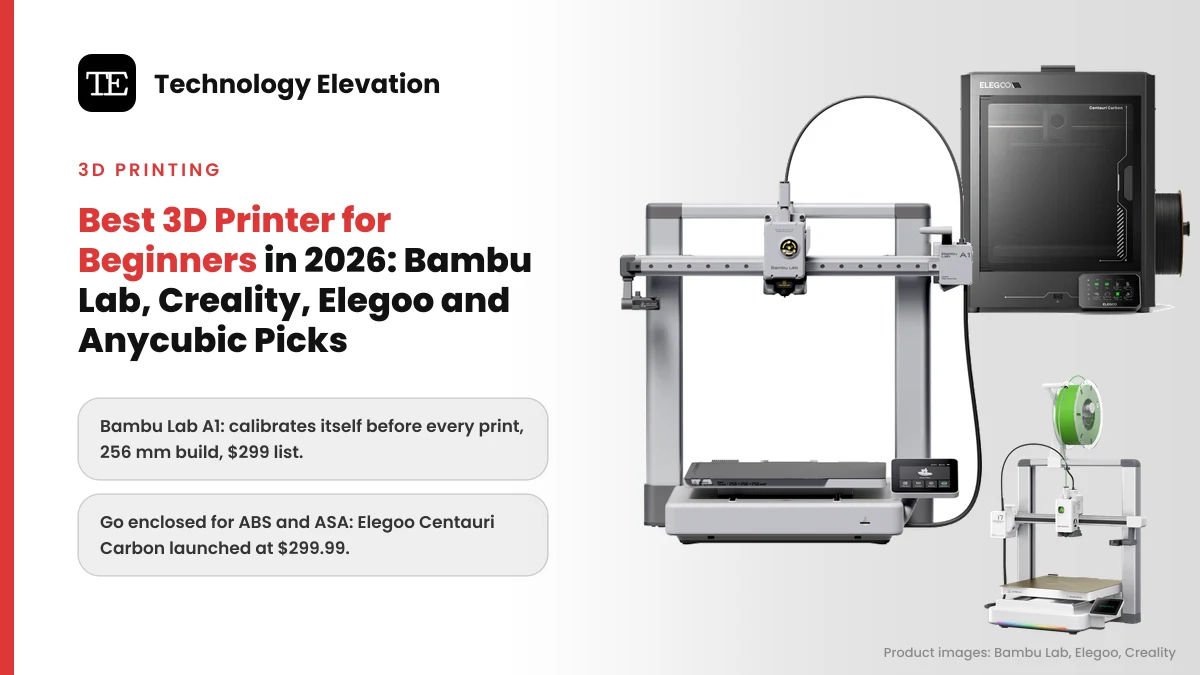
Ask anyone who bought a 3D printer five years ago about their first week and you will hear about paper. A sheet of printer paper slid under the nozzle, a knob turned a quarter at a time, and an evening lost to a first layer that would not stick. The best 3D printer for beginners in 2026 skips all of that. You unbox it, tap a model on your phone and walk away.
That change came fast. Bambu Lab says its A1 mini arrives pre-assembled, pre-squared and pre-tuned, and takes about 20 minutes to set up for a first print. Creality, Elegoo, Anycubic and Prusa now make the same kind of promise, and the prices have dropped to the point where a capable first machine costs about the same as a game console.
The hard part now is picking the right type. Open-frame printers are cheaper and simpler. Enclosed ones handle tougher plastics. Multicolor add-ons look magical and add cost, waste and a few more things to learn.
We compared the published specs, list prices and safety history of the beginner printers on sale in the US this November, using the makers’ own pages and announcements.
The best 3D printer for beginners is the Bambu Lab A1
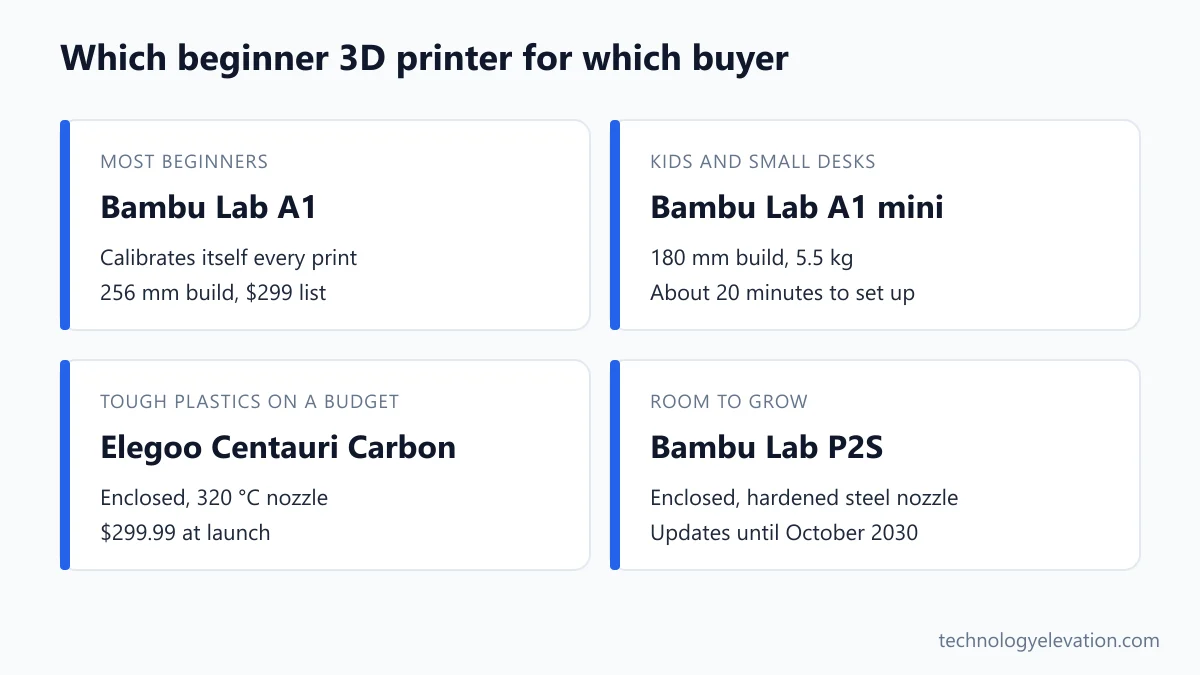
The Bambu Lab A1 is the best 3D printer for most beginners. It calibrates itself before every print, has a full-size 256 mm build volume, runs quietly and costs $299 at list price. The $399 Combo adds the AMS lite for four-color printing.
Every pick, by the job it does best:
- Best overall: Bambu Lab A1
- Best small printer and best for kids: Bambu Lab A1 mini
- Best Creality for first-timers: Creality SPARKX i7
- Best cheap enclosed printer: Elegoo Centauri Carbon
- Best enclosed multicolor starter: Anycubic Kobra S1 Combo
- Best with room to grow: Bambu Lab P2S
| Model | Build volume | Frame | Max nozzle temp | Price |
|---|---|---|---|---|
| Bambu Lab A1 | 256 x 256 x 256 mm | Open | 300 °C | $299 list |
| Bambu Lab A1 mini | 180 x 180 x 180 mm | Open | 300 °C | $219 list |
| Creality SPARKX i7 | 260 x 260 x 255 mm | Open | 300 °C | $279 list |
| Elegoo Centauri Carbon | 256 x 256 x 256 mm | Enclosed | 320 °C | $299.99 launch |
| Anycubic Kobra S1 Combo | 250 x 250 x 250 mm | Enclosed | 320 °C | $549 launch |
| Bambu Lab P2S | 256 x 256 x 256 mm | Enclosed | 300 °C | $549 list |
Printer prices swing hard around Black Friday, and every brand here runs its own sale. Treat the list and launch prices above as a ceiling, and learn how to spot fake Black Friday 2026 tech deals before you pay.
Bambu Lab A1: the best 3D printer for most beginners
The Bambu Lab A1 is the best first 3D printer for most people. It levels its own bed, sets its own nozzle height and tunes out vibration before every job, so a beginner’s first print looks like an expert’s. Its 256 mm cube build volume fits most projects.
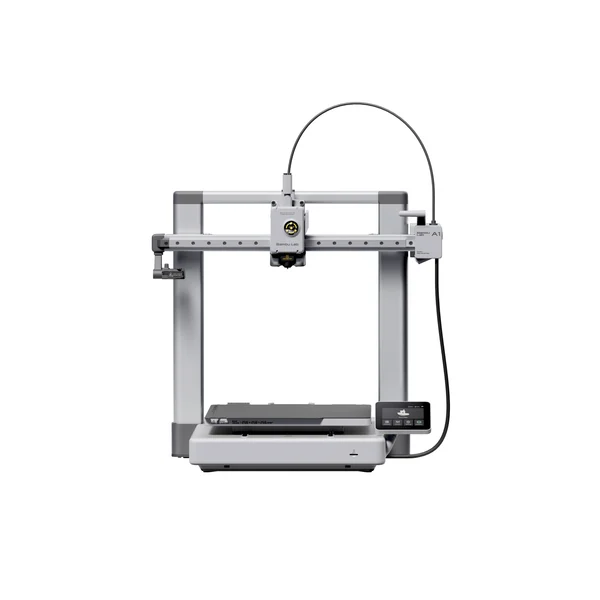
Key specs: 256 x 256 x 256 mm build volume, 500 mm/s max toolhead speed, 10,000 mm/s² acceleration, all-metal hotend up to 300 °C, heated bed up to 100 °C, 3.5-inch touchscreen, Wi-Fi, low-rate camera with timelapse. List price $299, or $399 for the Combo with the AMS lite.
The A1 is a “bed slinger,” which means the print bed slides back and forth while the nozzle moves side to side. That open design keeps the price down and makes every part easy to reach. You will want a sturdy table with some space behind it, because the bed sticks out as it moves.
Full-auto calibration is the big reason it wins. Bambu says the A1 checks bed level, Z-offset, vibration and flow before every print. That last one matters more than it sounds. Flow calibration is what stops corners from bulging, and on older printers it meant printing test patterns and squinting at them.
The Combo is worth the extra $100 if you think you will want color. The AMS lite holds four spools and swaps between them automatically, which is how people print the two-tone keychains and name signs that fill every 3D printing feed. Spool swaps also mean you never have to stop a long print just because one roll ran out.
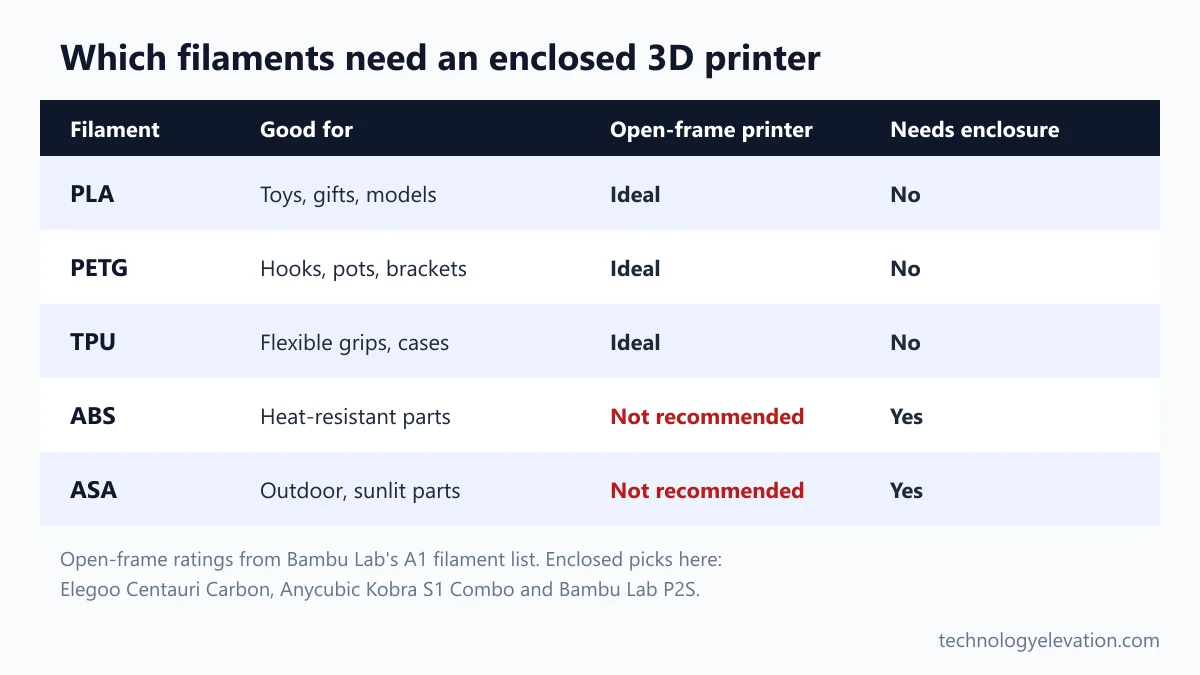
The honest catch is materials. Bambu rates PLA, PETG, TPU and PVA as ideal on the A1, but lists ABS, ASA, nylon and carbon fiber blends as not recommended. Without an enclosure, those plastics warp as they cool.
About the recall: in early 2024, Bambu Lab recalled every A1 then on the market over heatbed cables that could be damaged. In its A1 recall update, Bambu said fewer than 0.1% of printers had shown the fault, and offered refunds or a replacement heatbed. Bambu’s store now states that A1 printers sold after January 30, 2024 are not from the recalled batch and contain the fix. A new A1 bought today is fine. A second-hand one from early 2024 is worth asking about.
Buy the Bambu Lab A1 now on Amazon
Bambu Lab A1 mini: the best small 3D printer for beginners and kids
The Bambu Lab A1 mini is the best small 3D printer for beginners, families and anyone short on desk space. It shares the A1’s self-calibration and quick-swap nozzle, takes about 20 minutes to set up, and costs $219 at list price.
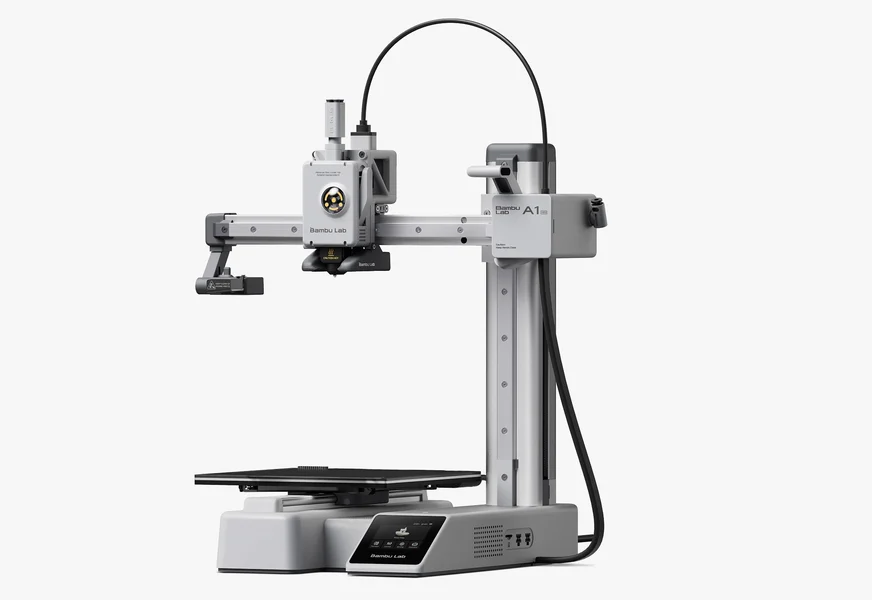
Key specs: 180 x 180 x 180 mm build volume, 500 mm/s max speed, hotend up to 300 °C, heated bed up to 80 °C, 2.4-inch touchscreen, 5.5 kg, 347 x 315 x 365 mm footprint, 150 W max power. List price $219, or $329 for the Combo with the AMS lite.
The size is the point. An 18 cm cube does not sound big, but it covers figurines, phone stands, cable clips, cookie cutters, board game inserts and most of what a beginner prints in the first month. Helmets and big cosplay parts are where you will feel the limit.
For a child’s bedroom or a classroom, the small frame helps. It weighs 5.5 kg, sits on a normal desk and draws 150 W at most. Bambu also lists a silent mode, so an overnight print does not keep the house awake.
Nozzles swap with one clip. That sounds like a pro feature, but it is really a beginner feature: a clogged nozzle becomes a two-minute fix instead of a weekend project.
The catch is the same as the A1, only more so. The bed tops out at 80 °C, so stick to PLA, PETG and TPU. And if your kid gets hooked, expect them to ask for something bigger within a year.
Buy the Bambu Lab A1 mini now on Amazon
Creality SPARKX i7: the best Creality printer for first-timers
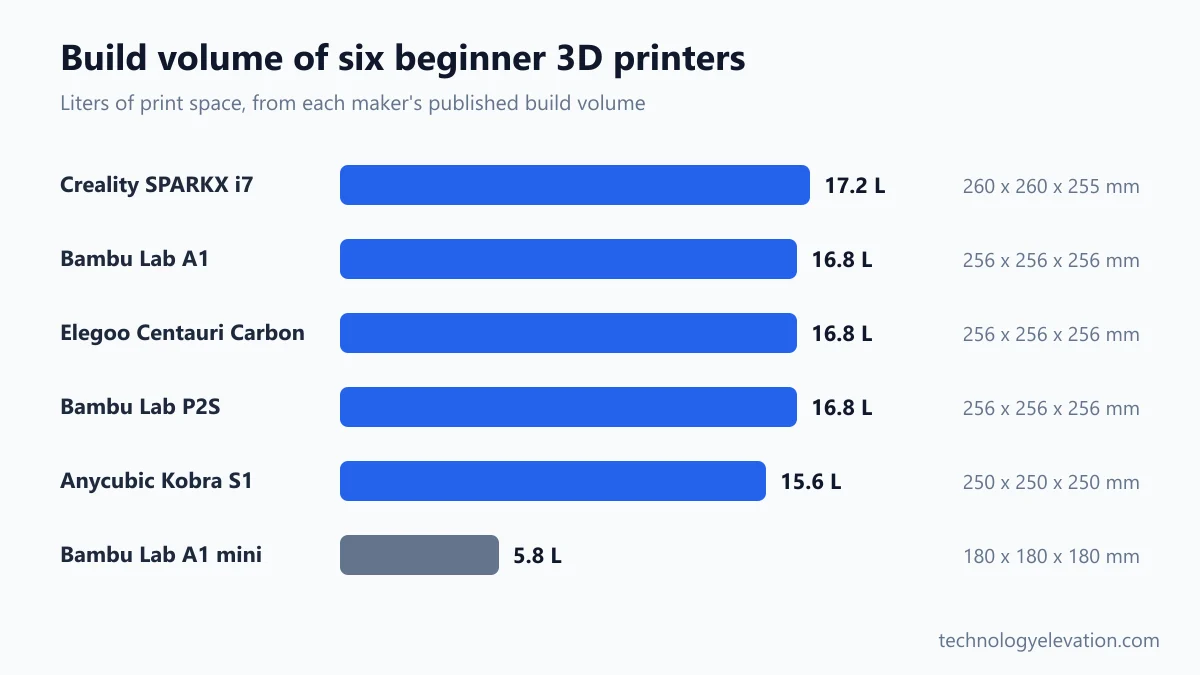
The Creality SPARKX i7 is the best Creality printer for beginners. It has the largest build volume among our open-frame picks, full-auto leveling, an AI camera that spots failed prints, and a quick-swap hotend. It lists at $279, with an optional four-spool CFS Lite for color.
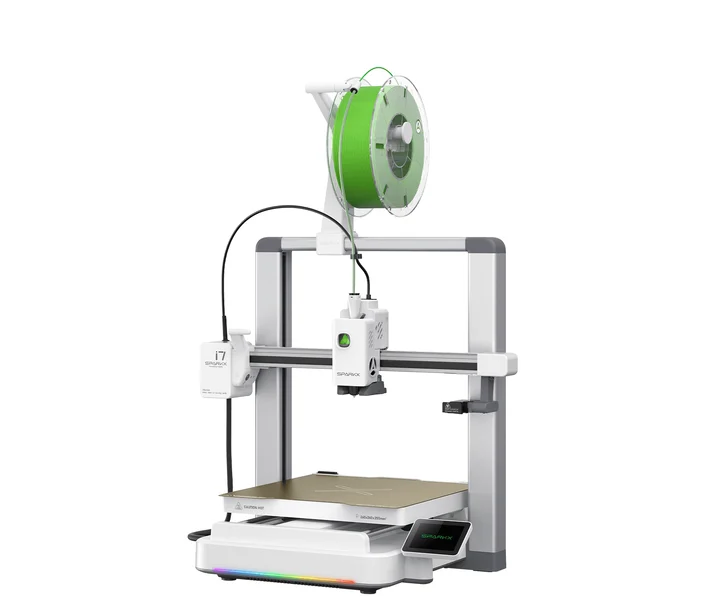
Key specs: 260 x 260 x 255 mm build volume, up to 500 mm/s, 10,000 mm/s² acceleration, nozzle up to 300 °C, bed up to 100 °C, direct drive extruder, 720p AI camera with spaghetti detection, 2.85-inch touchscreen, 8 GB storage, 2.4 GHz Wi-Fi. List price $279.
Creality built its name on cheap kits that you bolted together and tuned yourself. The SPARKX series is its answer to the plug-and-print machines. Creality says the i7 goes from box to first print in under five minutes, with no assembly and no settings to touch.
The AI camera is the feature beginners will thank it for. Failed prints usually turn into a bird’s nest of plastic called “spaghetti.” The i7 watches for it and stops the job, which saves filament and saves you from finding a mess in the morning.
Color comes through the CFS Lite, a four-slot box that also keeps filament dry with desiccant. Creality claims 50% less filament waste for its multicolor setup. The full-color RGB light bar shows print status at a glance and can be customized.
The catch is small but real. Belt tensioning is manual, so after a few months you may need to tighten a belt by hand. And the i7 supports only one CFS Lite, so four colors is the ceiling.
Buy the Creality SPARKX i7 now on Amazon
Elegoo Centauri Carbon: the best cheap enclosed 3D printer
The Elegoo Centauri Carbon is the best cheap enclosed 3D printer. It launched at $299.99 with a fully enclosed die-cast frame, a 320 °C nozzle and a built-in camera, so a beginner can move on to ABS and ASA without buying a second printer.
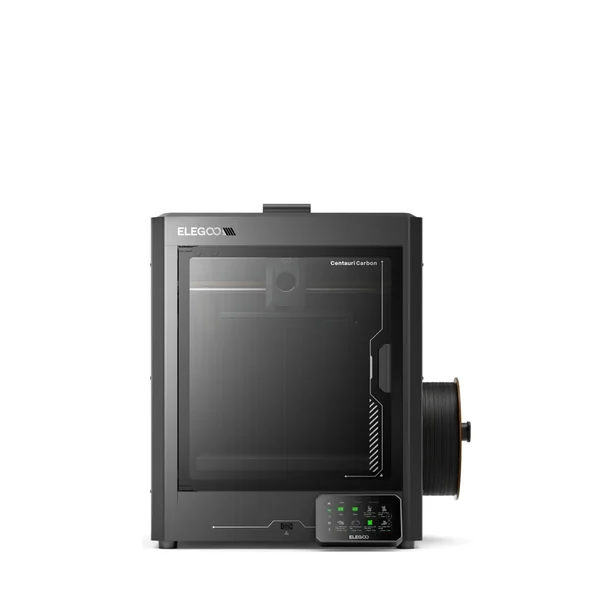
Key specs: 256 x 256 x 256 mm build volume, up to 500 mm/s, 20,000 mm/s² acceleration, 320 °C nozzle, enclosed CoreXY frame, camera with timelapse, LED chamber light, dual-sided magnetic build plate. Elegoo opened pre-orders on February 17, 2025, at $299.99 in the US.
An enclosure is a box around the printer. It keeps heat in, keeps drafts and curious fingers out, and stops tough plastics such as ABS and ASA from cracking as they cool. Those are the materials you want for car parts, outdoor brackets and anything that sits in the sun.
CoreXY means the bed only moves down, while the nozzle does all the side-to-side work. Prints come out cleaner at speed, and the printer takes up less room than a bed slinger with the same build volume.
Elegoo calls it a “print out of the box” machine, and the filament list backs it up: PLA, PETG, TPU, ABS, ASA and carbon-fiber blends. A waste bin and a silicone nozzle brush are built in, so purged plastic does not end up on the floor.
The catch is color. Elegoo’s multicolor add-on for this model, CANVAS for Centauri Carbon, ran late, and Elegoo posted an update notice offering existing owners a filament coupon or a warranty extension by way of apology. If you know you want color from day one, look at the Centauri Carbon 2 Combo instead.
Buy the Elegoo Centauri Carbon now on Amazon
Anycubic Kobra S1 Combo: the best enclosed multicolor starter
The Anycubic Kobra S1 Combo is the best enclosed multicolor printer for a beginner. It pairs a sealed CoreXY frame and 320 °C hotend with the ACE Pro, a four-spool box that also dries filament while it prints. It launched at $549.
Key specs: 250 x 250 x 250 mm build volume, up to 600 mm/s, 320 °C full-metal hotend, enclosed CoreXY frame, LeviQ 3.0 auto leveling, 4.3-inch touchscreen, AI monitoring camera, quiet mode as low as 44 dB. Founder’s launch price $549 in January 2025.
Anycubic says the S1 ships 95% pre-assembled, so setup is mostly unpacking and plugging in. LeviQ 3.0 handles bed leveling and Z-axis compensation, and the camera watches for jams and failed prints.
The ACE Pro is what sets it apart. Filament soaks up moisture from the air, and damp filament prints with bubbles, strings and weak layers. The ACE Pro heats and circulates air around all four spools during a print. Anycubic says it cut humidity inside the box from 93.2% to 42.6% in 10 minutes in its own test.
Want more than four colors? Two ACE Pro units together give you eight. Few first-time buyers will need that, but it is there.
The catch is complexity. A multicolor enclosed machine has more parts to learn than an open-frame single-color printer, and color prints are slower and waste some filament on every swap. If you mostly want plain PLA parts, the A1 is simpler.
Buy the Anycubic Kobra S1 Combo now on Amazon
Bambu Lab P2S: the best beginner printer with room to grow
The Bambu Lab P2S is the beginner printer to buy if you expect to get serious. It keeps Bambu’s easy setup but adds a full enclosure, a hardened steel nozzle and support for engineering plastics. It lists at $549, or $749 with the AMS 2 Pro.
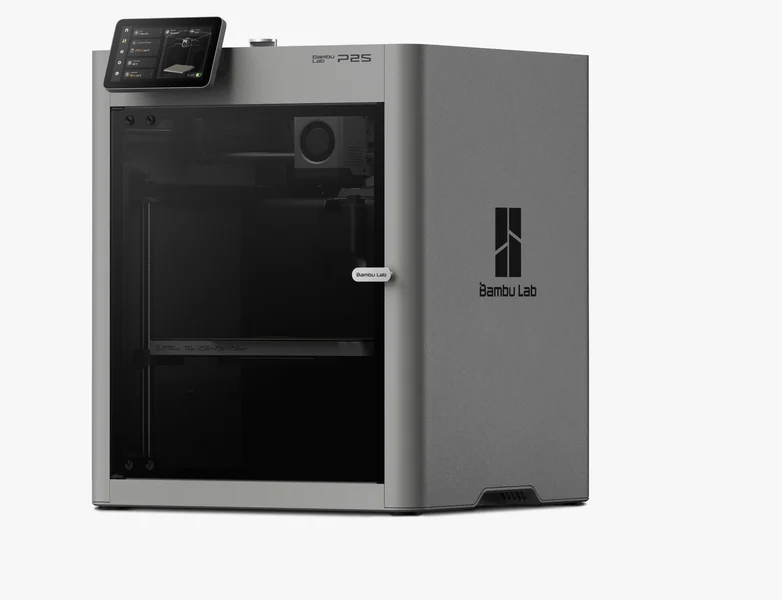
Key specs: 256 x 256 x 256 mm build volume, enclosed chamber, hardened steel nozzle and extruder gears, nozzle up to 300 °C, bed up to 110 °C, 5-inch touchscreen, 1080p camera with timelapse, dual-band Wi-Fi, activated carbon filter. List price $549, or $749 for the Combo.
Hardened steel is the quiet upgrade here. Carbon-fiber and glass-fiber filaments are abrasive and chew through the soft nozzles on cheaper printers. The P2S handles them, along with ABS, ASA, nylon and polycarbonate, the plastics people use for drone frames, tool holders and car parts.
The AMS 2 Pro in the Combo also dries filament, a feature Bambu itself calls long-awaited. That is a real saving if you live somewhere humid, because a separate filament dryer is otherwise the next thing you buy.
Bambu publishes a software support date for each printer. The P2S gets bug and feature updates until October 14, 2030, and security patches until October 14, 2032. Few makers commit to dates at all, and that is useful to know before spending $549.
The catch is simple: you pay for capability you may not use in year one. A beginner who only prints PLA figurines will be just as happy with an A1.
Buy the Bambu Lab P2S now on Amazon
Prusa CORE One+ is the pick if you would rather buy direct
The Prusa CORE One+ (Gen 2) is the beginner printer for buyers who value open-source hardware, repairability and long-term support over a low price. Prusa sells it direct from its own store, with the assembled version starting at $1,299 and a cheaper build-it-yourself kit.
The CORE One+ is a fully enclosed CoreXY printer with a 250 x 220 x 270 mm build volume, active chamber heating up to 55 °C and a 290 °C nozzle. Prusa says your first print starts 10 minutes after unpacking the assembled version, and it publishes the CAD files and firmware openly.
The kit is the interesting part for a curious beginner. Prusa’s assembly manuals walk you through the build step by step, and by the end you know every part of the machine. That makes the inevitable repair far less scary. Details and both versions are on the Prusa CORE One+ (Gen 2) product page.
The trade-off is cost. For the price of one assembled CORE One+, you could buy an A1 and a P2S and still have money left for filament.
Open-frame or enclosed: the frame decides which plastics you can print
Buy an open-frame printer if you will mostly print PLA and PETG, and an enclosed printer if you want ABS, ASA, nylon or carbon-fiber parts. Open frames are cheaper and easier to maintain. Enclosures trap heat, which stops tougher plastics from warping and cracking.
PLA is where almost everyone starts. It prints at low temperatures, barely smells, and comes in every color you can think of. PETG is a little tougher and handles heat better, which makes it good for plant pots and kitchen hooks. Both print happily on an open frame.
ABS and ASA are the next step. They survive a hot car and the sun, but they shrink as they cool and need warm, still air around them. An enclosure gives you that. It also keeps pets and small hands away from a 300 °C nozzle, which matters in a family home.
Ventilation is worth a thought either way. ABS and ASA give off a noticeable smell while printing. The P2S has an activated carbon filter, but a room with an open window is still the better place for those plastics.
Five checks decide the right first 3D printer
Choose a first 3D printer by what you want to make, then check size, plastics, color and setup. Most beginners are best served by an auto-calibrating open-frame printer around 250 mm. Buy an enclosure only if you need tougher plastics, and color only if you will really use it.
- Size the build volume to your projects. 180 mm covers toys, gadgets and small parts. 250 mm covers almost everything else. Bigger cosplay pieces can be printed in sections and glued.
- Insist on full-auto calibration. Every pick here levels its own bed. Skip any printer that still asks you to set the nozzle height with a sheet of paper.
- Match the frame to the plastic. PLA and PETG only? An open frame is fine. ABS, ASA or carbon fiber? Go enclosed.
- Be honest about color. Multicolor boxes add $100 or more and waste a little filament on each color change. They are great for signs, toys and gifts, and pointless for plain functional parts.
- Check the software and your computer. Bambu Studio runs on Windows and macOS. If your only computer is a Chromebook for students, check that your printer’s phone app can start prints from a model library.
Wi-Fi matters more than people expect. The Bambu A1 series uses 2.4 GHz Wi-Fi (802.11 b/g/n), and a printer in a garage or basement can drop its connection mid-job. A mesh Wi-Fi system fixes that faster than any printer setting.
Designing your own parts is the natural next step once you have printed a few downloads. Free tools handle simple shapes, and if you get into proper CAD, a laptop that runs Fusion 360 smoothly becomes the next upgrade. Design students print a lot too, which is why so many architecture students end up with a printer on their desk.
Filament, build plates and nozzles are the real running costs
The printer is the big purchase, but filament is the ongoing one. Bambu lists its PLA Basic at $17.99 for a 1 kg spool, or $14.99 as a refill without the spool. Build plates and nozzles wear slowly and cost far less than the printer.
A 1 kg spool goes further than most people expect. Small prints such as keychains, clips and figurines use only a few grams each. Big helmets and storage boxes are what empty a spool in a weekend.
Multicolor printing changes the maths. Every color change pushes out a little plastic to clean the nozzle, so a four-color sign uses noticeably more filament than the same sign in one color. Creality’s claim of 50% less waste on the SPARKX i7 tells you how much attention the makers now pay to this.
Build plates lose grip slowly over time, and a quick wash with dish soap brings most back. Nozzles clog or wear, especially with abrasive filaments, and on every Bambu pick here they swap without tools.
Skip these as a first 3D printer
Skip used printers from early 2024 with unknown history, kit printers that need manual leveling, and resin printers as a first machine. A used A1 may predate Bambu’s heatbed cable fix, manual leveling frustrates beginners, and resin needs gloves, ventilation and chemical cleanup.
Cheap kits are tempting. Creality’s Ender-3 V3 SE lists at $199 and now levels itself with a CR Touch sensor, but it still needs some assembly and tops out at 250 mm/s. For $20 more, the A1 mini sets itself up and has twice the top speed.
Resin printers make beautiful miniatures, but they are a different hobby. You handle liquid resin, wash prints in alcohol and cure them under UV light. That is a lot to take on in week one, and none of it suits a shared family space.
Finally, watch the gift season. A printer under the tree is one of the best tech gifts for a curious teenager, but add a spool or two of PLA. Most printers ship with only a small sample, and running out on Christmas morning is a sad way to start.
Frequently asked questions about 3D printers for beginners
What is the best 3D printer for a beginner?
The Bambu Lab A1 is the best 3D printer for most beginners. It calibrates itself before every print, has a 256 mm build volume and lists at $299. The A1 mini is the better choice for small desks and kids.
Is the Bambu Lab A1 safe after the recall?
Yes. Bambu Lab recalled early A1 printers in 2024 over a heatbed cable fault. Bambu says A1 printers sold after January 30, 2024 are not from the recalled batch and include the fix.
Do I need an enclosed 3D printer?
Only if you want to print ABS, ASA, nylon or carbon-fiber blends. PLA and PETG print well on open-frame printers. An enclosure also keeps pets and small hands away from the hot nozzle.
How big a build volume does a beginner need?
About 250 mm covers most projects, including tool holders, storage boxes and larger figures. A 180 mm printer such as the A1 mini handles toys, gadgets and small parts. Bigger pieces can be printed in sections.
Is multicolor 3D printing worth it for beginners?
Multicolor is worth it if you want to make signs, toys and gifts. Combo kits add $100 or more, print slower and waste some filament on each color change. For plain functional parts, a single-color printer is enough.
What filament should a beginner start with?
Start with PLA. It prints at low temperatures, barely smells, sticks well to the bed and comes in every color. Move on to PETG for tougher parts and to ABS or ASA once you have an enclosed printer.
Are 3D printers safe to use at home?
Modern 3D printers are generally safe when used as directed. Keep the printer on a stable surface, away from small children, and print ABS or ASA in a ventilated room. Check the maker’s recall notices before buying a used printer.
Last checked and sources
Last checked on 19 November 2026 by Abdullah Kabeer. We compared the build volume, temperature limits, setup claims, list or launch prices and safety history of each beginner printer using the manufacturers’ own product pages, spec sheets, stores, support notices and launch announcements.
- Bambu Lab, A1, A1 mini and P2S product pages, technical specifications and US store listings (bambulab.com, us.store.bambulab.com)
- Bambu Lab, A1 Recall Update, February 4, 2024 (blog.bambulab.com), and A1 recall registration page
- Bambu Lab, printer comparison page with software update support dates
- Creality, SPARKX i7, K2 and Ender-3 V3 SE product pages (store.creality.com)
- Elegoo, Centauri Carbon pre-order announcement, February 17, 2025, and Update Notice on Centauri Carbon (elegoo.com)
- Anycubic, Kobra S1 Combo pre-sale announcement, January 3, 2025, and Kobra S1 Combo wiki (wiki.anycubic.com)
- Prusa Research, CORE One+ (Gen 2) product page and technical parameters (prusa3d.com)
We update this buying guide when a maker launches, discontinues or recalls a beginner 3D printer. Readers who want larger and more advanced machines can compare them in our roundup of 3D printers.
Technology Elevation is reader-supported. As an Amazon Associate, we earn from qualifying purchases. When you buy through links on this page, we may earn a small commission at no extra cost to you.

GIPHY App Key not set. Please check settings