

 Haris Khan
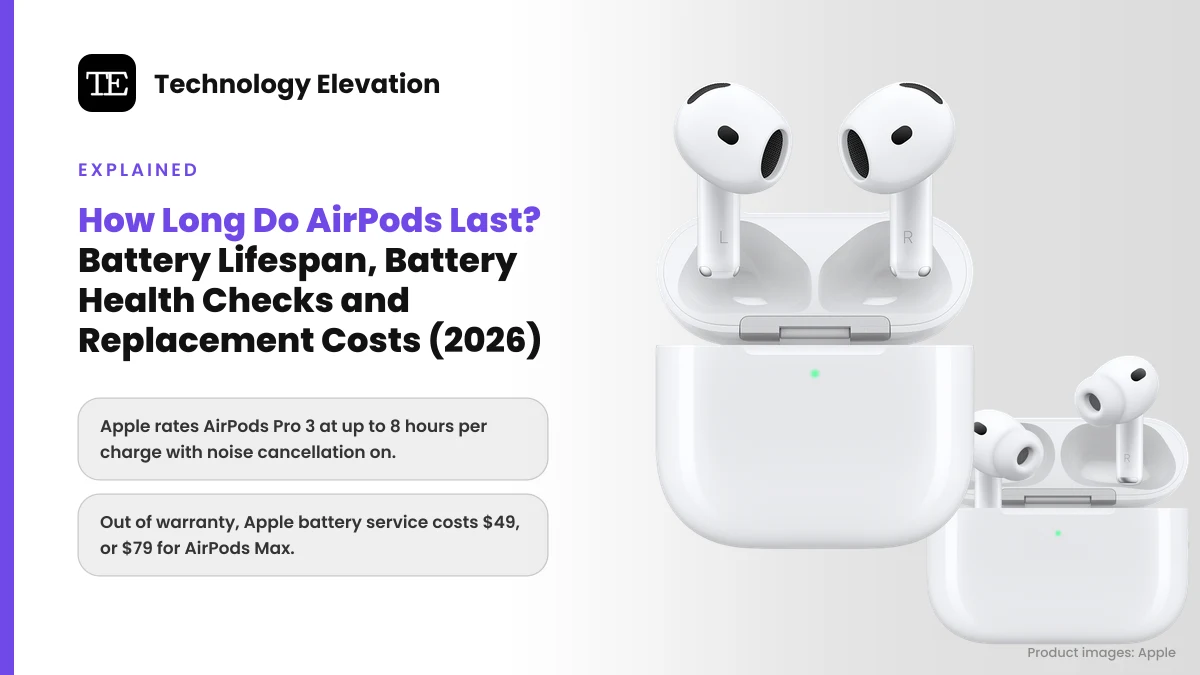
AirPods rarely break all at once. They fade. One morning the left earbud plays its low-battery chime halfway through the commute, and a pair that used to cover a whole workday now needs the case by lunch.
So how long do AirPods last? The real answer depends on the battery, not the plastic. Apple rates every model in hours per charge, and its repair rules treat a battery that holds less than 80% of its original capacity as worn. That 80% line is exactly where AppleCare+ replaces the battery at no extra charge.
Below you will find Apple’s official battery figures for every AirPods model from the 2016 original to the 2026 AirPods 5, the exact menus for checking charge, the settings Apple builds in to slow battery wear, and what Apple charges when the battery finally gives out.
Every figure comes from Apple’s own spec sheets, support articles and service pricing pages, checked on 15 November 2026.
AirPods last as long as their batteries hold a useful charge
AirPods last as long as their batteries stay useful. Apple does not publish a lifespan in years for AirPods. Its yardstick is capacity: once a battery holds less than 80% of its original charge, AppleCare+ replaces it, and for most owners that marks the practical end.
Apple explains battery wear in terms of charge cycles. You complete one cycle when you have used 100% of the battery’s capacity, though not necessarily from one charge. Use 75% one day, recharge, use 25% the next, and those two days add up to one cycle. With lithium-ion batteries, Apple says, capacity drops slightly with every complete cycle.
Apple designs its batteries to keep 80% of their original capacity for “a high number of charge cycles, which varies depending on the product.” For iPhone 15 models, that number is 1,000 cycles. Apple does not list a cycle rating for AirPods on its battery pages.
Simple maths helps here. Drain your earbuds once a day and you run through roughly 365 cycles a year. Listen for an hour on the train and you might need a week to finish one cycle. Two people can buy the same pair on the same day and see very different lifespans.
Keep in mind that a pair of AirPods holds three batteries: one in each earbud and one in the case. They wear at their own pace. If you take calls with only your right earbud, that one does more work and usually fades first.
Apple rates every AirPods model in hours per charge, not years
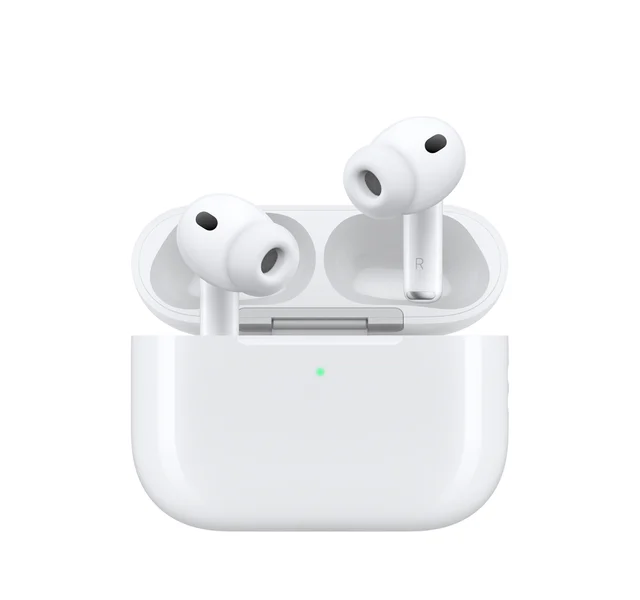
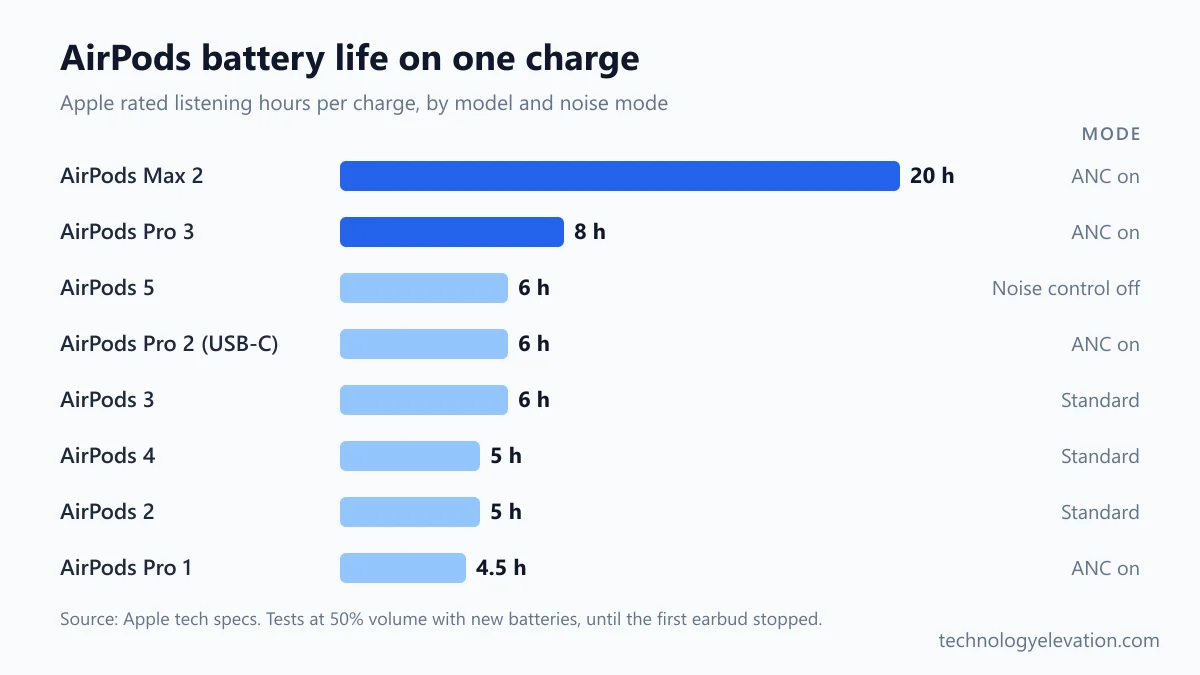
Apple rates AirPods Pro 3 at up to 8 hours per charge with noise cancellation on, AirPods Max 2 at up to 20 hours, and AirPods 5 at up to 4 hours with noise cancellation or 6 hours with noise control off. Older models range from 4.5 to 6 hours.
| Model | Introduced | One charge | With case | Quick charge |
|---|---|---|---|---|
| AirPods 5 | 2026 | 4 h with ANC, 6 h noise control off | 20 h with ANC | 5 min = about 1 h |
| AirPods 5 with Wireless Charging Case | 2026 | 5 h with ANC, 7 h noise control off | 22 h with ANC | 5 min = about 1 h |
| AirPods Pro 3 | 2025 | 8 h with ANC | 24 h with ANC | 5 min = about 1 h |
| AirPods Max 2 | 2026 | 20 h with ANC | Smart Case saves charge | 5 min = about 1.5 h |
| AirPods 4 with ANC | 2024 | 4 h with ANC, 5 h noise control off | 20 h with ANC, 30 h off | 5 min = about 1 h |
| AirPods 4 | 2024 | 5 h | 30 h | 5 min = about 1 h |
| AirPods Pro 2 (USB-C) | 2023 | 6 h with ANC | 30 h | 5 min = about 1 h |
| AirPods 3 | 2021 | 6 h | 30 h | 5 min = about 1 h |
| AirPods Max 1 | 2020 | 20 h with ANC | Smart Case saves charge | 5 min = about 1.5 h |
| AirPods Pro 1 | 2019 | 4.5 h, 5 h with ANC off | More than 24 h | 5 min = about 1 h |
| AirPods 2 | 2019 | 5 h | More than 24 h | 15 min = up to 3 h |
ANC means Active Noise Cancellation, the mode that uses microphones to cancel outside noise. Switching it on costs battery, which is why the same AirPods 5 earbud lasts 4 hours with ANC and 6 hours without it.
Apple’s numbers come from controlled tests. For AirPods Pro 3, Apple used preproduction units paired with iPhone 17 Pro, a playlist of 358 tracks, volume at 50% and ANC on, and stopped the clock when the first earbud stopped playing. Spatial Audio with head tracking drops that figure to 7.5 hours. Heart rate sensing during a workout gives up to 6.5 hours, and the Hearing Aid feature in Transparency mode gives up to 10.
Those tests used brand-new batteries at a moderate volume. A two-year-old pair played loud on a cold morning will come in under the rated time, and that gap is normal.
Checking your AirPods battery level takes a few taps
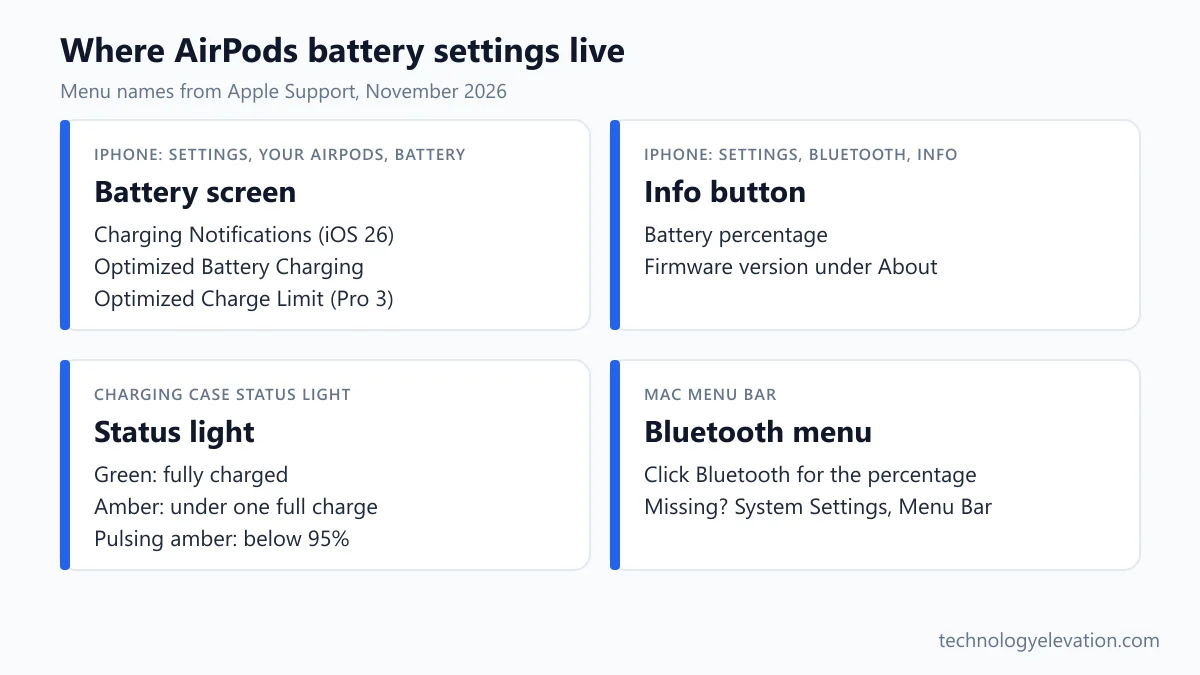
Open Settings on your iPhone or iPad and tap your AirPods’ name near the top of the screen to see the battery percentage. On a Mac, click Bluetooth in the menu bar. The status light on the case gives a quick green or amber reading without any screen.
These steps come straight from Apple’s Charge your AirPods support article and the AirPods User Guide:
- Wear your AirPods or open the case lid, and make sure they are connected to your device.
- iPhone or iPad: open the Settings app, then tap the name of your AirPods near the top of the screen. You can also tap Bluetooth, then the Info button next to your AirPods.
- Mac: click Bluetooth in the menu bar. If it is missing, open System Settings, click Menu Bar in the sidebar, and under Menu Bar Controls select the box next to Bluetooth.
- Home Screen: add a battery widget to see your AirPods alongside your other devices at a glance.
- Case light: with the AirPods inside and the lid open, the light shows the earbuds’ charge. With the case empty, it shows the case’s charge. Green means fully charged. Amber means less than one full charge remains.
Newer models add more detail to that light. On AirPods 5, AirPods 4, AirPods Pro 2 and AirPods Pro 3 running the latest firmware, the light briefly pulses amber when the AirPods or case are below 95%. It flashes amber when the earbuds are below 95% and the case is below 25%.
Your iPhone also warns you on its own. Apple sends low-battery notifications at 20, 10 and 5 percent, and the earbuds play a tone at 10 percent and again just before they switch off. With iOS 26, AirPods Pro 2, AirPods Pro 3, AirPods 4 with ANC, AirPods 5 with Wireless Charging Case and AirPods Max 2 can also send Charging Notifications. Turn them on in Settings, then your AirPods’ name, then Battery.
AirPods have no battery health menu, so compare real hours instead
AirPods do not show a battery health or maximum capacity figure the way an iPhone does. Apple’s AirPods battery settings cover charge level, Charging Notifications and Optimized Battery Charging. To judge wear yourself, time a full charge and compare it with Apple’s rated hours.
A fair test is easy to run at home. Update the firmware first, charge the earbuds to 100%, set the volume near 50% and use the same noise mode Apple used for its rating. Then play music and note when the first earbud stops. A pair that once matched the table and now manages well under 80% of the rated time has a worn battery. Treat that as a rough guide, because playback time does not track capacity perfectly.
Warning signs tend to show up together:
- One earbud regularly dies long before the other.
- The low-battery tone arrives within the first hour or two.
- The case needs a cable every day even with light use.
Before blaming the battery, check the firmware. Apple delivers updates automatically while your AirPods charge within Bluetooth range of an iPhone, iPad or Mac on Wi-Fi. To check the version, open Settings, tap Bluetooth, tap the Info button next to your AirPods and scroll to About. On 10 November 2026, Apple listed firmware 9B47 as current for AirPods 4, AirPods 5, AirPods Pro 2, AirPods Pro 3 and AirPods Max 2.
Optimized Battery Charging slows wear on AirPods 3 and later
Optimized Battery Charging reduces battery wear by limiting how long your AirPods sit at 100%. Your iPhone learns your routine and holds the charge below full until just before you usually listen. Apple turns it on by default for AirPods 3 or later and every AirPods Pro.
The feature needs an iPhone or iPad and is on by default with iOS or iPadOS 15 or later. AirPods 1 and AirPods 2 do not support it.
Most people should leave it on. If you need a full charge before a long flight, here is how Apple says to switch it off:
- Wear your AirPods and make sure they are connected to your iPhone or iPad.
- Open the Settings app and tap the name of your AirPods.
- Tap Battery.
- Turn off Optimized Battery Charging.
AirPods Pro 3 go one step further with Optimized Charge Limit. On top of delaying the last stretch of charging, they learn your daily use and decide when to stop at a lower limit and when to allow a full charge. The setting arrived with iOS 26 and sits on the same Battery screen. You can turn it off entirely or just for a day.
Charging habits Apple recommends for a longer AirPods lifespan
Keep AirPods in their case when you are not wearing them, charge whenever it suits you, avoid heat and keep the firmware current. Apple’s battery guidance says there is no need to drain a lithium-ion battery to zero before recharging, and that high temperatures can permanently cut capacity.
- Use the case as home base. AirPods switch off and charge whenever they are in the case with the lid closed.
- Top up freely. Partial charges are fine. Running AirPods flat every day does nothing for the battery.
- Keep them out of heat. Apple warns that ambient temperatures above 95° F (35° C) can permanently damage battery capacity. A car dashboard in July is the classic mistake.
- Leave Optimized Battery Charging on unless you truly need 100% that day.
- Store AirPods Max in the Smart Case. The case puts them into an ultralow power mode, which saves charge between sessions.
- Use a proper charger. Apple says charging is fastest with an iPhone or iPad USB charger or a Mac.
Wireless charging is fine too. AirPods Pro 2, AirPods Pro 3, AirPods 4 with ANC and AirPods 5 with Wireless Charging Case all charge on an Apple Watch charger, so one of the Apple Watch charging stands on your nightstand can handle both. Qi-certified pads work with every wireless-capable case, and 15W MagSafe chargers suit the AirPods Pro and AirPods 3 (MagSafe) cases. Place the case with the status light facing up.
Physical damage ends more pairs early than battery chemistry does. A drop onto a hard floor can crack a case, and a lost case means paying for a new one. A protective cover from the best AirPods Pro 2 compatible cases adds very little bulk and takes the knocks instead.
Apple charges $49 for AirPods battery service out of warranty
Apple’s estimated out-of-warranty fee for battery service is $49 for every AirPods and AirPods Pro model, and $79 for AirPods Max 1 and AirPods Max 2. Apple inspects the AirPods before setting the final fee, and tax plus a shipping fee may be added.
Apple’s one-year limited warranty does not help here. It covers manufacturing defects, but Apple states it does not cover “batteries that wear down from normal use.” Apple Authorized Service Providers can also set their own fees, so a local repair shop’s quote may differ.
Here are Apple’s estimated out-of-warranty fees from its AirPods service and repair page, checked in November 2026:
| Model | Battery service | Damaged AirPod | Lost case |
|---|---|---|---|
| AirPods Pro 1, 2 and 3 | $49 | $89 | $99 |
| AirPods 5 with Wireless Charging Case, AirPods 4 with ANC | $49 | $69 | $79 |
| AirPods 5, AirPods 4 | $49 | $69 | $69 |
| AirPods 1, 2 and 3 | $49 | $69 | $59 to $79 by case type |
| AirPods Max 1 and 2 | $79 | Quoted after inspection | Not listed |
Battery service is the cheapest line on that list. Replacing a damaged or lost part costs $20 to $50 more, so make sure the quote matches the actual problem.
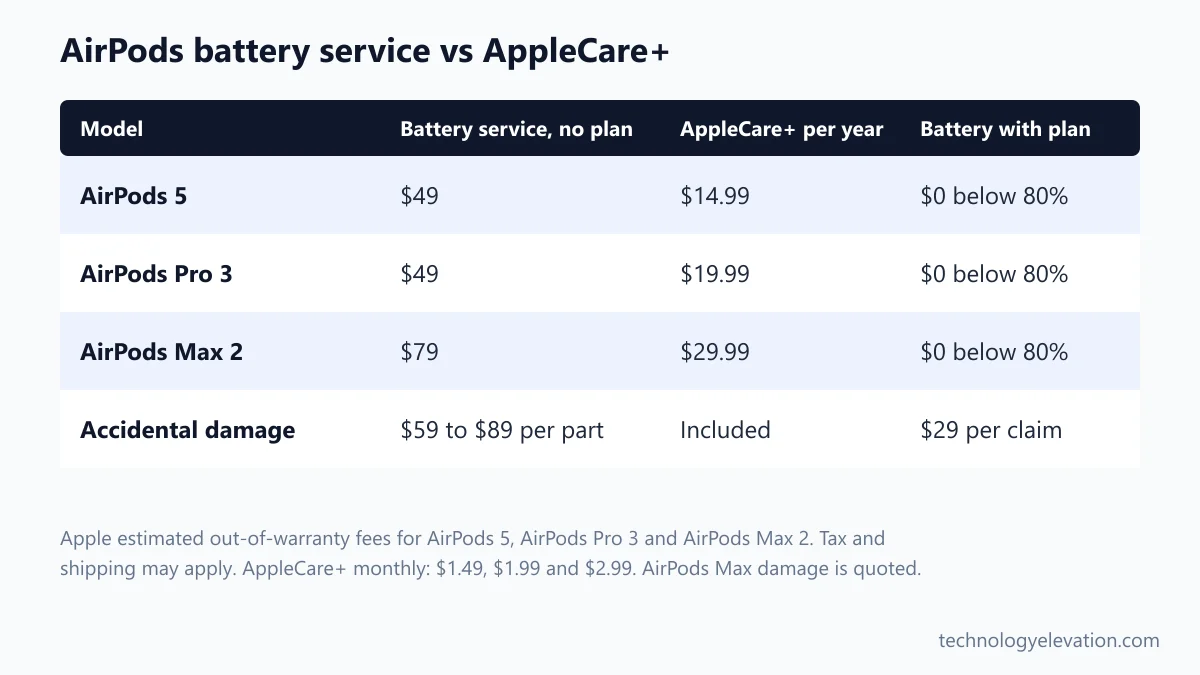
AppleCare+ makes AirPods battery replacement free below 80 percent
AppleCare+ for headphones costs $14.99 a year for AirPods 5, $19.99 for AirPods Pro 3 and $29.99 for AirPods Max 2. It replaces a battery holding less than 80% of its original capacity at no extra charge, and covers accidental damage for a $29 fee.

Monthly plans are $1.49, $1.99 and $2.99 for the same three models, billed until you cancel. Apple also bundles AirPods into AppleCare One, which starts at $19.99 a month for up to three products.
The plan includes unlimited repairs for drops and spills, Express Replacement (Apple ships replacement AirPods before you send yours back) and priority support by chat or phone.
Does it pay off? For battery wear alone, rarely in the first year, because a new battery seldom drops below 80% that fast. The value builds if you keep the plan running into year two and beyond, or if you tend to drop things. One accident claim plus one battery replacement on AirPods Pro 3 would cost $29 in fees with the plan, on top of the plan itself, against $138 without it.
A new pair makes more sense than battery service on older AirPods
Battery service makes sense when the rest of the pair works well and the model still gets current firmware. A new pair is the better buy when your AirPods are on an older firmware branch, lack Optimized Battery Charging, or need service on more than one piece at once.
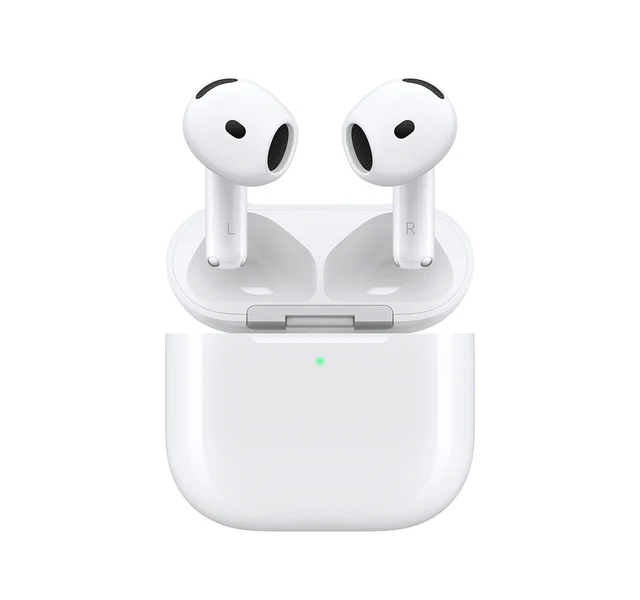
Apple’s firmware list tells the story. AirPods 2, AirPods 3 and AirPods Pro 1 sit on firmware 6F21, and the original AirPods on 6.8.8. AirPods 4, AirPods 5, AirPods Pro 2, AirPods Pro 3 and AirPods Max 2 share 9B47. Older pairs still work, but they miss newer features such as Charging Notifications and the pulsing status light.
Apple’s current lineup starts at $129 for AirPods 5, rises to $149 with the Wireless Charging Case, $249 for AirPods Pro 3 and $549 for AirPods Max 2. Against those list prices, a $49 battery service on a two-year-old AirPods Pro 2 is good value. The same fee on a 2019 pair with a tired case is harder to justify.
Not every buyer needs earbuds, either. If long sessions matter more than pocket size, over-ear models run far longer per charge, as the 20-hour AirPods Max ratings show, and noise cancelling folding headphones pack down small for travel. Heavy callers may also want earbuds built for voice, covered in the best earbuds for making phone calls.
Whatever you choose, protect the next pair from day one. The cheapest way to make AirPods last is to avoid losing or breaking them, and a lost case costs up to $99 to replace. One of the AirPods Pro 2 lanyards keeps the case clipped to a bag, and a case cover from the AirPods Pro 2 compatible cases roundup handles the drops.
Frequently asked questions about AirPods battery life
How many years do AirPods last?
Apple does not give a lifespan in years. AirPods last until their batteries fall below about 80% of original capacity, and the speed of that drop depends on how many full charge cycles you use. Daily heavy listening wears them far faster than occasional use.
Can you check AirPods battery health?
No. AirPods show charge level but no battery health or maximum capacity figure. To judge wear, charge them fully, play audio at about 50% volume and compare the time with Apple’s rated hours for your model.
Can AirPods batteries be replaced?
Yes, through Apple’s battery service. Apple’s estimated out-of-warranty fee is $49 for AirPods and AirPods Pro and $79 for AirPods Max. AppleCare+ covers the service at no extra charge when capacity falls below 80%.
Is it bad to keep AirPods in the case all the time?
No. Apple recommends putting AirPods in the case whenever you are not using them. Optimized Battery Charging on AirPods 3 or later and all AirPods Pro limits the time spent at full charge, which reduces wear.
Should I let my AirPods die before charging them?
No. Apple says there is no need to fully discharge its lithium-ion batteries before recharging. Charge whenever it suits you, because partial charges simply add up toward one charge cycle.
Why does one AirPod die faster than the other?
Each earbud has its own battery, so the one you use more wears faster. Using one earbud alone for calls is a typical reason. If the gap is large on a pair less than a year old, update the firmware and contact Apple, because manufacturing defects fall under the one-year limited warranty.
How long do AirPods Pro 3 last on one charge?
Apple rates AirPods Pro 3 at up to 8 hours per charge with Active Noise Cancellation, or 7.5 hours with Spatial Audio and head tracking. The MagSafe Charging Case brings the total to up to 24 hours with noise cancellation on.
Last checked and sources
Last checked on 15 November 2026 by Haris Khan. We compared every AirPods model using Apple’s published tech specs, support articles and service pricing pages, and left out any figure Apple does not publish.
- Apple, AirPods 5, AirPods Pro 3 and AirPods Max 2 tech specs and battery test footnotes (apple.com)
- Apple Support, tech specs for AirPods 2, AirPods 3, AirPods 4, AirPods 4 with ANC, AirPods Pro 1, AirPods Pro 2 (USB-C) and AirPods Max 1
- Apple Support, Charge your AirPods (published 13 October 2026) and Charge your AirPods Max
- Apple Support, AirPods User Guide: Charge AirPods, AirPods Pro, or AirPods Max
- Apple Support, About firmware updates for AirPods (published 10 November 2026)
- Apple Support, Apple Service and Repair for AirPods, estimated service fees
- Apple, AppleCare pricing for headphones (apple.com/applecare)
- Apple, Batteries: Why Lithium-ion, Maximizing Performance, and Service and Recycling
We update this guide when Apple releases new AirPods, changes battery ratings or revises its service fees.

GIPHY App Key not set. Please check settings