

 Abdullah Kabeer
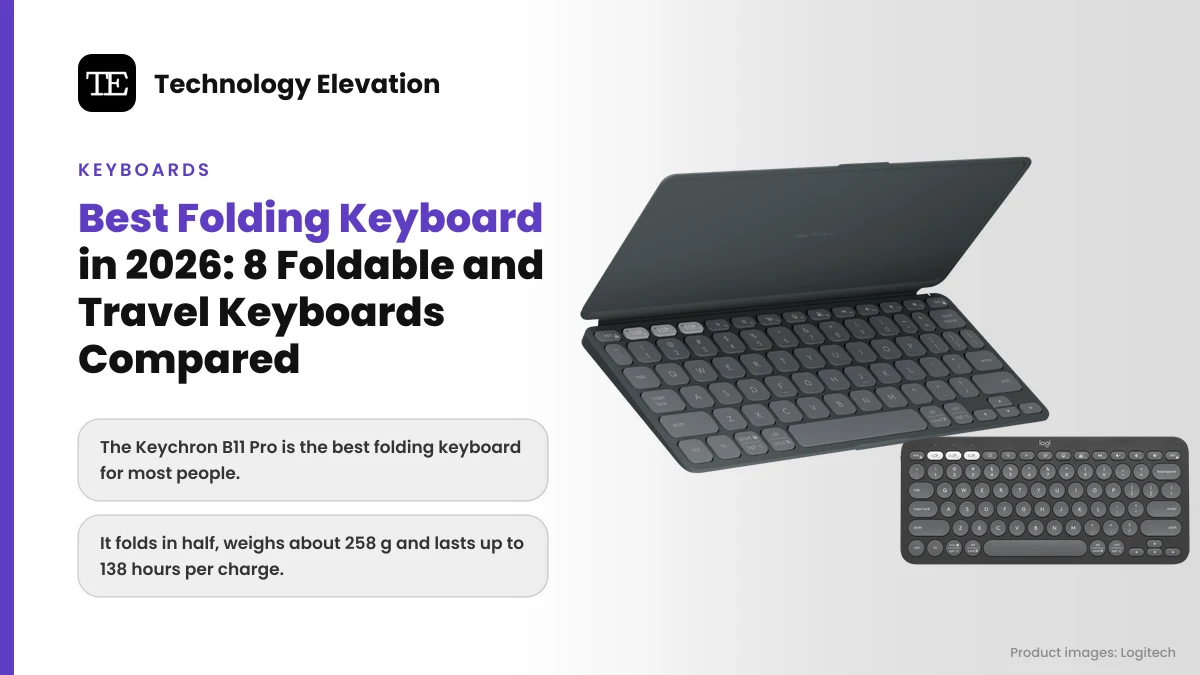
Watch someone answer a long email on a phone at an airport gate and you can see the frustration in their thumbs. A folding keyboard fixes that in about four seconds: pull it out of a jacket pocket, flip it open, and type at close to desk speed. The best folding keyboard packs down to the size of a large phone and still gives you keys big enough to touch type on.
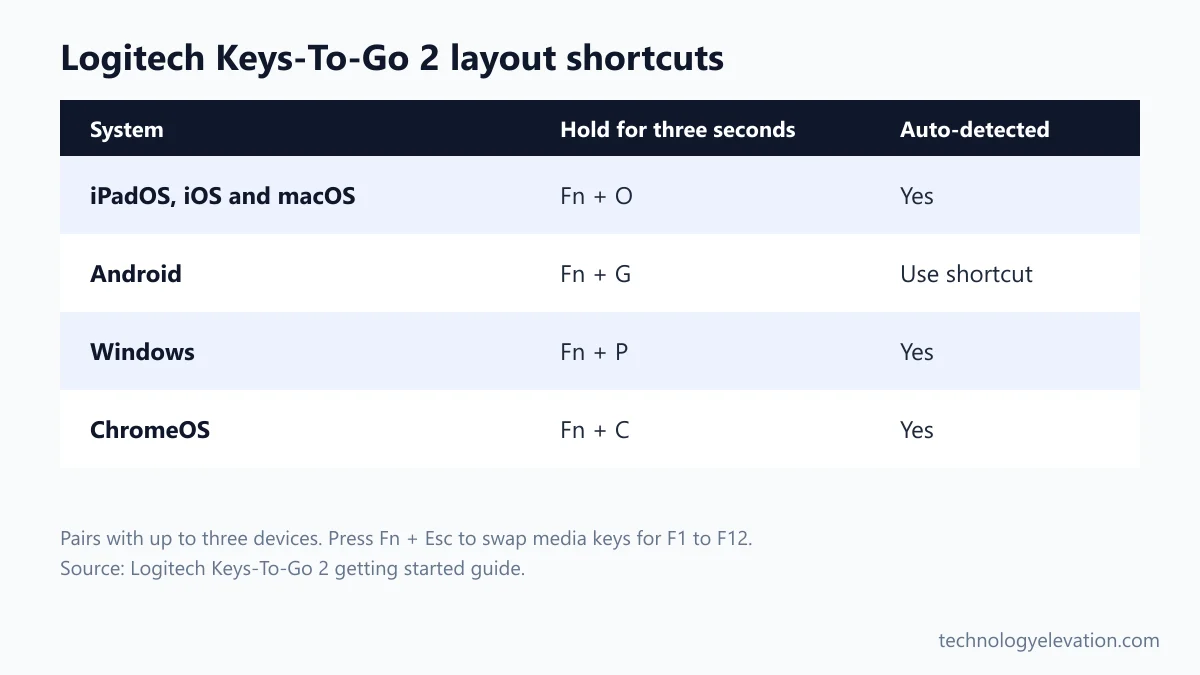
The trick is picking one that pairs with everything you carry. Most good models now remember three devices at once, so a phone, a tablet and a laptop can share one keyboard. Logitech’s Keys-To-Go 2, for example, pairs with up to three devices and switches its key layout for iPadOS, Android, Windows or ChromeOS with a single key combination.
Small brands such as ProtoArc and iClever make most of the folding designs, and Keychron joined them in March 2026 with its first folding model. We also included two compact non-folding keyboards from Logitech, because for many travelers they make more sense.
We compared current US models on size, weight, battery, multi-device pairing, touchpads and list price.
The best folding keyboard for most people is the Keychron B11 Pro
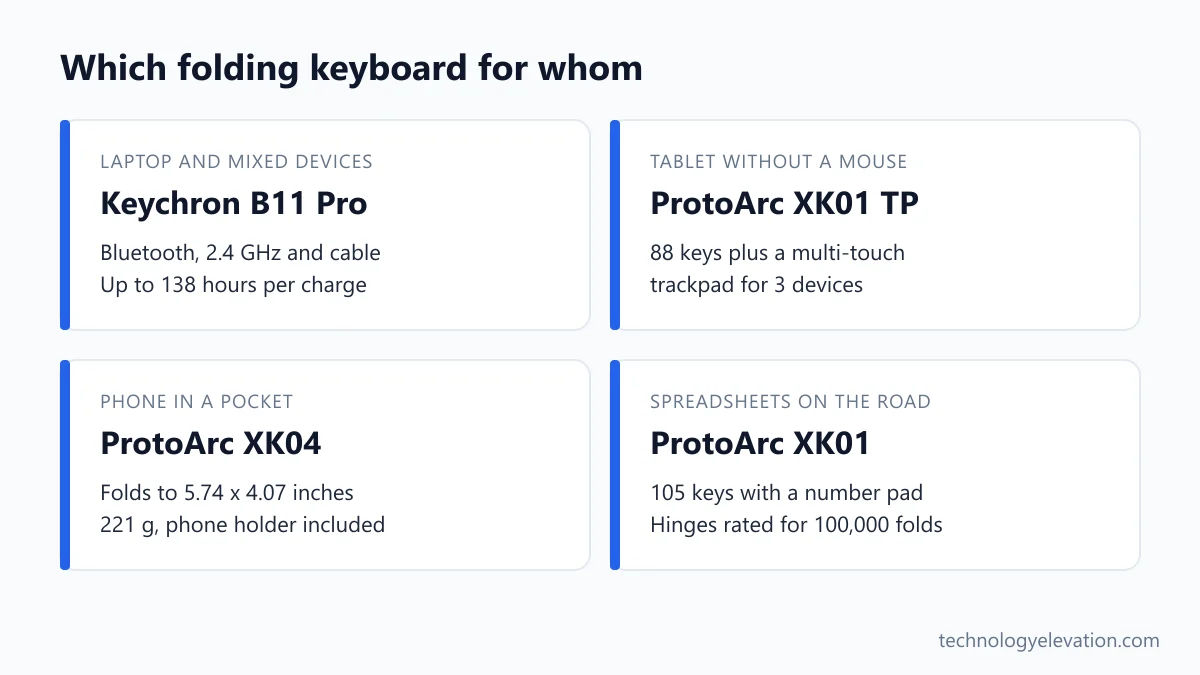
The Keychron B11 Pro is the best folding keyboard for most people. It folds down the middle of a split Alice layout, connects by Bluetooth, 2.4 GHz or cable, and lasts up to 138 hours per charge. Keychron lists it at $64.99, and it weighs about 258 g.
Every pick, by the job it does best:
- Best overall: Keychron B11 Pro
- Best with a touchpad: ProtoArc XK01 TP
- Best full-size with a number pad: ProtoArc XK01
- Best for phones: ProtoArc XK04
- Best backlit: iClever BK05
- Best small keyboard with a touchpad: iClever BK08
- Best non-folding travel keyboard for tablets: Logitech Keys-To-Go 2
- Best budget compact keyboard: Logitech Pebble Keys 2 K380s
| Keyboard | Folds | Touchpad | Devices | Power | List price |
|---|---|---|---|---|---|
| Keychron B11 Pro | Yes, in half | No | 3 Bluetooth, plus 2.4 GHz and cable | 250 mAh, up to 138 hours | $64.99 |
| ProtoArc XK01 TP | Yes, tri-fold | Yes | 3 Bluetooth | 300 mAh, USB-C | $62.99 |
| ProtoArc XK01 | Yes, tri-fold | No | 3 Bluetooth | 210 mAh, USB-C | $53.99 |
| ProtoArc XK04 | Yes | No | 3 Bluetooth | 90 mAh, USB-C | $39.99 |
| iClever BK05 | Yes, tri-fold | No | 3 Bluetooth, plus cable | 750 mAh, up to 300 hours unlit | $52.99 |
| iClever BK08 | Yes, tri-fold | Yes | 3 Bluetooth | Rechargeable | $57.99 |
| Logitech Keys-To-Go 2 | No | No | 3 Bluetooth | 2 coin cells, up to 3 years | $79.99 |
| Logitech Pebble Keys 2 K380s | No | No | 3 Bluetooth | 2 AAA, up to 36 months | $39.99 |
List prices come from each maker’s US store. Expect frequent sales below these figures.
Keychron B11 Pro: the best folding keyboard overall
The Keychron B11 Pro is the best all-round folding keyboard because it fixes the two classic weak spots: battery life and connections. It runs up to 138 hours on a charge and talks to laptops over 2.4 GHz as well as Bluetooth. List price is $64.99.
Key specs: 65% Alice layout that folds in half, scissor switches with concave keycaps, Bluetooth 5.3 for up to 3 devices, 2.4 GHz wireless and wired USB-C, 250 mAh battery rated for up to 138 hours, about 258 g, 196.3 x 143 mm folded, works with macOS, Windows and Linux. List price: $64.99.
The Alice layout is the clever part. The two halves of the keyboard angle slightly away from each other, so the fold line falls in the natural gap between your left and right hands. On most folding keyboards the hinge cuts through the middle of a row, and you feel it every time you reach for B or Y.
The keys fold inward, so they stay protected in a bag, and the keyboard switches itself off when you close it. Keychron’s browser-based Launcher software lets you remap keys, which is rare at this price.
The catch is the layout itself. If you have never typed on an Alice board, expect a few days of hitting the wrong key with the wrong hand. The B11 Pro also has no touchpad and no backlight.
Check the Keychron B11 Pro price on Amazon
ProtoArc XK01 TP: the best folding keyboard with a touchpad
The ProtoArc XK01 TP is the best folding keyboard with a touchpad. It unfolds into an 88-key layout with full-size keys and a multi-touch trackpad, so you can type and point on a tablet or TV box without a mouse. ProtoArc lists it at $62.99.
Key specs: Tri-fold design, 88-key layout with 0.65-inch keycaps and a row of 12 media keys, multi-touch trackpad, scissor switch keys, Bluetooth 5.1 for up to 3 devices, 300 mAh battery with USB-C charging, up to 120 days of standby, 8.46 x 4.68 x 0.78 inches folded, phone stand and PU leather pouch included. List price: $62.99 (launched at $59.99 in July 2024).
A touchpad matters more than it sounds. Reaching up to tap an iPad screen every few seconds gets tiring fast, and on a phone propped on a tray table it is worse. With the XK01 TP, you scroll and click without lifting your hands.
The catch is the hinge. As a tri-fold, the XK01 TP splits the key rows in two places, and the keys beside each seam sit slightly further apart than the rest.
Check the ProtoArc XK01 TP price on Amazon
ProtoArc XK01: the best full-size folding keyboard with a number pad
The ProtoArc XK01 is the best full-size foldable keyboard for anyone who needs a number pad. It opens into a 105-key layout with a numeric keypad, then folds to 8.48 by 4.71 inches. It weighs 10.5 oz (about 298 g) and lists at $53.99.
Key specs: Tri-fold, 105-key layout with 0.65-inch keycaps and a numeric keypad, Bluetooth 5.1 for up to 3 devices, rechargeable 210 mAh Li-Po battery with USB-C charging, hinges rated for 100,000 folds, 15.21 inches wide unfolded, 10.5 oz (297.72 g), works with Windows, macOS, iOS and Android. List price: $53.99.
Spreadsheets on the road are the reason to buy this one. Typing figures into a laptop’s top row of numbers is slow and error prone, and a separate keypad is one more thing to lose.
The catch is size. Open, it needs a full tray table or a desk, and it will not fit comfortably on an economy seat tray.
Check the ProtoArc XK01 price on Amazon
ProtoArc XK04: the best folding keyboard for phones
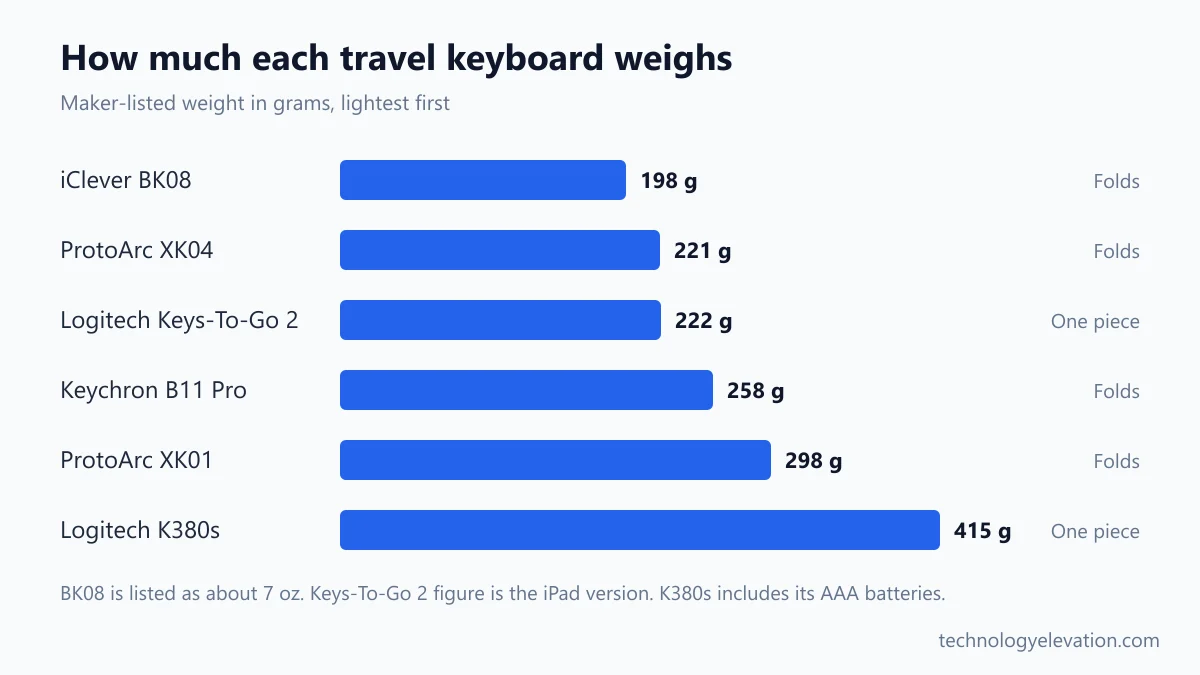
The ProtoArc XK04 is the best travel keyboard for a phone. It folds to 5.74 by 4.07 inches, small enough for a jacket pocket, weighs 7.8 oz (221 g) and comes with a collapsible phone holder. ProtoArc lists it at $39.99.
Key specs: Compact folding layout without a number pad, Bluetooth for 3 devices, rechargeable 90 mAh Li-Po battery with USB-C charging, up to 150 days of standby, 5.74 x 4.07 x 0.71 inches folded and 10.77 inches wide unfolded, 7.8 oz (221 g), phone holder included. List price: $39.99.
A 10.77-inch wide keyboard is far easier to hit than a glass keyboard on a 6-inch screen, and the holder props the phone up at eye level.
The catch is the battery. At 90 mAh, the XK04 has the smallest cell here, so charge it before a trip rather than counting on weeks of use.
Check the ProtoArc XK04 price on Amazon
iClever BK05: the best backlit folding keyboard
The iClever BK05 is the best backlit folding keyboard. Its three-color backlight makes typing possible on a dark plane or in a hotel room at night, and its 750 mAh battery lasts up to 300 hours with the lights off. iClever lists it at $52.99.
Key specs: Tri-fold design, three-color backlight, Bluetooth 5.1 for 3 devices plus a wired connection, 750 mAh battery rated for 5 hours with backlight on and up to 300 hours with it off, 90 days of standby, charges in under 4 hours, 291 x 117 x 8.25 mm unfolded and 166 x 120 x 14.8 mm folded. List price: $52.99.
The BK05 has by far the biggest battery of the folding picks, but the backlight drains it fast. Five hours with the lights on is one long flight, so use it only when you need it.
The catch is the familiar tri-fold gap. The BK05 has two seams, and the keys either side of them sit slightly apart from their neighbors.
Check the iClever BK05 price on Amazon
iClever BK08: the best small folding keyboard with a touchpad
The iClever BK08 is the best small folding keyboard with a touchpad. It weighs about 7 oz, folds to a third of its open size, and still fits a touchpad beside the keys. Its aluminum body pairs with three Bluetooth devices, and iClever lists it at $57.99.
Key specs: Tri-fold aluminum body, built-in touchpad, keys about 90% of standard size, Bluetooth for 3 devices, rechargeable lithium polymer battery, about 7 oz, works with iOS, macOS, Windows and Android. List price: $57.99.
The BK08 makes sense if the XK01 TP sounds too big. At about 7 oz, you will barely notice it in a bag.
The catch is the 90% keys. Fast touch typists will notice the tighter spacing for the first day or two, and the narrower layout makes hinge seams more noticeable.
Check the iClever BK08 price on Amazon
Logitech Keys-To-Go 2: the best non-folding travel keyboard for tablets
The Logitech Keys-To-Go 2 is the best travel keyboard if you can live without a hinge. It is one solid piece just 4.35 to 8.97 mm thick, with a built-in cover, and its coin cells last up to three years. Logitech lists it at $79.99.
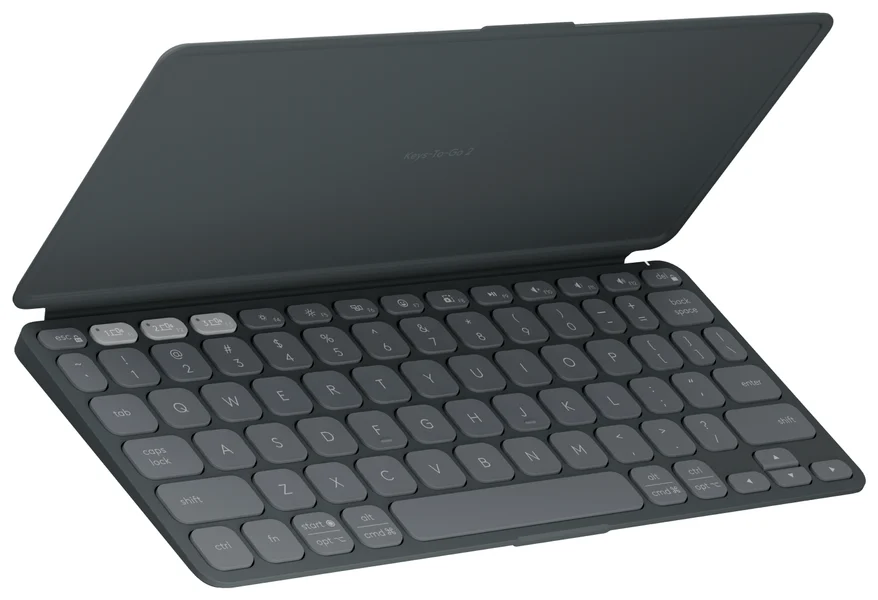
Key specs: One-piece slim design with a fold-over cover, low-profile scissor keys, Bluetooth for up to 3 devices with Easy-Switch, 2 replaceable CR2032 coin cells rated up to 3 years (at 2 hours of typing a day), 250 x 105 mm and 222 g (iPad version), universal version for Android, ChromeOS, Windows, iPadOS, iOS and macOS, plus an Apple version. List price: $79.99.
No hinge means no gap. The keys form one continuous layout, which is why many people type faster on it than on any folding model.
OS support is the best here. The keyboard detects iPadOS, iOS, macOS, Windows and ChromeOS automatically, and you can force a layout by holding Fn with O, G, P or C for three seconds.
The catch is size: at 250 mm long, it is a tablet-sized slab, not a pocket item. Keep the spare coin cells away from children, too. The US Consumer Product Safety Commission warns that a swallowed coin battery can cause severe burns in as little as two hours.
Check the Logitech Keys-To-Go 2 price on Amazon
Logitech Pebble Keys 2 K380s: the best budget compact keyboard
The Logitech Pebble Keys 2 K380s is the best budget compact keyboard for travel. It costs $39.99, switches between three devices, runs up to 36 months on two AAA batteries and works with Windows, macOS, iPadOS, iOS and Android. It does not fold.
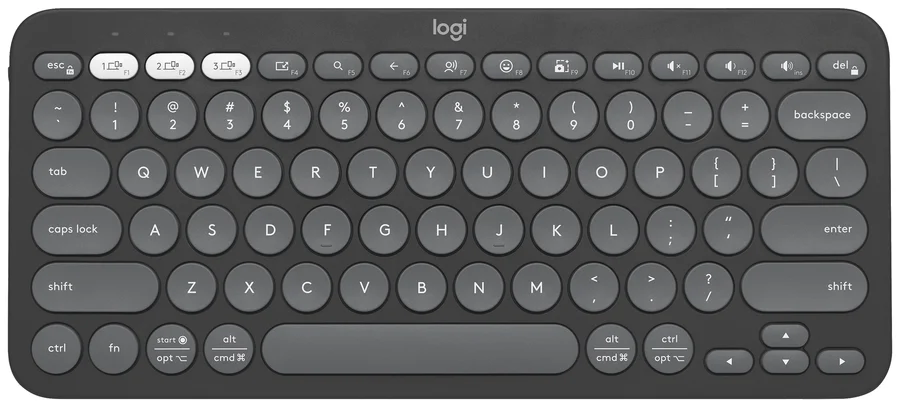
Key specs: Compact layout without number pad, round scissor-style keys, 10 customizable Fn keys (through Logi Options+ on Windows and macOS), Bluetooth Low Energy for up to 3 devices with Easy-Switch, Logi Bolt receiver supported but not included, 2 x AAA batteries rated up to 36 months, 279 x 124 x 16 mm, 415 g with batteries. List price: $39.99.
The catch is weight. AAA cells are easy to find anywhere, but at 415 g, the K380s is nearly twice as heavy as the XK04, and its 279 mm width takes up most of a small backpack sleeve.
Check the Logitech Pebble Keys 2 K380s price on Amazon
Need a keyboard that stays on a desk instead? The quiet, multi-device boards that suit business keyboards are a better fit for eight-hour days, and the wider field of keyboards covers gaming and mechanical options.
Six checks for choosing a folding keyboard
Choose a folding keyboard by matching its folded size to the bag or pocket you will carry it in, then its pairing to the devices you own. Touchpad, backlight and number pad come next. Battery type matters most for long trips away from a charger.
- Measure where it will live. Pocket models like the XK04 fold to under 6 inches. Full-size tri-folds like the XK01 fold to about 8.5 inches, which suits a jacket pocket or bag.
- Count your devices. All eight picks remember three Bluetooth devices. The Keychron B11 Pro adds 2.4 GHz and cable, which helps on laptops and work PCs.
- Decide on a touchpad. Tablets and TV boxes benefit most. On a laptop with its own trackpad, skip it and get bigger keys instead.
- Check the key size. Look for keycaps near 0.65 inches for full-speed typing. Keys around 90% of standard size feel cramped at first.
- Think about light. Only the iClever BK05 here is backlit. If you type on night flights, that matters.
- Pick a battery type. Rechargeable models need a USB-C cable. Logitech’s coin cell and AAA models need no charging at all for years.
Pair the keyboard with the right tablet and stand and you have a light laptop replacement. A tablet for business does most office work, and an iPad stand raises the screen so you are not hunched over the tray table.
Folding hinges trade typing comfort for pocket size
Every folding keyboard pays for its small size with a seam. Where the hinge sits decides how much you notice it. A tri-fold splits the rows twice, a half-fold once, and the Alice layout hides its single fold in the gap between your hands.
The gap is the first thing new owners notice. Keys beside a hinge are often slightly further apart than the rest, so fingers that expect a standard spacing hit the edge of a key or miss it.
Flex is the second issue. A hinge is a weak point, so pressing hard near the seam can make that section dip. On a firm table you will barely notice. On your knees, the halves can sag and the keyboard may even fold itself off.
Durability varies by maker. ProtoArc rates the XK01’s hinges for 100,000 folds, which is about 27 years of folding it ten times a day.
Multipoint Bluetooth and OS shortcuts decide daily comfort
Multipoint Bluetooth means the keyboard stores pairings for several devices and switches between them with one key. All eight picks store three, often on Fn plus Q, W and E, or on dedicated Easy-Switch keys. Only one device is active at a time.
Layout matters as much as pairing. Windows, Android and Apple systems use different modifier keys, so a keyboard set to the wrong system turns Command into Alt or loses the Home key. Logitech handles this best: the Keys-To-Go 2 detects most systems itself, and you can force the iPadOS, Android, Windows or ChromeOS layout by holding Fn with O, G, P or C.
iPad owners get the most out of any keyboard. Apple’s iPad keyboard shortcuts include Command-Tab to switch apps and Command-Space for Spotlight, and in iPadOS 26 the shortcuts for each app sit in the menu bar.
Android works with any Bluetooth keyboard, and Ctrl shortcuts for copy, paste and undo behave much as they do on Windows. If you mainly type on a Chromebook for students, the Keys-To-Go 2 universal version is the only pick here with a dedicated ChromeOS layout.
Frequently asked questions about folding keyboards
What is the best folding keyboard?
The Keychron B11 Pro is the best folding keyboard for most people. It folds in half along a split Alice layout, connects by Bluetooth, 2.4 GHz or cable, and lasts up to 138 hours per charge. Its list price is $64.99.
Are folding keyboards good for typing?
Yes, for emails, notes and documents on the go. The hinge leaves a small gap between some keys, so most people need a few days to adjust. For eight-hour days, a one-piece keyboard is more comfortable.
Which folding keyboard has a touchpad?
The ProtoArc XK01 TP and the iClever BK08 both have built-in touchpads. The XK01 TP has full-size keys and a multi-touch trackpad, while the BK08 is smaller and lighter at about 7 oz.
Do folding keyboards work with iPad and Android?
Yes, most do. The ProtoArc XK01, both iClever picks and both Logitech picks list iOS and Android support. The Logitech Keys-To-Go 2 also switches its key layout for each system with an Fn shortcut.
Can one folding keyboard connect to several devices?
Yes. All eight picks store pairings for three Bluetooth devices and switch between them with a key press. The Keychron B11 Pro also connects over 2.4 GHz and a USB-C cable.
Is there a foldable mechanical keyboard?
Rarely. Even low-profile mechanical switches are too tall for a keyboard this thin, so folding keyboards use scissor switches. The Keychron B11 Pro comes from a mechanical keyboard brand but uses scissor keys.
Last checked and sources
Last checked on 15 November 2026 by Abdullah Kabeer. We compared folding and compact travel keyboards on sale in the US using manufacturer specs, US list prices and launch announcements, and checked each pick against the CPSC recall database.
- Keychron, B11 Pro product listing, plus launch coverage from Cult of Mac and Guru3D
- ProtoArc, US product pages for the XK01, XK01 TP and XK04, and the XK01 TP launch release
- iClever, US product pages for the BK05 and BK08
- Logitech, US product pages, the Keys-To-Go 2 launch release and the Keys-To-Go 2 getting started guide
- Apple Support, iPad keyboard shortcuts
- US Consumer Product Safety Commission, recall database and coin battery guidance
We update this buying guide when keyboards launch, change price or are discontinued.
Technology Elevation is reader-supported. As an Amazon Associate, we earn from qualifying purchases. When you buy through links on this page, we may earn a small commission at no extra cost to you.

GIPHY App Key not set. Please check settings
2 Comments