

 Haris Khan
A neighbour watches you tap a code into your new front door lock and asks the question everyone asks: “What happens when someone hacks it?” Fair question. A lock that talks to your phone sounds like a lock that strangers could talk to as well.
So, are smart locks safe? Mostly, yes, and usually for boring reasons. The bolt that stops a kicked door is the same metal bolt inside a normal deadbolt, and the radio parts mainly decide who is allowed to turn it. The real risks are a weak bolt, a sloppy app, a dead battery and a maker that stops supporting the product.
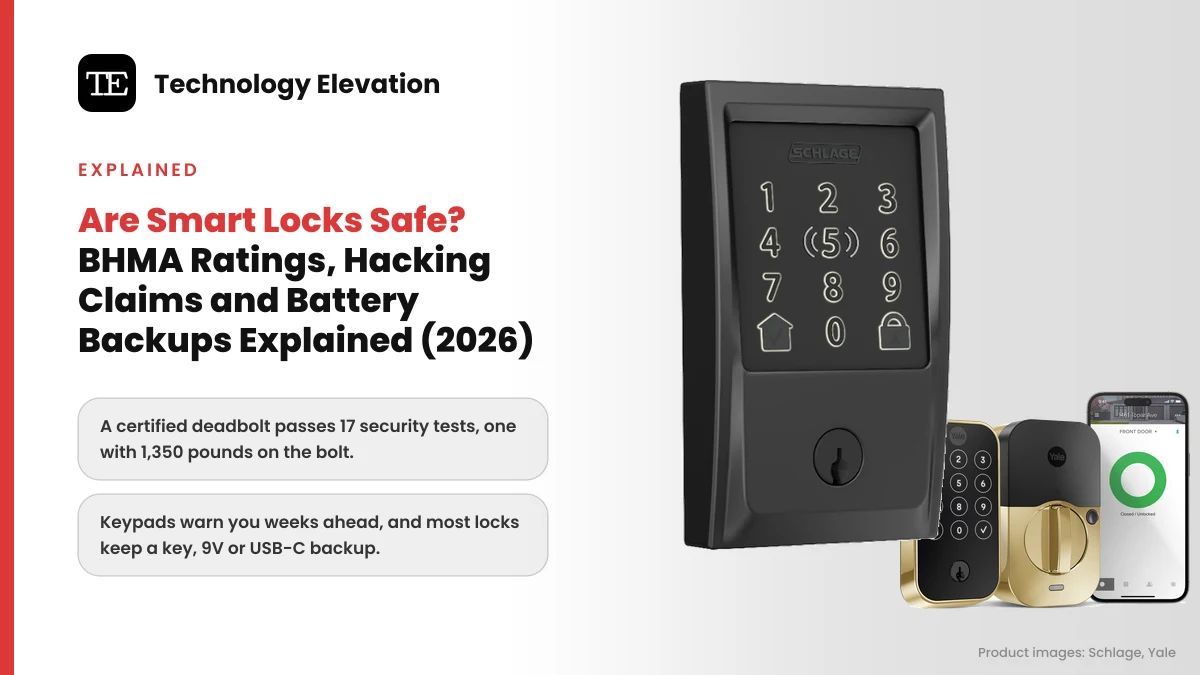
Strength is the easiest part to check. The Builders Hardware Manufacturers Association runs a Secure Home label for residential locks, and its FAQ says a certified deadbolt passes seventeen security tests, one of which loads 1,350 pounds of force against the bolt.
Below is how to read those ratings, what Matter and Thread change, which hacking stories turned out to be real, and how to get in when the batteries die. We checked every claim against maker support pages, standards bodies and US government records on 19 November 2026.
Smart locks are safe when the hardware is rated and the setup is careful
A smart lock is as safe as a good keyed deadbolt when it carries a BHMA rating, gets regular firmware updates, uses a strong code and has a backup way in. Most failures come from cheap hardware, weak app security, old firmware or flat batteries, not from movie-style hacking.
Five checks cover nearly all of the risk:
- Look for a BHMA Certified rating or an ANSI/BHMA grade on the box or the maker’s page.
- Keep the lock’s firmware and the phone app updated.
- Set a code longer than four digits, and give guests their own codes on a schedule.
- Keep a working backup: a physical key, a 9V jump-start point or a USB-C emergency port.
- Turn on low-battery alerts and change the batteries when the first one arrives.
None of these needs special skill. Most people skip step 4 until the evening the keypad goes dark in the rain.
If you are still choosing, hold any of the keyless entry door locks on your shortlist up against these five points before you buy.
ANSI/BHMA grades and Secure Home letters measure how strong the lock is
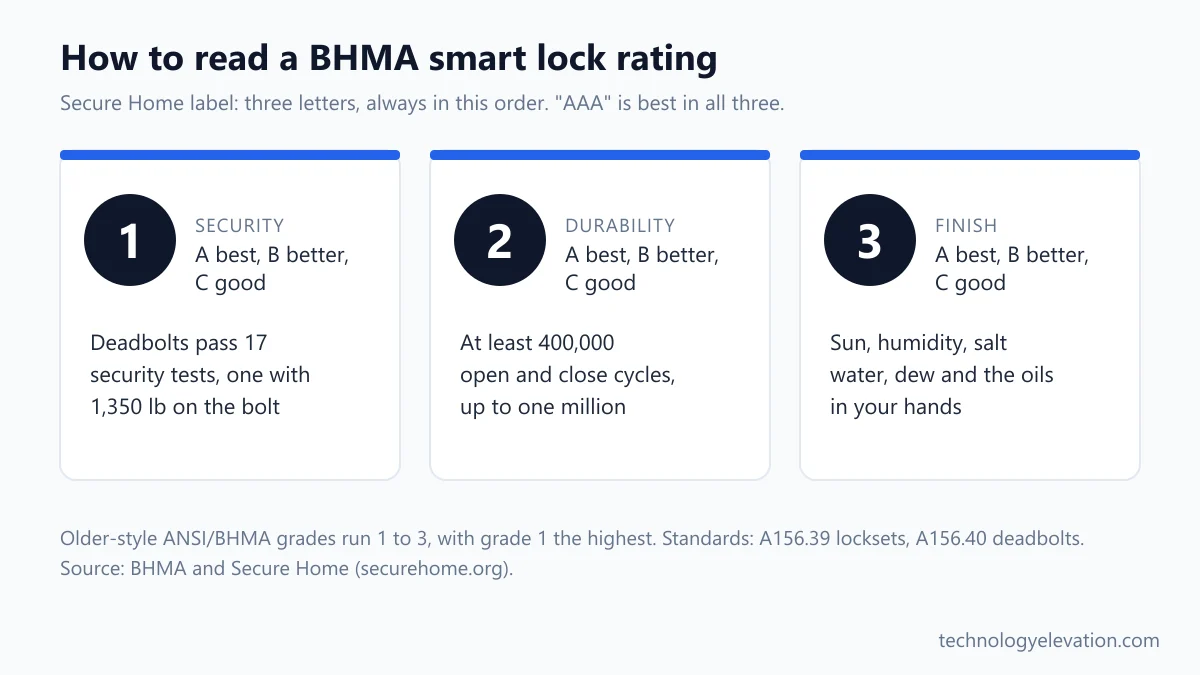
ANSI/BHMA ratings come from lab tests for force, wear and weather. Older-style grades run from 1 to 3, with grade 1 the highest. The newer residential Secure Home label gives three letters for security, durability and finish, where A means best and C means good.
BHMA’s own product grade page says grades 1, 2 and 3 are defined by progressive performance levels in each standard, and grade 1 is the top. Many smart lock listings still quote a grade this way.
For homes, BHMA now splits two standards out: A156.39 for locksets and latches, and A156.40 for residential deadbolts. Products certified to them get the Secure Home label, which reads like a school report: one letter for each category, always in the same order.
| Letter position | What it rates | What the test involves |
|---|---|---|
| 1st: Security | Resistance to impact and force | Deadbolts pass seventeen security tests, including 1,350 pounds of force on the bolt |
| 2nd: Durability | Smooth use over years | At least 400,000 open and close cycles, and up to one million |
| 3rd: Finish | Weather and wear on the surface | Sun, humidity, salt water, dew and the oils in your hands |
So “AAA” means best in all three. Schlage lists the Encode Plus as an “AAA Certified Deadbolt”, for example. A lock rated “CCA” has a top-grade finish but only good security and durability, which is fine for a bedroom and weak for a front door.
Watch the wording. “Certified” means the model passed lab testing for the label. Phrases like “tested to BHMA standards” or “complies with the same safety standard as” describe a target, so look the exact model up in BHMA’s Certified Products Directory before you rely on it. Aqara, for instance, says its U100 complies with the same safety standard as BHMA Level 3 for structural security.
Real smart lock hacks were app and Bluetooth flaws, not mind-reading radios
The smart lock failures documented in US government records come down to weak apps, unencrypted Bluetooth, poor account security and, in one case, a back panel that could be unscrewed. None involved a well-built lock with encrypted links being opened over the air.
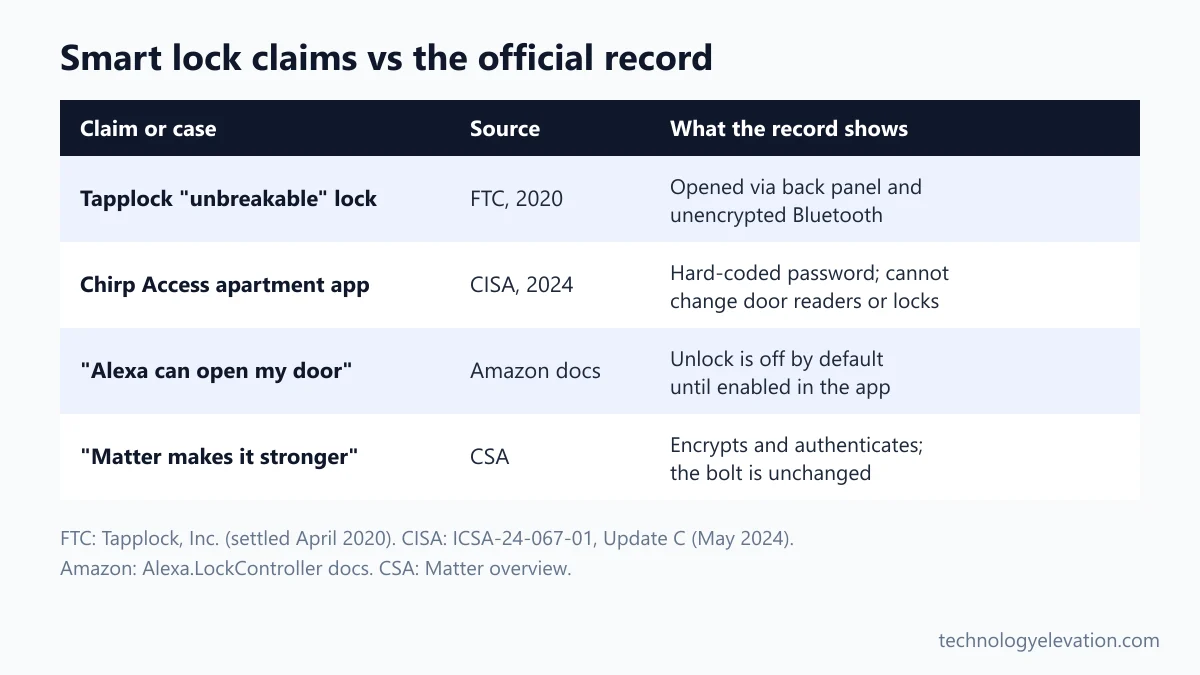
The clearest case is Tapplock. In April 2020 the US Federal Trade Commission announced a settlement with the Canadian maker, which had called its fingerprint padlock “unbreakable”. The FTC said researchers could open the lock by unscrewing the back panel and by exploiting the unencrypted Bluetooth connection between the app and the lock.
The FTC also said other flaws stopped owners from properly revoking access, and that researchers could bypass the account login. The FTC gave final approval to the order on 20 May 2020.
Headlines can also run ahead of the facts. In March 2024, CISA, the US cybersecurity agency, published an advisory on the Chirp Access app used in some apartment buildings, which contained a hard-coded password. The revised advisory, last updated 2 May 2024, gives it a CVSS 3.1 base score of 4.3 out of 10 and says the password cannot be used to change the door readers or locksets.
Those two stories carry the useful lesson. Physical build and app security matter more than the radio type. A lock with a solid bolt, encrypted links and a maker that ships fixes is a hard target. The BHMA force tests exist because a kicked or pried door is the attack every lock has to survive.
Matter and Thread change how a lock talks, not how strong its bolt is
Matter is a shared smart home standard that lets one lock work with Apple Home, Google Home and Alexa. Thread is the low-power mesh network many Matter locks use. Both add encrypted, authenticated connections, but neither changes the bolt, the strike plate or the BHMA rating.
The Connectivity Standards Alliance, which runs Matter, says authenticated onboarding, encrypted communication and standardised security mechanisms protect data and confirm that a device is genuine. Thread provides security at the network layer, according to the Thread Group, and runs on the power-efficient IEEE 802.15.4 radio.
For a lock, the practical gains are local control and battery life. Thread runs on a radio designed for low power, which suits a device that lives on four AA batteries. If you are new to the standard, Matter and Thread take a few minutes to understand, mostly because of the hub rules.
Matter locks still need extra gear. Yale says its Smart Lock with Matter needs a compatible Matter controller and a Thread border router for remote access. Schlage lists the Encode Plus as Matter Certified and working with Thread. Aqara’s U100 runs on Zigbee and needs a Matter-supported Aqara hub to join Matter.
Your router matters too. A lock on the edge of weak Wi-Fi drops offline more often, and a mesh Wi-Fi system is the usual fix for a front door far from the router.
Voice assistants and phone keys need a few settings checked
Voice assistants and phone keys are safe with careful setup. Alexa cannot unlock a lock until you turn unlocking on. Google Home uses 4 to 8 digit passcodes for Matter locks. Apple home keys can require Face ID before the door opens.
Amazon’s developer documentation says that, by default, you can’t unlock a device with Alexa. Owners have to enable the unlock feature in the Alexa app first. Leave it off if a smart speaker sits near an open window.
In Google Home, compatible Matter locks and the Nest x Yale Lock use personal and guest passcodes of 4 to 8 digits. Guest codes can run on a schedule, and you can revoke or edit them later. Use that instead of handing the cleaner your own code.
Apple home keys live in the Wallet app. Apple’s iPhone guide offers two modes: Express Mode, which unlocks without Face ID or Touch ID when you hold your phone near the lock, and Require Face ID or Passcode. Pick the second if your phone often sits unlocked on a hall table.
Cameras complete the picture. A video doorbell beside the lock shows who is at the door before you unlock it remotely, and home assistant devices can run routines that lock everything at night.
Dead batteries rarely lock you out if you keep one backup ready
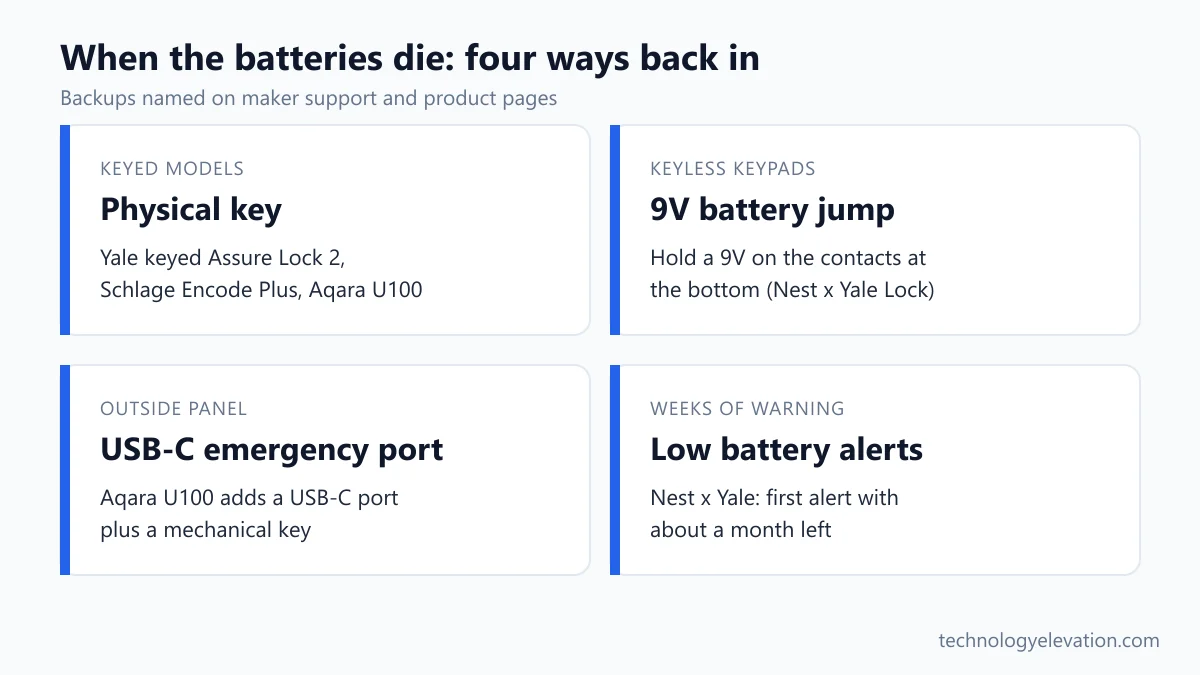
Smart locks warn you well before the batteries die, usually through the app, a light or a voice prompt. Most models also keep a backup: a physical key, terminals for a 9V battery under the keypad, or a USB-C emergency port. The risk is ignoring weeks of warnings.
Google’s help page on a drained Nest x Yale Lock shows how one lock handles it. The app sends a first alert when about a month of battery life is left, and a second when the batteries are critically low.
If the lock goes completely dark, Google says to hold a standard 9V alkaline battery on the contacts at the bottom of the lock. The keypad wakes up, the lock tells you the batteries are very low, and you keep the battery in place while you type your passcode.
Other makers use different backups:
- Yale Assure Lock 2: runs on 4 AA alkaline batteries, sends low-battery alerts and gives an estimate of when to replace them. Keyed models include a backup key, while Key Free models do not.
- Aqara U100: Aqara quotes up to 8 months of battery life from AA batteries, and adds both a mechanical key and a USB-C emergency charging port on the outside panel.
- Schlage Encode Plus: battery powered, with a keyed cylinder on the front of the lock.
Use fresh alkaline cells unless the maker says otherwise. Google warns against rechargeable NiMH batteries in the Nest x Yale Lock. Keep a spare pack of AAs in the car, not in a drawer behind the locked door.
Offline and end-of-support risks are the hidden smart lock problem
When a smart lock loses its internet link, the keypad and key normally keep working, but the app, alerts and remote access stop. The bigger long-term risk is a maker ending support for a hub or service the lock depends on, which can force you to buy new parts.
Google’s own history shows how this plays out. Support for Nest Secure ended on 8 April 2024, so Nest x Yale Locks that used a Nest Guard to reach Wi-Fi had to switch to a Nest Connect. Google says eligible owners were emailed in January 2024 with an offer of a free Nest Connect.
An earlier change hit in late July 2022. A Nest Hub Max update to prepare for Matter meant the Hub Max could no longer act as a bridge for the Nest x Yale Lock. In both cases, Google notes that an offline lock still opens with the keypad.
Two habits limit the damage. Choose a lock that works with an open standard such as Matter, so you are not tied to one maker’s hub. And make sure your lock opens without the internet, by keypad, key or both.
How to set up a smart lock so it stays secure
Set up a smart lock securely by fitting it to a solid door frame, updating its firmware, using long and separate codes, switching on two-factor sign-in for the app, limiting voice unlock, and testing the backup entry method before you need it. Each step takes minutes.
- Fit the lock to a solid door with a strong strike plate. The best bolt fails if the frame splits.
- Install the maker’s app, create the account and turn on two-factor sign-in if the app offers it.
- Update the lock’s firmware during setup, then let the app update it automatically.
- Set your own code of six digits or more, and create separate scheduled codes for guests.
- Turn on auto-lock and choose a delay that suits how you use the door.
- Leave voice unlock off unless you really need hands-free entry.
- Test the backup: use the key, or try the 9V or USB-C method once while the batteries are still good.
- Review the activity log every few weeks and delete codes for people who no longer need them.
Renters should check the lease before swapping a deadbolt. Yale sells a retrofit smart lock that it says installs in minutes without changing the door’s outside look.
Once the basics are done, an indoor security camera facing the hallway gives you a record if a code ever turns up where it should not. And if your current lock fails most of the checks above, newer keyless entry door locks with BHMA ratings and Matter support are the upgrade to compare.
Frequently asked questions about smart lock safety
Can smart locks be hacked?
Some smart locks have been hacked, mostly cheap models with unencrypted Bluetooth or weak app logins, such as the Tapplock case the FTC settled in 2020. A lock with encrypted connections, a solid bolt and regular firmware updates is a much harder target.
What happens to a smart lock when the batteries die?
The lock stops responding to the app and keypad, but it stays locked. You get warnings for weeks beforehand, and most models offer a backup: a physical key, a 9V battery held on contacts at the bottom of the lock, or a USB-C emergency port.
What ANSI grade should a front door smart lock have?
Aim for ANSI/BHMA grade 1 or 2, or a Secure Home security rating of A or B, on a front door. BHMA says grade 1 is the highest. Lower ratings suit bedrooms and closets better than exterior doors.
Is a Matter smart lock more secure?
Matter adds authenticated setup and encrypted connections, and it lets a lock work locally with Apple Home, Google Home and Alexa. It does not make the bolt any stronger. Check the BHMA rating for physical strength.
Are keyless smart locks safe?
Keyless smart locks are safe if you understand the backup. Without a key cylinder, nobody can pick the lock, but you rely on batteries, alerts and an emergency power method such as a 9V jump or a USB-C port. Change batteries at the first alert.
Can Alexa unlock my door?
Alexa can unlock a connected lock only after you enable unlocking in the Alexa app. Amazon says unlocking is off by default. Leave it off unless you need hands-free entry, and never enable it on a speaker people can reach from outside.
Last checked and sources
Last checked on 19 November 2026 by Haris Khan. We compared each claim with standards bodies, maker support pages and US government records, and kept only what those sources state.
- BHMA: Product Grade Levels and Certified Products Directory; BHMA Secure Home: ratings, combinations and FAQ pages
- US Federal Trade Commission: Tapplock, Inc. case and press releases (April and May 2020)
- CISA: advisory ICSA-24-067-01, Chirp Systems Chirp Access (Update C)
- Connectivity Standards Alliance: Matter overview; Thread Group: What is Thread
- Google Home Help: Nest x Yale Lock battery and 9V articles, lock control and passcodes, Nest Secure end of support, Nest Hub Max bridge change
- Apple iPhone User Guide: Unlock your door with a home key
- Amazon Alexa developer documentation: Alexa.LockController
- Schlage Encode Plus, Yale Assure Lock 2 and Aqara Smart Lock U100 product pages
We update this guide when standards change, makers end support for a product, or a new security advisory is published.


GIPHY App Key not set. Please check settings