

 Abdullah Kabeer
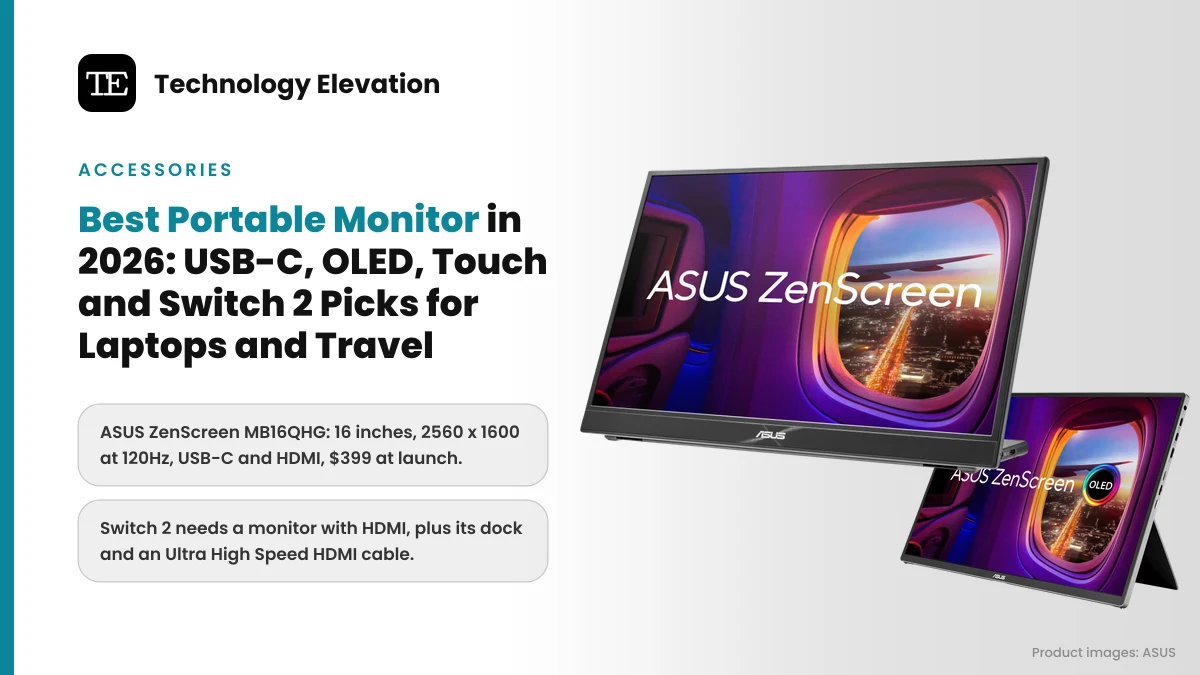
Look around any airport gate or hotel lobby this month and you will spot a laptop with a second screen propped beside it, thin as a magazine and plugged in with one cable. Picking the best portable monitor used to mean settling for a dim 1080p panel. In 2026 you can get 120Hz, OLED, 4K, touch and even two screens that fold like a book.
The other change is Nintendo. Plenty of people now want a travel screen for a Switch 2 as well as a laptop, and the rules are stricter than most product listings admit. Nintendo’s own setup steps call for the Switch 2 dock, the Switch 2 AC adapter and an Ultra High Speed HDMI cable, so a USB-C-only monitor will not work with it.
That one detail splits this list in two. Some picks have an HDMI port for consoles, cameras and older laptops. Others drop HDMI to save weight and rely entirely on USB-C.
We compared the official specs and US list prices of current models and sorted them by job, from long flights and coffee-shop desks to handheld gaming.
The best portable monitor for most people is the ASUS ZenScreen MB16QHG
The ASUS ZenScreen MB16QHG is the best portable monitor for most people. Its 16-inch 2560 x 1600 screen runs at 120Hz, reaches 500 nits, and has both USB-C and full-size HDMI, so it works with laptops and a docked Switch 2. It launched at $399.
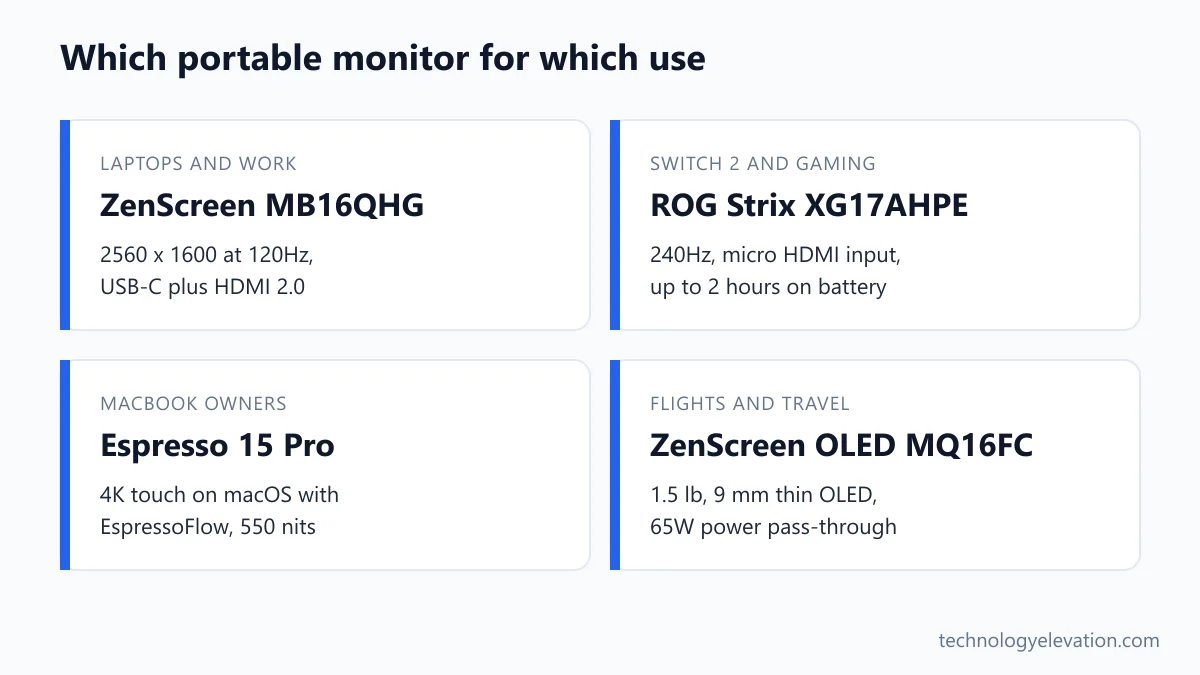
Every pick, by the job it does best:
- Best overall: ASUS ZenScreen MB16QHG
- Best touchscreen: ViewSonic TD1656-2K
- Best OLED and lightest for travel: ASUS ZenScreen OLED MQ16FC
- Best 4K and best for MacBook: Espresso 15 Pro
- Best for gaming and Switch 2: ASUS ROG Strix XG17AHPE
- Best dual screen: ASUS ZenScreen Duo OLED MQ149CD
- Best wireless: ViewSonic VG1656N
- Best on a budget: ViewSonic VA1655
| Model | Screen | Refresh | HDMI | Weight | List price |
|---|---|---|---|---|---|
| ASUS ZenScreen MB16QHG | 16 in IPS, 2560 x 1600 | 120Hz | Yes | 2.65 lb | $399 |
| ViewSonic TD1656-2K | 16 in IPS touch, 2560 x 1600 | 60Hz | No | 1.8 lb (2.8 lb with cover) | $379.99 |
| ASUS ZenScreen OLED MQ16FC | 16 in OLED, 1920 x 1200 | 60Hz | Mini HDMI | 1.5 lb | $279 |
| Espresso 15 Pro | 15.6 in IPS touch, 3840 x 2160 | 60Hz | No | About 1.8 lb | $699 with stand |
| ASUS ROG Strix XG17AHPE | 17.3 in IPS, 1920 x 1080 | 240Hz | Micro HDMI | 2.34 lb | $469 |
| ASUS ZenScreen Duo OLED MQ149CD | Two 14 in OLED, 1920 x 1200 each | 60Hz | Mini HDMI | 2.36 lb | $599 |
| ViewSonic VG1656N | 16 in IPS, 1920 x 1200 | 60Hz | No | About 3 lb with cover | $329.99 |
| ViewSonic VA1655 | 15.6 in IPS, 1920 x 1080 | 60Hz | Mini HDMI | 1.5 lb | $109.99 |
Portable monitors are a Black Friday staple, and street prices swing a lot. Treat the list prices above as a ceiling, not what you will actually pay this month.
ASUS ZenScreen MB16QHG: the best portable monitor overall
The ZenScreen MB16QHG wins because it does the most jobs well. A sharp 16:10 screen gives you more room than a laptop panel, 120Hz makes scrolling smooth, and HDMI 2.0 means consoles and cameras plug straight in. The trade-off is no built-in speakers.
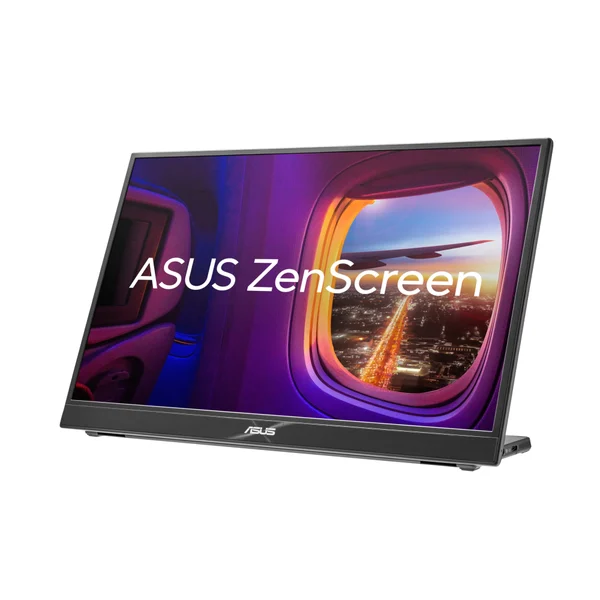
Key specs: 16-inch 2560 x 1600 IPS panel, 120Hz, 500 nits typical brightness, VESA DisplayHDR 400, 100% DCI-P3 color, two USB-C ports with DisplayPort Alt Mode, one HDMI 2.0 port, headphone jack, L-shaped kickstand, tripod socket, 7 mm thick, 2.65 lb. Launch price: $399.
The 16:10 shape is the quiet win here. You get extra height for a spreadsheet or a document, which is exactly where most laptop screens feel cramped.
The L-shaped kickstand works in landscape or portrait. Flip it sideways and you have a tall screen for code or a chat window, which is how a lot of developers use a second display.
The catch is power. ASUS notes that full brightness only unlocks with the power adapter plugged in, because the monitor holds back so it does not draw more than your laptop can supply. On battery in a hotel room, expect a dimmer screen. At 2.65 lb it is also heavier than the OLED picks below.
Buy the ASUS ZenScreen MB16QHG now on Amazon
ViewSonic TD1656-2K: the best touchscreen portable monitor
The ViewSonic TD1656-2K is the best touchscreen portable monitor. Its 16-inch 2560 x 1600 panel supports 10-point touch in Windows and, with ViewSonic’s free vTouch driver, on a Mac. Two USB-C ports pass through 65W of power. ViewSonic lists it at $379.99.
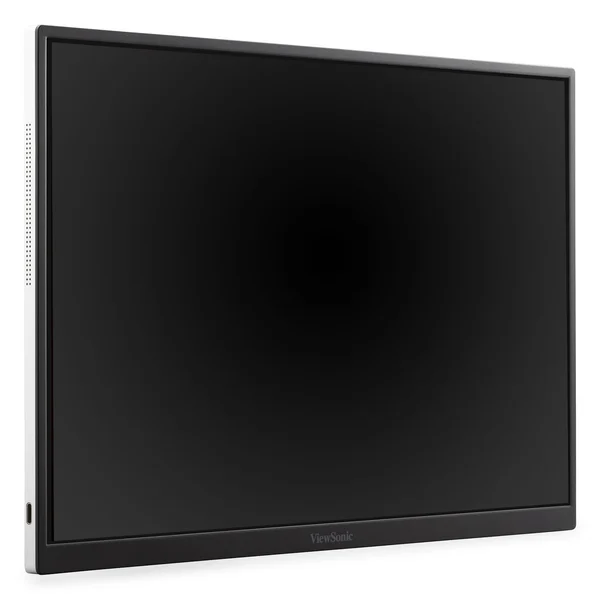
Key specs: 16-inch 2560 x 1600 IPS touchscreen, 60Hz, 330 nits, 10-point capacitive touch, two USB-C ports with 65W power delivery, smart cover stand with 50 mm of height adjustment, 20 to 70 degree tilt and portrait pivot, two 2W speakers, 1.8 lb without the cover and 2.8 lb with it.
Touch on a second screen sounds like a gimmick until you try scrolling a long PDF or dragging slides around with a finger. Windows 11 supports it natively. On a MacBook you install vTouch and get touch and gestures, which Apple’s own laptops still do not offer on their main screen.
One limit: ViewSonic says touch does not work with an iPhone or iPad.
The smart cover is more than a stand. It lifts the screen 50 mm and tilts it, so the display sits closer to eye level beside a laptop rather than flat on the table. The missing piece is HDMI, which rules it out for a Switch 2.
Buy the ViewSonic TD1656-2K now on Amazon
ASUS ZenScreen OLED MQ16FC: the best OLED portable monitor for travel
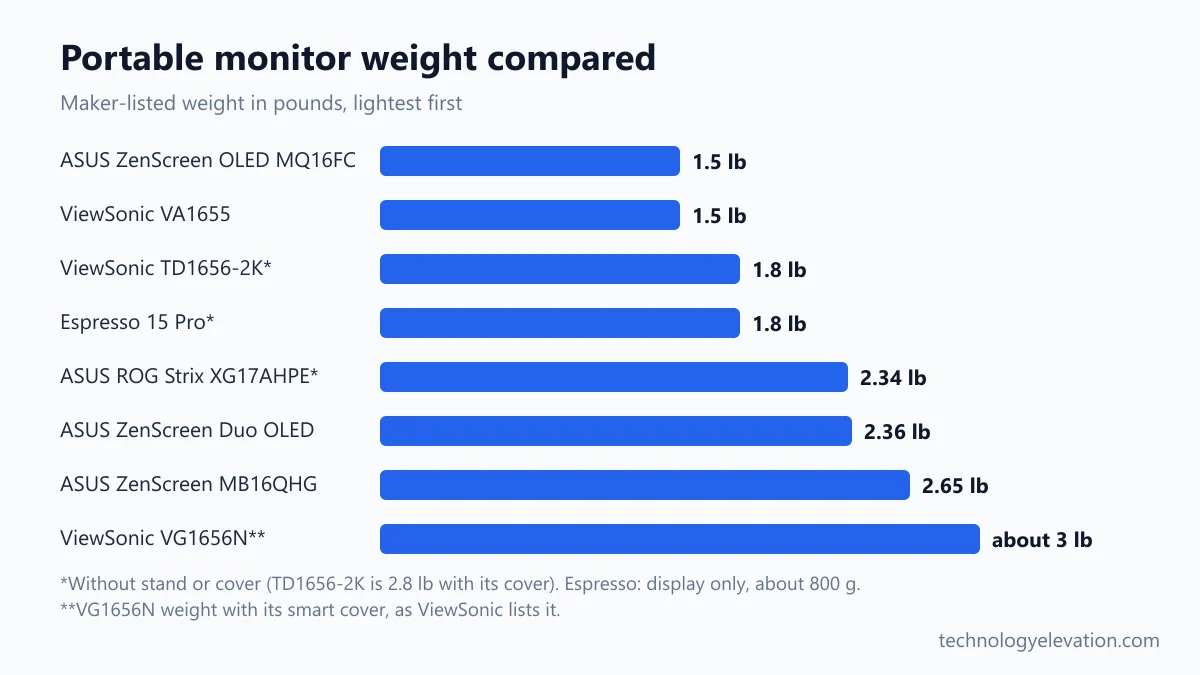
The ZenScreen OLED MQ16FC is the best OLED portable monitor and the lightest pick here at 1.5 lb. Its 16-inch OLED panel shows true blacks, it passes up to 65W through to your laptop, and it carries a US list price of $279.
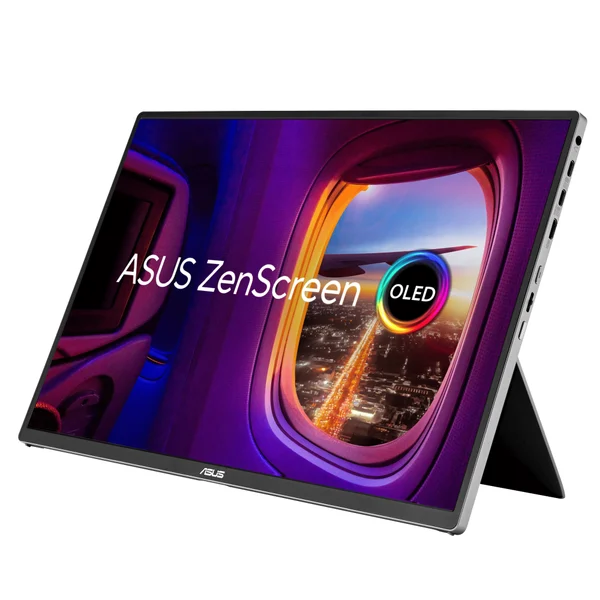
Key specs: 16-inch 1920 x 1200 OLED, 16:10, 60Hz, 1 ms response, 300 nits typical, two USB-C ports with DisplayPort Alt Mode, mini HDMI, headphone jack, up to 65W power pass-through, tripod socket, 9 mm thick, 1.5 lb. ASUS launched it in Europe in May 2026.
OLED pixels make their own light, so black areas switch off entirely. Movies on a dark plane look far better than on an IPS panel, which always glows a little.
Power pass-through matters on the road. Plug your laptop charger into the monitor, run one USB-C cable to the laptop, and both get power from a single wall socket. That saves hunting for a second outlet at a gate.
The honest catches are brightness and burn-in. At 300 nits it is dimmer than the MB16QHG, and the glossy screen picks up reflections. ASUS includes its OLED Care features to reduce burn-in risk, but avoid leaving a static taskbar on it for hours every day. Pack it in one of the budget laptop backpacks with a padded sleeve, since OLED glass does not like pressure.
Buy the ASUS ZenScreen OLED MQ16FC now on Amazon
Espresso 15 Pro: the best 4K portable monitor for MacBook owners
The Espresso 15 Pro is the best 4K portable monitor and the best match for a MacBook. It packs a 3840 x 2160 touchscreen into 15.6 inches, hits 550 nits, adds Mac touch through EspressoFlow, and costs $699 with its magnetic Stand+ included.
Key specs: 15.6-inch 3840 x 2160 IPS touchscreen, 60Hz, 550 nits, 100% Adobe RGB, 10-bit color (8-bit plus frame rate control), two USB-C ports, about 800 g (1.8 lb) for the display, magnetic Stand+ in the box. Unveiled at CES in January 2025 and named a CES Innovation Awards honoree.
4K on a 15.6-inch screen is very sharp. Text looks as crisp as it does on a MacBook’s Retina display, which is the main reason Mac owners find cheaper 1080p portables blurry next to their laptop.
The Stand+ is the clever part. A strong magnet holds the screen, so it switches between landscape and portrait in a second, and the stand raises it to sit level with your laptop screen. EspressoFlow adds touch on macOS and arranges the display next to your laptop for you.
The catches: $699 is a lot for a second screen, there is no HDMI, and it stays at 60Hz. If you are still choosing the laptop itself, the touchscreen MacBook Pro changes the case for a touch monitor.
Buy the Espresso 15 Pro now on Amazon
ASUS ROG Strix XG17AHPE: the best portable monitor for gaming and Switch 2
The ROG Strix XG17AHPE is the best portable monitor for gaming and for a docked Switch 2. Its 17.3-inch screen runs at 240Hz, a built-in battery gives up to two hours at full speed, and micro HDMI accepts consoles. ASUS lists it at $469.
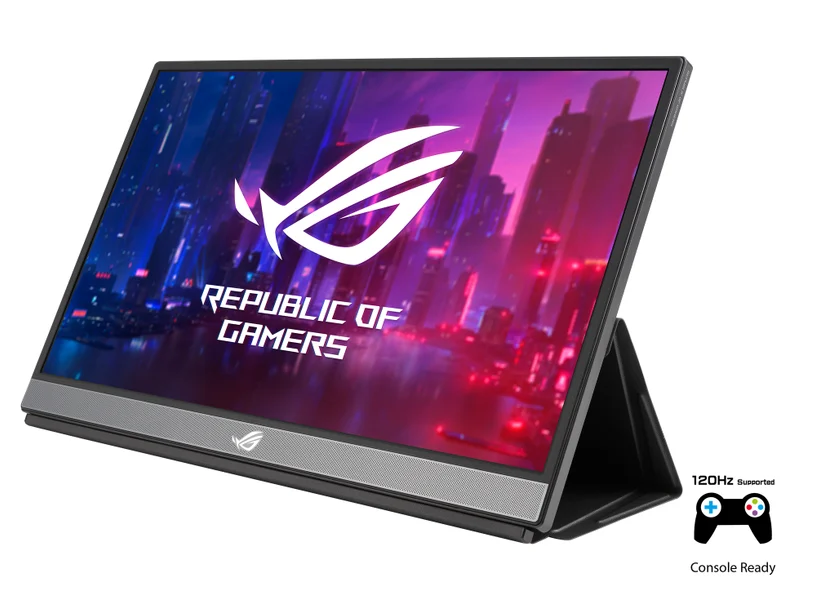
Key specs: 17.3-inch 1920 x 1080 IPS, 240Hz, 3 ms response, Adaptive-Sync, 300 nits, 7,800 mAh battery rated for up to 2 hours at 240Hz, two USB-C ports with DisplayPort Alt Mode, micro HDMI, two 1W speakers, Smart Cover stand, 2.34 lb without the stand.
The battery is the real reason to pick this one for a console. A docked Switch 2 already needs the dock’s own power adapter, so a monitor that runs on its own battery means one less cable and one less outlet in a hotel room.
ASUS says the HDMI input handles up to 240Hz, and it lists 1080p at 120Hz from a PS5 or Xbox Series X/S. Nintendo says the Switch 2 supports 120 fps when 1080p or 1440p output is selected, so this screen has headroom for the games that use it.
The catch is age. The XG17 design dates back to 2019, and the 1080p panel looks soft next to the 1600p picks. The USB-C ports also suit the handheld gaming PCs that output video over DisplayPort Alt Mode.
Buy the ASUS ROG Strix XG17AHPE now on Amazon
ASUS ZenScreen Duo OLED MQ149CD: the best dual-screen portable monitor
The ZenScreen Duo OLED MQ149CD is the best dual-screen portable monitor. Two 14-inch OLED panels fold on a 360 degree hinge, stack or stand like a book, and run from one USB-C cable. At 2.36 lb it weighs about the same as one MB16QHG. List price: $599.
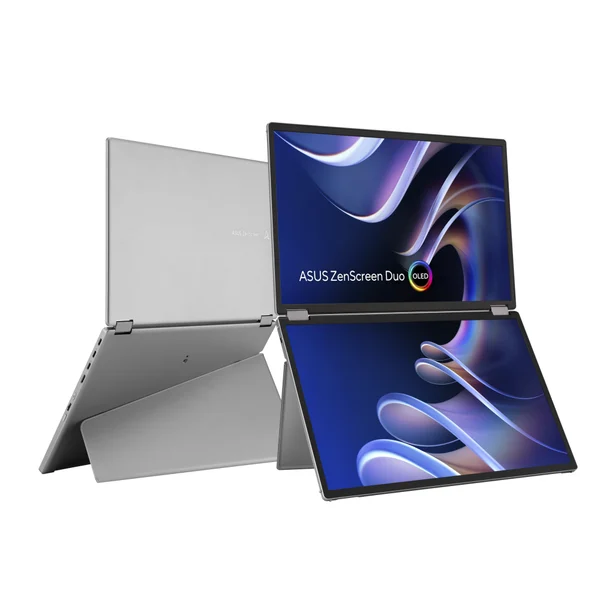
Key specs: two 14-inch 1920 x 1200 OLED panels, 60Hz, 400 nits typical and 500 nits peak, DisplayHDR 400 True Black, 100% DCI-P3, 10-bit color, two USB-C ports with DisplayPort Alt Mode, mini HDMI, kickstand, tripod socket, 2.36 lb, no speakers.
Stacked in landscape, the two screens give you a tall workspace above your laptop. Stood up like an open book, they become two portrait screens side by side. ASUS offers Independent, Extend, Mirror and Split modes, so you can even feed each panel from a different device.
The OLED panels share the strengths of the MQ16FC: deep blacks and rich color. They share the weaknesses too, with a glossy finish that reflects overhead lights.
The real catch is price. At $599 it costs more than two budget portables. It earns that only if you genuinely work across three screens, for example trading, editing or monitoring dashboards on the road.
Buy the ASUS ZenScreen Duo OLED MQ149CD now on Amazon
ViewSonic VG1656N: the best wireless portable monitor
The ViewSonic VG1656N is the best wireless portable monitor. A built-in 4,000 mAh battery runs it for up to 3 hours, and an included USB-C dongle casts your laptop or phone screen from almost 50 feet away. ViewSonic lists it at $329.99.
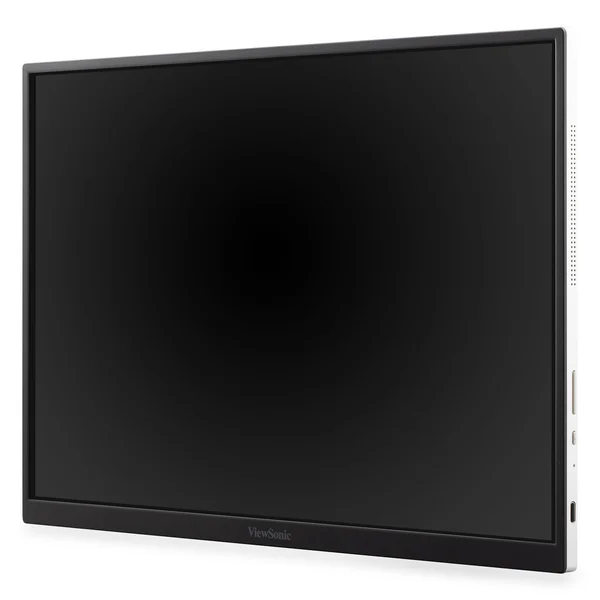
Key specs: 16-inch 1920 x 1200 IPS, 60Hz, 4,000 mAh battery rated for up to 3 hours, USB-C wireless casting dongle, two USB-C ports with 60W power delivery, smart cover stand, about 3 lb with the cover and 0.4 inches thick.
Wireless casting is handy in places where cables get in the way: a meeting room, a kitchen counter, or a client’s desk where you want to show a presentation without crawling under the table. You can mirror or extend your screen.
Read the small print, though. ViewSonic says auto-rotation only works over USB-C, not through the dongle, and the battery cannot charge your laptop. Three hours also covers a meeting, not a full workday. For a fixed desk, the wired picks above are sharper for the money.
Buy the ViewSonic VG1656N now on Amazon
ViewSonic VA1655: the best cheap portable monitor
The ViewSonic VA1655 is the best cheap portable monitor. For a list price of $109.99 you get a 15.6-inch 1080p IPS screen, USB-C plus mini HDMI, built-in speakers, a built-in stand and a 3-year warranty, which is rare at this price.
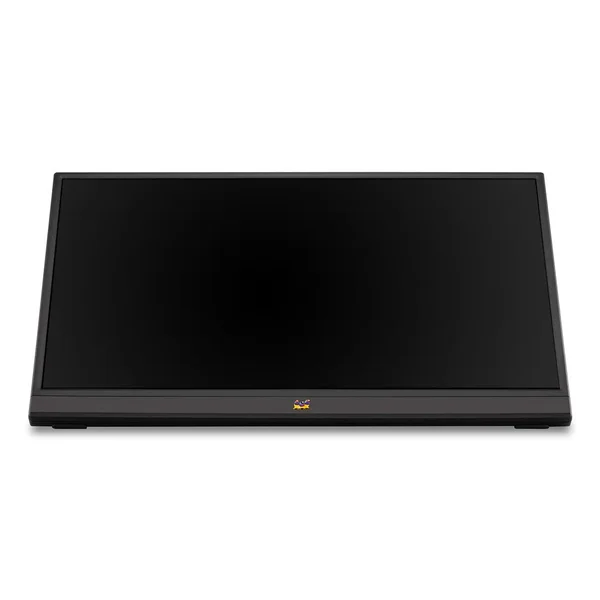
Key specs: 15.6-inch 1920 x 1080 IPS, 60Hz, 250 nits, two USB-C ports, mini HDMI 1.4, headphone jack, dual speakers, built-in stand for landscape or portrait, mini HDMI to HDMI cable and sleeve in the box, 3-year limited warranty on parts, labor and backlight.
For spreadsheets, email and a video call on the side, 1080p is fine. And because it has mini HDMI and speakers, it also works as a basic Switch 2 screen through the dock at 1080p, with sound coming out of the monitor itself.
The trade-offs are clear. At 250 nits it struggles next to a sunny window, and mini HDMI 1.4 tops out well below the 120Hz picks. Still, it is the easiest way to find out whether a second screen suits the way you work.
Buy the ViewSonic VA1655 now on Amazon
USB-C video only works if your laptop’s port supports DisplayPort Alt Mode
A portable monitor runs from one USB-C cable only when your laptop’s USB-C port carries video, a feature called DisplayPort Alt Mode. Thunderbolt and USB4 ports always do. Some cheap laptops have USB-C ports that charge and transfer files but cannot send a picture.
Look for a small DisplayPort logo or a lightning bolt (Thunderbolt) next to the port, or check the laptop maker’s spec sheet. ASUS states that every MacBook with Thunderbolt 3, Thunderbolt 4, Thunderbolt 5 or USB4 ports supports DisplayPort Alt Mode.
If your laptop’s port does not carry video, you have two options. Use the HDMI port on the monitor with a separate USB-C power supply, or add one of the USB-C hubs and docking stations that has an HDMI output.
Power is the other half of the story. A single cable carries both video and power, so a laptop running on battery drains faster. ASUS says the MB16QHG and Duo OLED limit their brightness when the laptop is their only power source. For long sessions, plug the monitor into a wall charger and let it pass power through to the laptop.
Nintendo Switch 2 needs its dock and an HDMI port on the monitor
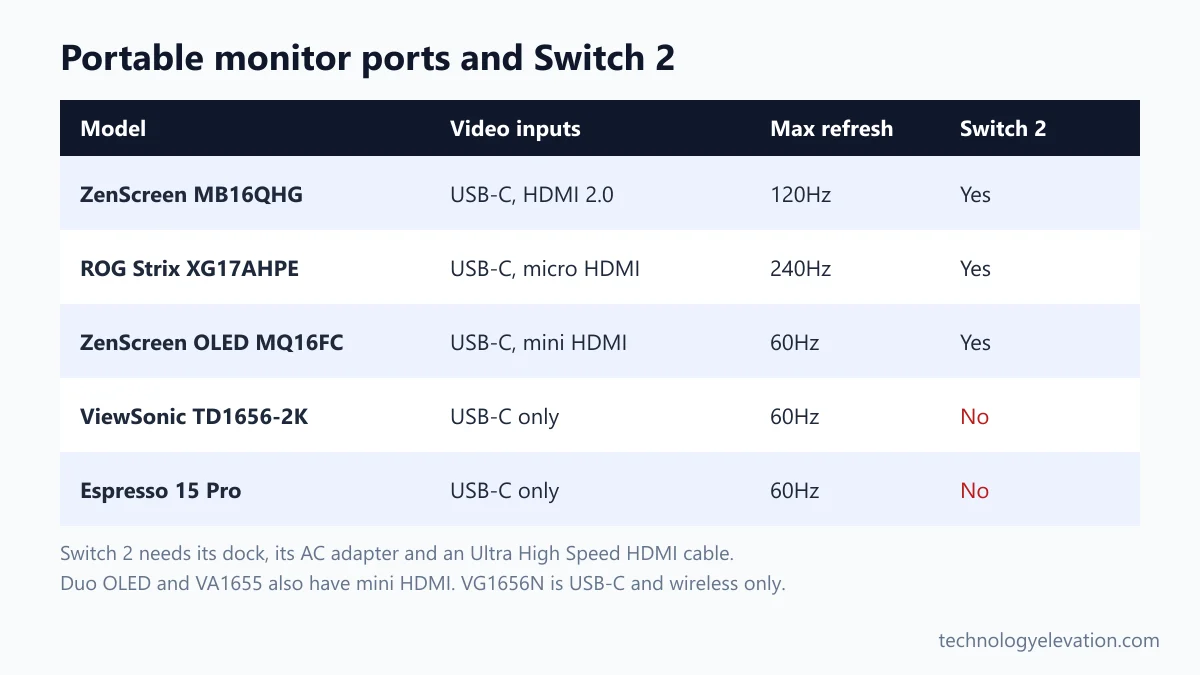
The Switch 2 sends video only through its dock’s HDMI port, not straight from the console’s USB-C ports. That means your portable monitor needs an HDMI, mini HDMI or micro HDMI input, plus the Switch 2 dock, its AC adapter and an Ultra High Speed HDMI cable.
Nintendo is specific about the parts. Its support steps say the original Switch AC adapter cannot power the Switch 2 dock for TV mode, and the HDMI cable from the original Switch is not Ultra High Speed, so pack the cable that came in the Switch 2 box. In TV mode the console can output up to 4K at 60 fps, and up to 120 fps at 1080p or 1440p.
Of our picks, the MB16QHG, MQ16FC, XG17AHPE, Duo OLED and VA1655 have an HDMI-type input. The TD1656-2K, Espresso 15 Pro and VG1656N do not, so they cannot take a Switch 2 signal.
Mini and micro HDMI ports need the right cable or adapter. Most of these monitors include one, and a sturdy cable from the list of HDMI cables for gaming is worth having as a spare. Sound plays through the monitor’s speakers or headphone jack, so a screen with no speakers, like the MB16QHG, needs headphones.
Size, resolution, ports and weight decide the right portable monitor
Choose a portable monitor by connection first, then size, resolution and weight. Make sure it connects to every device you own, pick 14 to 17 inches to suit your bag, aim for 1600p or higher on a 16-inch screen, and keep travel models under 2 lb.
- Check your ports. Confirm your laptop’s USB-C port carries video. If you also want a Switch 2, camera or older laptop, buy a monitor with HDMI.
- Match the size to your bag. A 14-inch screen fits beside a small laptop in most backpacks. A 16-inch model matches most work laptops, and 17.3 inches suits gaming more than flights.
- Pick the resolution. 1080p is fine for email and a chat window. 2560 x 1600 is noticeably sharper on 16 inches, and 4K only matters for photo work or Mac owners who want Retina-sharp text.
- Prefer 16:10. The taller shape adds vertical room for documents and code. Five of our eight picks use it.
- Weigh it honestly. Check the weight with the stand or cover, not just the panel. The TD1656-2K weighs 1.8 lb alone and 2.8 lb with its cover.
- Decide on extras. Touch, OLED, a battery and 120Hz or faster each add cost. Pay for the one you will use every day, not all four.
Stands matter more than spec sheets suggest. A built-in kickstand sets up in seconds on a tray table, while a folding cover takes more space and can wobble. And if you mostly work from one place, the laptops for working from home pair just as well with a cheap desktop monitor.
OLED, touch and 4K are worth paying for only in specific cases
OLED is worth it for movies, photos and dark rooms. Touch is worth it for people who annotate, sketch or present. 4K is worth it mainly on a Mac or for photo editing. For spreadsheets and email, a bright 16:10 IPS screen is the better value.
OLED gives perfect blacks and fast response, but most portable OLEDs are glossy and dimmer than the best IPS panels. Static elements like a taskbar can leave a faint image over time, so use dark mode and let the screen saver run.
Touch needs software support. Windows 11 handles it natively. On a Mac, the TD1656-2K needs ViewSonic’s vTouch driver and the Espresso 15 Pro uses EspressoFlow. If you mainly want a touch screen on an iPad, look at a tablet instead, and the comparison of which iPad to buy covers the OLED models.
4K on a 15.6-inch screen is very sharp, but it costs battery and money. Most Windows laptops scale it to look like 1080p anyway, so the gain is crispness, not more space.
Frequently asked questions about portable monitors
What is the best portable monitor?
The ASUS ZenScreen MB16QHG is the best portable monitor for most people. It has a 16-inch 2560 x 1600 screen at 120Hz, 500 nits of brightness, and both USB-C and HDMI, and it launched at $399.
Can a portable monitor work with a Nintendo Switch 2?
Yes, if the monitor has an HDMI, mini HDMI or micro HDMI input. The Switch 2 only outputs video through its dock, so you also need the Switch 2 dock, its AC adapter and an Ultra High Speed HDMI cable.
Do portable monitors need a power outlet?
Most portable monitors can run from a laptop’s USB-C port with no outlet. Brightness may be limited and the laptop battery drains faster, so plugging the monitor into a charger is better for long sessions. Battery models like the VG1656N run on their own for a few hours.
Why won’t my portable monitor work over USB-C?
Your laptop’s USB-C port probably does not support DisplayPort Alt Mode, which carries video. Try a Thunderbolt or USB4 port if you have one, use the monitor’s HDMI port, or connect through a USB-C hub with an HDMI output.
Are portable monitors good for gaming?
Yes, a high refresh rate model is good for gaming. The ASUS ROG Strix XG17AHPE runs at 240Hz with Adaptive-Sync and has its own battery, while the MB16QHG reaches 120Hz at a sharper 2560 x 1600 resolution.
Do portable monitors work with a MacBook?
Yes, every MacBook with Thunderbolt or USB4 ports can run a portable monitor over a single USB-C cable. Touch needs extra software on a Mac, such as vTouch for the ViewSonic TD1656-2K or EspressoFlow for the Espresso 15 Pro.
Is an OLED portable monitor worth it?
An OLED portable monitor is worth it for movies, photo work and dark rooms, where its true blacks stand out. For long office days with static windows, a bright IPS screen avoids burn-in worries and usually costs less.
Last checked and sources
Last checked on 19 November 2026 by Abdullah Kabeer. We compared the published specs, ports, weights and US list prices of current portable monitors using manufacturer pages, then cross-checked launch prices and details against independent reviews.
- ASUS product and spec pages for the ZenScreen MB16QHG, ZenScreen OLED MQ16FC, ZenScreen Duo OLED MQ149CD and ROG Strix XG17AHPE
- ViewSonic product pages for the TD1656-2K, VG1656N and VA1655
- Espresso Displays launch details for the Espresso 15 Pro and the CES 2025 Innovation Awards listing
- Nintendo Support, how to connect a Nintendo Switch 2 to a TV, and Nintendo Switch 2 tech specs
- Independent coverage by Tom’s Hardware, Tech Advisor, Engadget and Notebookcheck
- CPSC recall search: no recalls or safety notices for any pick
We update this buying guide when new portable monitors launch, older models are discontinued or list prices change.
Technology Elevation is reader-supported. As an Amazon Associate, we earn from qualifying purchases. When you buy through links on this page, we may earn a small commission at no extra cost to you.

GIPHY App Key not set. Please check settings