

 Abdullah Kabeer
Walk into almost any grandparent’s living room this winter and you will find the same thing on the side table: a small screen quietly cycling through photos that someone three states away sent that morning. The best digital photo frame is not really a gadget. It is a mailbox for family pictures, and the people sending them never have to visit.
That changes what matters when you shop. Screen size and sharpness count, but the bigger questions are how photos get onto the frame, whether the frame needs a monthly fee, and whether you can set it up before you wrap it.
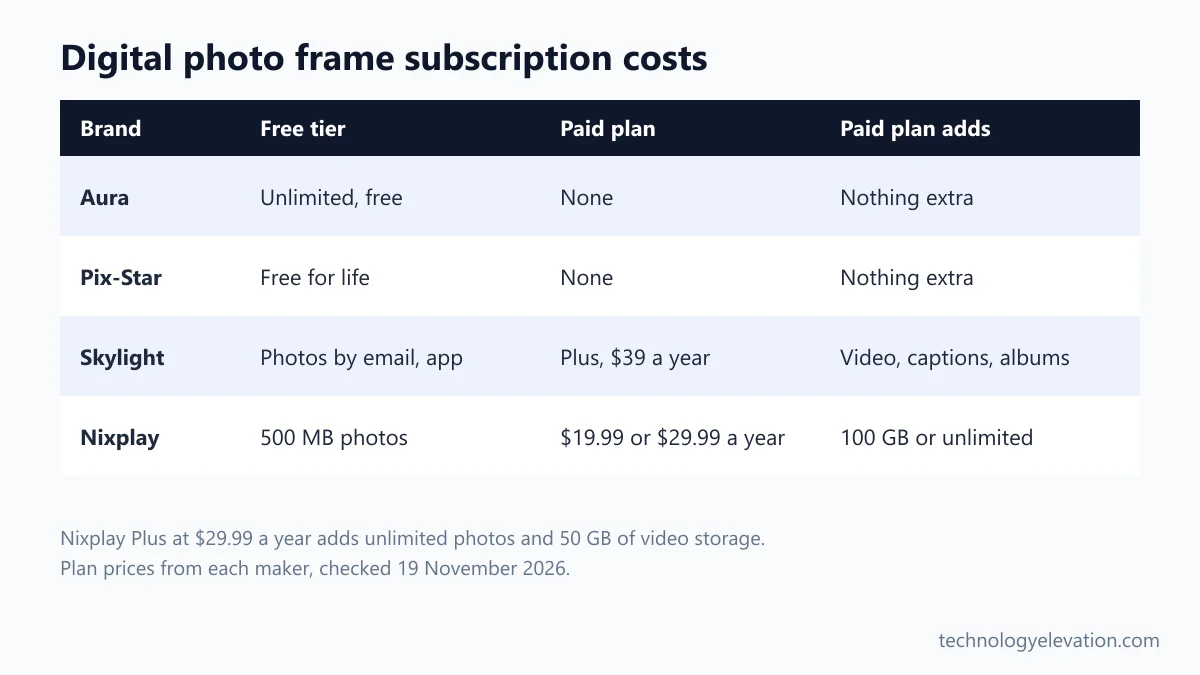
Fees are where brands split most. Aura charges no subscription, and its help center describes a gift preparation mode that preloads photos and presets the recipient’s Wi-Fi before the box is opened. Skylight and Nixplay sell paid plans on top of the frame, and Pix-Star promises free cloud storage for life.
We compared the official specs, Wi-Fi requirements and plan prices of current US Wi-Fi frames from Aura, Skylight, Nixplay, Pix-Star and Netgear’s Meural, then sorted them by who they suit.
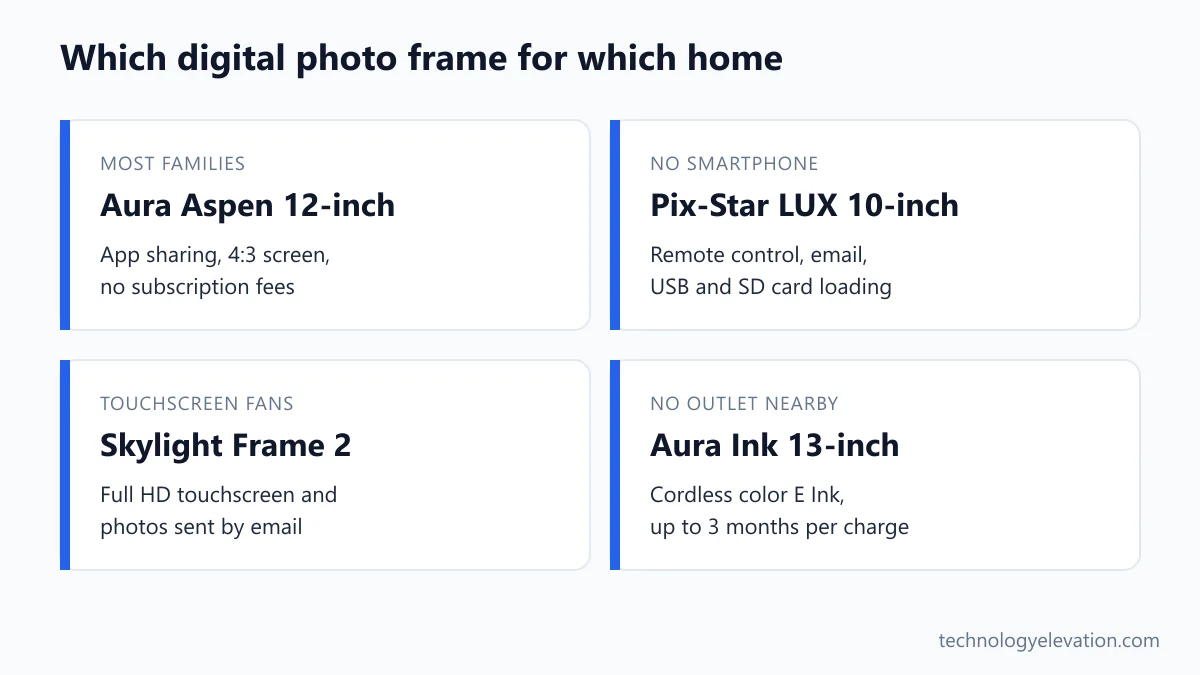
The best digital photo frame for most people is the Aura Aspen 12-inch
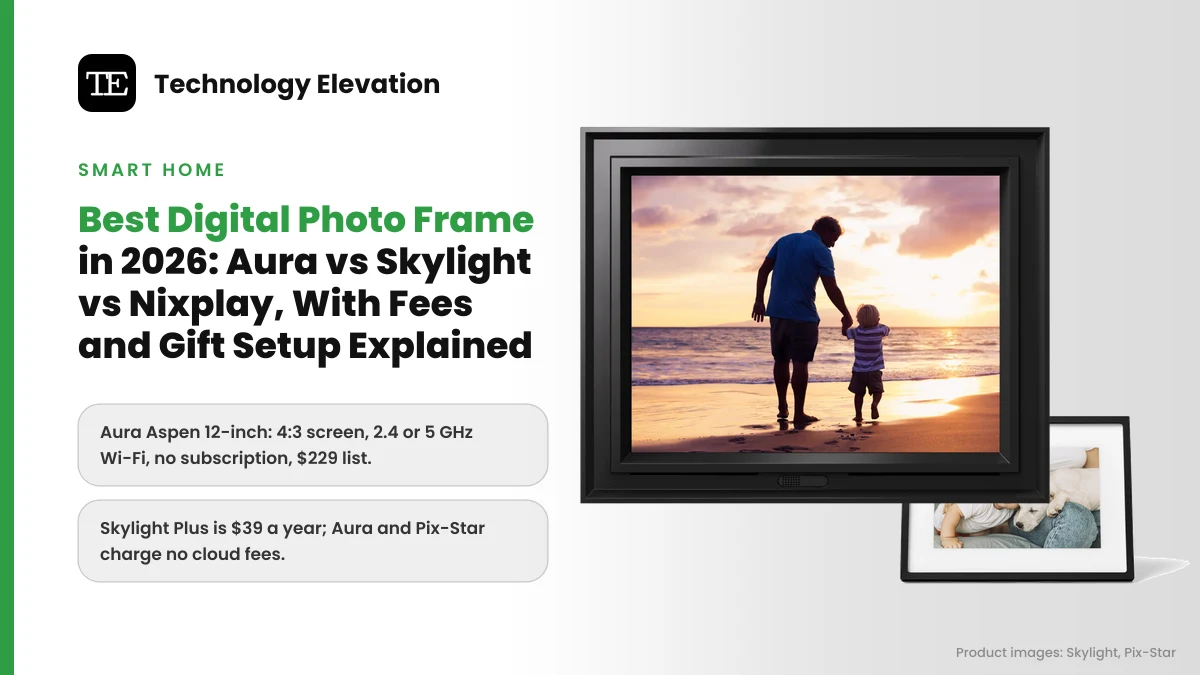
The Aura Aspen is the best digital photo frame for most people. Its 11.8-inch, 1600 x 1200 screen matches the 4:3 shape of phone photos, it stands in portrait or landscape, works on 2.4 or 5 GHz Wi-Fi and charges no subscription. Its list price is $229.
Every pick, by the job it does best:
- Best overall: Aura Aspen 12-inch
- Best 10-inch frame: Aura Carver Mat 10-inch
- Best large frame: Aura Walden 15-inch
- Best touchscreen: Skylight Frame 2
- Best for grandparents without a smartphone: Pix-Star LUX 10-inch
- Best with a paid storage plan: Nixplay Classic 10.1-inch
- Best cordless frame: Aura Ink 13-inch
| Model | Screen | Resolution | Wi-Fi | Fees |
|---|---|---|---|---|
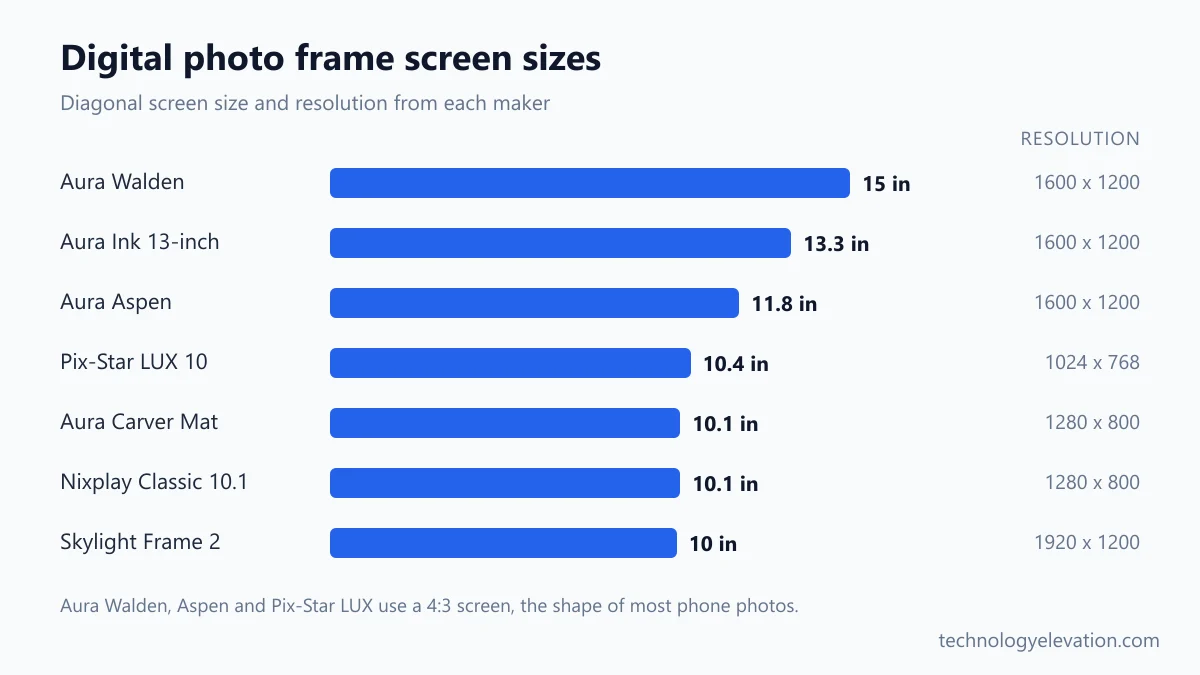
| Aura Aspen 12-inch | 11.8 in, 4:3 | 1600 x 1200 | 2.4 or 5 GHz | None |
| Aura Carver Mat 10-inch | 10.1 in, landscape | 1280 x 800 | 2.4 GHz only | None |
| Aura Walden 15-inch | 15 in, 4:3 | 1600 x 1200 | 2.4 or 5 GHz | None |
| Skylight Frame 2 | 10 in touchscreen | 1920 x 1200 | Required for setup | Optional Plus, $39 a year |
| Pix-Star LUX 10-inch | 10.4 in, 4:3 | 1024 x 768 | Wi-Fi 6, 2.4 and 5 GHz | None |
| Nixplay Classic 10.1-inch | 10.1 in touchscreen | 1280 x 800 | 2.4 GHz only | Free 500 MB, plans from $19.99 a year |
| Aura Ink 13-inch | 13.3 in E Ink | 1600 x 1200 | 2.4 or 5 GHz | None |
Black Friday 2026 lands on 27 November, and frames are among the most discounted gifts of the season. Aura and Skylight were both running Black Friday discounts when we checked, so treat the list prices below as a ceiling.
Aura Aspen 12-inch: the best digital photo frame overall
The Aura Aspen is the best all-round Wi-Fi frame because it fixes the two things that bother people most about cheaper frames: cropped faces and fiddly setup. Its 4:3 screen fits phone photos without cutting heads off, and the Aura app gets it running in minutes.

Key specs: 11.8-inch 1600 x 1200 display, portrait or landscape, interactive touch bar, built-in speaker, plays videos up to 30 seconds with sound, works with 2.4 or 5 GHz Wi-Fi, unlimited cloud storage, no subscription. List price: $229.
Most phone cameras shoot in a 4:3 shape. Put those photos on a wide 16:10 screen and the frame has to crop or add black bars. The Aspen shows them whole, which matters more than raw pixel count once the frame is on a shelf.
Aura’s sharing works through its free app. Anyone you invite can add photos and videos from their own phone, and invited members can also email single photos to the frame’s own address. Grandma just watches.
Portrait Pairing is a small touch that matters. When the frame stands in landscape, Aura places two portrait shots side by side instead of showing one with empty space around it.
The catch is that the frame needs a constant Wi-Fi connection, because photos come from Aura’s cloud. If the recipient’s internet drops often, look at the Skylight Frame 2 or Pix-Star LUX instead, which both store photos on the frame.
Buy the Aura Aspen 12-inch now on Amazon
Aura Carver Mat 10-inch: the best 10-inch frame
The Aura Carver Mat is the best 10-inch frame for a desk, kitchen counter or nightstand. It gives you the same app, sharing and no-fee cloud as the Aspen at a lower list price of $179, with a white mat around the screen.

Key specs: 10.1-inch 1280 x 800 HD display, landscape only, touch bar, auto on and off, plays videos up to 30 seconds with sound, needs a 2.4 GHz Wi-Fi network, no subscription. List price: $179. The plain Carver without a mat lists at $149.
The mat makes the Carver look more like a printed picture frame than a gadget. It stands on its own wedge-shaped back, so there is no stand to fold out or lose.
The screen is wider than the Aspen’s and only works in landscape. Portrait Pairing helps by placing two vertical photos side by side.
Check the network first. The Carver connects only on 2.4 GHz, while Aura’s Walden, Aspen and Ink frames also work on 5 GHz. Aura says dual-band routers are fine, but if yours splits the bands into two network names, connect your phone to the 2.4 GHz one before setup.
Buy the Aura Carver Mat 10-inch now on Amazon
Aura Walden 15-inch: the best large digital photo frame
The Aura Walden is the best large frame for a living room wall or a big shelf. Its 15-inch, 1600 x 1200 screen is readable from across the room, it stands in either orientation, and it keeps Aura’s no-fee cloud. Its list price is $299.

Key specs: 15-inch 1600 x 1200 display with a 4:3 aspect ratio, portrait or landscape, touch bar, built-in speaker, videos up to 30 seconds with sound, 2.4 or 5 GHz Wi-Fi, no subscription. List price: $299.
A 10-inch frame works at arm’s length. Across a sofa, faces start to shrink. The Walden is the size to choose when the frame will be seen from the couch rather than from a kitchen stool.
The Walden uses the same resolution as the smaller Aspen, so photos look a little less crisp up close. From normal viewing distance you will not notice.
Plan the spot before you buy. A 15-inch frame needs a wide shelf or a sturdy console table, and it still needs a power outlet nearby.
Buy the Aura Walden 15-inch now on Amazon
Skylight Frame 2: the best touchscreen frame
The Skylight Frame 2 is the best touchscreen frame. Its 10-inch Full HD screen lets the owner swipe, pinch and zoom, it holds photos on 16 GB of storage, and family can send pictures by email without an account. Plus, at $39 a year, adds video.

Key specs: 10-inch 1920 x 1200 anti-glare touchscreen, 16 GB storage (up to 16,000 photos), auto brightness, ten swappable Snap Frame styles, photos by email (up to 100 per email) or the free app. List price: $169.99 to $199.99 depending on the frame style.
Skylight’s big strength is email. Every frame gets its own address, and anyone who knows it can send photos straight from their inbox. That suits relatives who will never download another app.
Photos live on the frame itself. If the Wi-Fi goes down, the slideshow keeps running, and new photos arrive when the connection comes back.
The subscription is the part to read twice. Skylight says the Frame 2 needs the Plus plan for video and captions, and it lists albums, remote control and cloud backup as Plus features too. Skylight Plus costs $39 a year. Without it you still get photos by email and app, which is all most families need.
Gift Mode lets you preload photos and videos before the box is opened. The older Skylight Frame, with a 1280 x 800 screen and 8 GB of storage, still sells at a $139.99 list price if the budget is tight.
Buy the Skylight Frame 2 now on Amazon
Pix-Star LUX 10-inch: the best frame for grandparents without a smartphone
The Pix-Star LUX 10 is the best frame for someone who has no smartphone at all. It ships with a remote control, loads photos from USB sticks and SD cards as well as email and the app, and Pix-Star charges nothing for its cloud storage.
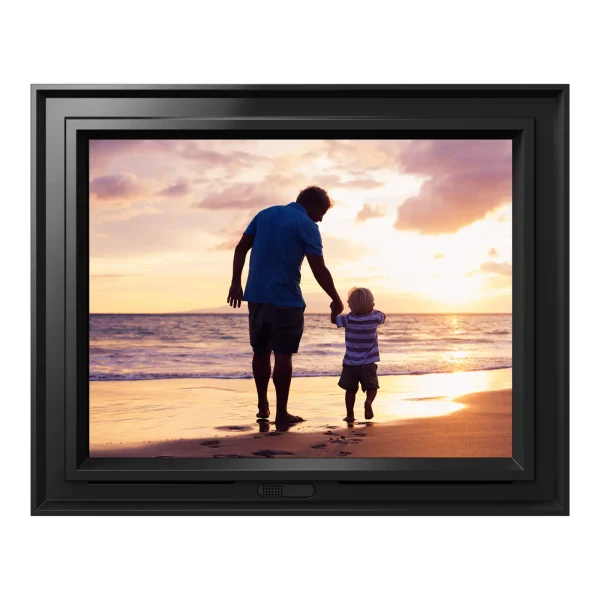
Key specs: 10.4-inch 1024 x 768 IPS display (4:3), 16 GB internal storage (about 60,000 photos), Wi-Fi 6 on 2.4 and 5 GHz, Bluetooth 5.0, motion sensor, remote control, two-year warranty.
Pix-Star is the frame to choose when the person receiving it will not touch an app. Each frame has its own email address, and Pix-Star says family can also send photos from its app or website without creating an account.
The remote control is the quiet win. Pausing on a favorite photo or skipping a blurry one does not need a touchscreen or a phone.
The trade-off is the screen. At 1024 x 768 it has the fewest pixels of any pick here, so fine detail looks softer up close than on the Aura and Skylight frames. The larger LUX 15 uses the same resolution, while the LUX 17 steps up to 1280 x 960.
Buy the Pix-Star LUX 10-inch now on Amazon
Nixplay Classic 10.1-inch: the best pick if you will pay for a plan
The Nixplay Classic 10.1-inch is a good touchscreen frame, but only with a paid plan. The free tier holds just 500 MB of photos, so most families end up on the $19.99 or $29.99 yearly plan. Its regular price is $189.99.
Key specs: 10.1-inch 1280 x 800 IPS touchscreen (16:10), activity sensor that turns the screen on and off, auto-rotation, videos up to 15 seconds, 2.4 GHz Wi-Fi. Regular price: $189.99.
Nixplay’s frame itself is solid. The touchscreen is bright, and the activity sensor switches the screen off when nobody is in the room, without recording anything.
The plans are where you need to do the maths. Nixplay’s free Basic plan includes 500 MB of photo storage and 500 MB of video storage. That fills up fast with modern phone photos. The Great Value plan is $19.99 a year for 100 GB of photo storage, and Nixplay Plus is $29.99 a year for unlimited photo storage and 50 GB of video.
Over three years, Nixplay Plus adds about $90 to the cost of the frame. That is why Aura or Pix-Star often works out cheaper, even when the frame itself costs more on day one.
Buy the Nixplay Classic 10.1-inch now on Amazon
Aura Ink 13-inch: the best cordless frame
The Aura Ink is the best cordless frame. Its 13.3-inch color E Ink screen looks like a printed photo rather than a glowing display, and Aura rates the battery at up to three months when the picture changes once a day. Its list price is $499.

Key specs: 13.3-inch E Ink Spectra 6 color e-paper display, 1600 x 1200 at 150 pixels per inch (4:3), soft front light, rechargeable battery, 1 to 12 photo changes per day, 2.4 or 5 GHz Wi-Fi. List price: $499. A 10-inch Aura Ink lists at $349.
E Ink is the same idea as a Kindle screen, now in color. It reflects room light instead of shining at you, so it looks calm in a bedroom or hallway.
No cord means it can hang on a wall with no cable running down to an outlet. That alone is the reason most people will buy it.
Know what you are giving up. Each photo change takes about 30 seconds, and e-paper colors are softer than on an LCD. Aura’s default is one new photo overnight, with up to 12 changes a day if you want more. It is a calm, slow frame, not a slideshow machine.
Buy the Aura Ink 13-inch now on Amazon
Netgear Meural is still sold, but it is an art frame first
Netgear still lists two Meural models on its US site: the 15.6-inch Meural Smart WiFi Photo Frame and the 27-inch Meural Canvas II. Both use 1920 x 1080 screens and focus on art, with a member library of more than 30,000 works.
Meural suits someone who wants a wall of rotating paintings with family photos mixed in. Netgear says the 15.6-inch frame includes 100 famous works of art, with the wider library of more than 30,000 pieces offered to Meural members.
For a gift that is mostly about family pictures, Aura, Skylight or Pix-Star is easier. Their apps and email sharing are built around the people sending photos, not around an art catalog.
A smart display can also act as a photo frame. Choosing between Apple HomeView, Echo Show and Nest Hub gets you a screen that shows photo albums when idle, plus video calls and a voice assistant. The trade-off is a camera and microphone in the room, which a plain frame does not have.
How to choose a digital photo frame
Start with the person receiving it, not the specs. A frame that one relative loves can end up face down in a drawer at another house because the setup asked too much of them.
- Decide who sends the photos. If the whole family will send, Aura’s app and Skylight’s email address are the easiest. If one person will load photos by hand, Pix-Star’s USB and SD slots help.
- Check the Wi-Fi at the destination. Aura Carver and Nixplay frames need a 2.4 GHz network. Aura’s Aspen, Walden and Ink, plus Pix-Star, also work on 5 GHz.
- Count the yearly fees. Aura and Pix-Star charge none. Skylight Plus is $39 a year and Nixplay plans run $19.99 to $29.99 a year.
- Match the screen shape. A 4:3 screen, like the Aspen, Walden or Pix-Star, shows phone photos without cropping. A 16:10 screen suits landscape shots.
- Pick a size for the viewing distance. 10 inches suits a desk or counter. 15 inches suits a living room shelf.
- Decide on touch. Skylight and Nixplay use touchscreens. Aura uses a touch bar on the frame edge, and Pix-Star uses a remote.
Video is another split. Aura plays up to 30 seconds with sound for free, Nixplay plays up to 15 seconds, and Skylight needs Plus for video.
Set up a digital photo frame as a gift before you wrap it
Aura and Skylight both let you preload photos before the box is opened. With Aura, you can also preset the recipient’s Wi-Fi so the frame connects on its own when they plug it in, which saves a phone call on Christmas morning.
For an Aura frame, the gift preparation flow in the Aura app works like this:
- Install the free Aura Frames app and create an account.
- When the app asks who the frame is for, choose the option for someone else to start gift preparation.
- Add a personal message, preload photos and videos, and invite other family members to contribute.
- If you have the frame with you and know the recipient’s Wi-Fi name and password, preset that network. The app asks you to plug the frame in and then unplug it.
- Wrap the frame without connecting it to your own Wi-Fi to test it. Aura warns that this can claim the gift and lock the frame to your network.
Until the gift is claimed, you can still edit the message and add photos in the app under Frame Settings, then Edit Gift.
Setting it up in person is often simpler. If you will be at the recipient’s home, Aura says to choose the “it’s for me” option and connect the frame to their network on the spot.
Aura’s gift boxes carry no price, so you can ship straight to the recipient. A frame is one of the easiest tech gifts for 2026 because the person receiving it has almost nothing to learn.
Wi-Fi and cloud storage matter more than screen size
A frame is only as good as the network it sits on. A frame on weak Wi-Fi in a back bedroom will show the same old photos for weeks, and the person who owns it rarely knows why.
Aura frames need a constant connection because photos come from Aura’s cloud. Skylight and Pix-Star keep photos in the frame’s own 16 GB of storage, so they keep showing pictures through outages.
If the frame will sit far from the router, a mesh Wi-Fi system usually fixes dead spots better than moving the frame. Aura says its frames work on mesh networks, and if one struggles to connect, unplugging the extra mesh points during setup usually helps.
Newer routers do not cause problems by themselves. A Wi-Fi 7 router still broadcasts a 2.4 GHz band alongside its faster ones, so older frames connect as usual.
Cloud storage is the other hidden cost. Google stopped offering unlimited free storage for Google Photos years ago, and frame makers have followed a similar path. Aura and Pix-Star still include it free, which is why they top the value list.
Frequently asked questions about digital photo frames
What is the best digital photo frame?
The Aura Aspen 12-inch is the best digital photo frame for most people. It has a sharp 4:3 screen, works in portrait or landscape, connects on 2.4 or 5 GHz Wi-Fi and has no subscription fees.
Do digital photo frames need a subscription?
Not all of them. Aura and Pix-Star charge no fees for cloud storage. Skylight sells an optional Plus plan for $39 a year that adds video and captions, and Nixplay’s free plan holds only 500 MB of photos.
Can I set up a digital photo frame before giving it as a gift?
Yes, Aura and Skylight both let you preload photos before the frame is unwrapped. Aura’s gift preparation flow can also preset the recipient’s Wi-Fi, so the frame connects on its own when they plug it in.
Which digital photo frame is best for elderly parents?
The Pix-Star LUX 10-inch is the best choice for elderly parents without a smartphone. It comes with a remote control, takes photos by email, USB or SD card, and needs no app on the owner’s side.
Do digital photo frames work without Wi-Fi?
Some do. Skylight and Pix-Star frames keep photos on the device, so the slideshow continues offline. Aura frames need a constant Wi-Fi connection because photos stream from Aura’s cloud.
Can a digital photo frame play videos?
Most Wi-Fi frames can. Aura plays videos up to 30 seconds with sound at no extra cost, and Nixplay plays clips up to 15 seconds. Skylight Frame 2 needs the Plus plan for video.
Are there any digital photo frame recalls?
Skylight recalled about 65,000 Series I power adapters sold with its frames in 2019 because of a shock hazard. If you own an older Skylight with a black adapter that has a circular indentation on the side, stop using it and contact Skylight for a free replacement, as the CPSC recall notice instructs.
Last checked and sources
Last checked on 19 November 2026 by Abdullah Kabeer. We compared the published specs, Wi-Fi requirements, subscription plans and US list prices of current Wi-Fi photo frames using manufacturer product pages, help centers and government recall records.
- Aura product pages for the Aspen, Carver Mat, Walden and Aura Ink, and the Aura help center articles on gifting, 2.4 GHz and 5 GHz Wi-Fi, email uploads and setup without a smartphone
- Skylight Frame 2 product page and Skylight Plus plan page
- Nixplay Classic 10.1-inch product page and Nixplay plan listings
- Pix-Star LUX frame specifications and FAQ
- Netgear Meural product pages for the MC315GDW and Canvas II MC327LW
- US Consumer Product Safety Commission recall database
We update this buying guide when new frames launch, older models are discontinued or subscription plans change.
Technology Elevation is reader-supported. As an Amazon Associate, we earn from qualifying purchases. When you buy through links on this page, we may earn a small commission at no extra cost to you.


GIPHY App Key not set. Please check settings