

 Abdullah Kabeer
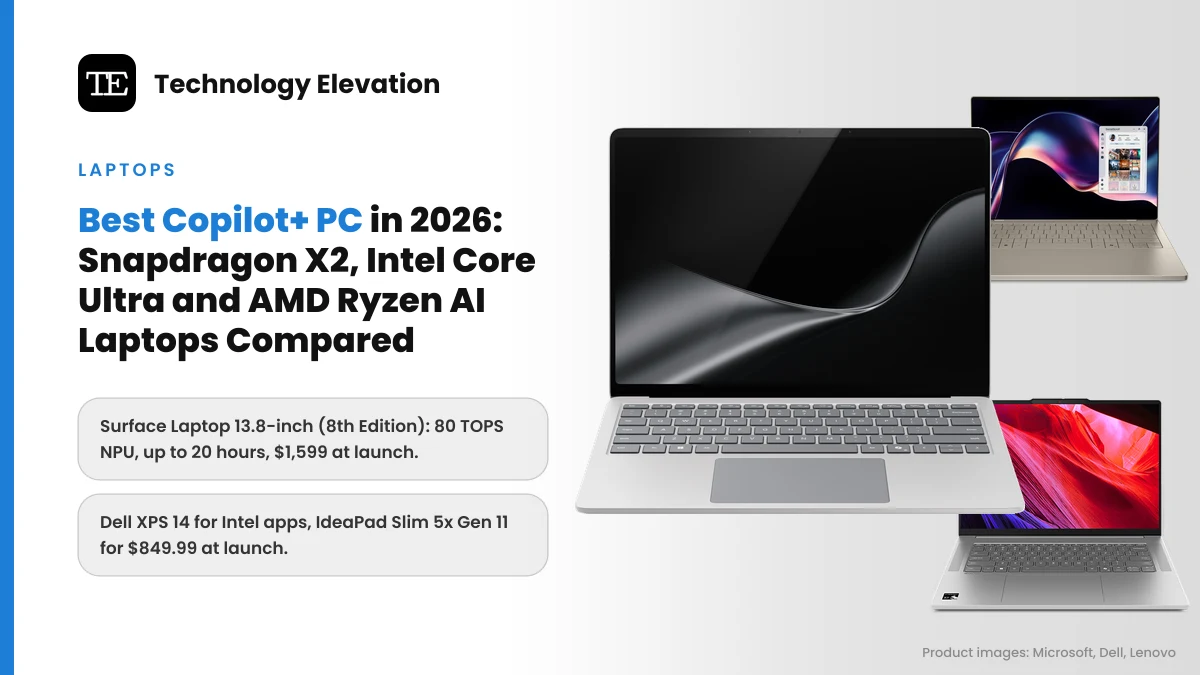
Walk past the laptop aisle in any big electronics store this month and nearly every Windows machine carries the same small sticker: Copilot+ PC. When Microsoft launched it in 2024, the label meant one chip family. Now it covers laptops built on Qualcomm, Intel and AMD silicon, from $849 budget models to premium machines that cost twice as much. Picking the best Copilot+ PC has become a real choice rather than a default.
The label itself is simple. Microsoft gives it to Windows 11 laptops whose built-in AI chip, the NPU (neural processing unit), can run over 40 trillion operations per second, or 40 TOPS. That chip handles features such as Recall, Click to Do and smarter Windows search on the laptop itself, without sending your data to the cloud.
What the sticker does not tell you is whether the laptop runs on Arm or x86, how long the battery lasts, or whether your favourite game will even install. Those details matter more than the TOPS number.
We compared the official specs, NPU ratings and launch prices of the Copilot+ laptops on sale in the US in November 2026, then sorted them by the kind of buyer each one suits.
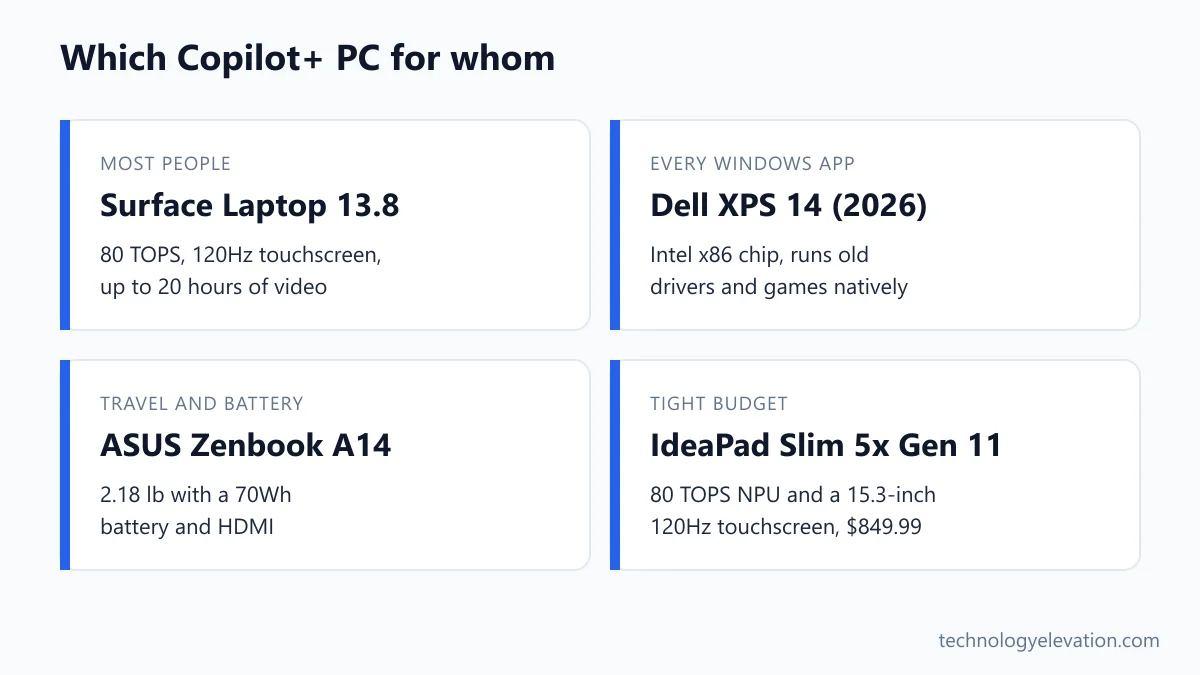
The best Copilot+ PC for most people is the Microsoft Surface Laptop 13.8-inch (8th Edition)
The Surface Laptop 13.8-inch (8th Edition) is the best Copilot+ PC for most people. Its Snapdragon X2 chip has an 80 TOPS NPU, Microsoft rates the battery at up to 20 hours of video, and the 120Hz touchscreen is excellent. It launched at $1,599.
Every pick, by the job it does best:
- Best overall: Microsoft Surface Laptop 13.8-inch (8th Edition)
- Best Intel Copilot+ PC: Dell XPS 14 (2026)
- Best for battery life and travel: ASUS Zenbook A14 (Snapdragon X2 Elite)
- Best AMD Copilot+ PC and best big screen: ASUS Zenbook S16 (UM5606, Ryzen AI 400)
- Best compact Copilot+ PC: Microsoft Surface Laptop 13-inch (Snapdragon X2 Plus)
- Best budget Copilot+ PC: Lenovo IdeaPad Slim 5x Gen 11 (15-inch)
| Model | Chip family | NPU rating | Screen | Weight | Launch price |
|---|---|---|---|---|---|
| Surface Laptop 13.8-inch (8th Edition) | Snapdragon X2 Plus or X2 Elite | 80 TOPS | 13.8 in, 2304 x 1536, 120Hz touch | 2.96 lb | $1,599 |
| Dell XPS 14 (2026) | Intel Core Ultra Series 3 | Up to 50 TOPS | 14 in, 1920 x 1200 LCD or 2.8K OLED | 3.00 to 3.05 lb | $2,049.99 |
| ASUS Zenbook A14 | Snapdragon X2 Elite | 80 TOPS | 14 in, 1920 x 1200 OLED | 2.18 lb | From $1,149.99 |
| ASUS Zenbook S16 (UM5606) | AMD Ryzen AI 400 | 50 to 55 TOPS | 16 in, 3K 120Hz OLED | 3.31 lb | $1,599.99 |
| Surface Laptop 13-inch | Snapdragon X2 Plus | 80 TOPS | 13 in, 1920 x 1280 touch | 2.7 lb | $1,199.99 |
| Lenovo IdeaPad Slim 5x Gen 11 | Snapdragon X2 Plus | 80 TOPS | 15.3 in, 1920 x 1200, 120Hz touch | 3.10 lb | $849.99 |
Laptop prices move a lot in late November. Treat the launch prices above as a ceiling, and compare them against the Black Friday 2026 tech deals before you pay full price.
Microsoft Surface Laptop 13.8-inch (8th Edition): the best Copilot+ PC overall
The Surface Laptop 13.8-inch (8th Edition) is the best all-round Copilot+ PC. It pairs a sharp 3:2 touchscreen with Snapdragon X2 chips, an 80 TOPS NPU and up to 20 hours of rated video playback, and Microsoft tunes Windows for it first. It launched at $1,599.
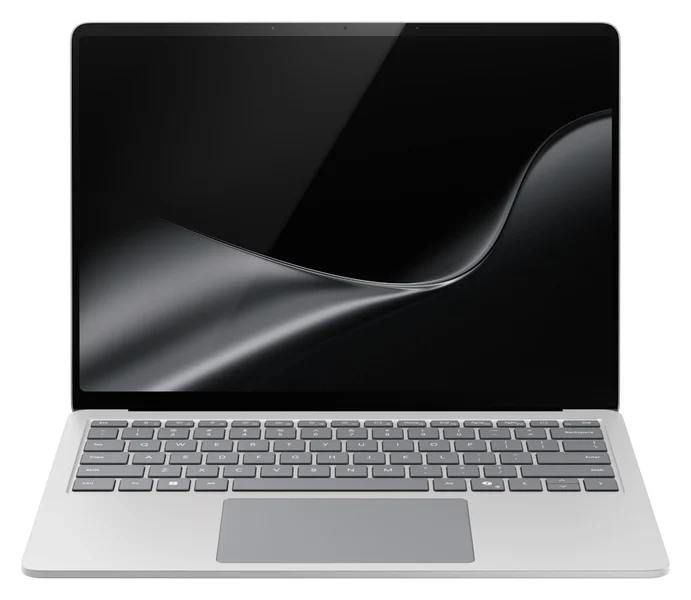
Key specs: Snapdragon X2 Plus (10-core) or Snapdragon X2 Elite (12-core), 80 TOPS NPU, 13.8-inch HDR PixelSense touchscreen at 2304 x 1536 and 120Hz, 16 GB to 64 GB of RAM, facial recognition sign-in, two USB4 ports plus USB-A and Surface Connect, 2.96 lb, up to 20 hours of local video playback. Launched June 16, 2026, at $1,599 with the X2 Plus, 16 GB and 512 GB.
Microsoft builds both Windows and this laptop, and that shows. New Copilot+ features have tended to reach Snapdragon machines first.
The screen is the other reason to buy it. The tall 3:2 shape fits more of a document or spreadsheet than a standard 16:10 panel, and the 120Hz refresh makes scrolling feel smooth. Notebookcheck measured an average of about 623 nits, bright enough for a sunny window seat.
The catches are real, though. RAM is soldered, so buy the amount you will need for years; 16 GB is the Copilot+ minimum, and the breakdown of how much RAM you need in a laptop explains when 32 GB is worth it. There is no HDMI port or card reader. And the price jumped hard this generation: the previous model started at $999.
Microsoft also sells a 15-inch Surface Laptop (8th Edition) with the same chip choices if you want more screen. Home buyers only get Snapdragon versions; the Intel model is sold to businesses.
Buy the Surface Laptop 13.8-inch (8th Edition) now on Amazon
Dell XPS 14 (2026): the best Intel Copilot+ PC
The Dell XPS 14 (2026) is the best Copilot+ PC with an Intel chip. Its Core Ultra Series 3 processors run every x86 Windows app natively, offer strong built-in graphics on the top chip, and keep the NPU near 50 TOPS. It launched at $2,049.99, with cheaper configurations following.
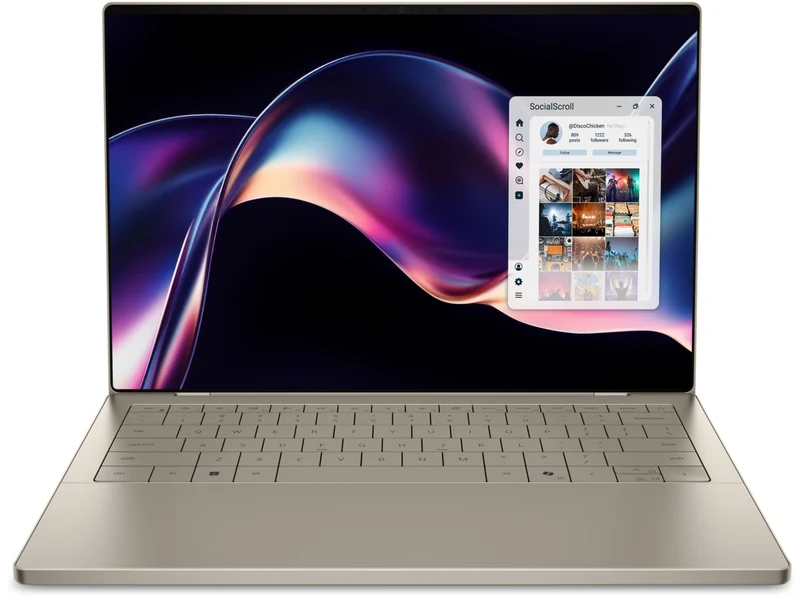
Key specs: Intel Core Ultra 5 325, Core Ultra 7 355 or Core Ultra X7 358H, NPU rated at 49 TOPS on the Core Ultra 7 355, 14-inch 1920 x 1200 LCD at 1 to 120Hz and 500 nits or a 2.8K OLED touchscreen, 70Wh battery, 3.05 lb (LCD) or 3.00 lb (OLED). Shown at CES in January 2026 at $2,049.99; Dell later added a Core Ultra 5 325 configuration at $1,599.99.
Intel matters for one simple reason: compatibility. The XPS 14 runs on the same x86 architecture as every Windows PC from the last 30 years. Old printer drivers, niche business software, VPN clients and games with anti-cheat all install as normal, with no translation layer.
Dell also listened to complaints about the last XPS. The capacitive touch function row that drew complaints on the last generation is gone, and the new 1 to 120Hz LCD can drop its refresh rate very low on a still screen to save battery.
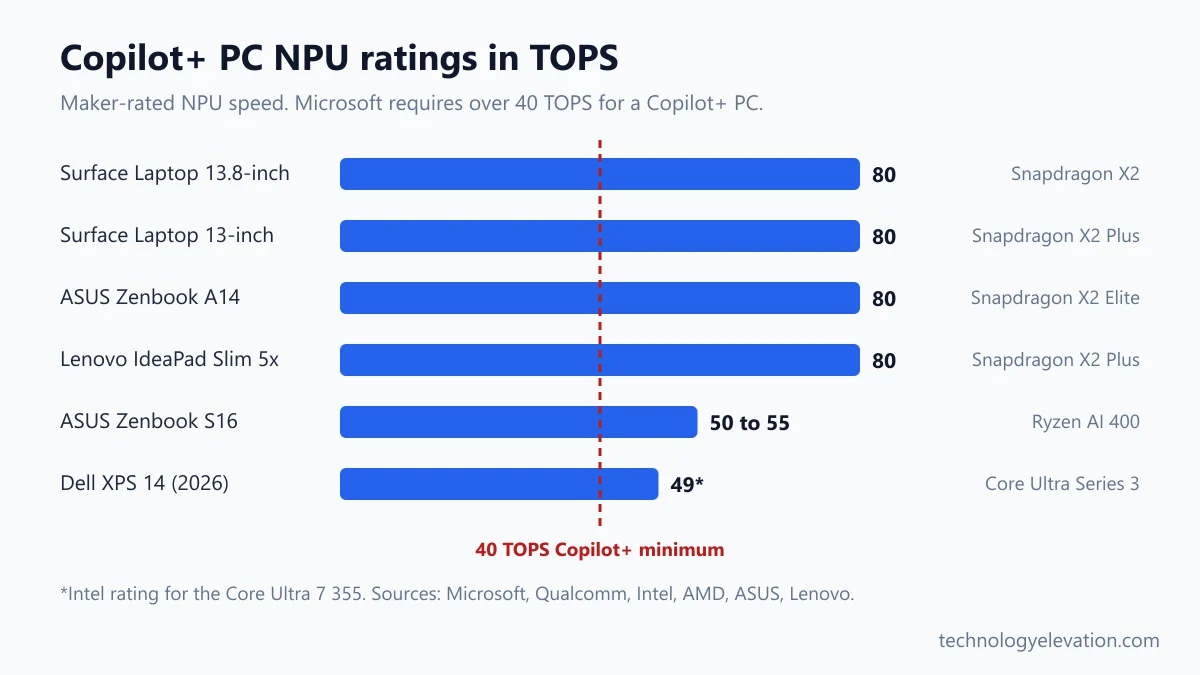
The honest catch is price. Even the $1,599.99 Core Ultra 5 model costs as much as the Surface Laptop, and the NPU is weaker on paper: Intel rates the Core Ultra 7 355’s NPU at 49 TOPS, against 80 on Snapdragon X2. For Copilot+ features, that gap makes little practical difference, since both clear Microsoft’s 40 TOPS bar.
Buy the Dell XPS 14 (2026) now on Amazon
ASUS Zenbook A14 (Snapdragon X2 Elite): the best Copilot+ PC for battery life and travel
The ASUS Zenbook A14 is the best Copilot+ PC for travel. The Snapdragon X2 Elite version weighs 2.18 lb, packs a 70Wh battery that ASUS rates at over 33 hours, and adds an OLED screen, two USB4 ports and HDMI. ASUS announced it from $1,149.99.
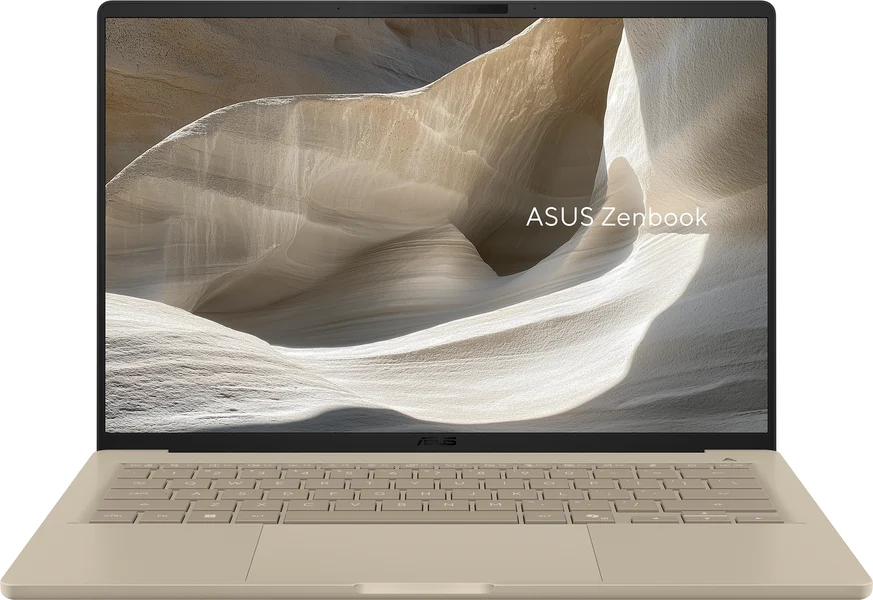
Key specs: Snapdragon X2 Elite (X2E-88-100, 18 cores), 80 TOPS NPU, 14-inch 1920 x 1200 OLED at 60Hz with 100% DCI-P3, 16 GB or 32 GB of soldered LPDDR5X, 512 GB or 1 TB SSD, 70Wh battery, two USB4 ports, USB-A, HDMI 2.1, headphone jack, 2.18 lb (0.99 kg). US availability began on April 7, 2026.
Weight is the headline here. At 2.18 lb, the A14 is the lightest laptop in this guide by half a pound, and it still fits a battery as big as the one in the heavier XPS 14. ASUS also says the battery reaches 50% in about 30 minutes of charging.
Ports are better than you would expect from something this thin. You get HDMI for a hotel TV or a conference room screen and a USB-A port for an old flash drive, so you can leave the dongle at home.
The catches: the OLED screen runs at 60Hz and is not touch, so it feels less smooth than the Surface’s 120Hz panel. US prices have also varied by retailer since launch, so check what configuration a deal actually includes before you buy. ASUS still sells older Snapdragon X versions of the A14, which have a 45 TOPS NPU and are a generation behind.
Buy the ASUS Zenbook A14 (Snapdragon X2 Elite) now on Amazon
ASUS Zenbook S16 (UM5606, Ryzen AI 400): the best AMD Copilot+ PC
The ASUS Zenbook S16 is the best AMD Copilot+ PC and the pick for a bigger screen. Its 16-inch 3K OLED runs at 120Hz, AMD’s Ryzen AI 400 chips keep full x86 compatibility, and the NPU is rated at 50 to 55 TOPS. It launched at $1,599.99.
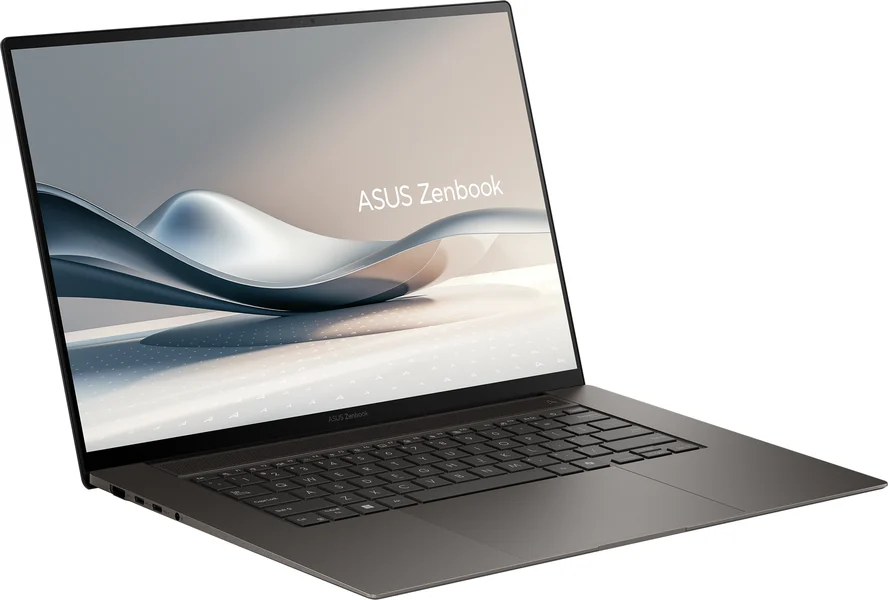
Key specs: AMD Ryzen AI 7 445, Ryzen AI 9 465 or Ryzen AI 9 HX 470, NPU rated at 50 to 55 TOPS depending on the chip, 16-inch 3K ASUS Lumina OLED at 120Hz, 78Wh or 83Wh battery, 3.31 lb (1.50 kg). US availability began in April 2026 at $1,599.99.
Sixteen inches usually means a heavy laptop. Not here. At 3.31 lb, the S16 weighs only about a quarter of a pound more than the much smaller XPS 14, which makes it one of the few big-screen laptops you can carry every day.
AMD’s Ryzen AI 400 chips are the safe middle ground. Like Intel, they run x86 apps natively, so compatibility is a non-issue, and AMD rates its top Ryzen AI 400 NPU at up to 60 TOPS. The HX 470 at the top of the S16 range sits at 55 TOPS.
Pick the configuration carefully. ASUS also lists older Ryzen AI 300 versions of the same UM5606 chassis, so read the chip name on the listing. If you mainly want a big screen at a desk, pairing a smaller laptop with a USB-C hub or docking station and a monitor is often cheaper.
Buy the ASUS Zenbook S16 (Ryzen AI 400) now on Amazon
Microsoft Surface Laptop 13-inch (Snapdragon X2 Plus): the best compact Copilot+ PC
The Surface Laptop 13-inch is the best compact Copilot+ PC. It keeps the 80 TOPS NPU of its bigger sibling, weighs 2.7 lb, and Microsoft rates its battery at up to 22.5 hours of video, the longest Surface figure. It launched at $1,199.99.
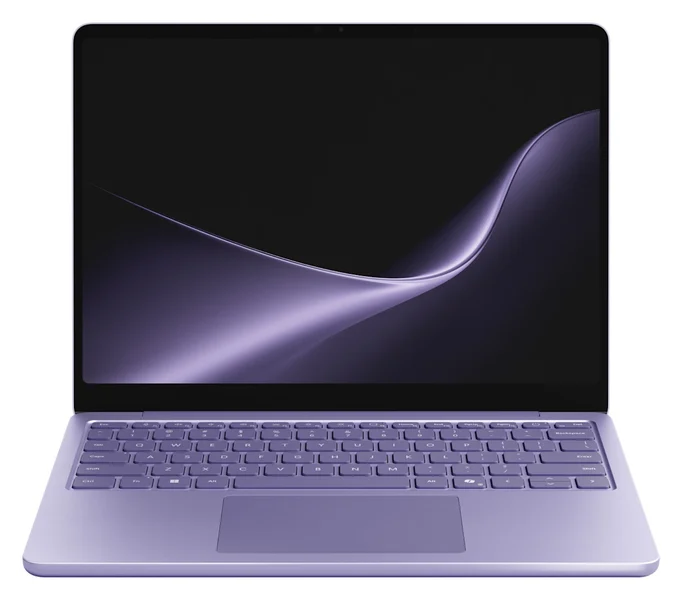
Key specs: Snapdragon X2 Plus (6-core), 80 TOPS NPU, 13-inch PixelSense touchscreen at 1920 x 1280 and 60Hz, 16 GB or 24 GB of RAM, up to 512 GB of storage, fingerprint sign-in, 2.7 lb, up to 22.5 hours of local video playback. Announced September 23, 2026, and shipping from October 13, 2026, at $1,199.99.
Think of this as the student and commuter Surface. You get the same Copilot+ features as the 13.8-inch model, a touchscreen and a battery that should outlast a long school day, for $400 less at launch.
Microsoft says the new screen is 25% brighter than before, at 500 nits. A brighter panel makes a real difference by a sunny window or on a train.
The trade-offs come from the cheaper chip. The X2 Plus here has 6 CPU cores, against 10 or 12 in the larger Surface, and the screen stays at 60Hz. For notes, browsing, video calls and Office, none of that will hold you back. For photo editing or large spreadsheets, step up.
Buy the Surface Laptop 13-inch (Snapdragon X2 Plus) now on Amazon
Lenovo IdeaPad Slim 5x Gen 11 (15-inch): the best budget Copilot+ PC
The Lenovo IdeaPad Slim 5x Gen 11 is the best budget Copilot+ PC. For $849.99 at launch you get a Snapdragon X2 Plus chip with an 80 TOPS NPU, a 15.3-inch 120Hz touchscreen, HDMI, two USB-A ports and a microSD slot.
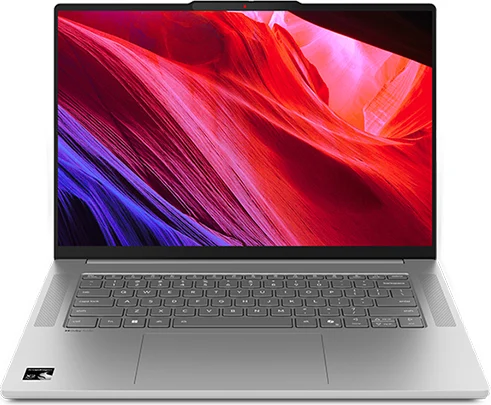
Key specs: Snapdragon X2 Plus (X2P-42-100, 6 cores), 80 TOPS NPU, 15.3-inch 1920 x 1200 touchscreen at 30 to 120Hz and 400 nits, 16 GB of RAM and 512 GB SSD in the base model, 54.7Wh battery (70Wh optional), two 10 Gbps USB-C ports, two USB-A ports, HDMI 2.1, microSD reader, 3.10 lb. Launch price: $849.99.
Here’s the surprise of the year. The NPU in this $849.99 laptop is rated the same 80 TOPS as the one in a $1,599 Surface, so every Copilot+ feature runs just as well. You pay less for a slower CPU and graphics, not for weaker AI.
The port selection is generous for the money too. HDMI, two USB-A ports and a microSD slot cover a projector in a classroom, a mouse receiver and a camera card, all without adapters.
The catches are the ones you expect at this price. The USB-C ports run at 10 Gbps rather than USB4 speed, and Thurrott measured a bit over 8.5 hours of real use from the smaller battery. If you only need a browser and Google Docs, older budget laptops for college students under $500 cost less still, but none of them is a Copilot+ PC.
Buy the Lenovo IdeaPad Slim 5x Gen 11 now on Amazon
Snapdragon, Intel or AMD decides more than the Copilot+ sticker does
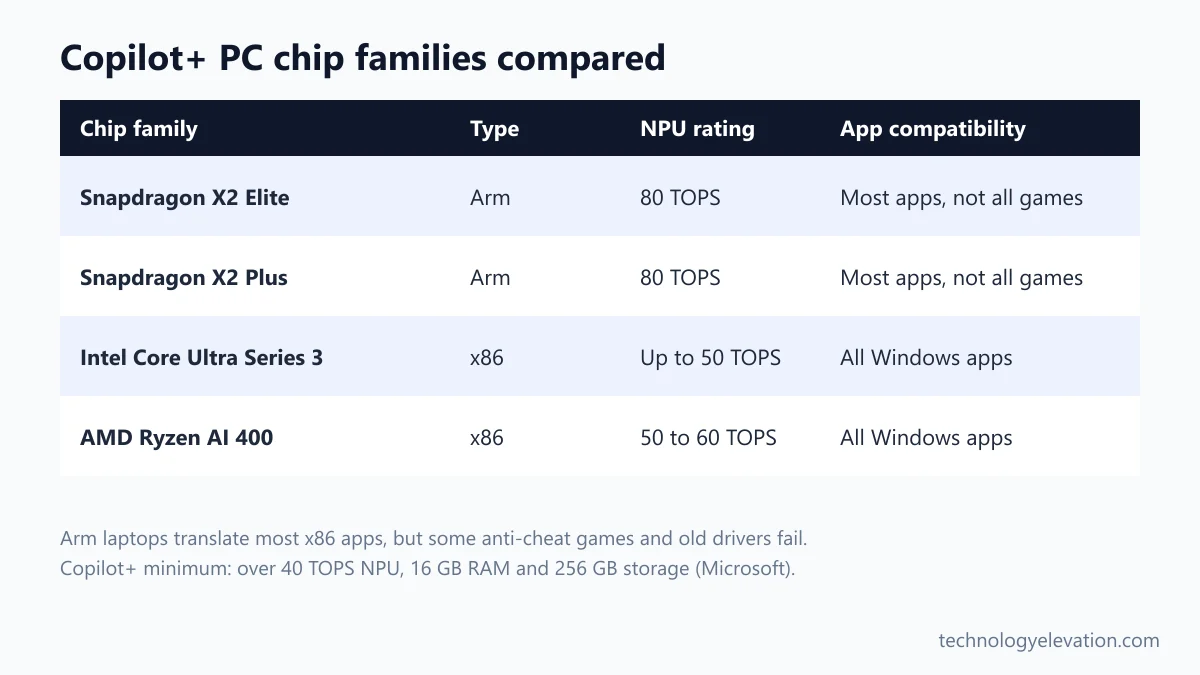
The chip family decides how a Copilot+ PC feels day to day. Snapdragon X2 laptops run on Arm, with the highest NPU ratings and long battery life. Intel Core Ultra Series 3 and AMD Ryzen AI 400 laptops run x86, so every Windows app and game works natively.
Snapdragon X2 (Arm). Qualcomm’s X2 Plus and X2 Elite chips carry an 80 TOPS NPU, roughly double the Copilot+ minimum, and the laptops built on them lead on battery claims. Most apps now have Arm versions, and Windows translates the rest. The exceptions are some games with anti-cheat software, older hardware drivers and a few specialist business tools. Check the apps you rely on before you buy.
Intel Core Ultra Series 3 (x86). Intel rates the NPU at up to 50 TOPS. You get the widest compatibility and, on the higher chips, strong integrated graphics for a thin laptop. Battery life has improved a lot over older Intel chips, which used to be the weak spot.
AMD Ryzen AI 400 (x86). AMD’s NPUs are rated from 50 to 60 TOPS across the range. Compatibility matches Intel, and the chips suit people who want one laptop for work and some light play.
Gamers should think twice about any thin Copilot+ laptop. A dedicated gaming laptop or a handheld gaming PC runs games far better than integrated graphics will, and the Copilot+ label adds nothing to gaming performance.
Copilot+ features run on the NPU and are optional
Copilot+ PCs add Windows features that run on the NPU, not in the cloud. The main ones are Recall, Click to Do, improved Windows search, live caption translation and image tools in Paint and Photos. Every one is optional, and Recall is off until you turn it on.
Recall takes regular snapshots of your screen so you can search for something you saw days ago by describing it. Microsoft says Recall is opt-in and processed locally, protected by Windows Hello sign-in and encryption, and can be removed from the PC completely.
Click to Do lets you act on whatever is on screen: summarise or rewrite a paragraph, or edit an image, without copying it into another app.
Improved Windows search understands meaning rather than exact file names, so “photo of the beach at sunset” can find the right picture.
Live Captions can translate audio from dozens of languages into English captions in real time, including video calls and streams.
The ordinary Copilot assistant works on any Windows 11 PC, because it runs in the cloud. The Copilot+ label is about the local extras. If none of them appeals, a laptop without the sticker can still be a great buy, and a Mac remains an option too: the touchscreen MacBook Pro, MacBook Air and MacBook Neo are the alternatives worth comparing.
Apps, RAM, screen and ports decide the right Copilot+ PC
Choose a Copilot+ PC by checking app compatibility first, then RAM, then screen and ports. The NPU rating matters least, because every model here clears Microsoft’s 40 TOPS bar, and the Copilot+ features run the same on all of them.
- List your must-have apps. If you rely on old drivers, niche business software or competitive online games, pick an Intel or AMD model. Otherwise Snapdragon is fine.
- Buy enough RAM up front. Microsoft requires 16 GB of RAM for a Copilot+ PC, and every pick here solders its memory to the board. Go to 32 GB if you edit photos or keep dozens of tabs open.
- Check storage. The Copilot+ minimum is 256 GB, but 512 GB gives you room for Recall snapshots and updates.
- Pick a screen for your day. OLED gives deep blacks for video, 120Hz makes scrolling smoother, and a touchscreen helps if you sketch or sign documents.
- Count the ports. HDMI and USB-A save you from carrying adapters. USB4 matters if you plan to use a fast external monitor or dock.
- Weigh the weight. Under 2.5 lb feels effortless in a backpack. Over 3 lb is fine for a desk but noticeable on a commute.
Heavy users should also think about heat. Thin laptops throttle under long loads, and the laptops with the best cooling tend to be thicker machines with bigger fans.
Older Copilot+ PCs from 2024 and 2025 are still on sale
Many first-generation Copilot+ PCs from 2024 and 2025 are still sold, often at big discounts. They run the same Copilot+ features, but use older chips such as the Snapdragon X Plus and X Elite, rated at 45 TOPS, and older Ryzen AI 300 parts.
A discounted older model is not a bad buy. The Snapdragon X chips still clear the 40 TOPS bar, and battery life on that generation was already strong. Just know what you are getting, because listing titles often say only “Snapdragon” or “Copilot+ PC”.
The easy check is the chip name. Look for “X2” in a Snapdragon model, “Ultra 5 325”, “Ultra 7 355” or another 300-series number on Intel, and a 400-series number such as “Ryzen AI 7 445” on AMD. Anything else is last year’s hardware, which is fine at the right price for laptops for working from home or school.
Frequently asked questions about Copilot+ PCs
What is the best Copilot+ PC in 2026?
The Microsoft Surface Laptop 13.8-inch (8th Edition) is the best Copilot+ PC for most people. It has a Snapdragon X2 chip with an 80 TOPS NPU, a 120Hz touchscreen and up to 20 hours of rated video playback. It launched at $1,599.
What makes a laptop a Copilot+ PC?
A Copilot+ PC is a Windows 11 laptop with an NPU rated at over 40 TOPS, at least 16 GB of RAM and at least 256 GB of storage. Chips from Qualcomm, Intel and AMD now meet those requirements.
Is Snapdragon or Intel better for a Copilot+ PC?
Snapdragon is better for battery life and NPU rating, while Intel is better for app and game compatibility. Snapdragon X2 chips run on Arm with an 80 TOPS NPU. Intel Core Ultra Series 3 chips run every x86 Windows app natively.
Do I need a Copilot+ PC to use Copilot?
No, the Copilot assistant runs in the cloud and works on ordinary Windows 11 PCs. A Copilot+ PC adds extra features that run on its own NPU, such as Recall, Click to Do and improved Windows search.
Do Copilot+ PCs run all Windows apps?
Intel and AMD Copilot+ PCs run all Windows apps natively. Snapdragon models run most apps, either in Arm versions or through Windows translation, but some games with anti-cheat software, older drivers and specialist tools may not work.
Is Recall turned on by default?
No, Recall is opt-in. Microsoft says its snapshots are processed locally, protected by Windows Hello sign-in and encryption, and that you can remove Recall from the PC completely.
What is the cheapest good Copilot+ PC?
The Lenovo IdeaPad Slim 5x Gen 11 is the best budget Copilot+ PC, at $849.99 at launch. Its Snapdragon X2 Plus chip has the same 80 TOPS NPU rating as far more expensive laptops, plus a 15.3-inch 120Hz touchscreen.
Last checked and sources
Last checked on 19 November 2026 by Abdullah Kabeer. We compared the published specs, NPU ratings, launch dates and US launch prices of current Copilot+ laptops using manufacturer pages and announcements, then cross-checked details against independent reviews.
- Microsoft Copilot+ PC page and Microsoft Support, Copilot+ PC hardware requirements
- Windows Experience Blog, Copilot+ PC features update, April 25, 2025
- Microsoft Surface Laptop product and specification pages (13-inch, 13.8-inch and 15-inch)
- Dell XPS 14 (2026) product and configuration pages
- Intel Core Ultra 7 355 specification page
- AMD Ryzen AI 400 Series product documents
- ASUS US press release on the 2026 Zenbook lineup, April 7, 2026, and ASUS Zenbook A14 and Zenbook S16 specification pages
- Independent coverage by Notebookcheck, Thurrott, Windows Central, 9to5Google, Tom’s Hardware, TechRadar and ITPro
We update this buying guide when new Copilot+ PCs launch, older models are discontinued or prices change.
Technology Elevation is reader-supported. As an Amazon Associate, we earn from qualifying purchases. When you buy through links on this page, we may earn a small commission at no extra cost to you.

GIPHY App Key not set. Please check settings