

 Abdullah Kabeer
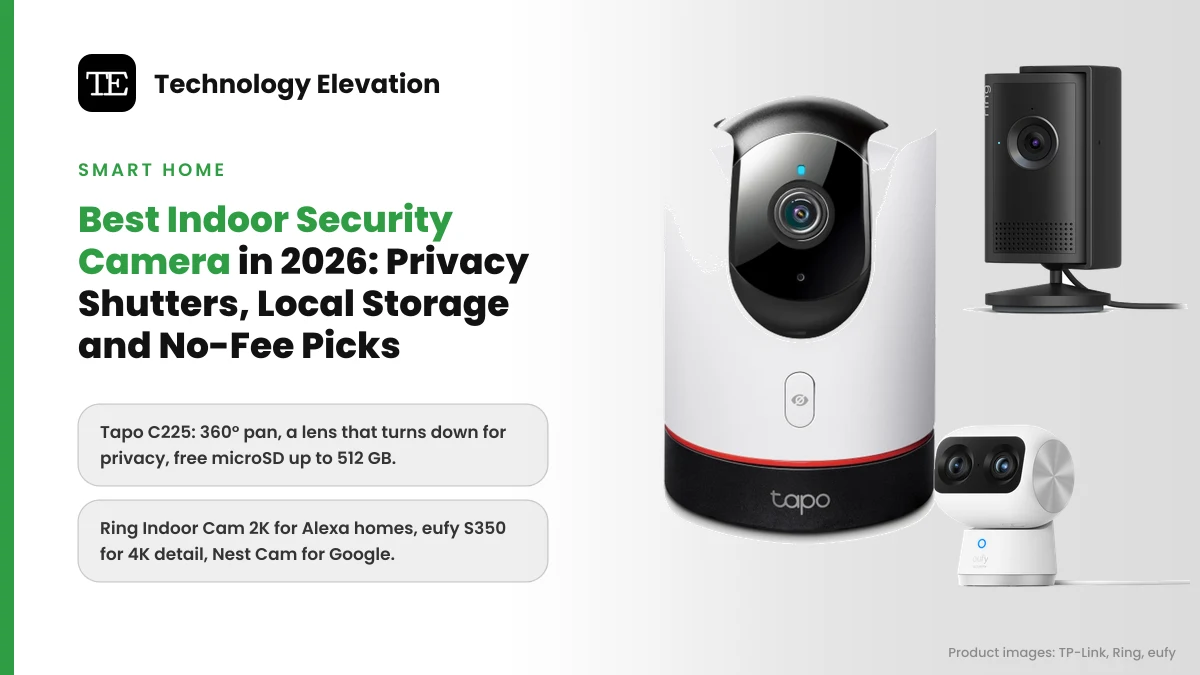
Walk into any living room with a camera on the bookshelf and you will notice the same thing: nobody looks at it after the first week. That is the point of a good indoor camera, and also the risk. The best indoor security camera watches the dog, the front hall or the baby’s room when you are out, then gets out of the way, physically, when you are home.
Privacy is not a theoretical worry here. In 2023, the US Federal Trade Commission said that one Ring employee had viewed thousands of customer videos, including footage from cameras in bathrooms and bedrooms, and Ring paid $5.8 million to settle the case. Indoor cameras point at the most private rooms you have, so how a camera shuts itself off matters as much as how sharp it looks.
The other two questions are money and storage. Some cameras save every clip to a microSD card you own. Others need a monthly plan before they save anything at all. Ring’s plans start at $4.99 a month for one camera, and without one, a Ring camera only gives you live view and alerts.
So we compared indoor cameras from Tapo, Ring, eufy, Wyze, Google Nest, Aqara and Blink on three things: how the privacy mode works, where the video goes, and what still works with no subscription. We checked every spec on the maker’s own page and searched the US Consumer Product Safety Commission recall database for each brand.
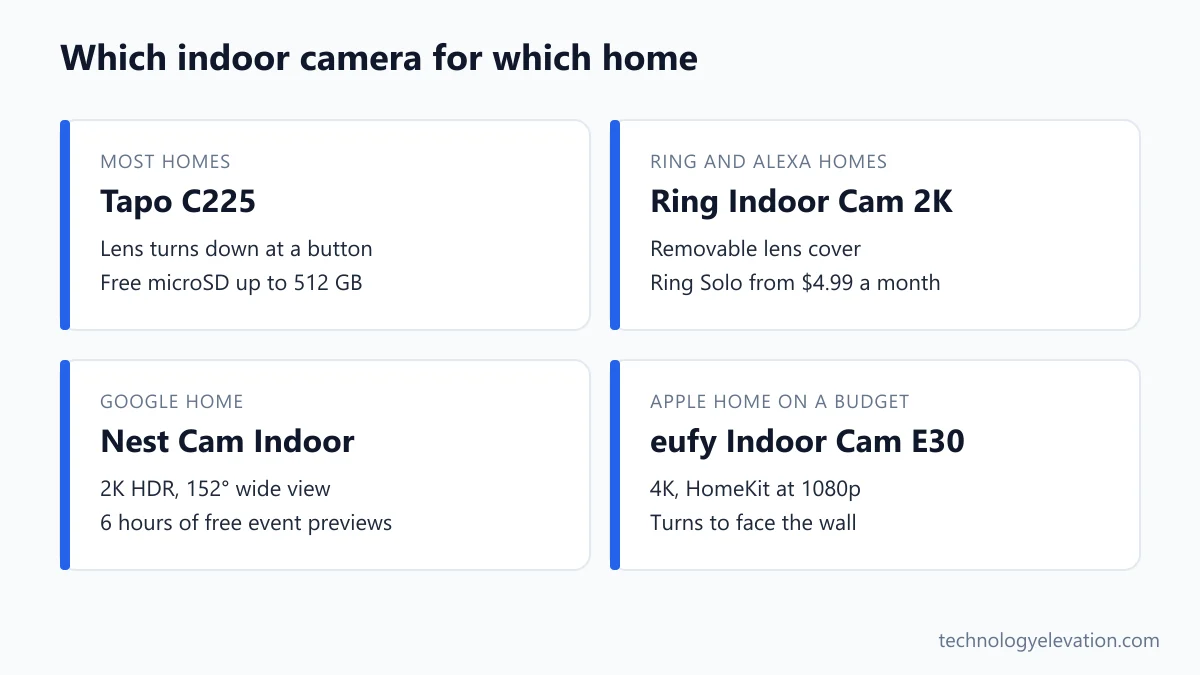
The best indoor security camera is the Tapo C225
The Tapo C225 is the best indoor security camera for most homes. It pans a full 360 degrees, records 2K video to a microSD card of up to 512 GB with no fee, and a button on the camera physically turns the lens down when you want privacy.
Every pick, by the job it does best:
- Best overall: Tapo C225
- Best for Ring and Alexa homes: Ring Indoor Cam 2K
- Best cheap pan-tilt with a shutter: Ring Pan-Tilt Indoor Cam
- Best 4K detail: eufy Indoor Cam S350
- Best for Apple Home on a budget: eufy Indoor Cam E30
- Best 4K pan-tilt for the money: Wyze Cam Pan v4
- Best for Google Home: Google Nest Cam Indoor (wired, 3rd gen)
- Best for Matter and smart home hubs: Aqara Camera Hub G350
- Best add-on for a Blink system: Blink Mini 2K+
| Camera | Video | Privacy method | Local storage | Moves |
|---|---|---|---|---|
| Tapo C225 | 2K, 4 MP | Lens turns down (button or app) | microSD up to 512 GB | 360° pan and tilt |
| Ring Indoor Cam 2K | 2560 x 1440 | Removable lens cover | None, cloud plan needed | Fixed |
| Ring Pan-Tilt Indoor Cam | 1080p | Cover turns off camera and mic | None, cloud plan needed | 360° pan, 169° tilt |
| eufy Indoor Cam S350 | 4K plus 2K telephoto | Privacy Mode in app | microSD up to 128 GB or HomeBase | 360° pan, 75° tilt |
| eufy Indoor Cam E30 | 4K | Lens turns to face the wall | microSD up to 128 GB or HomeBase | 360° pan and tilt |
| Wyze Cam Pan v4 | 4K (3840 x 2160) | Lens points down | microSD up to 512 GB | 360° pan, 180° tilt |
| Nest Cam Indoor (3rd gen) | 2K (2560 x 1440) | No shutter, green LED when streaming | None, 6 hours of free event previews | Fixed |
| Aqara Camera Hub G350 | 4K plus 2.5K telephoto | True Privacy Mode | microSD up to 512 GB | 360° |
| Blink Mini 2K+ | 2K | No shutter | USB drive via Sync Module 2 | Fixed |
Black Friday prices on all of these move daily. Where a maker lists a regular price, we give it below as a ceiling, not as what you will pay this week.
Tapo C225: the best indoor camera overall
The Tapo C225 wins because it gets the three big things right at once. It covers a whole room with 360-degree panning, saves video to your own microSD card for free, and hides its lens with one press of a button, so privacy is something you can see.
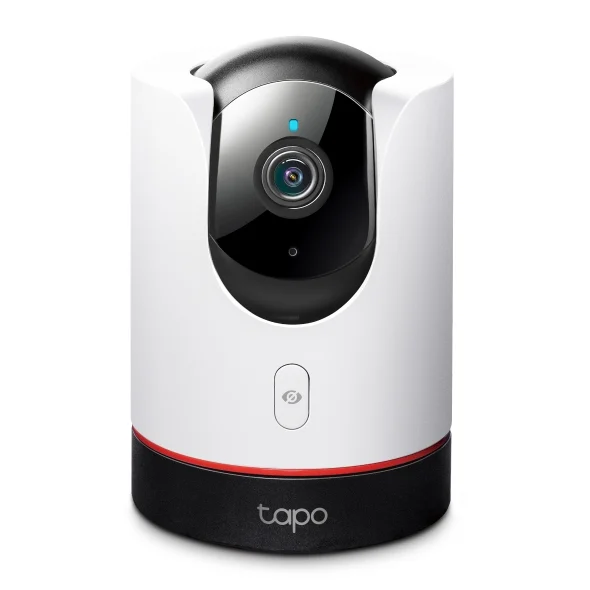
Key specs: 2K QHD 4 MP video with HDR at 30 fps, f1.6 aperture and a starlight sensor, 360-degree pan and tilt, motion tracking at up to 120 degrees per second, physical lens conceal, switchable 940 nm invisible night vision, microSD up to 512 GB or Tapo Care cloud storage, works with Apple HomeKit, Alexa and Google Assistant.
The privacy feature is the reason to buy it. Press the button on the front and the camera turns its lens down into the base. TP-Link describes it plainly on the Tapo C225 product page: once hidden, footage is no longer being captured. You can do the same from the Tapo app on your way home.
Local storage is the other big win. Drop in a microSD card and the C225 records to it with no subscription. Tapo Care, the optional cloud plan, is there if you want an off-site copy in case someone walks off with the camera.
Night vision is smarter than most. You can switch the infrared to the 940 nm invisible mode, so there is no red glow in a bedroom or a nursery. Parents comparing it with a dedicated baby monitor will like the baby crying alert, too.
The catch is the shape. A pan-tilt dome is bigger than a fixed cube and draws the eye on a shelf. If you want a small fixed camera with the same idea, the Tapo C125 has a physical privacy shutter, a 140-degree lens, Wi-Fi 6, a magnetic base and the same 512 GB microSD limit.
Buy the Tapo C225 now on Amazon
Ring Indoor Cam 2K: the best for Ring and Alexa homes
The Ring Indoor Cam 2K is the best pick if you already have a Ring doorbell or an Echo device. It records sharp 2560 x 1440 video, ships with a removable lens cover, and shows up in the same app as the rest of your Ring gear.
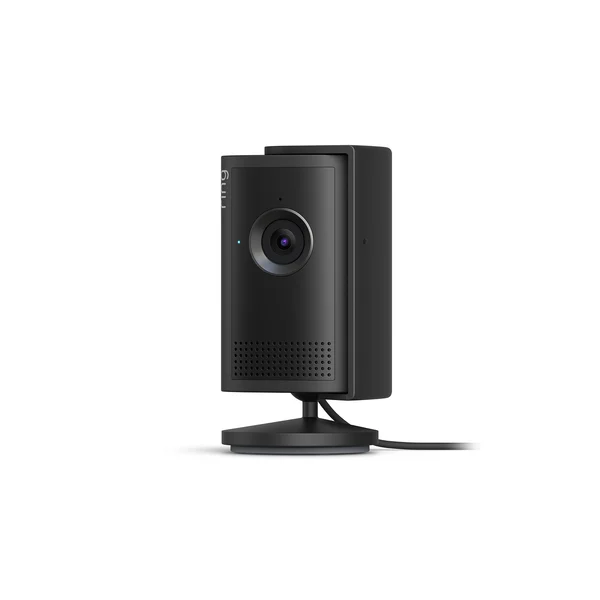
Key specs: 2560 x 1440 video, 115-degree horizontal and 60-degree vertical field of view, up to 4x zoom, two-way talk with noise cancellation, removable privacy cover, 2.4 GHz Wi-Fi only, plug-in power. Ring lists it at $59.99. It was called the Indoor Cam Plus until Ring renamed it.
The cover slides over the lens to block the view and muffles the microphone. Ring says that for full audio privacy you also need to turn the mic off in the Ring app, which is worth doing in a bedroom.
Storage is where Ring costs more over time. Without a plan, you get live view and motion alerts but cannot save or replay missed clips. Ring Solo is $4.99 a month or $49.99 a year for one camera, and Ring Multi is $9.99 a month for every device at one address. Continuous 24/7 recording is a separate $3 a month per camera.
The FTC case is the elephant in the room. Under the 2023 order, Ring had to build a privacy and security program, put safeguards on human review of videos and use multi-factor authentication for employee and customer accounts. Keep two-step verification switched on in your Ring account.
Ring households who want the same app for their porch will find the video doorbell range works alongside it, and every Ring device shares one Ring Multi plan.
Buy the Ring Indoor Cam 2K now on Amazon
Ring Pan-Tilt Indoor Cam: the best cheap pan-tilt with a shutter
The Ring Pan-Tilt Indoor Cam is the best low-cost way to cover a whole room in a Ring home. It pans 360 degrees and tilts 169 degrees, and its manual cover switches off both the camera and the microphone when you slide it across.
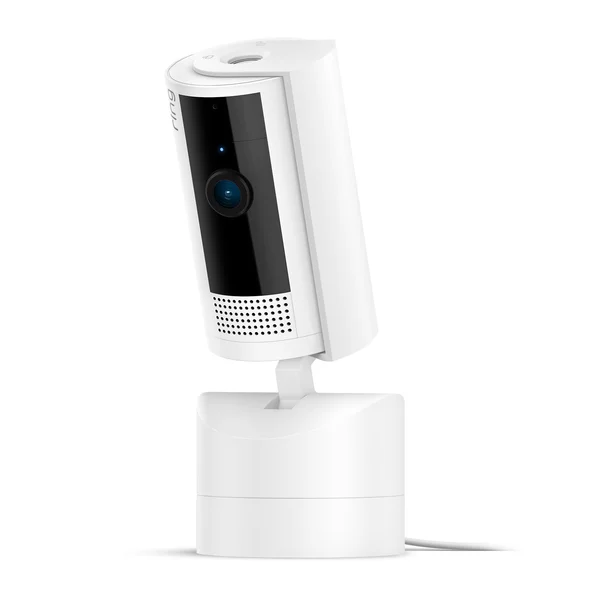
Key specs: 1080p HD video with color night vision, 360-degree pan and 169-degree tilt controlled from the Ring app, custom motion zones, manual removable privacy cover that turns off the camera and mic, 10 ft USB-C power cable. Ring lists it at $59.99.
That cover is more thorough than the one on the Indoor Cam 2K. Slide it in front of the lens and Ring says the camera and microphone both turn off. Swivel it to the side and the camera comes back. You can also take it off entirely.
Video is 1080p rather than 2K, which is fine for checking on a pet across the room but softer when you zoom into a face at the door. The pan-tilt base makes up for it by letting one camera cover a living room and the hallway beyond.
The same Ring Protect rule applies: no plan, no saved clips. Ring includes a free 30-day trial unless your address already has a plan.
Buy the Ring Pan-Tilt Indoor Cam now on Amazon
eufy Indoor Cam S350: the best 4K detail
The eufy Indoor Cam S350 has the sharpest view in this guide. It pairs a 4K wide-angle lens with a 2K telephoto lens for 8x hybrid zoom, pans 360 degrees, and saves video locally with no monthly fee, which suits big open rooms.
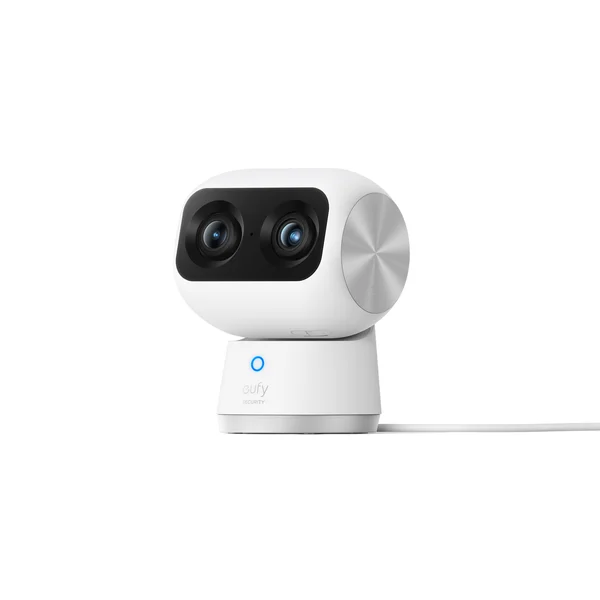
Key specs: 4K wide-angle lens (3840 x 2160, 130-degree diagonal) plus a 2K telephoto lens (2304 x 1296), 3x optical and 8x hybrid zoom, 360-degree pan and 75-degree tilt, Privacy Mode, microSD up to 128 GB or a compatible eufy HomeBase, dual-band Wi-Fi 6. eufy lists it at $139.99.
Two lenses solve a problem every wide camera has. A 4K wide shot of a large room looks great until you zoom in on the far doorway and the detail turns to mush. The S350 switches to its telephoto lens instead, so a face at the back door is still a face.
Storage costs nothing extra. Clips go to a microSD card or to a eufy HomeBase, and eufy’s optional Plus membership adds cloud backup if you want it.
Two catches. First, eufy says the S350 does not work with Apple HomeKit or Google Home, so it lives in the eufy app. Second, eufy’s history is not spotless. In late 2022, a security researcher found that eufy cameras sold as local-only were uploading facial thumbnails to cloud servers, and eufy then added a cloud disclaimer to its app. Check the cloud settings in the eufy app before you mount it.
Buy the eufy Indoor Cam S350 now on Amazon
eufy Indoor Cam E30: the best for Apple Home on a budget
The eufy Indoor Cam E30 is the cheapest way to get a 4K pan-tilt camera into Apple Home. It records 4K to a local microSD card, tracks people and pets, and its privacy mode swings the lens to face the wall and stops recording.
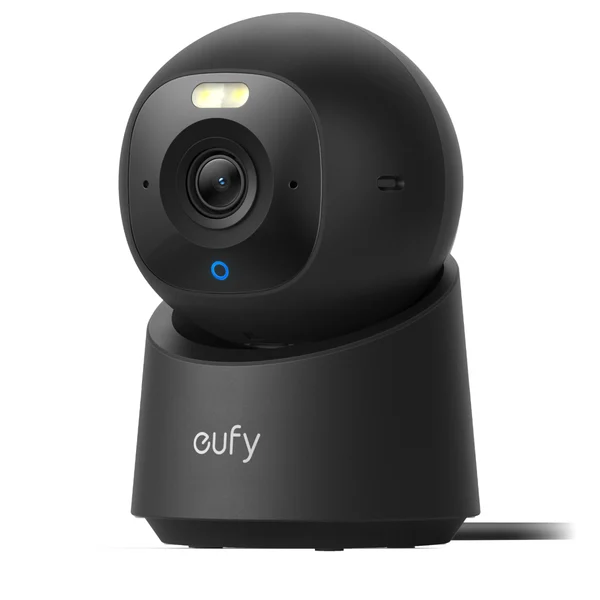
Key specs: 4K UHD video, 360-degree pan and tilt, human and pet tracking with up to 4 saved preset positions, privacy mode that turns the camera away and stops recording, microSD up to 128 GB or HomeBase S380 and HomeBase mini, Apple HomeKit at 1080p, 2.4 GHz Wi-Fi only. eufy lists it at $69.99.
The privacy mode is a nice middle ground between a software switch and a shutter. When you turn it on, the camera rotates to face the wall or a direction you choose. Anyone in the room can see at a glance that the lens is pointing away.
Apple Home support is the reason to pick it over the S350. Add it to the Home app and you can see it next to your other HomeKit gear, though eufy caps HomeKit video at 1080p. The full 4K view stays in the eufy app.
Tracking is useful for pets. The camera follows a person or animal as it moves, then returns to its default position after 30 seconds without motion. The single-band 2.4 GHz Wi-Fi is the one real weak spot, especially in a crowded apartment building.
Buy the eufy Indoor Cam E30 now on Amazon
Wyze Cam Pan v4: the best 4K pan-tilt for the money
The Wyze Cam Pan v4 gives you 4K video, 360-degree pan and 180-degree tilt for a regular price of $59.98. It records to microSD cards of up to 512 GB, and its privacy mode turns the whole camera so the lens points down.
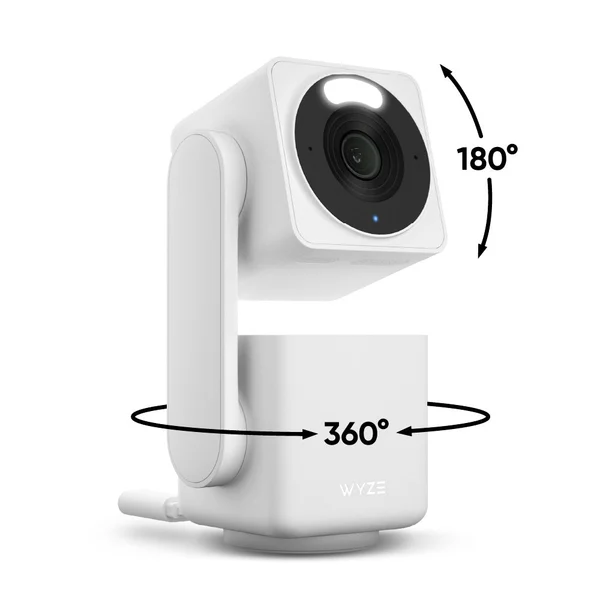
Key specs: 4K (3840 x 2160) video, 360-degree pan and 180-degree tilt, 8x digital zoom, color night vision with a 60-lumen spotlight, AI tracking of people, pets and vehicles, microSD up to 512 GB, dual-band 2.4 and 5 GHz Wi-Fi 6, works with Alexa and Google Assistant, IP65 for outdoor use with an extra adapter. Regular price: $59.98.
For the money, nothing else here matches the spec sheet. You get 4K, full pan and tilt, 5 GHz Wi-Fi and a big microSD limit for about the price of a fixed 2K camera from Ring.
Cam Plus, the optional plan, adds cloud clips and person, package and vehicle alerts for $2.99 a month per camera after a free month. Without it, the microSD card does the job.
The catch is Wyze’s track record. In February 2024, about 13,000 Wyze customers were shown images from someone else’s home camera. And in June 2026, the CPSC announced a recall of about 321,360 Wyze Solar Cam Pan outdoor cameras, model WYZESCPWH, because the wrong screw could puncture the battery. That recall does not cover the indoor Cam Pan v4, but Solar Cam Pan owners should stop using it and file a claim at wyze.com/SCPrecall.
Buy the Wyze Cam Pan v4 now on Amazon
Google Nest Cam Indoor (wired, 3rd gen): the best for Google Home
The Nest Cam Indoor (wired, 3rd gen) is the best indoor camera for a Google Home. It records 2K HDR video with a wide 152-degree view, works with Gemini for Home, and keeps up to 6 hours of event previews with no subscription.
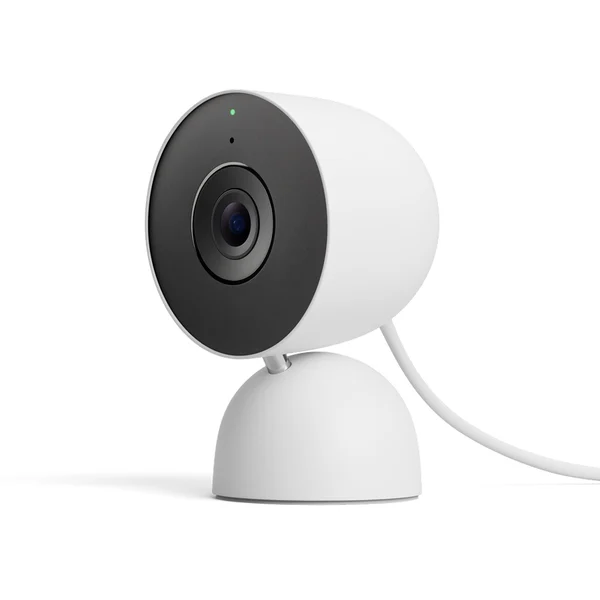
Key specs: 2K (2560 x 1440) sensor, 152-degree diagonal field of view, 6x digital zoom, HDR video at 30 fps, infrared night vision up to 15 ft, 2.4 and 5 GHz Wi-Fi, 10 ft attached USB-C cable, indoor use only, colors Snow, Hazel and Berry. The Google Store spec page lists it at $129.99.
Buy this one for the ecosystem. It needs the Google Home app and a Google account, works with Gemini for Home, and is also compatible with Alexa. If your thermostat, speakers and display already run on Google, it slots straight in.
The free tier is better than Ring’s. Google includes up to 6 hours of event video previews, with clips of up to 10 seconds. Google Home Premium Standard stretches that to 30 days of event history, and the Advanced plan adds 60 days of events plus 10 days of continuous recording.
You get no shutter. Google’s answer is a green light that shows when the camera is streaming or processing video, plus encrypted video and two-step verification through your Google account. For a bedroom, pick a camera with a physical cover instead. Owners of older Nest cameras can compare it with other Google Home compatible security cameras before switching.
Buy the Google Nest Cam Indoor (wired, 3rd gen) now on Amazon
Aqara Camera Hub G350: the best for Matter and smart home hubs
The Aqara Camera Hub G350 is the pick for people who run a serious smart home. It is a dual-lens 4K pan camera, a Zigbee hub and a Matter controller in one, and Aqara markets it as the first Matter-certified camera.

Key specs: 4K wide-angle lens (133 degrees) plus a 2.5K telephoto lens (2560 x 1440), 9x hybrid zoom, 360-degree view with up to 30 preset angles, True Privacy Mode, microSD up to 512 GB, Apple HomeKit Secure Video (1080p in Apple Home), Zigbee and Thread radios, Wi-Fi 6 on 2.4 and 5 GHz.
The hub part is the real draw. The G350 connects Aqara’s Zigbee sensors and works as a Matter controller and bridge, so Aqara door and motion sensors can connect to the camera itself instead of a separate hub on the shelf.
Apple users get HomeKit Secure Video, which needs an iCloud+ plan and an Apple home hub. Aqara notes that Apple Home shows the camera at 1080p, and which Matter features you get depends on your platform. It helps to know what Matter is and what your platform supports before you count on a feature.
Aqara says True Privacy Mode extends a physical shutdown for full visual privacy when the camera is off. The design is the other talking point: the camera has small ears on top, which some people find cute and others find odd on a bookshelf.
Buy the Aqara Camera Hub G350 now on Amazon
Blink Mini 2K+: the best add-on for a Blink system
The Blink Mini 2K+ makes sense if you already own Blink outdoor cameras or a Blink doorbell. It is a small plug-in 2K camera with a built-in siren, it lives in the same Blink app, and Blink lists it starting at $49.99.
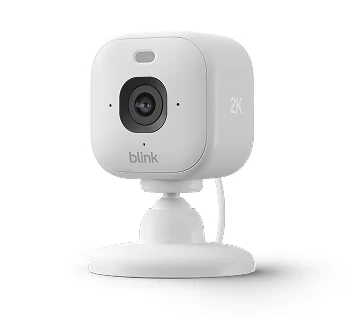
Key specs: up to 2K video, 138-degree diagonal field of view, infrared night vision, two-way audio with noise cancellation, built-in siren, 2.4 GHz Wi-Fi, USB-C power, IP65 outdoors with Blink’s weather-resistant adapter. Blink calls it its third-generation Mini.
Local storage works through a hub. Blink’s Sync Module 2, sold separately, saves clips to a USB drive of up to 256 GB without a subscription, and Blink lists its Mini cameras among the supported models. On a Blink plan, clips go to the cloud and back up to the drive once a day.
Blink gives the Mini 2K+ no physical shutter, and it is a fixed camera. If you want 4K, Blink now also sells the Mini 4K+, with dual-band Wi-Fi 6.
Pair it with a solar doorbell camera or outdoor cameras from the same brand and everything shares one app and one plan.
Buy the Blink Mini 2K+ now on Amazon
How to choose an indoor security camera
Choose an indoor camera by deciding which room it watches, how you want privacy to work, and where the video should be stored. Resolution matters less than those three. A 2K camera with a real shutter and a microSD slot beats a 4K camera you never trust.
- Pick the room first. A living room or hallway suits a pan-tilt camera. A nursery or a pet corner usually only needs a fixed lens.
- Decide how privacy should work. A lens that physically turns away or a sliding cover is easy to trust. A green light or an app switch asks you to take the maker’s word for it.
- Choose local or cloud storage. A microSD slot means no monthly fee. Cloud plans keep a copy if a burglar takes the camera.
- Match your smart home. Ring and Blink suit Alexa homes, Nest suits Google Home, and Tapo, eufy E30 and Aqara work with Apple Home.
- Check your Wi-Fi. Several picks only use 2.4 GHz. Ring recommends at least 5 Mbps of upload speed for its Indoor Cam 2K.
- Add up the yearly cost. A $60 camera on a $49.99 yearly plan costs more than a $140 camera with free local storage within two years.
Wi-Fi is the quiet failure point. A camera at the far end of a house that keeps dropping offline is worse than no camera, and a mesh Wi-Fi system often fixes it for good.
Privacy shutters beat privacy software
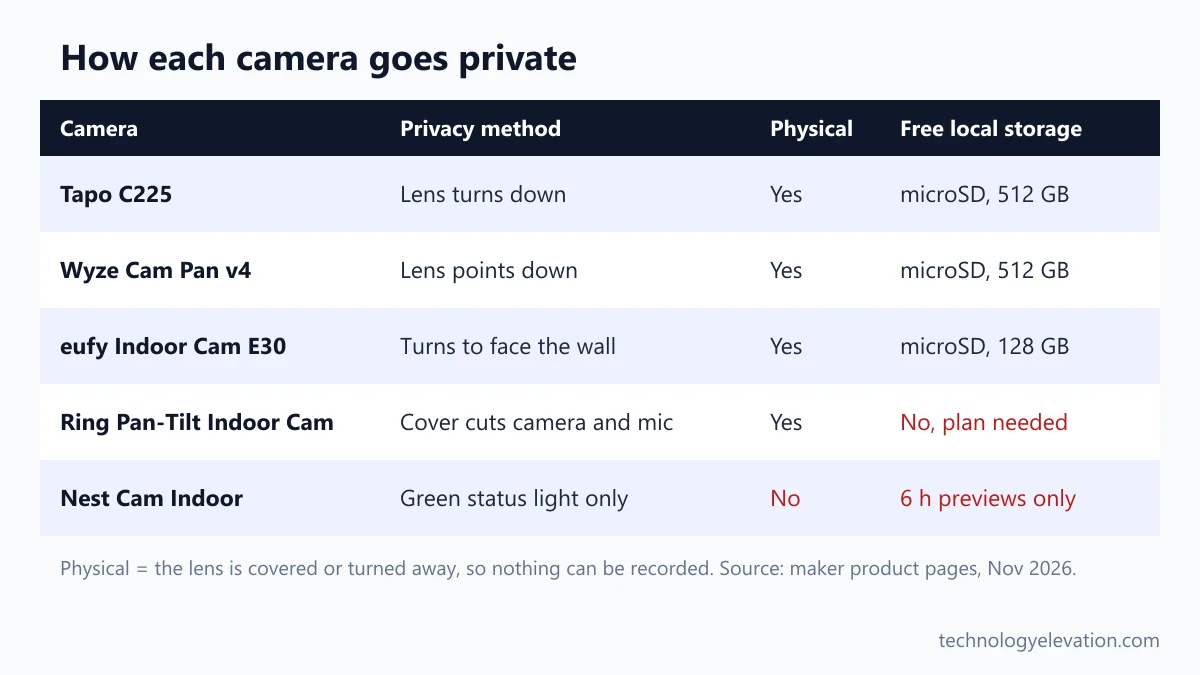
A physical privacy shutter is the safest choice for any camera inside your home. When the lens is covered or turned away, nothing can be recorded, no matter what happens to your account, the app or the company’s servers. Software privacy modes depend on all three.
The picks in this guide fall into three groups. Tapo, eufy E30 and Wyze turn the lens away from the room. Ring uses a cover you slide across the lens, and the Pan-Tilt version also cuts the mic. Nest and Blink have no physical cover at all, and Aqara describes its True Privacy Mode as a physical shutdown.
The track records explain why this matters. The FTC found that hackers got into about 55,000 US Ring accounts in 2017 and 2018, and some used two-way audio to harass people. Wyze’s 2024 incident showed strangers’ camera images to about 13,000 users. In each case, a closed shutter would have shown nothing.
Whatever you buy, turn on two-step verification, use a password you do not use anywhere else, and keep the camera’s firmware updated. Those three steps help block the password-reuse attacks the FTC described.
Local storage saves more than a subscription
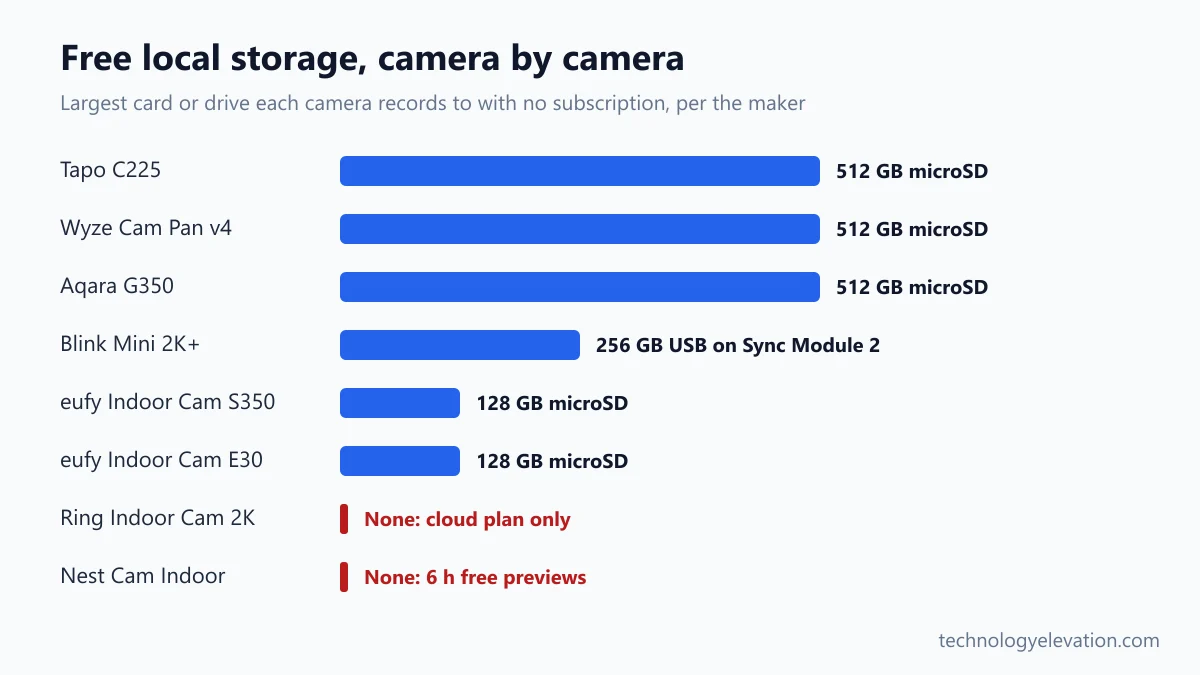
Local storage on a microSD card is the cheapest way to keep indoor camera footage. Tapo, Wyze and Aqara accept cards of up to 512 GB and eufy up to 128 GB, all with no fee. Ring and Nest need a plan for saved video.
The maths is simple. Ring Solo at $49.99 a year adds about $150 over three years for one camera. A 128 GB microSD card is a one-time purchase.
Cloud storage still has one real advantage: if someone steals the camera, the card goes with it. A good compromise is local recording for everyday clips and a cheap cloud plan only on the camera that faces your main entrance. For the yard, outdoor security lights with cameras from the same brand can share one app with your indoor cameras.
Smart displays are another way to watch a live feed on the kitchen counter. Choosing between Apple HomeView, Echo Show and Nest Hub mostly comes down to which camera brand you already own.
Frequently asked questions about indoor security cameras
Do indoor security cameras need a subscription?
Not all of them. Tapo, Wyze, eufy and Aqara cameras record to a microSD card with no monthly fee. Ring cameras need a Ring plan, from $4.99 a month, to save and replay clips.
Which indoor cameras have a physical privacy shutter?
The Tapo C225 and Wyze Cam Pan v4 turn their lens down, the eufy E30 turns to face the wall, and Ring’s indoor cameras use a removable lens cover. The Tapo C125 has a built-in shutter on a fixed camera.
Can indoor security cameras be hacked?
Yes, any internet-connected camera can be accessed if your account is weak. The FTC found that hackers reached about 55,000 Ring accounts in 2017 and 2018. Two-step verification and a unique password help block these attacks.
Which indoor camera works with Apple Home?
The Tapo C225, Tapo C125, eufy Indoor Cam E30 and Aqara Camera Hub G350 work with Apple HomeKit. The Aqara G350 also supports HomeKit Secure Video, which needs an iCloud+ plan and an Apple home hub.
Is a 4K indoor camera worth it?
Only for large rooms. 4K helps when you zoom into a far doorway, which is why the eufy S350 and Wyze Cam Pan v4 use it. For a nursery or a small apartment, 2K is plenty and uses less storage.
Has any indoor security camera been recalled?
None of the picks in this guide is under a recall. In June 2026, Wyze recalled about 321,360 Solar Cam Pan outdoor cameras, model WYZESCPWH, because of a battery fire risk. Owners should stop using them and claim a replacement or refund from Wyze.
Where should I put an indoor security camera?
Put it in a corner facing the main entry to a room, at about head height or higher. Avoid pointing it at a window, because bright light and glass ruin night vision, and keep it out of bathrooms.
Last checked and sources
Last checked on 19 November 2026 by Abdullah Kabeer.
We compared each camera’s official product and spec pages, read each maker’s storage and subscription terms, checked the FTC’s Ring order and searched the US Consumer Product Safety Commission recall database for every brand.
- TP-Link Tapo product pages for the Tapo C225, Tapo C125 and Tapo C210
- Ring product pages for the Indoor Cam 2K and Pan-Tilt Indoor Cam, and the Ring plans page
- eufy product pages for the Indoor Cam S350 and Indoor Cam E30
- Wyze Cam Pan v4 product page and tech specs
- Google Store tech specs for the Nest Cam Indoor (wired, 3rd gen)
- Aqara Camera Hub G350 product page
- Blink product page and Blink support tech specs for the Mini 2K+ and Mini 4K+, and the Blink Sync Module 2 FAQ
- US Federal Trade Commission press release on the Ring settlement, May 31, 2023
- US Consumer Product Safety Commission recall notice for the Wyze Solar Cam Pan, June 4, 2026
- CNN Business on the February 2024 Wyze incident; Ars Technica and Android Police on eufy’s cloud thumbnails, 2022
We update this guide when new indoor cameras launch or current models are discontinued.
Technology Elevation is reader-supported. As an Amazon Associate, we earn from qualifying purchases. When you buy through links on this page, we may earn a small commission at no extra cost to you.


GIPHY App Key not set. Please check settings