

 Haris Khan
Open 30 browser tabs, a video call and a spreadsheet on an 8GB laptop and you can feel the moment it runs out of room. The fan spins up, tabs reload when you click back to them, and the cursor stutters for half a second. That stutter is the whole reason people search “how much RAM do I need” before buying a laptop.
The answer moved in the last two years. Microsoft now requires 16GB of RAM for any Copilot+ PC, the Windows laptops built for on-device AI features. Apple made 16GB the least you can get in any MacBook Air or MacBook Pro, then launched the $599 MacBook Neo with 8GB in March 2026.
So the floor depends on the laptop, not just on what you do with it. Below, the minimums come from Microsoft, Apple, Google and game publishers’ own requirement pages, then we match them to real use.
RAM (random access memory) is the laptop’s short-term workspace. Your storage drive holds files. RAM holds whatever is open right now, and when it fills up, everything slows down.
Most people need 16GB of RAM in a laptop in 2026
Most people need 16GB of RAM in a new laptop in 2026. It runs Windows 11 or macOS comfortably with dozens of tabs, office apps, calls and light photo editing, and it is the Copilot+ PC minimum. Choose 8GB only for light use, and 32GB for heavy creative work.
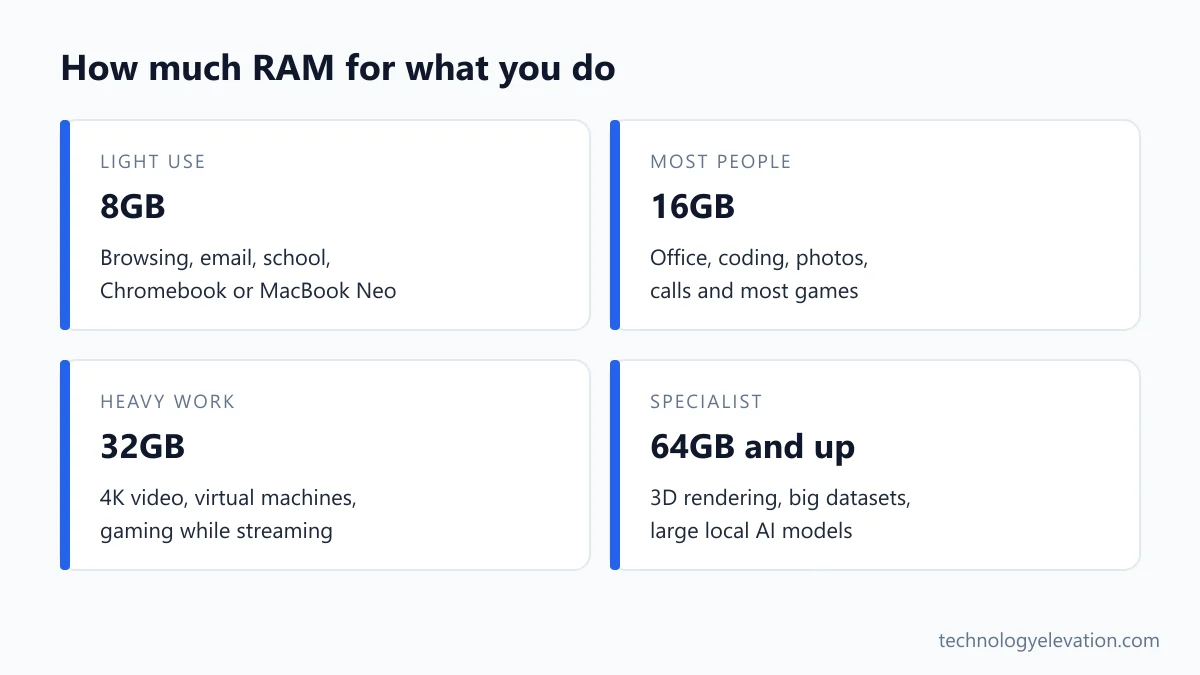
RAM by use, at a glance:
- 8GB: web browsing, email, streaming, schoolwork, a Chromebook or a MacBook Neo.
- 16GB: most people. Office work, heavy browsing, coding, photo editing, mainstream gaming.
- 32GB: 4K video editing, large code projects with virtual machines, gaming while streaming.
- 64GB and up: specialist work such as 3D rendering, big datasets and running large AI models locally.
| What you do | Enough | Comfortable |
|---|---|---|
| Browsing, email, streaming | 8GB | 8GB to 16GB |
| School, office apps, video calls | 8GB | 16GB |
| Coding and photo editing | 16GB | 16GB to 32GB |
| Gaming | 16GB | 16GB to 32GB |
| 4K video, 3D, virtual machines | 32GB | 32GB to 64GB |
Treat the “Enough” column as the least you should accept today. Most people keep a laptop for years, and software only gets hungrier.
Official minimums set the floor for every laptop
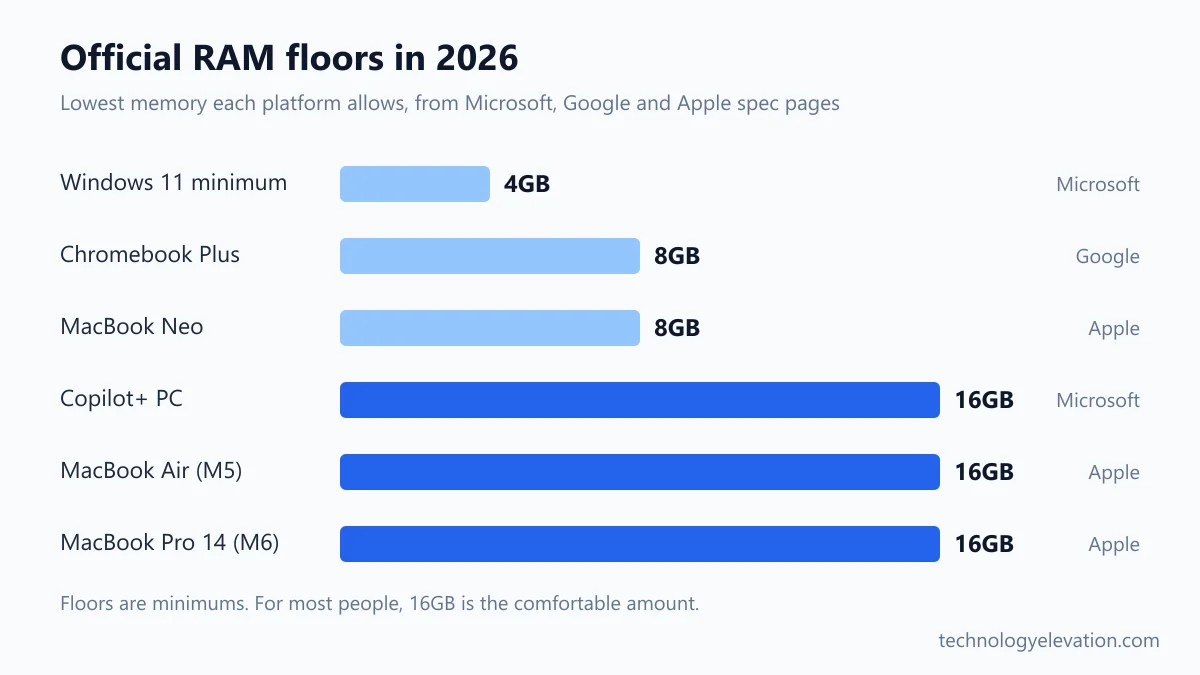
Official minimums set the floor. Windows 11 installs on 4GB, Copilot+ PCs need 16GB, Chromebook Plus models need 8GB, and Apple sells the MacBook Neo with 8GB while no MacBook Air or MacBook Pro comes with less than 16GB. Buy above the floor, never at it.
| Platform | RAM rule | Who sets it |
|---|---|---|
| Windows 11 | 4GB minimum | Microsoft |
| Copilot+ PC | 16GB DDR5 or LPDDR5 | Microsoft |
| Chromebook Plus | 8GB or more | |
| MacBook Neo (A18 Pro) | 8GB, no other option | Apple |
| MacBook Air (M5) | 16GB, up to 32GB | Apple |
| 14-inch MacBook Pro (M6) | 16GB, up to 32GB | Apple |
The Windows 11 number is the one that fools people. Microsoft lists 4GB because that is what the system needs to install and boot. Nobody at Microsoft is claiming 4GB is pleasant to use with a modern browser.
The Copilot+ rule is stricter. Microsoft pairs that 16GB with a 256GB SSD and an NPU (a chip for AI tasks) rated at 40+ TOPS, trillions of operations per second. Any laptop sold with a Copilot+ badge has to meet all three.
Google’s Chromebook Plus spec guarantees 8GB of RAM, 128GB of storage, an Intel Core i3 12th Gen or AMD Ryzen 3 7000 series chip or better, a 1080p webcam and a Full HD IPS screen. Plain Chromebooks have no such floor: Google’s own Chromebook pages still list an Acer Chromebook 315 configuration with 4GB.
8GB is enough for light use, Chromebooks and the MacBook Neo
8GB is enough for light use. Browsing, email, streaming, documents and schoolwork run fine on 8GB, especially on ChromeOS or a MacBook Neo, where the system is tuned for it. Heavy multitasking, gaming and video editing will push 8GB into slowdowns quickly.

ChromeOS is the most forgiving platform here. Most of what you do happens in the browser, and Google built the Chromebook Plus program around 8GB as the guaranteed amount. For a student who lives in Google Docs and Classroom, that is a sensible amount. The best Chromebook for students rarely needs more.
The MacBook Neo is Apple’s bet on the same idea. It runs the A18 Pro chip, the one first used in an iPhone, with 8GB of unified memory and no way to order more. Apple’s launch photos show it handling schoolwork, web browsing and email, and for that it makes sense.
Windows on 8GB is the weak spot. Windows 11, a busy browser and a Teams call can leave very little of 8GB free before you open anything else. If you shop for laptops for college students under $500, an 8GB Windows model can work, but a 16GB one at the same price is the better buy every time.
16GB is the right amount for most Windows laptops and Macs
16GB is the right amount for most laptops. It handles heavy browsing, office apps, video calls, coding, photo editing and mainstream games at the same time, meets the Copilot+ PC rule, and matches the smallest memory option on any MacBook Air or MacBook Pro.
Think of 16GB as the amount where you stop noticing RAM. You can leave Slack, Spotify, 40 tabs and a spreadsheet open, then start a video call, and nothing reloads.
Students and programmers both land here. A developer with an editor, a local server, a terminal and a browser full of documentation tabs is usually comfortable on 16GB, which is why most picks among the best laptops for Python programming start there.
32GB is for 4K video, big projects and gaming while streaming
32GB is for heavy work: editing 4K video, running virtual machines or Docker containers, working with big photo libraries or code projects, and gaming while streaming. For everyday use, 32GB is not overkill so much as unused money. Buy it when your apps clearly ask for it.
A good test is your own software. Video editors, 3D apps and some games publish their own memory requirements, and the “recommended” line tells you more than any general rule. If your main app recommends 32GB for the work you do, buy 32GB.
Streamers are a common case. Running a game, OBS and a browser with chat at the same time stacks three memory users on top of each other, which is why 32GB is worth it on the best laptops for live streaming.
On a Mac, Apple’s configuration options make the decision for you. The MacBook Air tops out at 32GB, while the MacBook Pro with M5 Max goes up to 128GB. If you know you need more than 32GB, you are shopping for a MacBook Pro.
Laptop games now list 16GB as the minimum
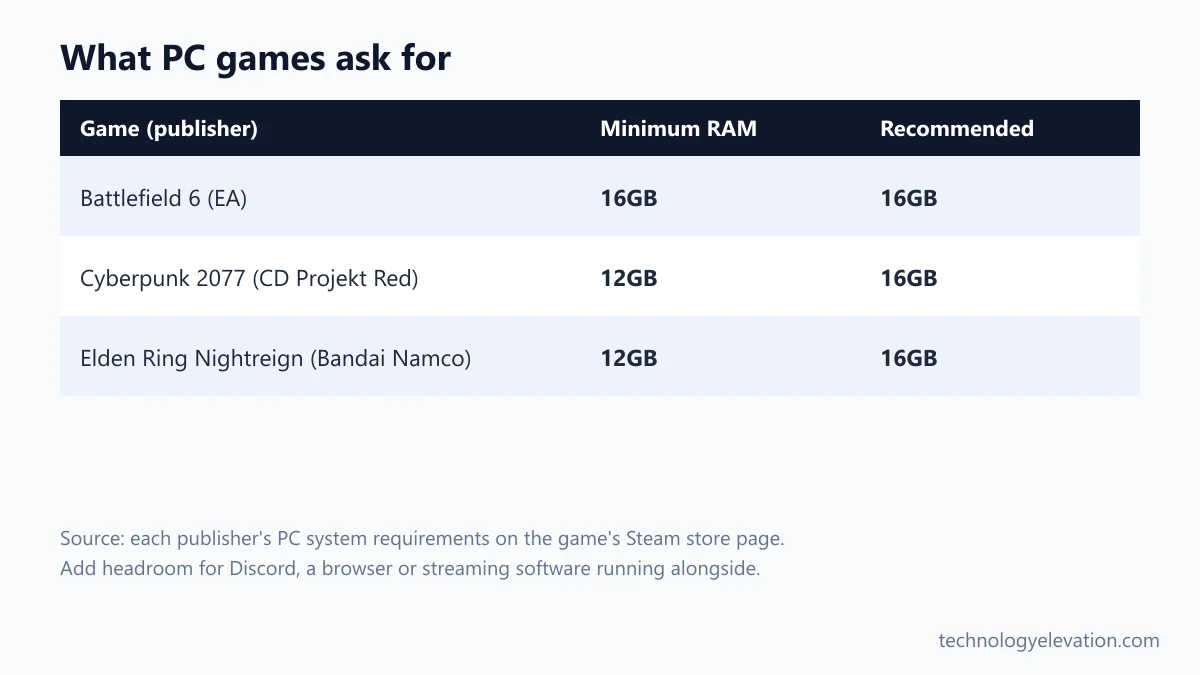
New PC games now list 16GB of RAM as the minimum or recommended amount. Battlefield 6 needs 16GB just to run, and Cyberpunk 2077 and Elden Ring Nightreign recommend 16GB. A gaming laptop with 16GB is the floor today, and 32GB gives room for Discord and streaming.
| Game (publisher) | Minimum RAM | Recommended RAM |
|---|---|---|
| Battlefield 6 (Electronic Arts) | 16GB | 16GB |
| Cyberpunk 2077 (CD Projekt Red) | 12GB | 16GB |
| Elden Ring Nightreign (Bandai Namco) | 12GB | 16GB |
Those numbers come from the publishers’ own requirement listings on Steam. Notice that none of them recommend more than 16GB. Games rarely use 32GB on their own; the extra room helps when a browser, a voice chat app and a recording tool run alongside the game.
Graphics memory (VRAM) is a separate pool on the graphics card, and it matters just as much for games. A laptop with 32GB of RAM and a weak graphics chip will still struggle. The best gaming laptops under $900 balance both, and so do the best thin and light gaming laptops.
Unified memory on a Mac is shared, not magic
Unified memory is one pool of RAM shared by the processor, graphics and AI hardware on Apple chips. Apple says it lets every part of the chip use the same data without copying it. That makes 16GB go further, but a Mac still slows down when the pool fills.
Apple first explained the idea with the M1 chip in 2020: high-bandwidth, low-latency memory brought “into a single pool” so the parts of the chip can work on the same data without making copies. On a typical Windows laptop with a separate graphics card, graphics use their own VRAM and the system RAM sits apart.
Speed differs by chip, too. Apple lists 60GB/s of memory bandwidth for the A18 Pro in the MacBook Neo and 153GB/s for the M5 in the MacBook Air. Higher bandwidth feeds the graphics and AI hardware faster.
What unified memory does not do is turn 8GB into 16GB. Because graphics share the pool, a heavy graphics task actually leaves less for your apps. Pick a Mac’s memory the same way you would pick a PC’s, by what you run.
Soldered RAM means you choose once
Soldered RAM is fixed to the motherboard and can never be upgraded. MacBook memory is chosen only when you order, and most thin Windows laptops are soldered too. Only laptops with SO-DIMM slots, often bigger gaming and business models, take more RAM later.
The spec sheet tells you which kind you are getting. Look for the words “soldered”, “on board” or “LPDDR5X” for fixed memory, and “SO-DIMM” plus a number of slots for upgradeable memory. Lenovo’s guide for the ThinkPad X1 Carbon Gen 13, for example, lists its memory as LPDDR5X “soldered on board, up to 64 GB”.
LPDDR memory (the “LP” means low power) is the reason so many thin laptops last longer on battery. The catch is that it cannot be swapped. If you are torn between 16GB and 32GB on a soldered laptop, buy the bigger one now. Upgrading later costs you a whole new laptop.
On a laptop with slots, starting at 16GB and adding a second stick in two years is a fair plan. Check that the slot is free; some models ship with both slots filled by two smaller sticks.
Swap and the page file are a safety net, not extra RAM
Swap, called the page file on Windows, moves data you are not using from RAM to the SSD when memory runs short. That keeps apps from crashing, but an SSD is far slower than RAM, so a laptop that swaps all day feels sluggish.
Microsoft describes the page file as a hidden system file that lets Windows move “infrequently accessed modified pages” out of physical memory. A system-managed page file can grow to three times your RAM or 4GB, whichever is larger, once memory use reaches 90% of the limit.
Macs do the same thing and add a trick: macOS also compresses memory. Activity Monitor shows how much memory is compressed and how much sits in swap, under “Swap Used”.
Swap also writes to your SSD, and a nearly full drive leaves less room for it. Keep at least some free space, and move old video and photo libraries to one of the best portable SSDs if the internal drive is tight.
How to check if your laptop needs more RAM
Check your laptop’s memory with the tools already built in. On Windows, Settings shows installed RAM and Task Manager shows how much is in use. On a Mac, Activity Monitor’s Memory Pressure graph turns yellow or red when the Mac needs more RAM.
- On Windows, open Settings, select System, then About. Under Device specifications, look for the amount of RAM installed.
- Open Task Manager, go to the Performance tab and select Memory. Check how full memory gets during your busiest hour of the day.
- On a Mac, open Activity Monitor and click Memory. Watch the Memory Pressure graph at the bottom of the window.
- Read the colour the way Apple does. Green means the Mac uses its RAM efficiently, yellow means it “might eventually need more RAM”, and red means it “needs more RAM”.
- To see whether a Mac can take more RAM, hold the Option key and choose Apple menu, then System Information. Under Hardware, click Memory. If no Memory Slots section appears, the memory cannot be upgraded.
Do the check on a normal working day, not right after a restart. Memory use right after boot always looks fine.
If Windows sits above 90% in use for hours, or your Mac lives in yellow and red, more RAM will help more than a faster processor. Apple’s Activity Monitor guide covers the colours in full.
How to choose the right amount for your next laptop
Choose RAM by your heaviest regular task, the laptop’s upgrade options and how long you will keep it. Start at 16GB for Windows or a MacBook Air, accept 8GB only on a Chromebook or MacBook Neo for light use, and step up to 32GB for video, 3D or streaming.
Write down the three apps you use most, then look up their own requirements. The highest “recommended” number on that list is your target.
Next, find out whether the RAM is soldered. If it is, add one size of headroom. If it has slots, you can buy for today and upgrade later.
Last, think in years. A laptop you plan to keep for five years should have more RAM than one you will replace in two. Shoppers comparing budget laptops for college students should weigh 16GB above almost any other spec, and anyone eyeing the laptops for Python programming should treat 16GB as the minimum and 32GB as the comfortable choice.
Frequently asked questions about how much RAM you need
Is 8GB of RAM enough for a laptop in 2026?
8GB is enough for browsing, email, streaming and schoolwork, especially on a Chromebook or a MacBook Neo. It is tight for Windows multitasking and too little for most new games. If the price gap to 16GB is small, take the 16GB model.
Is 16GB of RAM enough for gaming?
Yes, 16GB is enough for most PC games today. Battlefield 6 lists 16GB as both its minimum and recommended amount, and Cyberpunk 2077 recommends 16GB. Choose 32GB if you stream or record while you play.
Is 32GB of RAM overkill for a laptop?
For browsing, office work and most games, 32GB is more than you will use. For 4K video editing, virtual machines, big code projects or gaming while streaming, it is the sensible amount. Let your main apps’ recommended requirements decide.
How much RAM does Windows 11 need?
Microsoft’s minimum for Windows 11 is 4GB of RAM. That is only enough to install and run the system itself. For daily use with a modern browser and office apps, 16GB is the practical amount, and Copilot+ PCs require 16GB.
Is 8GB on a Mac the same as 16GB on Windows?
No, 8GB of unified memory is still 8GB. Apple’s shared memory pool and memory compression use RAM efficiently, but graphics share that same pool. An 8GB MacBook Neo suits light work, while heavier work needs a 16GB MacBook Air or more.
Can I add more RAM to my laptop later?
Only if your laptop has SO-DIMM memory slots. MacBooks and most thin Windows laptops have memory you can only choose when you buy. Check the maker’s spec sheet for “soldered” or “SO-DIMM” before you buy.
Does more RAM make a laptop faster?
More RAM makes a laptop faster only when it is running out of memory. If your apps already fit, extra RAM sits unused and the processor and SSD decide speed. If memory is full and the laptop swaps to its SSD, more RAM is the biggest upgrade you can make.
Last checked and sources
Last checked on 15 November 2026 by Haris Khan.
We compared official requirement and specification pages from operating system makers, laptop makers and game publishers, and matched them to common uses.
- Microsoft: Windows 11 specifications and Copilot+ PC requirements
- Microsoft Learn: Introduction to the page file
- Microsoft Support: Find information about your Windows device
- Google: Chromebook Plus launch announcement and Chromebook Plus pages
- Apple: MacBook Neo, MacBook Air and MacBook Pro tech specs, MacBook Neo announcement (March 2026), M1 announcement (November 2020)
- Apple Support: Activity Monitor user guide
- Lenovo: ThinkPad X1 Carbon Gen 13 user guide
- Electronic Arts, CD Projekt Red and Bandai Namco: system requirements on the games’ Steam store pages
We update this guide when operating system requirements or laptop memory options change.


GIPHY App Key not set. Please check settings