

 Abdullah Kabeer
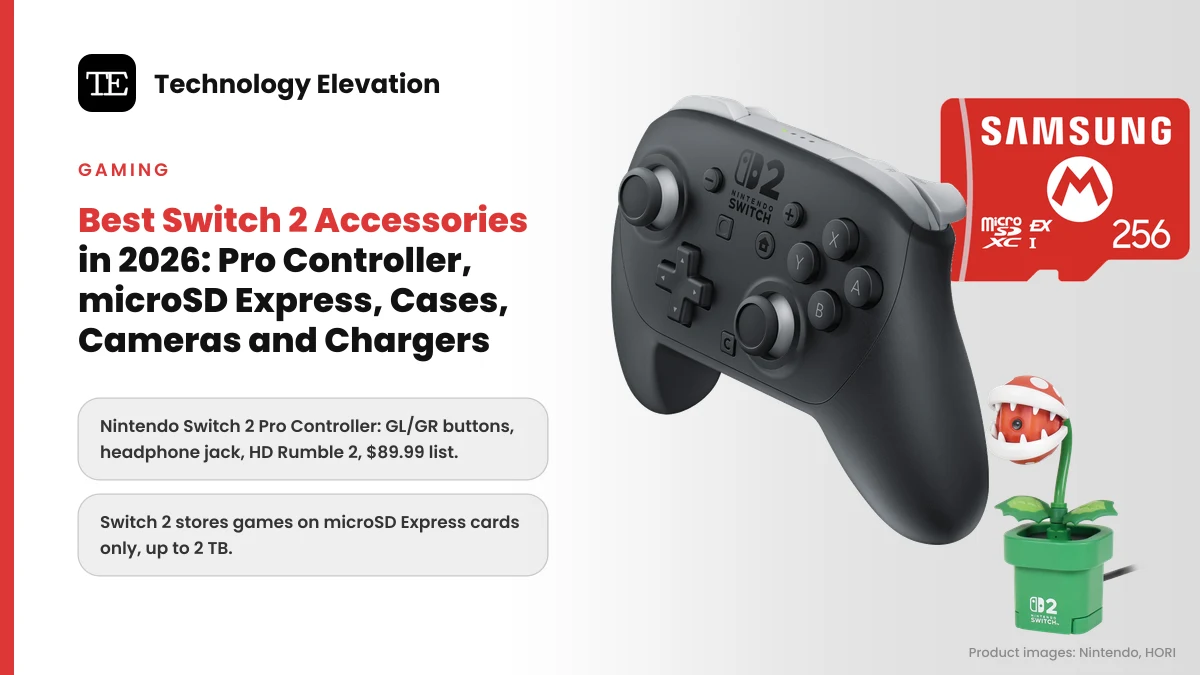
Open a Switch 2 box on a holiday morning and the first problem shows up within an hour. Mario Kart World is installed, a second game is downloading, and the storage bar is already climbing. The second problem arrives when a cousin wants to race and there is only one pair of Joy-Con 2. The best Switch 2 accessories fix exactly those moments: more storage, a second controller, a case for the trip home and a charger that lives in the travel bag.
Nintendo makes most of the essentials itself, and a short list of licensed partners fills the gaps. Licensed means the maker sent the product to Nintendo for compatibility testing and can print the Switch 2 logo on the box. That matters more than usual on this console, because the storage slot and the camera features only work with gear built for the new system.
The console itself got pricier this year. Nintendo’s US store now lists the Switch 2 at $499.99, so spending a little on protection makes more sense than it did at launch.
We compared every pick against the maker’s own product page and spec sheet, then sorted them by the job they do best.
The best Switch 2 accessory for most players is the Nintendo Switch 2 Pro Controller
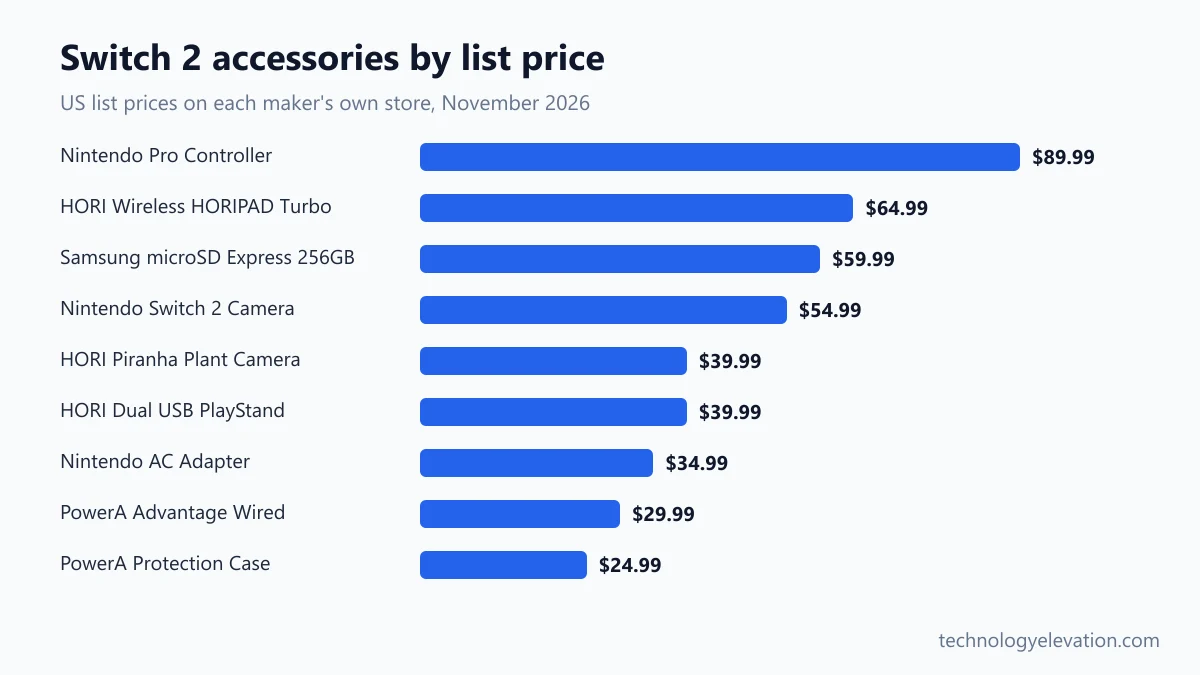
The Nintendo Switch 2 Pro Controller is the best Switch 2 accessory for most players. It adds a C Button for GameChat, two remappable GL and GR rear buttons, a headphone jack, HD Rumble 2, motion controls and amiibo support. Nintendo lists it at $89.99.
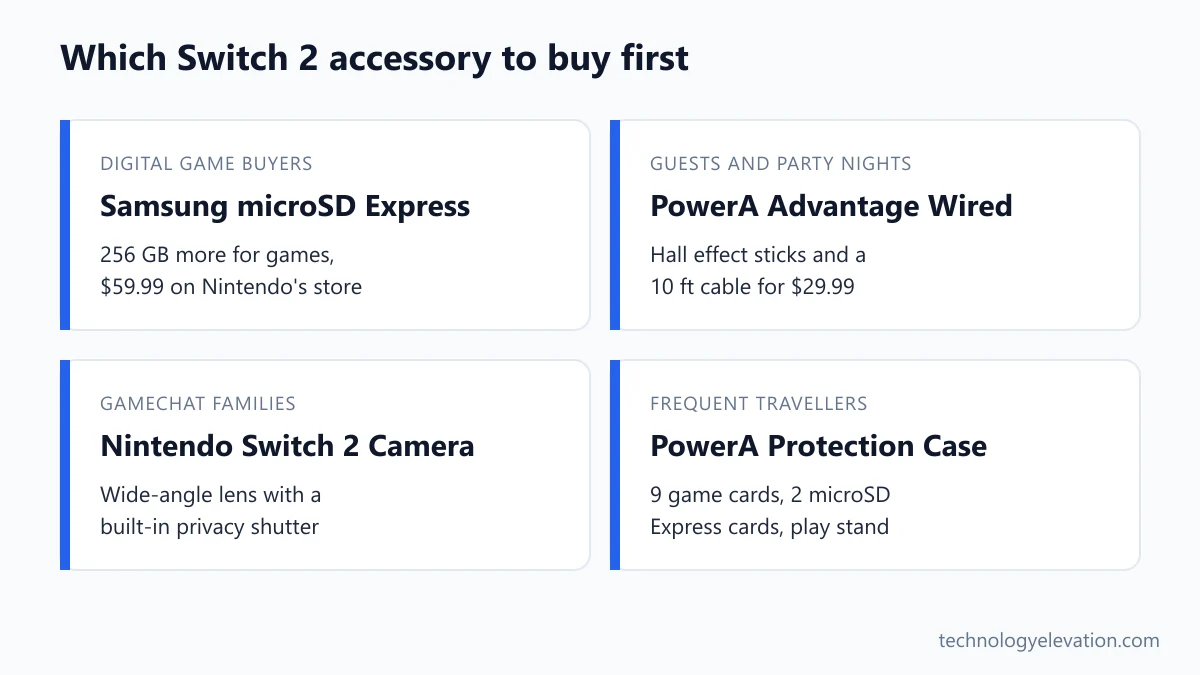
Every pick, by the job it does best:
- Best controller overall: Nintendo Switch 2 Pro Controller
- Best drift-resistant wireless controller: HORI Wireless HORIPAD Turbo
- Best cheap controller: PowerA Advantage Wired Controller
- Best storage: Samsung microSD Express Card (256GB) for Nintendo Switch 2
- Best camera: Nintendo Switch 2 Camera
- Best camera for kids: HORI Piranha Plant Camera
- Best case: PowerA Protection Case
- Best charger: Nintendo Switch 2 AC Adapter
- Best for tabletop play: HORI Dual USB PlayStand
| Accessory | Type | Key feature | List price |
|---|---|---|---|
| Nintendo Switch 2 Pro Controller | Wireless controller | GL/GR buttons, HD Rumble 2, headphone jack | $89.99 |
| HORI Wireless HORIPAD Turbo | Wireless controller | TMR sticks, up to 10 hours | $64.99 |
| PowerA Advantage Wired Controller | Wired controller | Hall effect sticks, 10 ft cable | $29.99 |
| Samsung microSD Express Card (256GB) | Storage | Doubles the built-in 256 GB | $59.99 |
| Nintendo Switch 2 Camera | Camera | Wide-angle lens, privacy shutter | $54.99 |
| HORI Piranha Plant Camera | Camera | Mouth closes over the lens | $39.99 |
| PowerA Protection Case | Case | 9 game cards, 2 microSD Express cards | $24.99 |
| Nintendo Switch 2 AC Adapter | Charger | Charges the console or the dock | $34.99 |
| HORI Dual USB PlayStand | Stand | Charge and play in tabletop mode | $39.99 |
Prices are the list prices on each maker’s US store in November 2026. Black Friday deals on accessories are common, so treat them as a ceiling.
Nintendo Switch 2 Pro Controller: the best controller overall
The Nintendo Switch 2 Pro Controller is the best controller for long sessions on a TV. It keeps HD Rumble 2, motion controls and amiibo support, then adds two extra rear buttons, a headphone jack and a full-size grip.
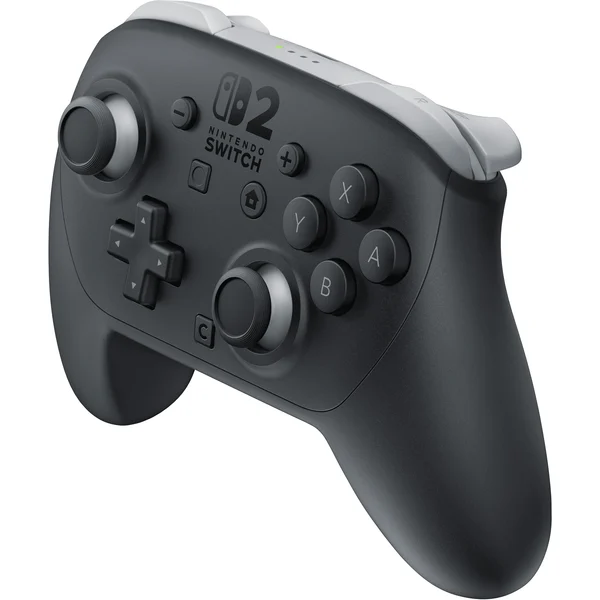
Key specs: C Button that opens GameChat, GL and GR rear buttons you can map to any button, Capture Button, 3.5 mm four-pole stereo headphone jack (CTIA standard), HD Rumble 2, motion controls, built-in amiibo reader, USB-C charging cable in the box. Nintendo lists it at $89.99 and says it works only with the Switch 2.
The GL and GR buttons are the quiet upgrade. Map jump or dodge to the back of the controller and your thumb never leaves the right stick, which helps in platformers and shooters alike.
The headphone jack is the other big win. Plug a wired headset straight into the controller and you can play late at night from the sofa without running a cable to the console. Pair it with one of the best gaming earbuds for a tidy setup.
The catch is price. At $89.99 it costs three times as much as the cheapest licensed pad, and Nintendo does not advertise magnetic sticks. If a sibling is hard on controllers, the HORI below is the safer bet against drift.
Buy the Nintendo Switch 2 Pro Controller now on Amazon
HORI Wireless HORIPAD Turbo: the best drift-resistant Switch 2 controller
The HORI Wireless HORIPAD Turbo is the best Switch 2 controller for avoiding stick drift. Its TMR magnetic sticks have no contact parts to wear out, it runs up to 10 hours per charge, and it adds turbo, button remapping and gyro aiming for $64.99.
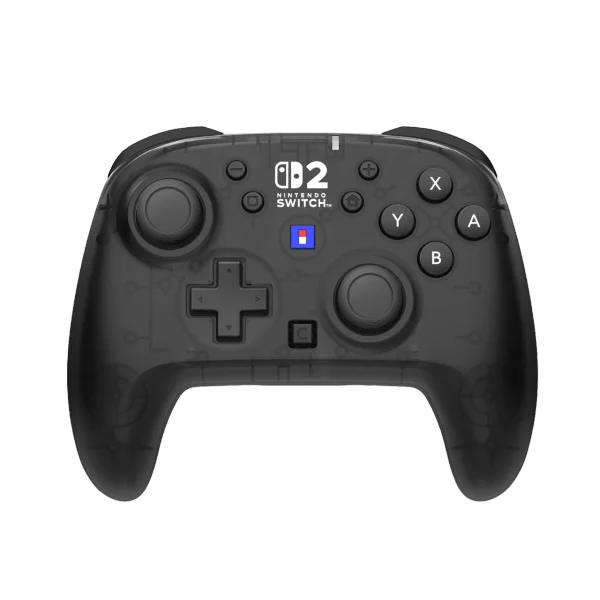
Key specs: TMR (tunnel magnetoresistance) sticks, gyroscope and accelerometer, C Button for GameChat, programmable rear buttons, turbo at 5, 10 or 20 presses per second, two saved button profiles, button lock, up to 33 ft wireless range, up to 10 hours of battery, USB-C charging cable included. Works with the Switch 2, Switch, Switch OLED and Switch Lite. List price: $64.99 on HORI’s US store.
Stick drift is the slow, ghostly movement you see when a worn stick reports input you never gave. Most drift comes from contacts inside the stick rubbing away. HORI says its TMR sticks are non-contact, which removes that wear point. The full background is in Hall effect vs mechanical switches, which covers the same magnetic sensing in keyboards.
The HORI button is handy for families. Kids can set turbo for a tricky boss, then flip back to a normal profile without digging through menus.
The honest catch: there is no HD Rumble 2 or any vibration at all. Games that use rumble for cues, like fishing in a life sim, feel flatter. PowerA’s Advantage Wireless Controller with Lumectra is the alternative if you want lights too. It also uses Hall effect sticks and rates 14 hours of battery for the same $64.99, but it skips HD Rumble 2 and amiibo as well.
Buy the HORI Wireless HORIPAD Turbo now on Amazon
PowerA Advantage Wired Controller: the best cheap Switch 2 controller
The PowerA Advantage Wired Controller is the best cheap Switch 2 controller. For $29.99 you get Hall effect sticks, two mappable rear buttons, a C Button for GameChat, a headphone jack and a 10 ft detachable USB-C cable. It only works while the console is docked.
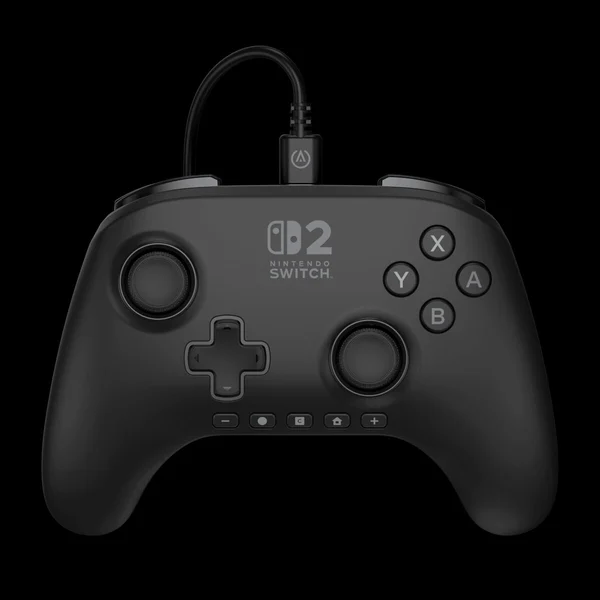
Key specs: Hall effect thumbsticks, two Advanced Gaming Buttons you can map mid-game, C Button, on-board audio controls for headset volume, mic mute and three EQ modes, 3.5 mm stereo jack, 10 ft detachable USB-C cable, no batteries needed. Also works with the original Switch and Switch OLED. List price: $29.99 on PowerA’s US store.
Think of it as the spare pad for the drawer. When friends visit for a Mario Kart night, a wired controller never runs flat halfway through the Grand Prix.
The audio button on the back is a nice extra at this price. You can turn a headset down or mute your mic without pausing the game.
The trade-offs are clear on PowerA’s own page. It has no HD Rumble 2, no motion controls, no IR camera and no amiibo reader, and it does not work with Joy-Con-only games. Party games built around motion, such as bowling or dancing, need the Joy-Con 2 instead.
Buy the PowerA Advantage Wired Controller now on Amazon
Samsung microSD Express Card (256GB): the best Switch 2 storage upgrade
The Samsung microSD Express Card (256GB) for Nintendo Switch 2 is the best storage upgrade. Nintendo sells it on its own store for $59.99, it doubles the console’s built-in 256 GB, and it uses the microSD Express format the Switch 2 requires for games.
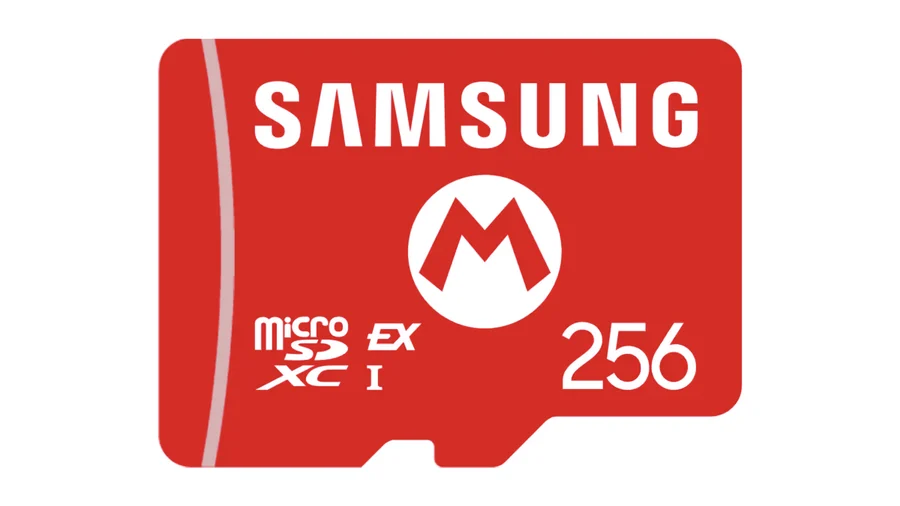
Key specs: 256 GB, microSD Express format, Mario-themed design, sold and listed by Nintendo for Nintendo Switch 2. List price: $59.99 on Nintendo’s US store.
The format rule catches a lot of people. Nintendo’s Switch 2 tech specs say the slot takes microSD Express cards only, up to 2 TB. An ordinary microSD card from an old Switch can only be used to copy screenshots and videos across. It will not hold games.
Look for the small “EX” mark on the card before you buy. Plenty of cheaper cards on store shelves look identical without it.
Part of the internal 256 GB is reserved for the system, so the real free space is lower than the box suggests. A family that buys digital games will fill it within months. Heavy downloaders can step up: Samsung’s own P9 Express card comes in 512 GB at $149.99 on Samsung’s US store and is rated at up to 800 MB/s read speed.
Buy the Samsung microSD Express Card (256GB) now on Amazon
Nintendo Switch 2 Camera: the best camera for GameChat
The Nintendo Switch 2 Camera is the best camera for GameChat and camera games. It plugs into the console’s top USB-C port, works in TV, tabletop and handheld modes, has an adjustable wide-angle lens and a built-in privacy shutter, and lists at $54.99.
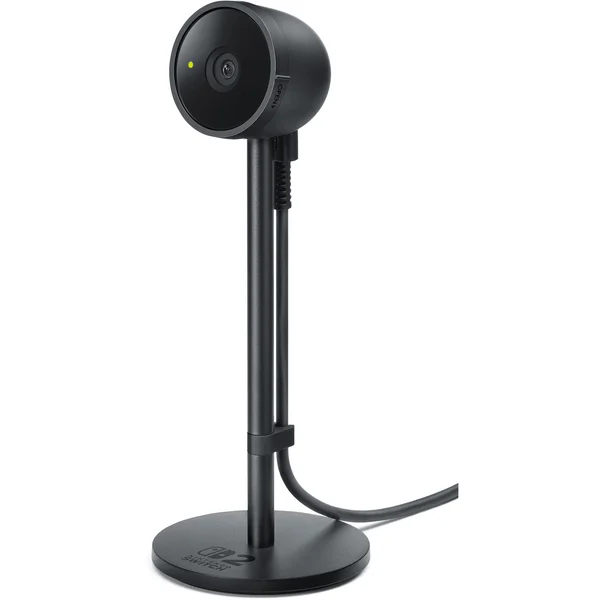
Key specs: Wide-angle lens you can tilt to frame the room, high-sensitivity sensor that adjusts brightness to find faces, built-in privacy shutter, compact body that is easy to reposition, USB-C cable included. Works with the Nintendo Switch 2 only. List price: $54.99 on Nintendo’s US store.
GameChat is the Switch 2’s built-in voice and video chat. With a camera connected, friends see your face in a small window while you play, and compatible games use it for in-game camera features.
The adjustable wide-angle lens is the reason to pay for Nintendo’s own model. A sofa of players has a far better chance of fitting in the shot.
The privacy shutter is a welcome touch for a camera that may live in a child’s bedroom. Slide it shut and the lens is physically covered, no app setting required. Chat features can require an internet connection, a Nintendo Account and a paid Nintendo Switch Online membership.
Buy the Nintendo Switch 2 Camera now on Amazon
HORI Piranha Plant Camera: the best Switch 2 camera for kids
The HORI Piranha Plant Camera is the best Switch 2 camera for kids. The camera sits inside a Piranha Plant whose mouth closes over the lens for privacy, it works three ways, and it lists at $39.99. The 640 x 480 video is basic, though.
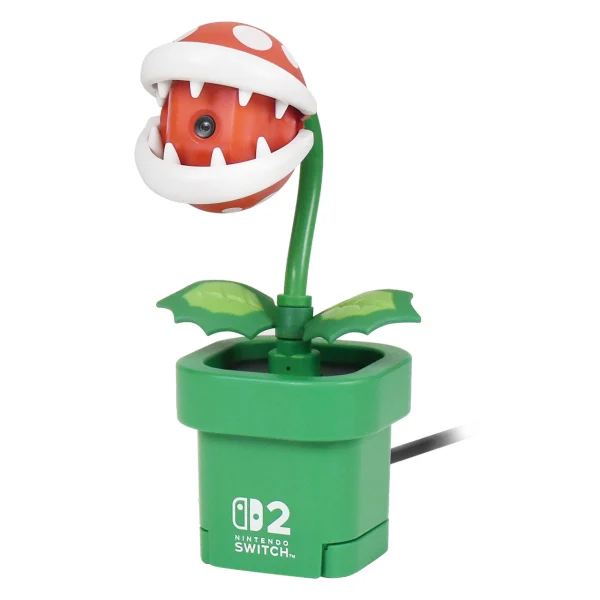
Key specs: 640 x 480 resolution at 30 fps, 85-degree viewing angle, flexible neck, mouth that opens and closes over the lens, Warp Pipe base with a TV clip, USB-C to USB-C cable and a 3.5 mm right-angle headphone adapter in the box. Officially licensed by Nintendo. List price: $39.99 on HORI’s US store.
Kids love it for the obvious reason. Closing the plant’s mouth to end a call is more fun than any slider.
Practically, it is flexible too. Plug it into the base and the dock for TV play, clip the base onto the top of a TV, or attach the camera unit straight to the top of the console for handheld play.
The catch is image quality. At 640 x 480 your face looks soft next to a modern phone camera. HORI also sells a plain USB Camera with the same specs and a sliding lens cover for $34.99 if the plant is too much.
Buy the HORI Piranha Plant Camera now on Amazon
PowerA Protection Case: the best Switch 2 case
The PowerA Protection Case is the best Switch 2 case for most owners. It has a hard outer shell, holds 9 game cards plus 2 microSD Express cards, folds out into a play stand, and adds a mesh pocket and carry handle for $24.99.
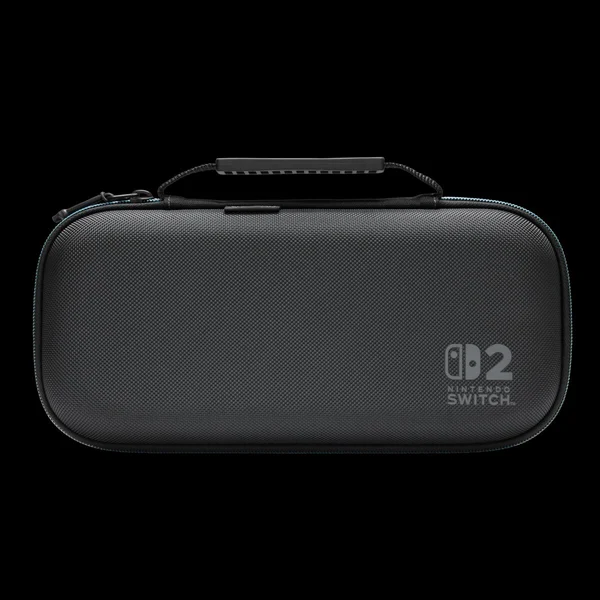
Key specs: Sturdy zippered shell with a molded, plush-lined interior, removable holder for 9 game cards and 2 microSD Express cards, built-in play stand that doubles as a padded screen protector, zippered mesh pocket for straps, earbuds or a cable, rubberized handle. Fits the Switch 2, Switch and Switch OLED. Officially licensed, with a 2-year limited warranty. List price: $24.99.
The microSD Express slots are the detail most cases miss. A spare card full of games is easy to lose in a jacket pocket, and here it sits next to the cartridges.
The play stand earns its place on flights. Prop the console up on a tray table, pop the Joy-Con 2 off and you are playing in tabletop mode with no extra kit.
Other good options from the same makers, all licensed:
- PowerA Slim Case ($19.99): thinner, holds 10 game cards, with the same fold-out stand and a 2-year limited warranty.
- Nintendo Switch 2 Carrying Case & Screen Protector ($39.99): Nintendo’s own case, with a screen protector and cleaning cloth in the box.
- Nintendo Switch 2 All-In-One Carrying Case ($84.99): carries the console, dock, Joy-Con 2, cables and up to six game cards, so a whole TV setup travels in one bag.
- HORI Premium Screen Protective Filter ($16.99): a 9H scratch-resistant film made in Japan, with a blue light cut layer.
Buy the PowerA Protection Case now on Amazon
Nintendo Switch 2 AC Adapter: the best Switch 2 charger
The Nintendo Switch 2 AC Adapter is the best spare charger for a Switch 2. It plugs into the console or the dock, the cable detaches from the plug for packing, and it also charges an original Switch, Switch OLED or Switch Lite. It lists at $34.99.
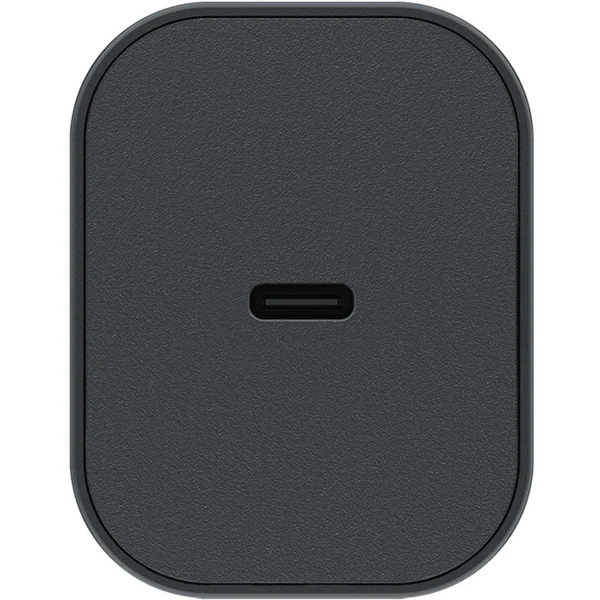
Key specs: Connects to the Nintendo Switch 2 system or the Nintendo Switch 2 dock, separable adapter and cable, also compatible with Nintendo Switch, Switch OLED and Switch Lite. List price: $34.99 on Nintendo’s US store.
A second adapter is the cheapest way to stop unplugging the dock every time the console leaves the house. Leave one behind the TV and keep one in the travel case.
Battery life explains why that matters. Nintendo rates the Switch 2 at roughly 2 to 6.5 hours per charge depending on the game, and about 3 hours to charge in sleep mode. A long car trip with a demanding game drains it well before you arrive.
For a second TV, the Nintendo Switch 2 Dock Set ($124.99) includes a dock, AC adapter, USB-C charging cable and Ultra High Speed HDMI cable. If your TV setup needs a longer run, check the cable specs in the best HDMI cables for gaming before you buy a third-party one.
Flying with a power bank for the console? Airlines cap battery size by watt-hours, and the power bank airline rules explain the limits before you pack one in a carry-on.
Buy the Nintendo Switch 2 AC Adapter now on Amazon
HORI Dual USB PlayStand: the best stand for tabletop play
The HORI Dual USB PlayStand is the best stand for playing the Switch 2 in tabletop mode. It holds the console at a comfortable angle, adds two USB-A ports for wired accessories and has a USB-C input so you can charge while you play. It lists at $39.99.
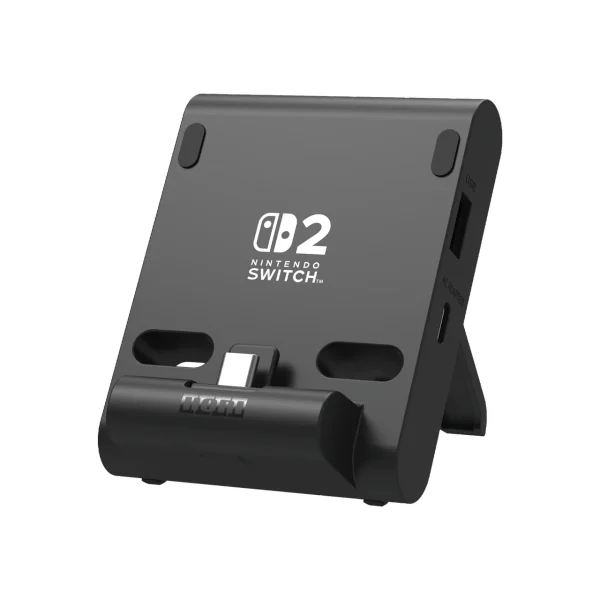
Key specs: Two built-in USB-A ports, one USB-C port for the Nintendo Switch AC Adapter (sold separately), charge while playing in tabletop mode, slim foldable design for bags and pouches. Officially licensed by Nintendo. List price: $39.99 on HORI’s US store.
The console’s own kickstand works, but it cannot charge you while you play. On a hotel desk with a long game, that limit shows up fast.
The two USB-A ports turn a tray table into a mini dock for wired gear. Note the catch: the adapter is not in the box, so budget for a spare charger if your only one lives behind the TV.
Buy the HORI Dual USB PlayStand now on Amazon
More official Switch 2 accessories worth knowing about
Nintendo sells a few more first-party extras that suit specific players. The GameCube Controller suits retro fans, the Joy-Con 2 Charging Grip suits Joy-Con loyalists, and racing wheels suit Mario Kart World families. None of them is essential for everyone.
- Nintendo GameCube Controller ($69.99): works only with the Switch 2 and adds a C Button and Capture Button. You need a paid Nintendo Switch Online membership to buy it, with a limit of four per account. The GameCube Nintendo Classics games themselves need the Expansion Pack tier.
- Joy-Con 2 Charging Grip ($39.99): turns the two Joy-Con 2 into one classic-style controller, charges them over USB-C and adds mappable GL and GR buttons. PowerA’s Joy-Con 2 Comfort Grip ($16.99) is a cheaper grip with no charging.
- Joy-Con 2 Wheel, set of 2 ($24.99): snap-on steering wheels for motion steering in racing games.
- HORI Mario Kart Racing Wheel Pro Mini ($79.99): an 8.6-inch wired wheel with pedals, racing paddles and a programmable Item button, connected by a 9.8 ft USB-A cable and held down with suction cups.
Joy-Con 2 last about 20 hours per charge by Nintendo’s estimate and take about 3 hours 30 minutes to charge, so most families never need a separate charging stand.
Shopping for a gamer rather than yourself? The best gifts for gamers list adds headsets, capture cards and subscriptions that work across Switch 2, PS5 and PC.
Stick drift is the main reason to look past the Joy-Con 2
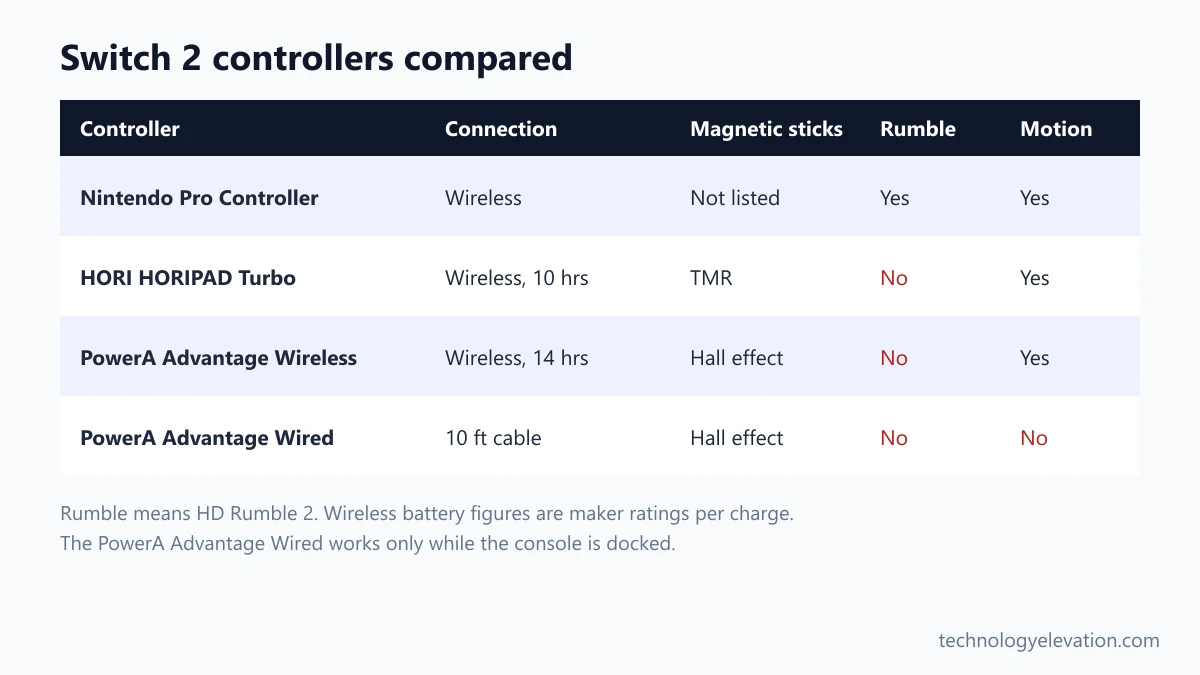
Stick drift is the main reason to look past standard controllers. If a Joy-Con 2 or Pro Controller starts drifting, calibrate it first in System Settings, then contact Nintendo. For a new pad, magnetic Hall effect or TMR sticks resist drift by design.
On a Switch 2, open System Settings from the HOME Menu, select Controllers & Accessories, then Calibrate Control Sticks. The step-by-step fix, plus Nintendo’s warranty and repair routes in the US and Europe, is in how to fix controller stick drift.
Magnetic sticks change the odds. Hall effect sensors read the stick’s position from a magnet, and TMR sensors do the same job with a different magnetic sensor. Neither has a contact strip that rubs away, which is what causes most drift on older pads.
Among our picks, the HORI Wireless HORIPAD Turbo uses TMR sticks, while both PowerA Advantage controllers use Hall effect sticks. Nintendo’s own pages do not list either technology for the Pro Controller or Joy-Con 2.
Licensed accessories are the safest buy for a Switch 2
Licensed accessories are the safest buy because Nintendo has tested them with the Switch 2. Look for “Officially Licensed by Nintendo” and the Switch 2 logo on the box. Unlicensed docks and chargers can work, but nobody has checked them against the console.
Compatibility is the other trap. Several items only work on the new system, while others cover the whole family:
- Switch 2 only: Nintendo Switch 2 Pro Controller, GameCube Controller, Joy-Con 2 Charging Grip, Nintendo Switch 2 Camera.
- Switch 2 and original Switch: HORI Wireless HORIPAD Turbo, PowerA Advantage Wired Controller (docked play only), PowerA Protection Case, Nintendo Switch 2 AC Adapter.
- Game storage: microSD Express cards only. Regular microSD cards cannot store Switch 2 games.
Still deciding between consoles? The best gaming console for casual gamers comparison covers the Switch family, and the best handheld gaming PC guide covers Steam and Xbox handhelds.
Storage, a second controller and a case decide the right Switch 2 kit
Start with storage, a second controller and a case, in that order, for most new Switch 2 owners. Add a camera if you use GameChat, and a spare charger if the console travels. Match each accessory to how and where you actually play.
- Check your storage habits. Digital buyers need a microSD Express card early. Card-only players can wait.
- Pick a second controller by budget. The Pro Controller has every feature, the HORIPAD Turbo resists drift, and the PowerA wired pad covers guests for $29.99.
- Buy a case before the first trip. The 7.9-inch screen has no cover of its own.
- Decide on GameChat. A camera only matters if you have Nintendo Switch Online and friends who chat.
- Plan charging. A second AC adapter saves unplugging the dock every time you leave.
- Confirm the logo. “Officially Licensed” and the Switch 2 badge on the box mean Nintendo tested it.
Frequently asked questions about Switch 2 accessories
What accessories do I need for a Switch 2?
Most Switch 2 owners need a microSD Express card, a second controller and a case. A spare AC adapter helps if the console travels, and a camera only matters if you use GameChat video.
Can I use a regular microSD card in the Switch 2?
No. The Switch 2 stores games only on microSD Express cards, up to 2 TB. A regular microSD card can only be used to copy screenshots and videos from an original Switch.
Is the Switch 2 Pro Controller worth it?
Yes, if you play on a TV often. It adds remappable GL and GR rear buttons, a headphone jack, HD Rumble 2, motion controls and amiibo support. Nintendo lists it at $89.99.
Do I need a camera for GameChat?
No. GameChat voice chat works without a camera. A camera such as the Nintendo Switch 2 Camera adds video of your face and works with camera-based games. Chat features can require a paid Nintendo Switch Online membership.
Which Switch 2 controller is least likely to drift?
Controllers with magnetic sticks are least likely to drift. The HORI Wireless HORIPAD Turbo uses TMR sticks, and the PowerA Advantage Wired and Advantage Wireless controllers use Hall effect sticks. None of these touch-free designs has a contact strip to wear out.
Which charger should I buy for a Switch 2?
Buy the Nintendo Switch 2 AC Adapter, which lists at $34.99. It charges the Switch 2 or its dock, has a detachable cable, and also works with the Switch, Switch OLED and Switch Lite.
What size case does the Switch 2 need?
The Switch 2 measures about 10.7 inches wide and 4.5 inches tall with the Joy-Con 2 attached, according to Nintendo. Buy a case made for the Switch 2, such as the PowerA Protection Case, which also fits the original Switch and Switch OLED.
Last checked and sources
Last checked on 19 November 2026 by Abdullah Kabeer. We compared each accessory using the makers’ own product pages, spec sheets and US store list prices, and checked the CPSC recall database for every brand. We found no recalls or safety notices for any pick.
- Nintendo, Nintendo Switch 2 tech specs (nintendo.com)
- Nintendo, My Nintendo Store product pages for the Pro Controller, Camera, AC Adapter, Dock Set, cases, Joy-Con 2 accessories, GameCube Controller and Samsung microSD Express Card
- Samsung, P9 Express microSD Express card product page (samsung.com)
- HORI USA, product pages for the Wireless HORIPAD Turbo, Piranha Plant Camera, USB Camera, Dual USB PlayStand, Premium Screen Protective Filter and Mario Kart Racing Wheel Pro Mini
- PowerA, product pages for the Advantage Wired Controller, Advantage Wireless Controller with Lumectra, Protection Case, Slim Case and Joy-Con 2 Comfort Grip
- US Consumer Product Safety Commission, recall database (saferproducts.gov)
We update this buying guide when Nintendo or its licensed partners launch, discontinue or reprice a Switch 2 accessory.
Technology Elevation is reader-supported. As an Amazon Associate, we earn from qualifying purchases. When you buy through links on this page, we may earn a small commission at no extra cost to you.

GIPHY App Key not set. Please check settings